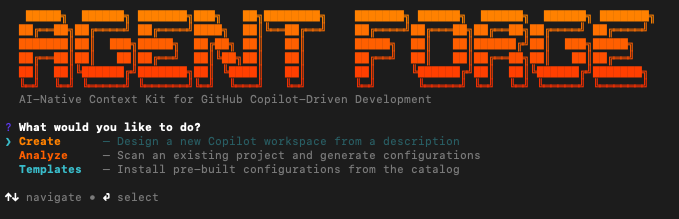
AI-Native Context Kit for GitHub Copilot-Driven Development
Generate agents, prompts, instructions, skills, hooks, MCP configs, and agentic workflows — powered by a multi-agent AI pipeline.


What is AGENT-FORGE?
AGENT-FORGE is a Context Engineering Toolkit that generates GitHub Copilot customization files for your VS Code project. Instead of manually authoring .github/ configuration, you describe what you need and a multi-agent AI pipeline plans, generates, validates, and installs everything.
- Multi-agent generation — a planner decomposes your project into domains, then 7 specialized writer agents create tailored artifacts
- Greenfield & brownfield — works from a description (new projects) or scans your existing codebase to codify real patterns
- Tech stack detection — identifies frameworks, libraries, and conventions from your project files
- Post-generation validation — checks YAML frontmatter, tool names, glob patterns, and content quality with auto-fix
Prerequisites
Required:
- Node.js 18+
- VS Code (or VS Code Insiders) with the GitHub Copilot extension
- GitHub Copilot CLI — powers the generation pipeline
Optional:
- Git — version control
- GitHub CLI (
gh) — needed for agentic workflows - Docker — needed by some MCP servers
Run forge check to verify everything in one step.
Quick Start
npx @agent-forge-copilot/cli init
The CLI walks you through everything interactively — choose to create from a description, analyze an existing project, or install pre-built templates.
Global install:
npm install -g @agent-forge-copilot/cli, then useforgedirectly.
What gets created
.github/
├── agents/                # AI personas — define what Copilot can do
├── prompts/               # Slash commands — shortcuts you type in chat
├── instructions/          # Rules — auto-applied to matching file patterns
├── skills/                # Knowledge packs — domain info agents reference
├── hooks/                 # Automation — scripts triggered by agent events
├── workflows/             # GitHub Actions with AI automation
└── copilot-instructions.md
.vscode/
└── mcp.json               # External tool servers (GitHub, Playwright, etc.)
Features
7 Artifact Types
| Type | File Pattern | Purpose |
|---|---|---|
| Agent | *.agent.md | AI persona with tools, responsibilities, and process |
| Prompt | *.prompt.md | Slash command that routes to an agent |
| Instruction | *.instructions.md | Quality rules auto-applied to matching files |
| Skill | SKILL.md | Domain knowledge loaded on-demand |
| Hook | hooks/*.json | Lifecycle automation triggered on agent events |
| MCP Config | .vscode/mcp.json | External tool servers for AI-powered development |
| Workflow | workflows/*.md | GitHub Actions with AI automation |
Project Modes
| Mode | Description |
|---|---|
| Greenfield | Provide a description. The planner extracts the tech stack, decomposes domains, and generates everything from scratch. |
| Brownfield | The planner scans your codebase — package.json, source files, directory structure, existing .github/ config — and creates a plan aligned to your real patterns. |
Speed Modes
| Mode | How it works | Cost |
|---|---|---|
| Standard | Single Copilot CLI session, orchestrator creates all files sequentially | ~2 PRU |
| Turbo | Single session with /fleet — parallel subagents, each with their own context | ~N+1 PRU |
Smart Merging
When generating into a project with existing .github/ files, AGENT-FORGE detects files it previously generated (via <!-- Generated by AGENT-FORGE --> markers) and only overwrites those. User-created files are preserved. Use --force to override.
CLI Reference
| Command | Description |
|---|---|
forge init | Interactive setup wizard |
forge generate <description> | Generate Copilot files from a description |
forge list | Show installed and available use cases |
forge validate [scope] | Check config files for errors |
forge check | Verify prerequisites |
forge init
| Flag | Description |
|---|---|
--mode <mode> | Wizard mode: create, analyze, or templates |
--description <text> | Use case description (skip prompt) |
--model <model> | AI model to use (skip prompt) |
--strategy <strategy> | Analyze strategy: auto (scan-only) or guided (scan + custom requirements) |
--speed <speed> | standard or turbo |
--use-cases <ids> | Comma-separated template IDs (e.g., code-review,testing) |
--skip-check | Skip the prerequisite check |
--force | Overwrite existing files |
forge init
forge init --mode templates --use-cases code-review,testing
forge init --mode analyze --strategy auto
forge init --mode create --description "Next.js app" --model claude-sonnet-4.6 --speed turbo
forge generate
| Flag | Description |
|---|---|
--model <model> | AI model to use |
--mode <mode> | discovery, full, on-demand, mcp-server, hooks, agentic-workflow |
--types <types> | Comma-separated artifact types for on-demand mode |
--speed <speed> | standard or turbo |
forge generate "API rate limiter with per-tenant limits"
forge generate "Security scanner" --model claude-opus-4.6
forge generate "CI/CD automation" --mode hooks
forge generate "Dev tooling" --mode mcp-server
forge generate "Testing tools" --mode on-demand --types agent,hook
forge generate "Full-stack app" --speed turbo
forge validate
| Flag | Description |
|---|---|
--fix | Auto-fix issues using AI |
--no-fix | Skip the interactive fix prompt |
--model <model> | Model for AI-powered fixes |
forge validate
forge validate ./path/to/dir
forge validate --fix
forge validate --fix --model claude-opus-4.6
forge list
Shows which Copilot customization files exist in your project and which gallery templates are available. No flags.
forge list
forge check
Verifies that Node.js, VS Code, Git, GitHub CLI, Copilot CLI, and Docker are installed. No flags.
forge check
Model selection
Pass --model <value> or choose interactively during generation:
| Value | Name | Description | Premium |
|---|---|---|---|
claude-sonnet-4.6 | Claude Sonnet 4.6 | Fastest — best speed/quality tradeoff (default) | 1× |
claude-sonnet-4.5 | Claude Sonnet 4.5 | Fast — higher quality reasoning | 1× |
gpt-4.1 | GPT-4.1 | Fast — efficient code generation | 1× |
gpt-5.2-codex | GPT 5.2 Codex | Balanced — strong code generation | 1× |
gemini-3-pro-preview | Gemini 3 Pro | Strong reasoning — large context window | 2× |
claude-opus-4.6 | Claude Opus 4.6 | Highest quality — deep reasoning | 5× |
How It Works
AGENT-FORGE uses a plan-then-execute architecture powered by GitHub Copilot CLI:
- Plan — A planner agent analyzes your description (greenfield) or scans your codebase (brownfield), extracts the tech stack, decomposes it into domains, and outputs a
forge-plan.json. - Execute — An orchestrator reads the plan and delegates to 7 specialized writer agents that create each artifact type.
- Validate — All generated files are checked for YAML correctness, valid tool names, and content quality. Issues are auto-fixed when possible.
- Install — Artifacts are placed into
.github/and.vscode/with smart merge logic.
forge init / generate
        │
        ▼
   ┌─────────┐     Analyzes description or scans codebase
   │ Planner  │──▶  Extracts tech stack, decomposes domains
   └────┬────┘     Outputs forge-plan.json
        │
        ▼
   ┌──────────────┐
   │ Orchestrator  │──▶  Reads plan, delegates to writers
   └──────┬───────┘
          │
          ├──▶ Agent Writer       → *.agent.md
          ├──▶ Instruction Writer → *.instructions.md
          ├──▶ Skill Writer       → SKILL.md
          ├──▶ Prompt Writer      → *.prompt.md
          ├──▶ Hook Writer        → hooks/*.json
          ├──▶ MCP Writer         → .vscode/mcp.json
          └──▶ Workflow Writer    → workflows/*.md
                                        │
                                        ▼
                                  Validate & Auto-fix
                                        │
                                        ▼
                                  Install to .github/
Contributing
git clone https://github.com/jiratouchmhp/agent-forge.git
cd agent-forge
npm install
npm run build
node dist/index.js init --help
Project structure
src/
├── index.ts                 # CLI entry point (Commander)
├── types.ts                 # Shared TypeScript types
├── commands/                # CLI command handlers
│   ├── init.ts              # forge init — interactive wizard
│   ├── generate.ts          # forge generate — direct AI generation
│   ├── list.ts              # forge list — show installed & gallery
│   ├── validate.ts          # forge validate — quality checks
│   └── check.ts             # forge check — prerequisites
├── lib/                     # Core libraries
│   ├── copilot-cli.ts       # Copilot CLI orchestration & fleet mode
│   ├── detector.ts          # Workspace tech stack detection
│   ├── domain-registry.ts   # Domain pattern matching & decomposition
│   ├── gallery.ts           # Built-in template registry
│   ├── merger.ts            # Smart merge for existing .github/ files
│   ├── prerequisites.ts     # Prerequisite checking
│   ├── prompt-builder.ts    # Prompt construction with reference examples
│   ├── scaffold.ts          # Workspace setup & file installation
│   └── validator.ts         # YAML validation, tool name checks & auto-fix
├── cli/                     # Multi-agent pipeline definitions
│   ├── planners/            # Plan-phase agents
│   ├── orchestrators/       # Execution-phase agents
│   ├── writers/             # 7 specialized writer agents
│   └── reference/           # Format specifications
└── template/                # Gallery template files

assets/                      # Branding (SVG logos)
scripts/
└── copy-assets.mjs          # Build helper
License
MIT