
AgentKits Memory
by AityTech







Persistent Memory System for AI Coding Assistants via MCP
Fast. Local. Zero external dependencies.
Store decisions, patterns, errors, and context that persists across sessions.
No cloud. No API keys. No setup. Just works.
Quick Start • Web Viewer • Features • Ecosystem • agentkits.net
Features
| Feature | Benefit |
|---|---|
| 100% Local | All data stays on your machine. No cloud, no API keys, no accounts |
| Blazing Fast | SQLite + WASM = instant queries, zero latency |
| Zero Config | Works out of the box. No database setup required |
| Cross-Platform | Windows, macOS, Linux - same code, same speed |
| MCP Server | memory_save, memory_search, memory_recall, memory_list, memory_status |
| Web Viewer | Browser UI to view, add, edit, delete memories |
| Vector Search | Optional HNSW semantic similarity (no external service) |
| Auto-Capture | Hooks for session context, tool usage, summaries |
| Git-Friendly | Export to markdown for version control |
Web Viewer
View and manage your memories through a modern web interface.
npx agentkits-memory-web
Then open http://localhost:1905 in your browser.
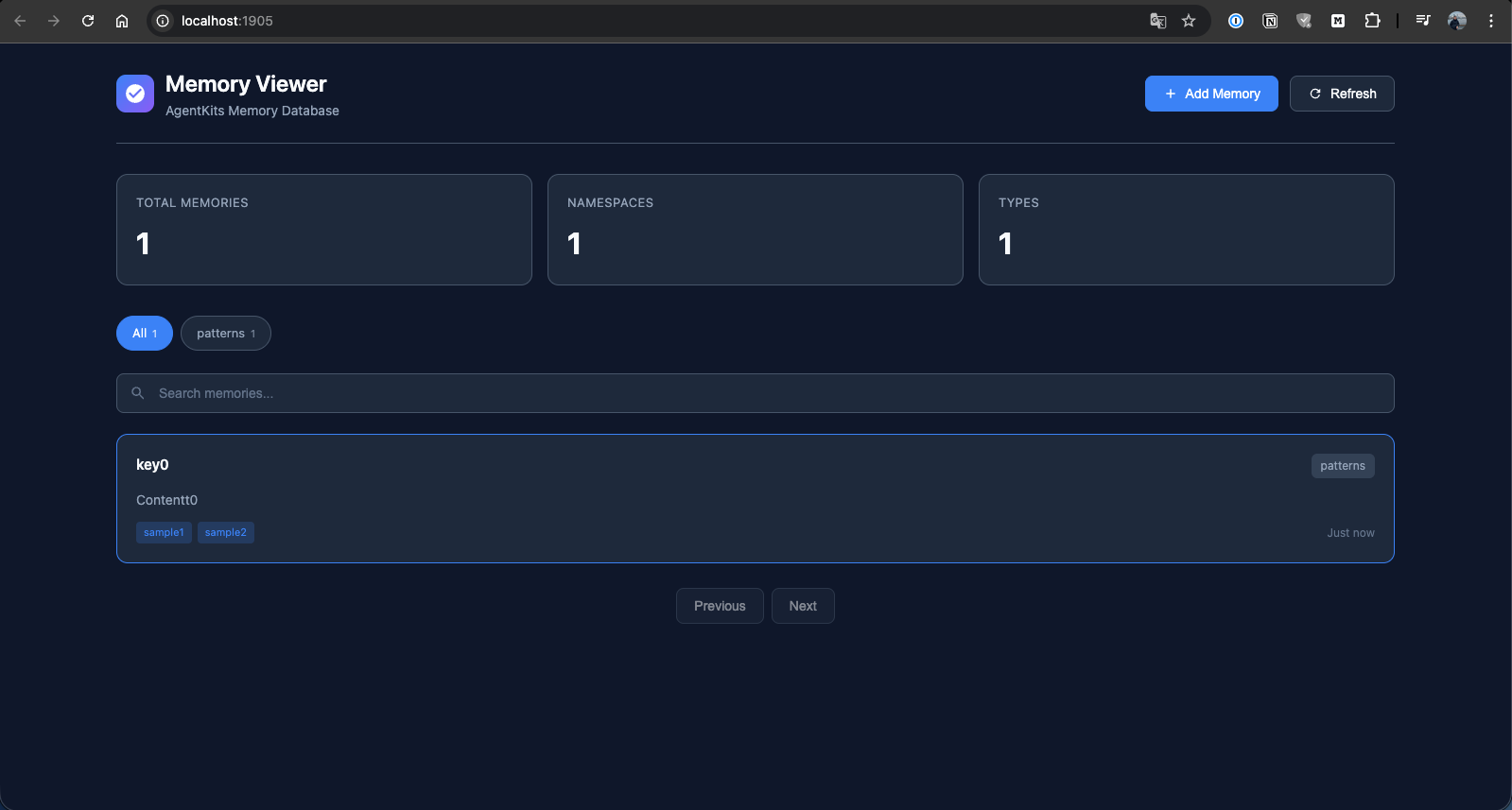
Memory List
Browse all stored memories with search and namespace filtering.
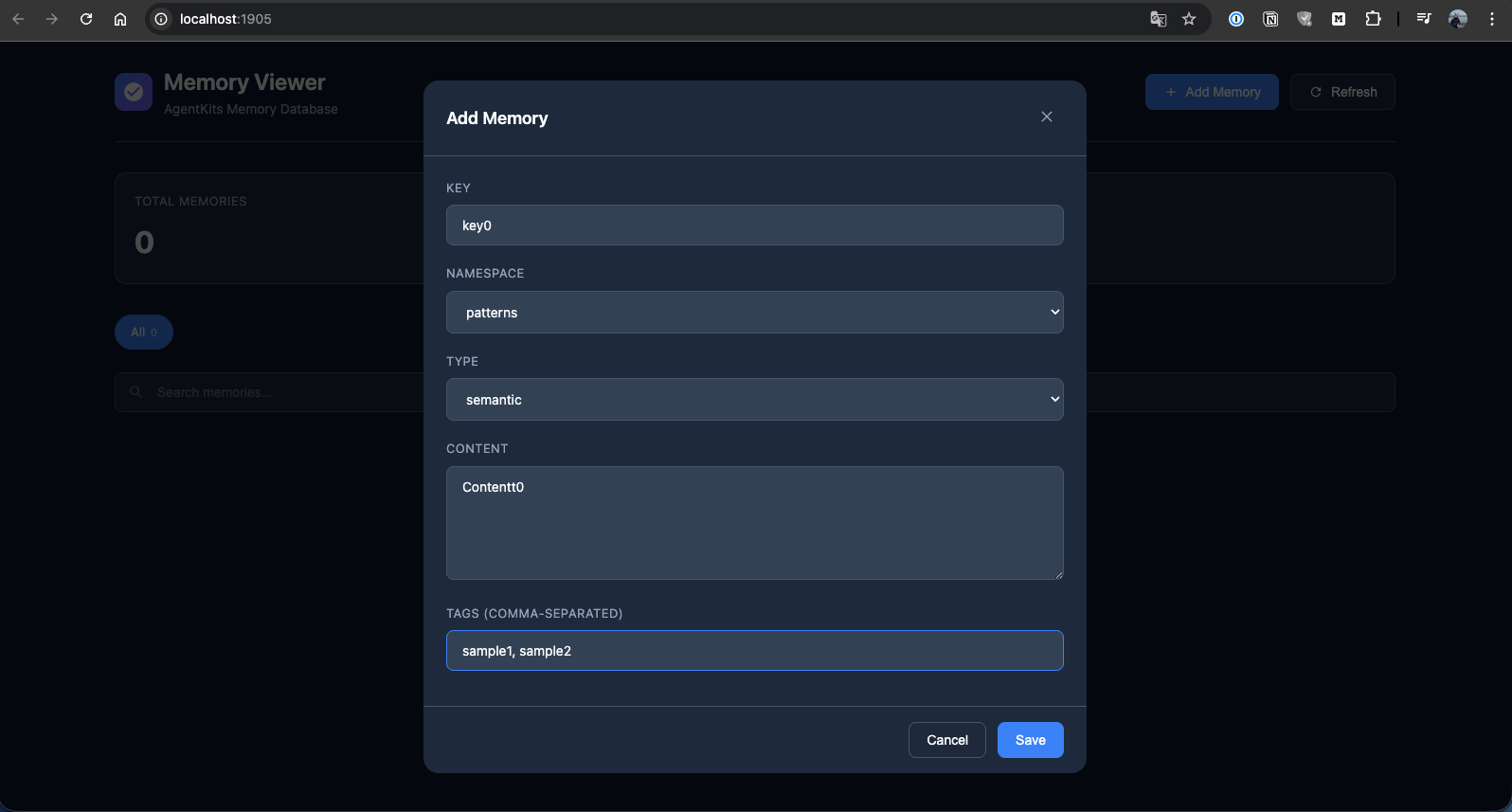
Add Memory
Create new memories with key, namespace, type, content, and tags.
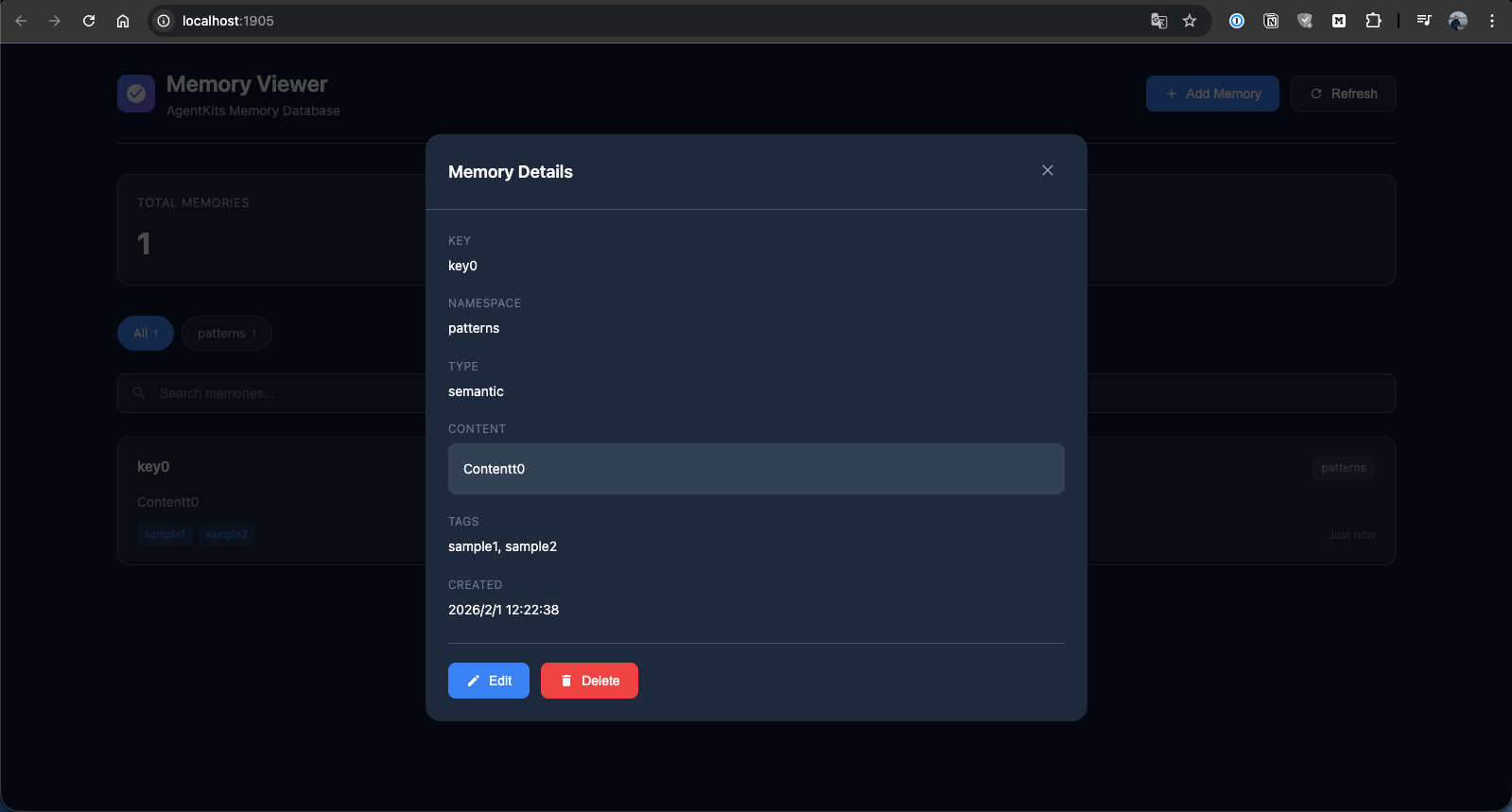
Memory Details
View full memory details with edit and delete options.
Quick Start
1. Install
npm install @aitytech/agentkits-memory
2. Configure MCP Server
Add to your .mcp.json (or .claude/.mcp.json):
{
  "mcpServers": {
    "memory": {
      "command": "npx",
      "args": ["agentkits-memory-server"]
    }
  }
}
3. Use Memory Tools
Once configured, your AI assistant can use these tools:
| Tool | Description |
|---|---|
memory_save | Save decisions, patterns, errors, or context |
memory_search | Search memories using semantic similarity |
memory_recall | Recall everything about a specific topic |
memory_list | List recent memories |
memory_status | Check memory system status |
CLI Commands
# Start MCP server
npx agentkits-memory-server

# Start web viewer (port 1905)
npx agentkits-memory-web

# View stored memories (terminal)
npx agentkits-memory-viewer

# Save memory from CLI
npx agentkits-memory-save "Use JWT with refresh tokens" --category pattern --tags auth,security

# Setup hooks for auto-capture
npx agentkits-memory-setup
Programmatic Usage
import { ProjectMemoryService } from '@aitytech/agentkits-memory';

const memory = new ProjectMemoryService({
  baseDir: '.claude/memory',
  dbFilename: 'memory.db',
});
await memory.initialize();

// Store a memory
await memory.storeEntry({
  key: 'auth-pattern',
  content: 'Use JWT with refresh tokens for authentication',
  namespace: 'patterns',
  tags: ['auth', 'security'],
});

// Query memories
const results = await memory.query({
  type: 'hybrid',
  namespace: 'patterns',
  content: 'authentication',
  limit: 10,
});

// Get by key
const entry = await memory.getByKey('patterns', 'auth-pattern');
Auto-Capture Hooks
The package includes hooks for automatically capturing AI coding sessions:
| Hook | Trigger | Action |
|---|---|---|
context | Session Start | Injects previous session context |
session-init | First User Prompt | Initializes session record |
observation | After Tool Use | Captures tool usage |
summarize | Session End | Generates session summary |
Setup hooks:
npx agentkits-memory-setup
Or manually copy hooks.json to your project:
cp node_modules/@aitytech/agentkits-memory/hooks.json .claude/hooks.json
Memory Categories
| Category | Use Case |
|---|---|
decision | Architecture decisions, ADRs |
pattern | Reusable code patterns |
error | Error solutions and fixes |
context | Project context and facts |
observation | Session observations |
Storage
Memories are stored in .claude/memory/memory.db within your project directory.
.claude/memory/
├── memory.db          # SQLite database
├── memory.db-wal      # Write-ahead log (temp)
└── exports/           # Optional markdown exports
API Reference
ProjectMemoryService
interface ProjectMemoryConfig {
  baseDir: string;              // Default: '.claude/memory'
  dbFilename: string;           // Default: 'memory.db'
  enableVectorIndex: boolean;   // Default: false
  dimensions: number;           // Default: 384
  embeddingGenerator?: EmbeddingGenerator;
  cacheEnabled: boolean;        // Default: true
  cacheSize: number;            // Default: 1000
  cacheTtl: number;             // Default: 300000 (5 min)
}
Methods
| Method | Description |
|---|---|
initialize() | Initialize the memory service |
shutdown() | Shutdown and persist changes |
storeEntry(input) | Store a memory entry |
get(id) | Get entry by ID |
getByKey(namespace, key) | Get entry by namespace and key |
update(id, update) | Update an entry |
delete(id) | Delete an entry |
query(query) | Query entries with filters |
semanticSearch(content, k) | Semantic similarity search |
count(namespace?) | Count entries |
listNamespaces() | List all namespaces |
exportToMarkdown(namespace) | Export to markdown |
getStats() | Get statistics |
Requirements
- Node.js >= 18.0.0
- MCP-compatible AI coding assistant
AgentKits Ecosystem
AgentKits Memory is part of the AgentKits ecosystem by AityTech - tools that make AI coding assistants smarter.
| Product | Description | Link |
|---|---|---|
| AgentKits Engineer | 28 specialized agents, 100+ skills, enterprise patterns | GitHub |
| AgentKits Marketing | AI-powered marketing content generation | GitHub |
| AgentKits Memory | Persistent memory for AI assistants (this package) | npm |

Star History
License
MIT
Give your AI assistant memory that persists.
AgentKits Memory by AityTech
Star this repo if it helps your AI remember.