🧠 AgentxSuite
AgentxSuite is an open-source platform to connect, manage, and monitor AI Agents and Tools across multiple MCP servers — all in one unified interface.
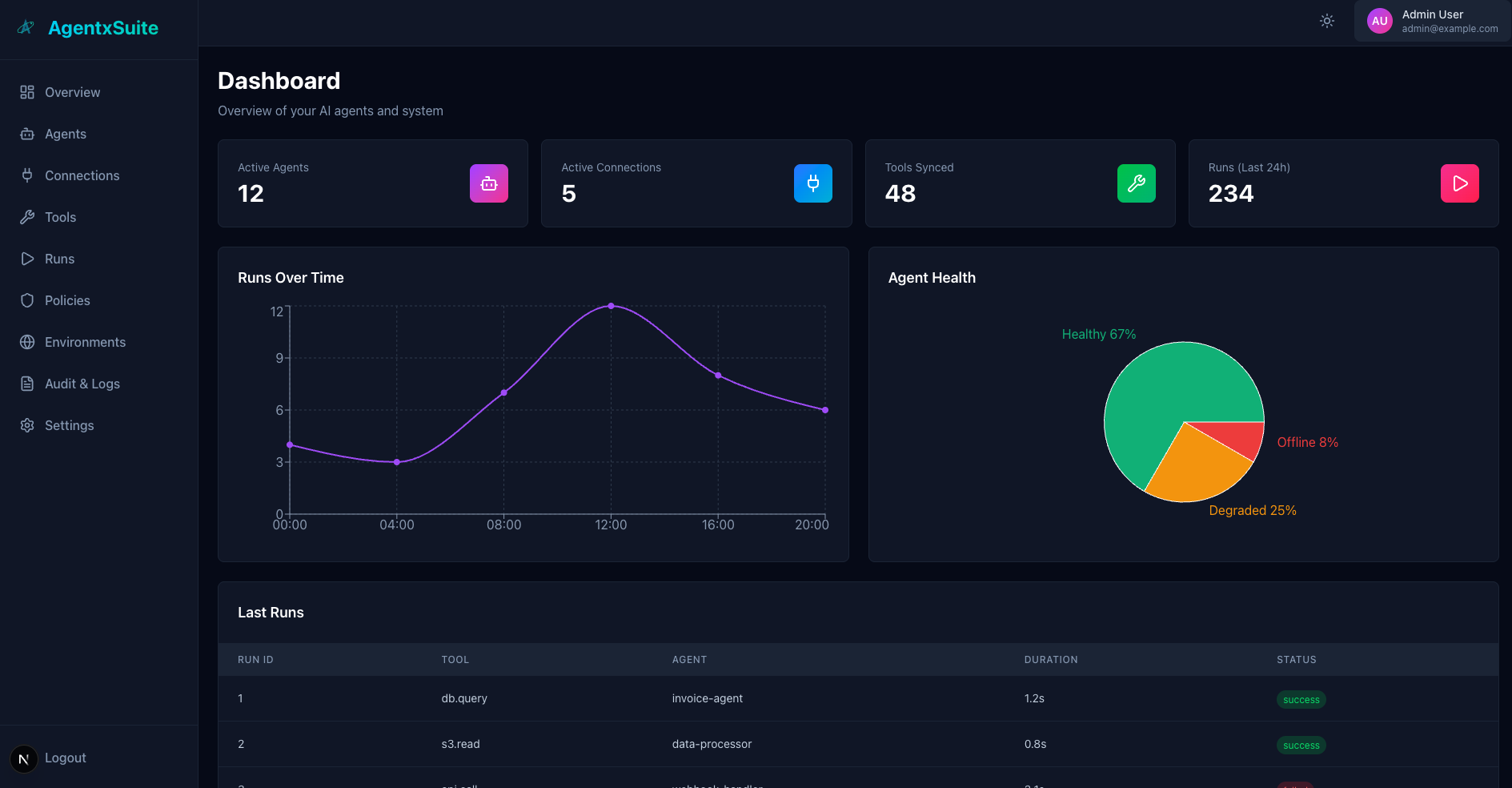
🚀 Overview
AgentxSuite provides a consistent control layer for distributed AI agents.
It connects Agents, Tools, and Policies under a single orchestration system, built for secure, multi-tenant, and MCP-compatible environments.
🧩 Tech Stack
| Component | Technology |
|---|---|
| Backend | Django 5.2+, Django REST Framework 3.15+ |
| MCP Service | FastAPI 0.104+ (MCP Fabric Layer) |
| Database | PostgreSQL (production) / SQLite (development) |
| Language | Python 3.11+ |
backend/
  config/              # Django project configuration
  apps/
    accounts/          # User model & auth
    tenants/           # Organizations & Environments
    connections/       # MCP server connections
    agents/            # Agent definitions
    tools/             # Tool registry
    runs/              # Run orchestration
    policies/          # Access policies
    audit/             # Audit events (stub)
  libs/
    secretstore/       # Secret storage abstraction
    permissions/       # RBAC utilities
  mcp_fabric/          # FastAPI MCP-compatible service
    routers/           # Manifest, tools, and run endpoints
    tests/             # Unit & integration tests
  requirements/        # Dependencies (base, dev, test)
⚙️ Setup
Option 1: Docker (Recommended)
The easiest way to get started is using Docker Compose:
1. Create environment file (optional):
cp .env.example .env
# Edit .env with your settings (SECRET_KEY, database passwords, etc.)
2. Start all services:
docker-compose up -d
This will start:
- PostgreSQL database (port 5432)
- Redis cache (port 6379)
- Django API (port 8000)
- Next.js Frontend (port 3000)
3. Run migrations:
docker-compose exec backend python manage.py migrate
4. Create superuser:
docker-compose exec backend python manage.py createsuperuser
5. Start MCP Fabric service (optional):
docker-compose --profile mcp-fabric up -d mcp-fabric
6. View logs:
docker-compose logs -f backend
docker-compose logs -f frontend
docker-compose logs -f mcp-fabric
7. Stop services:
docker-compose down
Environment Variables:
SECRET_KEY- Django secret key (required)POSTGRES_DB,POSTGRES_USER,POSTGRES_PASSWORD- Database credentialsSECRETSTORE_FERNET_KEY- Fernet key for secret encryptionCORS_ALLOWED_ORIGINS- Allowed CORS originsNEXT_PUBLIC_API_URL- Frontend API URLNEXT_PUBLIC_MCP_FABRIC_URL- Frontend MCP Fabric URL
Option 2: Local Development
1. Create a virtual environment
python3 -m venv venv
source venv/bin/activate  # On Windows: venv\Scripts\activate
2. Install dependencies
cd backend
pip install -r requirements/base.txt
pip install -r requirements/dev.txt
pip install -r requirements/test.txt
3. Apply migrations
python manage.py migrate
4. (Optional) Create a superuser
python manage.py createsuperuser
5. Start the servers
Important: Make sure the virtual environment is activated (source venv/bin/activate)
Django API
cd backend
python manage.py runserver
MCP Fabric (FastAPI)
cd backend
uvicorn mcp_fabric.main:app --reload --port 8090
Start both servers simultaneously:
cd backend
# Terminal 1: Django
python manage.py runserver

# Terminal 2: MCP Fabric (in new terminal, venv must be activated!)
source ../venv/bin/activate  # If not already activated
uvicorn mcp_fabric.main:app --reload --port 8090
Alternative: Use Makefile
# Django API
make run

# MCP Fabric
make run-mcp-fabric
🔑 Authentication
| Endpoint | Method | Description |
|---|---|---|
/api/v1/auth/register/ | POST | Register new user |
/api/v1/auth/login/ | POST | Login and get token |
/api/v1/auth/logout/ | POST | Logout current user |
/api/v1/auth/me/ | GET | Get current user info |
Header:
Authorization: Token <your-token>
🧱 Core Endpoints
Organizations & Environments
GET /api/v1/orgs/POST /api/v1/orgs/GET /api/v1/orgs/:org_id/environments/POST /api/v1/orgs/:org_id/environments/
Connections
GET /api/v1/orgs/:org_id/connections/POST /api/v1/orgs/:org_id/connections/POST /api/v1/connections/:id/test/POST /api/v1/connections/:id/sync/
Agents, Tools & Runs
GET /api/v1/orgs/:org_id/agents/POST /api/v1/orgs/:org_id/agents/GET /api/v1/orgs/:org_id/tools/POST /api/v1/orgs/:org_id/tools/POST /api/v1/orgs/:org_id/runs/execute/- Unified tool execution endpoint (recommended)POST /api/v1/tools/:id/run/- Legacy endpoint (deprecated, use/runs/execute/instead)GET /api/v1/orgs/:org_id/runs/
Unified Run API
The unified run endpoint (POST /api/v1/orgs/:org_id/runs/execute/) provides a consistent way to execute tools:
Request:
{
  "tool": "uuid-or-name",      // Tool UUID or name
  "agent": "uuid",              // Optional if Agent-Token is used
  "input": {...},               // Input data
  "environment": "uuid",        // Optional, derived from tool if not provided
  "timeout_seconds": 30         // Optional timeout
}
Response (MCP-compatible format):
{
  "run_id": "uuid",
  "status": "succeeded",
  "content": [{"type": "text", "text": "..."}],
  "isError": false,
  "agent": {"id": "...", "name": "..."},
  "tool": {"id": "...", "name": "..."},
  "execution": {
    "started_at": "2025-01-01T12:00:00Z",
    "ended_at": "2025-01-01T12:00:02Z",
    "duration_ms": 2000
  }
}
Agent Selection:
- If using an Agent Token: Agent is automatically extracted from token (highest priority)
- If no Agent Token:
agentfield in request is required (no automatic fallback) - For security reasons, automatic agent selection is not allowed
🧬 MCP Fabric (FastAPI Service)
MCP Fabric exposes standardized MCP endpoints to access tools from connected environments. It supports both multi-tenant URL-based routing and JWT token-based authentication.
Endpoints
Multi-tenant endpoints (org/env in URL path):
| Endpoint | Method | Description |
|---|---|---|
/mcp/{org_id}/{env_id}/.well-known/mcp/manifest.json | GET | Get MCP manifest |
/mcp/{org_id}/{env_id}/.well-known/mcp/tools | GET | List registered tools |
/mcp/{org_id}/{env_id}/.well-known/mcp/run | POST | Execute a tool |
Root endpoints (org/env extracted from JWT token):
| Endpoint | Method | Description |
|---|---|---|
/.well-known/mcp/manifest.json | GET | Get MCP manifest (org/env from token) |
/.well-known/mcp/tools | GET | List registered tools (org/env from token) |
/.well-known/mcp/run | POST | Execute a tool (org/env from token) |
Authentication:
Authorization: Bearer <JWT-token>
JWT tokens must include org_id and env_id claims for root endpoints.
Connection Types
MCP Fabric supports three types of connections:
-
System Tools (
agentxsuite://system)- Internal system tools (e.g.,
agentxsuite_list_runs,agentxsuite_create_agent) - Executed directly via handler functions (no HTTP calls)
- Tools are fetched from database
- Internal system tools (e.g.,
-
Own MCP Fabric (
http://localhost:8090or configured MCP Fabric URL)- Points to the same MCP Fabric service
- Tools are fetched directly from database (bypasses HTTP)
- Used for internal tool execution
-
External MCP Servers (any other HTTP endpoint)
- Standard MCP-compatible servers
- Tools are fetched via HTTP (manifest endpoints or defaults)
- Full validation and health checks
Architecture Highlights
- fastmcp — Embedded MCP server for manifest, tools, and run endpoints
- registry.py — Dynamically registers Django tools with fastmcp, supports direct database queries
- adapters.py — Bridges FastAPI tool handlers to Django services
- Security Layer — Policy checks, JSON schema validation, rate limiting, timeouts, and audit logging
- Strategy Pattern — Endpoint type detection (SYSTEM, OWN_MCP_FABRIC, EXTERNAL_MCP) for optimal routing
🧪 Testing
Run all tests:
pytest
With coverage:
pytest --cov=apps --cov=libs --cov-report=term-missing
Run specific test:
pytest apps/policies/tests/unit/test_policies_allow_deny.py
Local test setup (with mock MCP server):
python manage.py seed_local_agentsuite
bash dev/run_servers.sh
🧹 Code Quality
ruff check .
ruff format .
mypy apps libs
Or via Makefile:
make install
make lint
make typecheck
make test
🔐 Policies & Access Control
AgentxSuite uses a default-deny policy model with explicit allow rules.
Policy Rules
Policies support both exact matches and wildcard patterns using Unix shell-style matching (fnmatch):
Examples:
{
  "allow": ["agentxsuite_*", "custom_special_tool"],
  "deny": ["dangerous_*", "*_delete_all"]
}
Wildcard Patterns:
agentxsuite_*- Matches all system tools (e.g.,agentxsuite_list_runs,agentxsuite_create_agent)*_delete- Matches tools ending with_delete(e.g.,user_delete,tool_delete)tool-*- Matches tools starting withtool-(e.g.,tool-123,tool-test)*- Matches all tools (use with caution)
Policy Evaluation:
- Deny list checked first (most restrictive)
- Allow list checked second (explicit permission)
- Default deny if no explicit allow
Policy Scope:
- Policies can be organization-wide or environment-specific
- Environment-specific policies override organization-wide policies
- Multiple policies are evaluated in order
System Tools
AgentxSuite includes built-in system tools for management:
agentxsuite_list_runs- List all runs for an environmentagentxsuite_create_agent- Create a new agentagentxsuite_get_agent- Get agent detailsagentxsuite_list_agents- List all agentsagentxsuite_list_connections- List all connectionsagentxsuite_list_tools- List all tools
System tools are accessed via the special connection endpoint: agentxsuite://system
Developer Documentation:
- Token Usage Tracking - How to implement token usage tracking and cost calculation in system tools and external MCP servers
🌟 Features
- Multi-tenant architecture - Organizations & Environments with complete isolation
- Policy-based access control - Wildcard support, default-deny model, environment-specific rules
- System Tools - Built-in management tools for agents, runs, connections, and tools
- Token Usage Tracking - Automatic token usage and cost calculation for LLM-powered tools
- MCP-compatible FastAPI gateway - Standard MCP endpoints with JWT authentication
- Connection Types - Support for system tools, own MCP Fabric, and external MCP servers
- Tool Execution Results - MCP-formatted responses with run_id, duration, and content
- SecretStore - Fernet encryption for secrets, never stored in plaintext
- Service-layer architecture - Clean separation of concerns, business logic in services
- High test coverage - Comprehensive test suite with pytest
- Strict type checking - Full mypy support for type safety
- Agent Designer - Visual workflow editor with node-based diagram for designing agent architectures
- Audit & Logs - Comprehensive audit logging system for tracking all system events and actions
- Cost Analytics - Advanced cost tracking and analytics dashboard with detailed breakdowns and visualizations
🎨 User Interface Features
Agent Designer
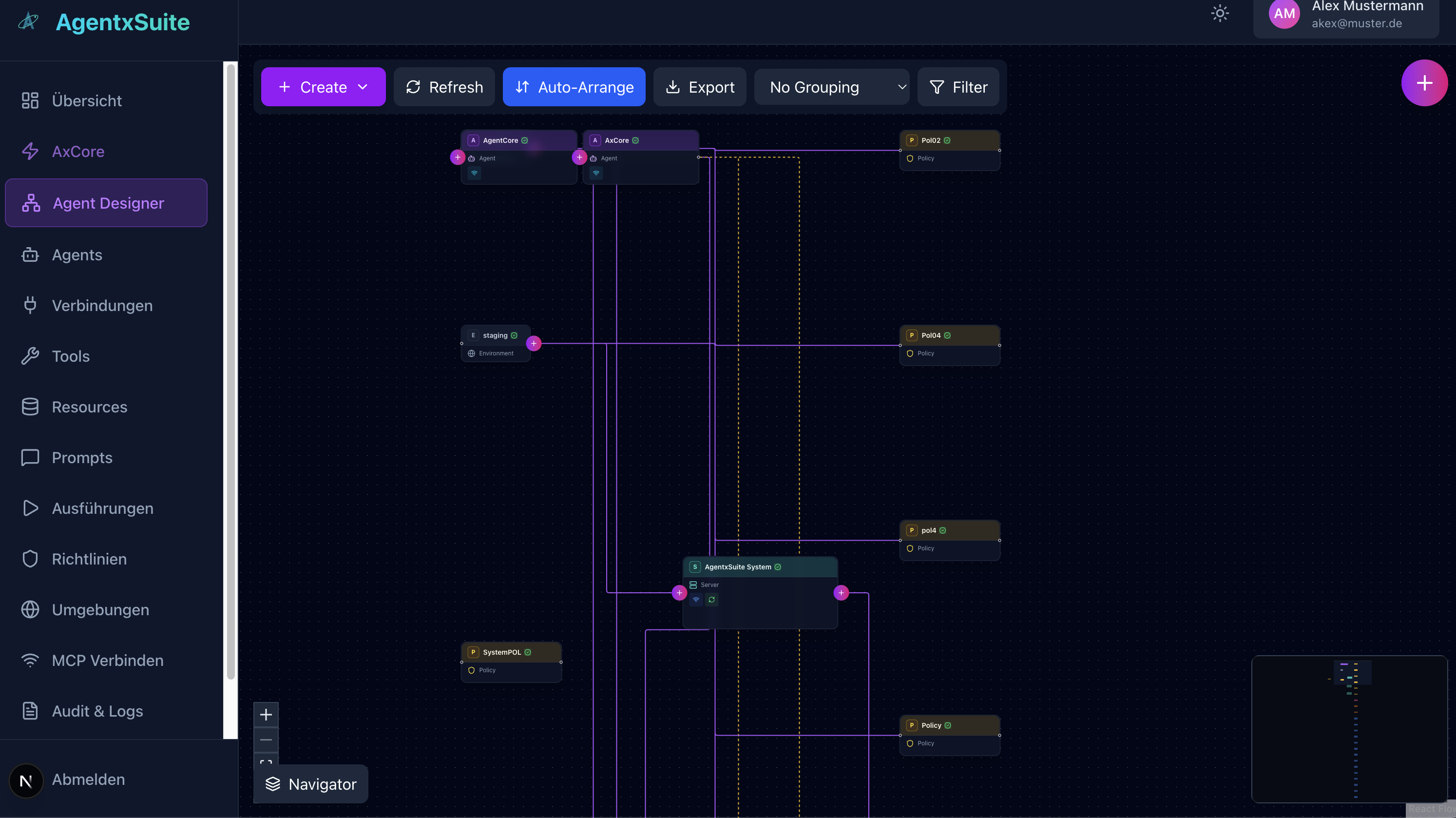
The Agent Designer provides a powerful visual workflow editor for designing and managing agent architectures. This node-based interface allows you to:
- Visual Architecture Design: Create and visualize complex agent workflows using an intuitive node-based diagram editor
- Component Management: Add and connect agents, environments, policies, and system components through drag-and-drop interactions
- Relationship Mapping: Visualize connections and dependencies between different components with interactive connection lines
- Auto-Arrangement: Automatically organize and align nodes for better readability
- Export Capabilities: Export your designs for documentation or sharing
- Filtering & Grouping: Organize and filter components by type, environment, or custom criteria
- Interactive Navigation: Zoom, pan, and navigate large diagrams with a minimap overview
The designer supports multiple node types including:
- Agents - AI agent definitions and configurations
- Environments - Deployment environments (staging, production, development)
- Policies - Access control and security policies
- System Components - Core system services and infrastructure
Audit & Logs
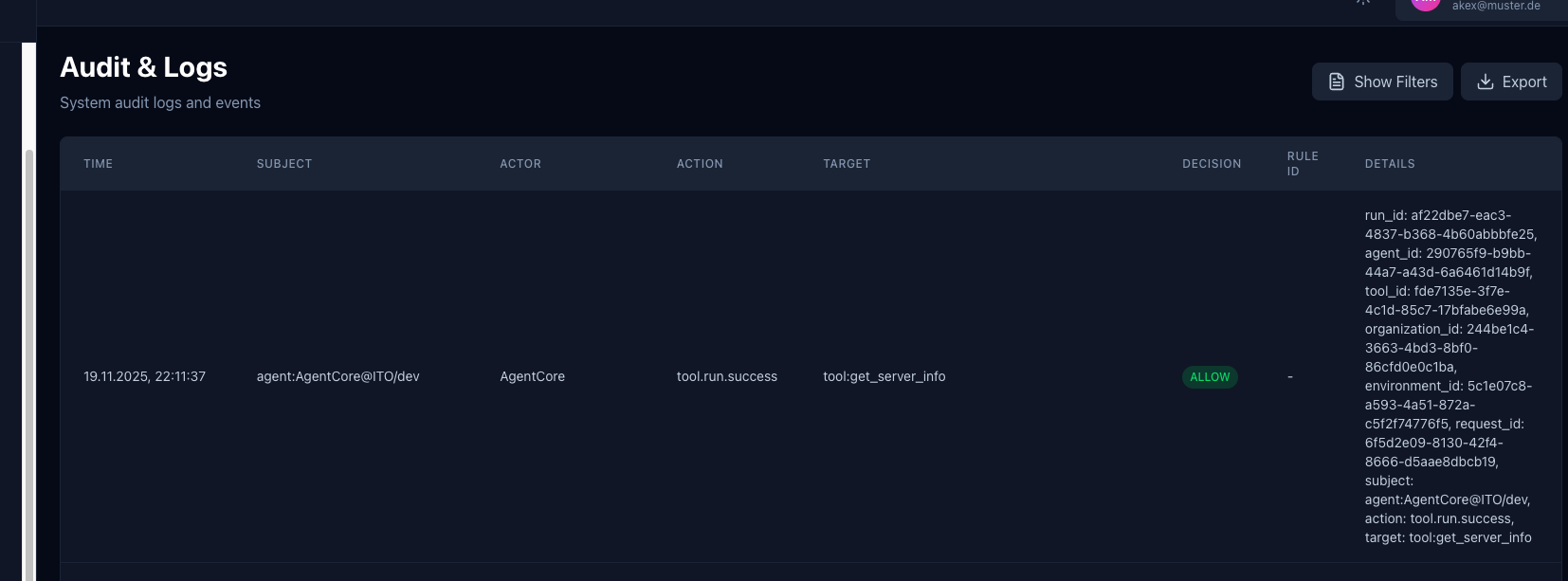
The Audit & Logs system provides comprehensive tracking and monitoring of all system events and actions:
- Complete Event History: Track all system events including tool executions, policy decisions, agent actions, and administrative changes
- Detailed Event Information: Each log entry includes:
- Timestamp - Precise time of the event
- Subject - Entity that triggered the action (e.g.,
agent:AgentCore@ITO/dev) - Actor - User or agent that performed the action
- Action - Type of action (e.g.,
tool.run.success,policy.check) - Target - Resource or entity affected by the action
- Decision - Policy decision (ALLOW/DENY)
- Rule ID - Policy rule that was evaluated
- Details - Complete context including run IDs, agent IDs, tool IDs, organization/environment IDs, and request IDs
- Filtering & Search: Filter logs by time range, actor, action type, or decision
- Export Functionality: Export audit logs for compliance, analysis, or archival purposes
- Real-time Monitoring: View system activity as it happens
This comprehensive audit trail ensures full transparency and compliance for all operations within AgentxSuite.
Cost Analytics
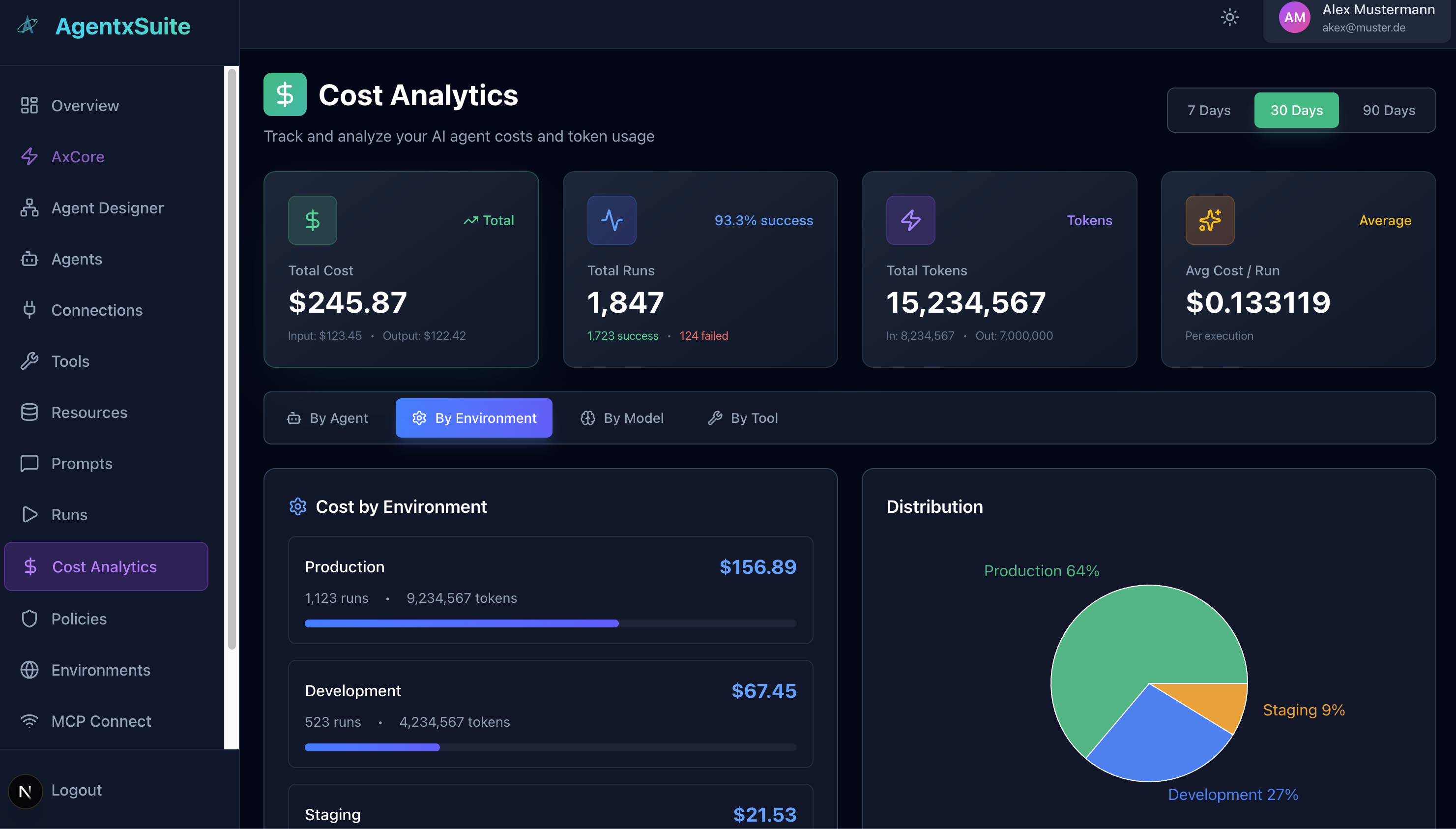
The Cost Analytics dashboard provides detailed insights into AI agent costs and resource usage:
-
Key Metrics Overview:
- Total Cost - Overall spending with input/output cost breakdown
- Total Runs - Number of executions with success rate tracking
- Total Tokens - Token consumption with input/output token counts
- Average Cost per Run - Cost efficiency metrics per execution
-
Flexible Time Ranges: Analyze costs over 7, 30, or 90-day periods
-
Multi-Dimensional Analysis: View costs grouped by:
- By Agent - Cost breakdown per agent
- By Environment - Cost distribution across environments (Production, Development, Staging)
- By Model - Costs per AI model used
- By Tool - Tool-specific cost analysis
-
Visual Analytics:
- Bar Charts - Horizontal progress bars showing cost distribution
- Pie Charts - Percentage breakdown of costs across categories
- Trend Indicators - Visual trend graphs showing cost changes over time
-
Detailed Breakdowns: For each category, view:
- Total cost
- Number of runs
- Token usage (input and output)
- Success rates
- Cost per execution
The Cost Analytics dashboard helps you optimize spending, identify cost drivers, and make informed decisions about resource allocation across your AI agent infrastructure.
📚 Documentation
- Token Usage Tracking - Guide for implementing automatic token usage and cost tracking in system tools and external MCP servers
📄 License
Licensed under AGPL-3.0.
See LICENSE for details.