Antrieb MCP Server
An MCP server that validates your AI-generated infra code. On real VMs. Tell Claude (or any MCP client) to generate the code to setup a LAMP stack and Antrieb will spin up VMs, run the code, and self-correct until it works, then destroys the VMs.
No containers. No sandboxes. Real VMs with full OS access, networking, and multi-node clusters.
Antrieb is a remote MCP server, thus nothing to install. Add it to your config and start deploying. Antrieb uses its own hypervisor to control the full VM lifecycle.
No credentials or cloud account required. Antrieb runs entirely on its own infrastructure, including real AWS provisioning. The
terraform-awsandcloudformation-awsimages run against real AWS using Antrieb's own credentials. You don't need to supply yours.
Antrieb: Make AI-Generated Infrastructure Converge.

Quick Start
Add this to your MCP client config (.mcp.json, Claude Desktop settings, etc.):
{
  "mcpServers": {
    "antrieb": {
      "type": "http",
      "url": "https://antrieb.sh/mcp"
    }
  }
}
OR with an API key:
{
  "mcpServers": {
    "antrieb": {
      "type": "http",
      "url": "https://antrieb.sh/mcp",
      "headers": {
        "Authorization": "Bearer ant_YOUR_API_KEY"
      }
    }
  }
}
That's it. No local install, no dependencies, no Docker.
You can try without an API key or get one by logging in at https://antrieb.sh/
Note: Without an API key, your tasks will appear in the community feed.
What It Does
You describe what you want in natural language. Your LLM generates the code, Antrieb spins up real VMs, executes it, validates the result, and self-corrects if something fails — all in one call.
"Write a bash script that sets up a Node.js Express hello world app with PM2 then validate it on Antrieb with 1 Ubuntu node"
"Write a Terraform stack that creates 2 t3.micro EC2 instances behind a Network Load Balancer and validate it on Antrieb"
"Write an Ansible playbook to set up Prometheus and node_exporter on 3 nodes then validate on Antrieb"
Every execution returns a live monitoring dashboard so you can watch it happen in real time.
Tools
Antrieb exposes 5 MCP tools:
run
Validate infrastructure code on real VMs.
| Parameter | Type | Required | Description |
|---|---|---|---|
prompt | string | yes | The code and intent to validate |
cluster | array | no | VM topology (e.g. ["ubuntu24.04 x3"], ["ansible-controller", "ubuntu24.04 x3"]) |
language | string | no | bash, python, ansible, dockerfile, terraform-aws, cloudformation-aws |
session_id | string | no | Resume a previous session for iterative changes |
search
Find available VM images.
| Parameter | Type | Required | Description |
|---|---|---|---|
keywords | string | no | Search by name, description, or tags |
status
Monitor a running job. Supports long-polling.
| Parameter | Type | Required | Description |
|---|---|---|---|
job_id | string | no | Job ID from a previous run |
timeout | number | no | Long-poll timeout in ms |
files
Download files from a completed session.
| Parameter | Type | Required | Description |
|---|---|---|---|
session_id | string | yes | Session ID |
filenames | array | yes | Files to retrieve |
cancel
Stop a running job and destroy its VMs.
| Parameter | Type | Required | Description |
|---|---|---|---|
job_id | string | yes | Job to cancel |
Available Environments
Base Images
ubuntu24.04almalinux9archlinuxcentos-stream10alpine
Pre-Built Images
Antrieb includes specialized images with pre-configured environments:
ansible-controller, terraform-aws, cloudformation-aws, podman-docker
Use search to discover all available images, or just describe what you need and Antrieb will pick the right topology.
How It Works
- Your LLM generates the automation code
- You call
runwith the code or a natural language prompt - Antrieb provisions VMs — each VM in less than a second
- Code executes on the real VMs
- If something fails, Antrieb reads the error, rewrites the code, and retries
- You get back the result, generated files, and a monitoring dashboard
- Antrieb destroys the VMs
Monitoring
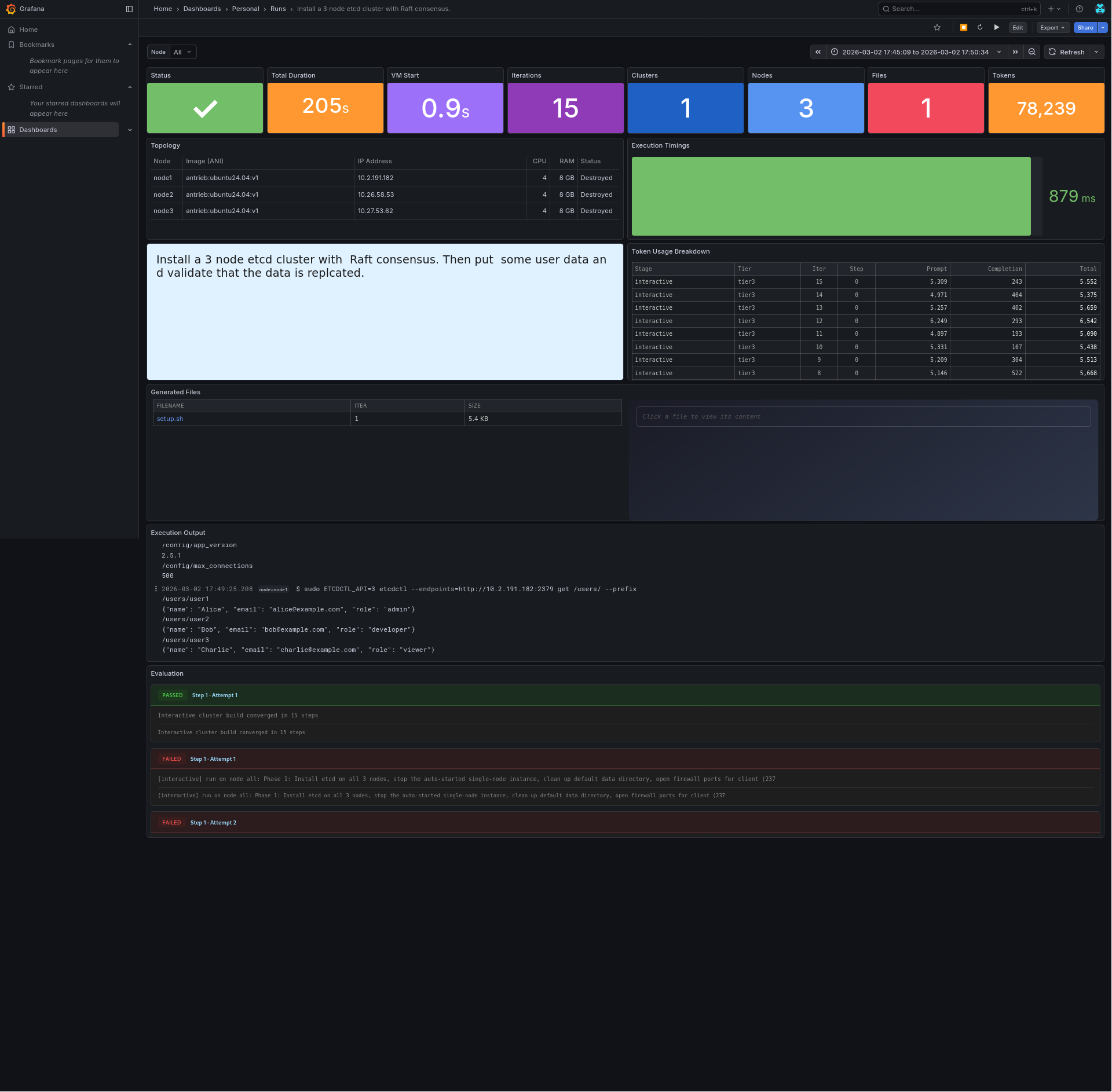
Every run returns a telemetry_url pointing to a Grafana dashboard with:
- Real-time execution timeline
- Generated files with syntax highlighting
- Per-node output logs
- LLM-generated digest of what happened
Multi-Node Clusters
Specify topology with the cluster parameter:
// Shell or Python on 3 identical Ubuntu VMs
{ "cluster": ["ubuntu24.04 x3"] }

// Ansible controller + 3 managed nodes
{ "cluster": ["ansible-controller", "ubuntu24.04 x3"] }

// Terraform controller against real AWS
{ "cluster": ["terraform-aws"] }

// Docker or Podman
{ "cluster": ["podman-docker"] }

// Shell or Python on 3 identical Alpine VMs
{ "cluster": ["alpine x3"] }
License
Apache 2.0