AnyLoom: AnythingLLM Local AI Agentic Stack
A fully local, multi-agent AI system that gives you ChatGPT-level intelligence with complete privacy and control over your data.
Now with Docker! One command starts the entire stack. Zero manual setup.
💡 What Can You Do With This?
Run a production-grade AI assistant stack entirely on your hardware:
- 🔒 100% private — No data leaves your machine. No API keys. No subscriptions.
- 🧠 Advanced reasoning — Qwen3-30B MoE (30.5B params, 3.3B active) with hybrid thinking mode
- 📚 Hybrid RAG search — Finds YOUR information better than pure vector search (dense + sparse retrieval)
- 🤖 Multi-agent swarm — DyTopo coordination routes complex tasks to specialized agents that collaborate, with optional RAG context pre-fetch for domain grounding
- 🛠️ 10 MCP servers — Memory knowledge graph, web search, browser automation, file operations, code execution, RAG search, multi-agent swarm
- 🐋 Docker-first architecture — One command to start/stop everything. Auto-restart. Zero networking hassles.
- 💬 AnythingLLM UI — Clean interface for chat, document Q&A, and workspace management
Ideal for:
- Engineers who need AI assistance with proprietary codebases
- Researchers handling sensitive documents (legal, medical, financial)
- Privacy-conscious users who want ChatGPT-level capability without cloud dependency
- Developers building custom AI workflows with persistent memory and multi-agent collaboration
Why AnyLoom vs Cloud AI or Single-LLM Setups?
| AnyLoom | Cloud AI (ChatGPT, Claude) | Single Local LLM | |
|---|---|---|---|
| Privacy | ✅ 100% local, zero telemetry | ❌ Your data trains their models | ✅ Local |
| Cost | ✅ One-time hardware investment | ❌ $20-200/month subscription | ✅ Free after setup |
| Retrieval Quality | ✅ Hybrid dense+sparse RAG | ⚠️ Dense-only embeddings | ⚠️ Basic or no RAG |
| Multi-Agent Swarm | ✅ DyTopo routing, 3-5 agents | ❌ Single model per request | ❌ Single model |
| Persistent Memory | ✅ MCP knowledge graph across sessions | ⚠️ Limited to conversation | ❌ No cross-session memory |
| Tool Ecosystem | ✅ 10 MCP servers (RAG, swarm, web, code, files, browser) | ⚠️ Limited, cloud-gated | ❌ Manual integration |
| Context Window | ✅ 131K tokens (configurable) | ⚠️ 128K (expensive tiers) | ⚠️ Varies by model |
| Offline Use | ✅ Fully functional | ❌ Requires internet | ✅ Fully functional |
The bottom line: If you need ChatGPT-level capability for sensitive work, AnyLoom gives you near the same intelligence without the privacy trade-offs or subscription costs.
🌐 How It Works
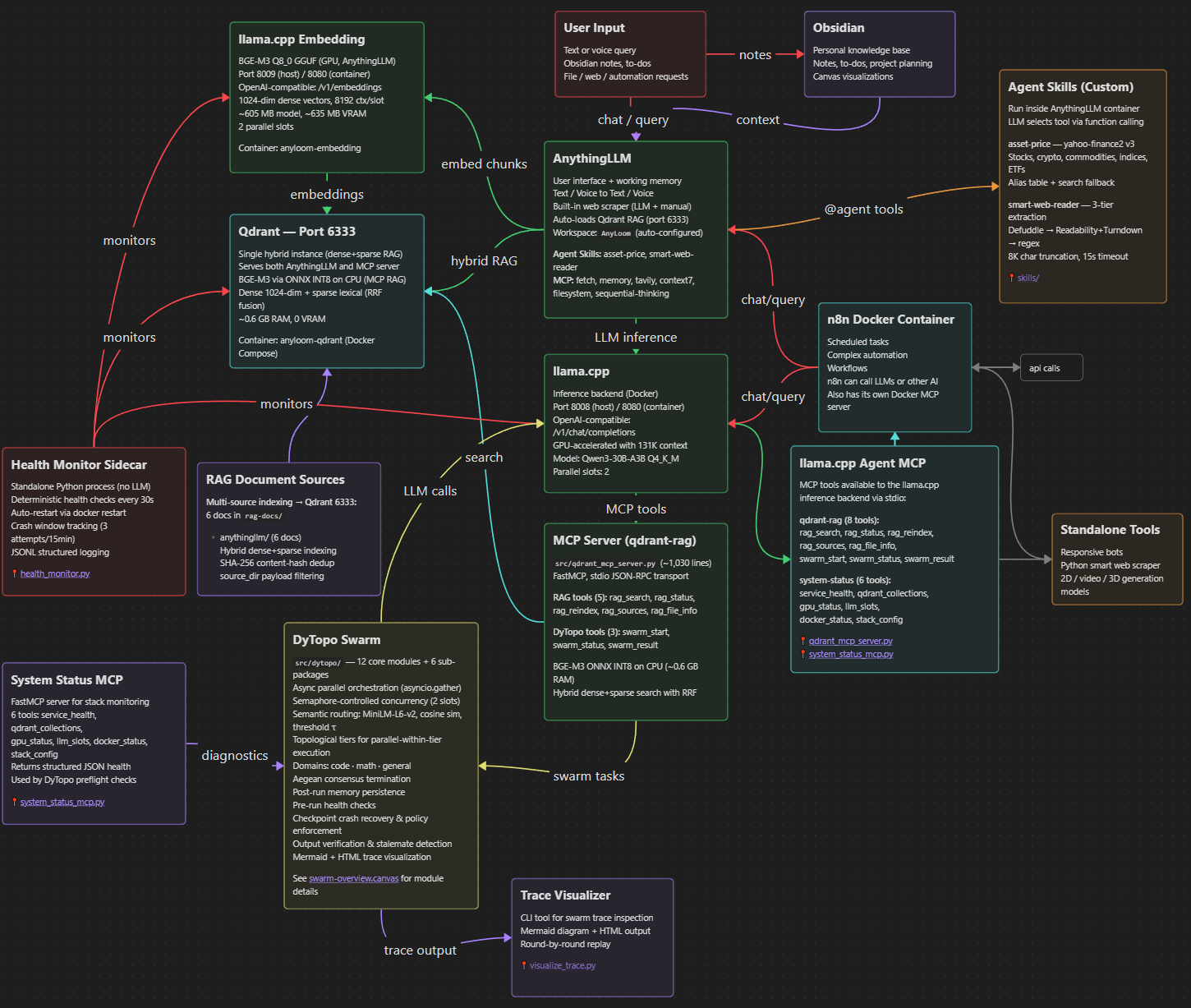
AnyLoom runs as a Docker Compose stack with these services:
- Qdrant (port 6333) — Vector database for hybrid dense+sparse RAG
- llama.cpp LLM (port 8008) — GPU-accelerated inference with 131K context (Qwen3-30B-A3B)
- llama.cpp Embedding (port 8009) — BGE-M3 embedding server for AnythingLLM (1024-dim dense vectors)
- AnythingLLM (port 3001) — Web UI for chat and document management
- DyTopo swarm (Python, runs natively) — Multi-agent orchestration for complex tasks
- 10 MCP servers — RAG search, DyTopo swarm, memory graph, web search, browser automation, file ops, and more
Everything starts with one command. Docker handles networking, GPU access, auto-restart, and data persistence.
| Component | Tokens |
|---|---|
| Total Token Budget | 131K |
| System prompt | ~2K |
| MCP tool definitions (9 Docker + 1 qdrant-rag) | ~3K |
| RAG snippets (16 × ~500 tokens) | ~8K |
| Chat history (30 messages) | ~12K |
| Overhead Subtotal: | ~25K |
| Remaining for chat | ~106K |
The entire RAG-prompt set fits comfortably inside the token limit. Context length is configurable (default 131K). Q4_K_M model weights are ~18.6 GiB, leaving ample room for KV cache on 32GB GPUs. See docs/llm-engine.md for VRAM budget details.
✅ Runs on a single GPU (requires 32GB+ VRAM; optimized for RTX 5090)
🛠️ Prerequisites
All you need:
| Component | Requirement |
|---|---|
| Docker Desktop | v24.0+ with WSL2 integration and GPU support enabled |
| NVIDIA GPU | RTX 4090/5090 or similar (32GB VRAM recommended for full 131K context. 24GB GPUs can run with reduced context.) |
| NVIDIA Driver | 535+ (for CUDA 12 support) |
| Python | 3.10+ (for benchmarks and DyTopo scripts) |
| Disk Space | ~100GB for models and data |
Docker handles everything: Qdrant, llama.cpp (LLM + Embedding), and AnythingLLM run as containers. No manual WSL setup or service management!
🚀 Quickstart
1. Clone and Download Model
git clone <repo-url>
cd AnyLoom

# Download models
mkdir -p models
pip install huggingface_hub

# LLM model — Qwen3-30B-A3B Q4_K_M (~18.6 GB, GPU)
huggingface-cli download Qwen/Qwen3-30B-A3B-Instruct-2507-GGUF \
  Qwen3-30B-A3B-Instruct-2507-Q4_K_M.gguf \
  --local-dir models

# Embedding model — BGE-M3 Q8_0 (~605 MB, GPU)
huggingface-cli download ggml-org/bge-m3-Q8_0-GGUF \
  bge-m3-q8_0.gguf \
  --local-dir models
Already have the LLM GGUF? Symlink instead of re-downloading:
ln -s ~/.lmstudio/models/lmstudio-community/Qwen3-30B-A3B-Instruct-2507-GGUF/Qwen3-30B-A3B-Instruct-2507-Q4_K_M.gguf models/
2. Start the Docker Stack
# One command starts everything (creates volumes, checks model, waits for health)
bash scripts/docker_start.sh

# Or manually (must create volumes first)
docker volume create anyloom_qdrant_storage
docker volume create anyloom_anythingllm_storage
docker volume create anyloom_anythingllm_hotdir
docker compose up -d
Startup takes ~2 minutes while llama.cpp loads the model into GPU VRAM. First query may take an additional 1-2 minutes as the prompt cache warms up.
3. Configure AnythingLLM
- Open http://localhost:3001 and complete the initial setup wizard (password, preferences). The API is locked until this is done.
- Then run the automated configuration:
python scripts/configure_anythingllm.py
This configures AnythingLLM system defaults (LLM provider, max tokens, BGE-M3 embedding, vector DB, chunk size/overlap, default system prompt), creates an AnyLoom workspace, uploads and embeds the RAG reference documents from rag-docs/anythingllm/ into the workspace's vector store, pushes tuned workspace settings, and runs a smoke test. Re-running the script is safe — it skips documents that are already uploaded and embedded.
4. Access Services
- AnythingLLM UI: http://localhost:3001
- llama.cpp LLM API: http://localhost:8008/v1/models
- llama.cpp Embedding API: http://localhost:8009/v1/embeddings
- Qdrant Dashboard: http://localhost:6333/dashboard
5. Run Benchmarks (Optional)
# Install Python dependencies first
pip install -r requirements-dytopo.txt

# Test the full stack (all 6 phases)
ANYTHINGLLM_API_KEY=your-key python scripts/benchmarks/bench_run_all.py

# Or test just llama.cpp directly (no AnythingLLM needed)
ANYTHINGLLM_API_KEY=your-key python scripts/benchmarks/bench_phase5_llm.py
Phase 5 validates llama.cpp directly — fabrication guards, tool boundary awareness, and depth calibration. Current score: 15/20 (75%) with perfect marks on fabrication guards, adversarial resistance, cross-workspace parity, depth stability, and LLM direct validation. See benchmark results for full scores.
🔧 Management Commands
# View logs
bash scripts/docker_logs.sh llm           # llama.cpp only
bash scripts/docker_logs.sh anythingllm  # AnythingLLM only
docker compose logs -f                    # All services

# Stop services
bash scripts/docker_stop.sh
# Or: docker compose down

# Restart a specific service
docker compose restart llm

# Check status
docker compose ps

# Remove everything including data (⚠️ DESTRUCTIVE)
docker compose down -v
📚 Documentation
Start here:
INSTALL.md— Docker-based installation guide (repo root)
Reference documentation in docs/:
| Document | Contents |
|---|---|
architecture.md | System topology, VRAM budget, port assignments |
llm-engine.md | llama.cpp Docker container config, GPU settings, troubleshooting |
qwen3-model.md | Qwen3-30B-A3B MoE architecture, quantization, sampling |
bge-m3-embedding.md | BGE-M3 embedding architecture (ONNX INT8 CPU for MCP RAG + llama.cpp GGUF for AnythingLLM, 1024-dim dense vectors) |
qdrant-topology.md | Qdrant Docker container, collection schema, sync |
qdrant-servers.md | MCP server inventory, tool definitions, token budget |
dytopo-swarm.md | DyTopo multi-agent routing, package architecture, domains, lifecycle |
anythingllm-settings.md | AnythingLLM Docker container, provider config, workspace setup |
benchmark-results-showcase.md | Benchmark results across all rounds |
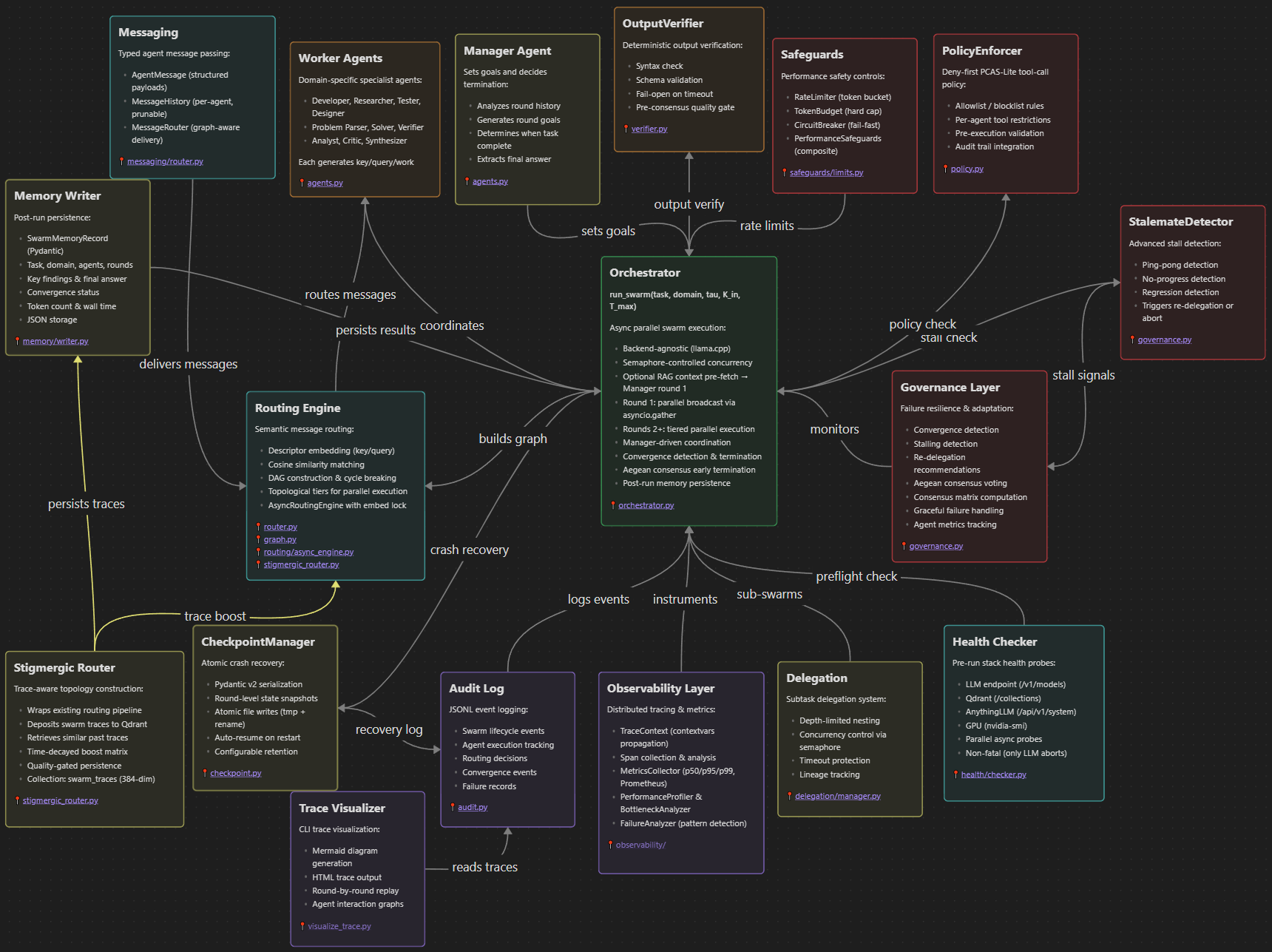
DyTopo Package (src/dytopo/)
| Module | Purpose |
|---|---|
models.py | Pydantic v2 data models (AgentState, SwarmTask with RAG context field, SwarmMetrics, etc.) |
config.py | YAML configuration loader with defaults (dytopo_config.yaml) |
agents.py | System prompts, JSON schemas, domain rosters |
router.py | MiniLM-L6-v2 embedding, cosine similarity, threshold, degree cap |
graph.py | NetworkX DAG construction, cycle breaking, topological sort |
orchestrator.py | Main swarm loop with singleton inference client, Aegean termination, memory persistence |
governance.py | Convergence detection, stalling detection, re-delegation, Aegean consensus voting |
audit.py | JSONL audit logging to ~/dytopo-logs/{task_id}/ |
health/checker.py | Pre-run health probes for LLM, Qdrant, AnythingLLM, GPU |
memory/writer.py | Post-run swarm result persistence to structured storage |
🔄 Data & Persistence
-
Docker Volumes (persist across restarts):
anyloom_qdrant_storage— Vector databaseanyloom_anythingllm_storage— AnythingLLM workspacesanyloom_anythingllm_hotdir— AnythingLLM document collector
-
Host Bind Mount:
./models/— GGUF model files (~19.2 GB total). LLM model (~18.6 GB) + embedding model (~605 MB). Place both files here before starting.
-
Filesystem Access: All configuration files and Python scripts are local
-
Model Updates: Replace the GGUF file in
./models/and restart:docker compose restart llm -
RAG Re-indexing: Re-run
python scripts/configure_anythingllm.py(idempotent) or re-embed documents via AnythingLLM UI
# View volumes
docker volume ls | grep anyloom

# Backup a volume
docker run --rm -v anyloom_qdrant_storage:/data -v $(pwd):/backup ubuntu tar czf /backup/qdrant_backup.tar.gz /data

# Remove all data (⚠️ DESTRUCTIVE)
docker compose down -v
✅ You're now running a next-gen, fully local AI agentic stack. Start creating, querying, and orchestrating with AnyLoom today.