AnythingMCP
Convert any API into an MCP server in minutes.
REST API to MCP • SOAP to MCP • GraphQL to MCP • Database to MCP • MCP Gateway & Middleware










⭐ Star this repo if you find it useful — it helps others discover AnythingMCP!
Cloud & Deploy



Self-hosting instead? Run
./setup.shfor the interactive Docker setup. See Quick Start below.
AnythingMCP is a self-hosted, source-available MCP middleware that turns your existing APIs into MCP (Model Context Protocol) servers. Connect any API — REST, SOAP, GraphQL, databases, or other MCP servers — and expose them as tools to AI clients like Claude, ChatGPT, Gemini, Copilot, Cursor, and more.
No SDK. No code changes. Just point, configure, and connect.
Looking for an MCP gateway? AnythingMCP acts as a universal MCP proxy and API-to-MCP bridge — the missing middleware between your APIs and AI agents.
🏭 Built for production — AnythingMCP was born from real-world needs at a German industrial group connecting 15+ legacy systems (ERP, CRM, IoT) to AI agents.
Get Started in 60 Seconds
git clone https://github.com/HelpCode-ai/anythingmcp.git
cd anythingmcp && ./setup.sh
# Open http://localhost:3000 — done!
See the full Quick Start below for detailed configuration options.
Use Cases
- Talk to your ERP from Claude Desktop — connect SAP, Oracle, or any REST/SOAP ERP and query it conversationally
- Let AI agents query your production database safely — read-only database connectors with audit logging
- Bridge legacy SOAP services to modern AI workflows — automatic WSDL parsing, no code changes
- Aggregate multiple MCP servers behind one gateway — MCP-to-MCP bridge for unified tool access
- Import your Postman collection and get MCP tools instantly — zero-config API onboarding
Why AnythingMCP?
| Problem | Solution |
|---|---|
| You have REST APIs but AI clients speak MCP | REST API to MCP conversion with OpenAPI/Swagger import |
| You have legacy SOAP/WSDL services | SOAP to MCP bridge with automatic WSDL parsing |
| You need to query databases from AI agents | Database to MCP with auto-generated query tools |
| You want one MCP gateway for all your APIs | MCP middleware that aggregates multiple connectors |
| You need auth, audit logs, and role-based access | Built-in enterprise governance layer |
How AnythingMCP Compares
| Feature | AnythingMCP | Custom MCP Server | Other Gateways |
|---|---|---|---|
| No-code setup | ✅ Visual editor | ❌ Write code | ⚠️ Config files |
| SOAP / WSDL support | ✅ Built-in | ❌ Manual | ❌ Rare |
| Database connectors | ✅ 7 engines | ❌ Build yourself | ⚠️ Limited |
| Visual tool editor | ✅ | ❌ | ❌ |
| Auth & audit trail | ✅ OAuth2, RBAC, logs | ❌ DIY | ⚠️ Partial |
| Self-hosted or Cloud | ✅ Docker / Railway / DigitalOcean / Cloud | ✅ | ⚠️ Often SaaS-only |
| Multi-client support | ✅ Claude, ChatGPT, Gemini, Copilot, Cursor | ✅ | ⚠️ Varies |
Key Features
- 5 Connector Types — REST, SOAP, GraphQL, Database (PostgreSQL, MySQL, MariaDB, MSSQL, Oracle, MongoDB, SQLite), MCP-to-MCP Bridge
- 6 Import Formats — OpenAPI/Swagger, Postman Collections, cURL commands, WSDL, GraphQL introspection, custom JSON
- Dynamic MCP Server — Tools registered at runtime, no restart needed
- Visual Tool Editor — Map parameters to path, query, body, headers visually
- Database Auto-Tools — Schema introspection + dynamic query execution out of the box
- Environment Variables — Per-connector
{{VAR}}interpolation, hidden from AI - Full Auth — OAuth2 (PKCE + Client Credentials), Bearer Token, API Key, Basic Auth, WS-Security, Certificates
- Audit Logging — Every tool invocation logged with input, output, duration, status
- Roles & Access Control — Tool-level whitelisting per custom role
- Per-User MCP API Keys — Individual keys with usage tracking
- Docker Ready —
docker compose upand you're running
Pre-configured Connectors
AnythingMCP ships with a catalog of ready-to-use connectors that work out of the box — just provide your API credentials and activate them. Currently available:
| Connector | Category |
|---|---|
| DHL Tracking | Logistics |
| MFR Fieldservice | Field Service Management |
| DATEV | Accounting / Tax |
| Billomat | Invoicing |
| Fastbill | Invoicing |
| Scopevisio | ERP / Accounting |
| weclapp | ERP / CRM |
| Kenjo | HR |
| Payone | Payments |
| N26 Open Banking | Banking |
| ImmobilienScout24 | Real Estate |
| TeamViewer | Remote Access |
| Bundesbank | Financial Data |
| DESTATIS Genesis | Statistics |
| NINA Warnung | Emergency Alerts |
Want to add your own? Create a JSON adapter file in packages/backend/src/adapters/ (organized by region, e.g. de/), register it in catalog.ts, and it becomes available to all users. See the existing adapters for the expected format.
Quick Start
git clone https://github.com/HelpCode-ai/anythingmcp.git
cd anythingmcp
./setup.sh                 # Interactive setup — generates .env, starts Docker
The setup script configures everything interactively: deployment mode, domain/SSL, auth, email, Redis, and more. All secrets are auto-generated. First user to register becomes Admin.
What setup.sh handles:
- Domain and HTTPS — for production domains, enables Caddy reverse proxy with automatic Let's Encrypt SSL
- Secrets — generates JWT, encryption keys, and database passwords
- MCP authentication mode — OAuth 2.0, API Key, or both
- Optional SMTP and Redis configuration
Prefer manual setup? Copy
.env.exampleto.env, edit the values, and rundocker compose up -d. See the Deployment Guide for details.
| Service | Default URL |
|---|---|
| Web UI | http://localhost:3000 (or https://yourdomain.com with Caddy) |
| Backend API | http://localhost:4000 |
| MCP Endpoint | http://localhost:4000/mcp |
| Swagger Docs | http://localhost:4000/api/docs |
Next step: Create a connector, import your API spec, and connect your AI client. See the Connector Guides below.
Connect Your AI Client
AnythingMCP works with any MCP-compatible client. Follow the guide for your AI tool:
| Client | Guide | Transport |
|---|---|---|
| Claude Desktop | Setup Guide | Streamable HTTP |
| Claude Code | Setup Guide | Streamable HTTP |
| ChatGPT | Setup Guide | Streamable HTTP |
| Google Gemini | Setup Guide | HTTP / SSE |
| GitHub Copilot | Setup Guide | Streamable HTTP |
| Cursor | Setup Guide | Streamable HTTP |
| Any MCP Client | Setup Guide | Streamable HTTP |
Connector Guides
Each connector type has dedicated documentation with setup instructions, examples, and best practices:
| Connector | Use Case | Docs |
|---|---|---|
| REST | HTTP APIs, OpenAPI/Swagger, Postman | REST Connector Guide |
| SOAP | WSDL web services, WCF, legacy enterprise APIs | SOAP Connector Guide |
| GraphQL | GraphQL endpoints with introspection | GraphQL Connector Guide |
| Database | PostgreSQL, MySQL, MariaDB, MSSQL, Oracle, MongoDB, SQLite | Database Connector Guide |
| MCP Bridge | Aggregate multiple MCP servers into one | MCP Bridge Guide |
Architecture
                        ┌─────────────────────────────────┐
  Claude Desktop ──────►│                                 │
  ChatGPT ─────────────►│         AnythingMCP             │──── REST APIs
  Gemini CLI ──────────►│      (MCP Middleware)            │──── SOAP Services
  GitHub Copilot ──────►│                                 │──── GraphQL Endpoints
  Cursor ──────────────►│   MCP Protocol (HTTP)           │──── PostgreSQL / MySQL / MSSQL / MongoDB / ...
  Any MCP Client ──────►│                                 │──── Other MCP Servers
                        └─────────────────────────────────┘
                          Caddy (optional) │ automatic HTTPS
                          Next.js UI + NestJS Backend
                          PostgreSQL  │  Redis (optional)
How it works:
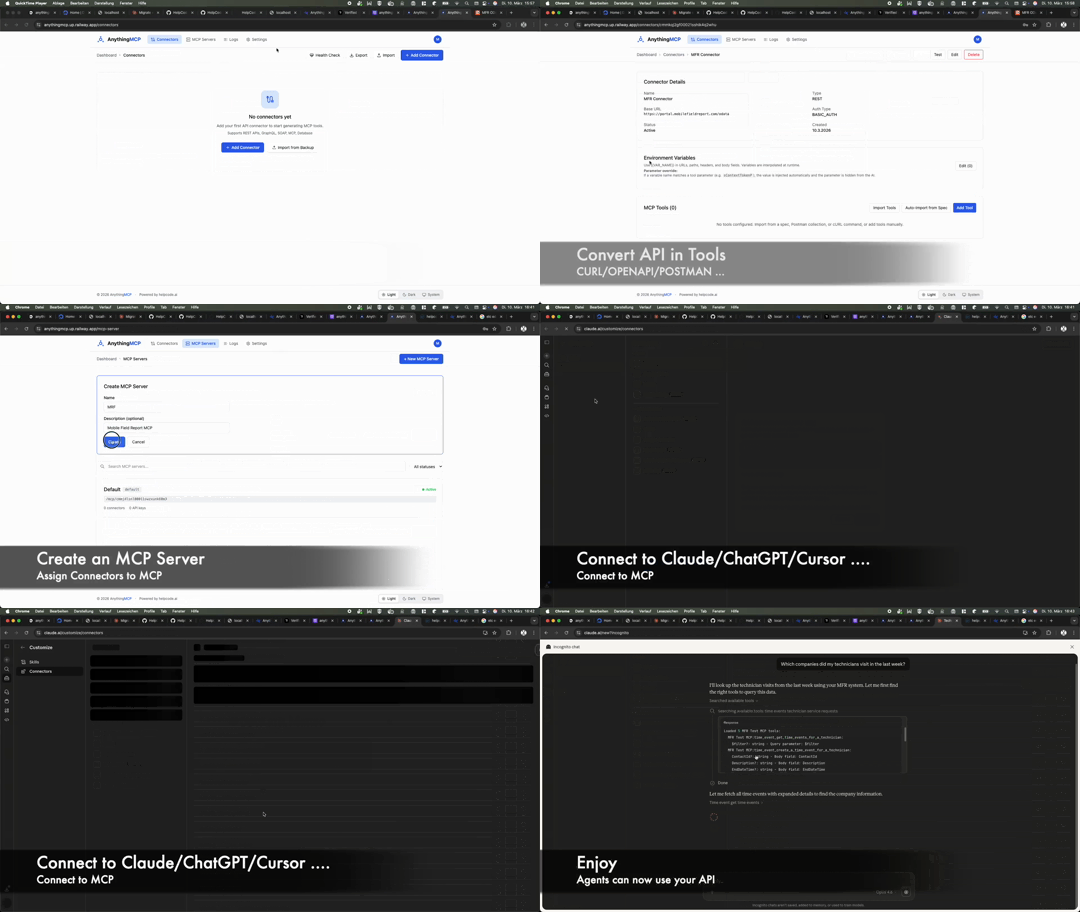
- Create a Connector — Point to your API (REST base URL, WSDL endpoint, GraphQL URL, database connection string)
- Import or Define Tools — Auto-import from OpenAPI/Postman/WSDL/GraphQL or define manually
- Connect AI Clients — Point your MCP client to
http://your-server:4000/mcp - AI calls tools — AnythingMCP translates MCP tool calls into actual API requests and returns results
Documentation
| Topic | Description |
|---|---|
| API Reference | Full REST API for connectors, tools, auth, audit |
| Tool Definition Format | Parameters, endpoint mapping, response mapping |
| Deployment Guide | Docker, production setup, reverse proxy, env vars |
| Authentication | OAuth2, JWT, API keys, MCP auth modes |
Tech Stack
| Layer | Technology |
|---|---|
| Frontend | Next.js 16, React 19, Tailwind CSS v4 |
| Backend | NestJS 11, TypeScript |
| MCP | @modelcontextprotocol/sdk, Streamable HTTP |
| Database | PostgreSQL 17, Prisma 7 |
| Cache | Redis 7 (optional) |
| Reverse Proxy | Caddy 2 (optional — automatic HTTPS via Let's Encrypt) |
| Auth | JWT, OAuth2, AES-256-GCM |
| Deploy | Docker (single container for app) + Docker Compose |
Development
The easiest way to set up local development:
./setup.sh    # Choose "Local development" mode
npm run dev
Or see the Deployment Guide for manual setup.
Community & Support
- Questions & Discussions — GitHub Discussions
- Bug Reports — Open an issue
- Feature Requests — Request a feature
- Built by helpcode.ai — AI-powered software development from Germany
Contributing
We welcome contributions! Please read our Contributing Guide before submitting a PR.
For security issues, see SECURITY.md.
License
AnythingMCP is source-available under the Business Source License 1.1 (BSL-1.1). This is not an OSI-approved open-source license — see the License FAQ for a plain-language explanation.
- Free for: internal use, personal use, development, testing, evaluation, academic use
- Not permitted: offering as a commercial hosted service (SaaS) without a separate license
- Change Date: 2030-03-04 — on this date the license automatically converts to Apache 2.0
For commercial licensing: info@helpcode.ai
Transparency note: AnythingMCP makes optional network calls to
anythingmcp.comfor license verification and email delivery when SMTP is not configured. No API credentials or tool invocation data is ever sent. See External Services for full details.
Copyright (c) 2026 helpcode.ai GmbH