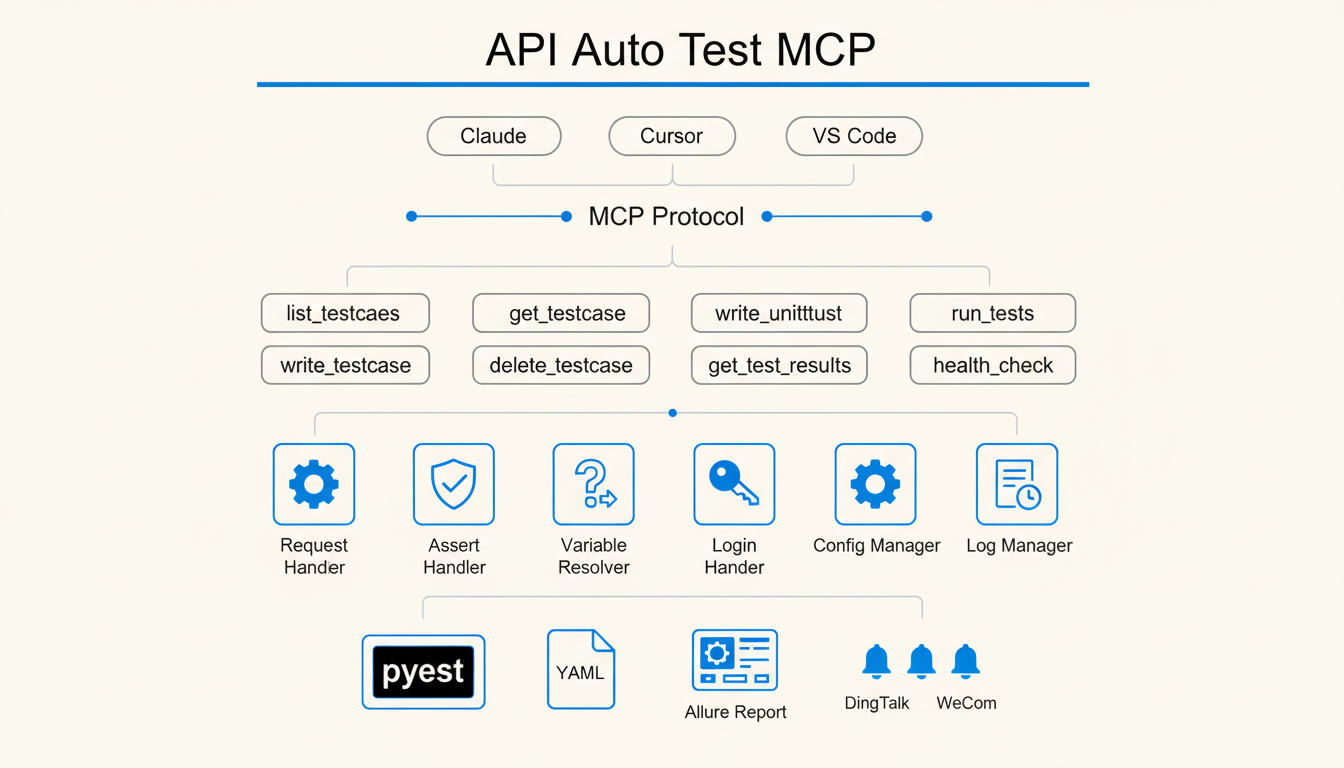
API Auto Test Framework


YAML Declarative API Testing Framework, Optimized for AI Coding Assistants
Quick Start | MCP Integration | YAML Spec | Unit Testing
Why This Framework?
When asking AI to write API tests, you might encounter these issues:
Scenario 1: Repetitive Work
Every time you ask AI to generate tests, you need to re-describe the project structure, authentication method, and assertion style. For 10 API tests, the same fixture and setup code gets generated 10 times.
Scenario 2: Token Black Hole
A simple login API test generates 200 lines of code. You find an assertion is wrong, ask AI to fix it, and it generates another 200 lines. After 3 revisions, you've consumed 2000+ Tokens, and you still end up fixing it manually.
Scenario 3: Debugging Dead Loop
AI-generated tests fail to run. You paste the error message, AI fixes it but still wrong. After 5 rounds of conversation, the problem persists, and you've burned 5000+ Tokens.
This Framework's Solution:
Traditional: Natural Language -> AI Generates Full Code -> Run Error -> Paste Error -> AI Regenerates -> Loop...
This Framework: Natural Language -> AI Generates YAML -> Framework Executes -> Locate Issue -> Fix 1 Line YAML
| Metric | Traditional AI | This Framework |
|---|---|---|
| Test 1 API | ~200 lines code | ~20 lines YAML |
| Modify Assertion | Regenerate all code | Fix 1-2 lines YAML |
| 10 API Tests | Repeat setup 10x | Shared config, 0 repeat |
| Debug Issue | 3-5 rounds avg | Usually 1 round |
Key Features
| Feature | Description |
|---|---|
| YAML Declarative Tests | Test logic separated from execution code, AI generates structured data only |
| MCP Server | Seamless integration with Claude/Cursor and other AI editors |
| API Workflow Orchestration | Multi-step API calls in single file, with data passing and assertions between steps |
| Variable Resolution Engine | Support for cross-step data transfer, global variables, and dynamic function calls |
| Auto Authentication | Token acquisition and refresh handled by framework |
| Data Factory | Built-in mock data generation, no Java dependencies |
| Multi-format Reports | Allure (offline/online), pytest-html (standalone HTML, styled) |
| Multi-channel Notifications | DingTalk, Feishu, WeCom |
| Unit Testing | Python code unit testing with automatic mock dependency injection |
Quick Start
Installation
# 1. Install uv (if not installed)
curl -LsSf https://astral.sh/uv/install.sh | sh

# 2. Install MCP server (recommended: install as a tool)
uv tool install git+https://github.com/GalaxyXieyu/Api-Test-MCP.git

# Verify
api-auto-test-mcp --help

# Manage tools
uv tool list
uv tool uninstall api-auto-test   # use the tool name shown by `uv tool list`
Run without installing (uvx):
uvx --from git+https://github.com/GalaxyXieyu/Api-Test-MCP.git api-auto-test-mcp --help
Common mistake: uvx install ... is wrong. uvx treats the first word after it as the tool name, so it will try to resolve a package literally named install and fail.
Configure Editor
Add the following to your editor's MCP settings:
{
  "mcpServers": {
    "api-auto-test": {
      "command": "api-auto-test-mcp"
    }
  }
}
| Editor | Config Location |
|---|---|
| Claude Desktop | ~/Library/Application Support/Claude/claude_desktop_config.json |
| Cursor | Settings -> MCP Servers |
| VSCode + Continue | .vscode/mcp.json |
Local Development
# Recommended with uv
uv pip install -r requirements.txt

# Or with pip
pip install -r requirements.txt
Create Test Case
# tests/cases/user_login.yaml
testcase:
  name: user_login
  description: User login API test
  host: http://localhost:8000
  steps:
    - id: login
      path: /api/auth/login
      method: POST
      data:
        username: "test_user"
        password: "123456"
      assert:
        - type: status_code
          expected: 200
        - type: equals
          field: data.code
          expected: 0
Generate and Run
# Generate pytest scripts
python -m atf.case_generator

# Run tests
pytest tests/scripts/ -v

# Generate Allure report
pytest tests/scripts/ --alluredir=tests/allure-results
allure serve tests/allure-results

# Generate pytest-html report
pytest tests/scripts/ --html=report.html
MCP Server Integration
Through MCP, AI editors can directly call framework tools to generate and execute tests.
Efficiency Comparison
| Metric | Without MCP | With MCP | Improvement |
|---|---|---|---|
| Total Cost | $0.0214 | $0.0099 | -54% |
| API Latency | 11 sec | 4 sec | -64% |
| Output Tokens | 585 | 238 | -59% |
| Cache Read | 42.0k | 21.0k | -50% |
Test Scenario: Same API test generation task (pure consultation/analysis conversation)
Core Advantages:
- 54% cost reduction: MCP directly calls tools, avoiding lengthy code generation context
- 64% faster API response: Tool calls are more efficient than natural language interaction
- 59% less token consumption: Only necessary parameters needed, no need to repeat project structure
Available Tools
| Tool | Description |
|---|---|
list_testcases | List test cases |
get_testcase | Read test case content |
write_testcase | Create/update test case and generate pytest script |
write_unittest | Create unit test |
delete_testcase | Delete test case |
run_tests | Execute tests |
get_test_results | Get test execution history |
health_check | Service health check |
Usage Example
Tell AI:
Create a test for /api/users interface, verify returned user list length > 0
AI will call write_testcase to generate YAML and corresponding pytest script.
Project Structure
api-auto-test/
├── atf/                    # Framework core
│   ├── core/               # Request, assertion, variable resolution modules
│   ├── mcp/                # MCP Server implementation
│   └── handlers/           # Notification, report handlers
├── tests/
│   ├── cases/              # YAML test cases
│   └── scripts/            # Generated pytest scripts
├── config.yaml             # Project config (environment, database, notifications)
└── pyproject.toml
YAML Test Case Spec
Basic Structure
testcase:
  name: test_name              # Case name, used for filename
  description: Description     # Optional
  host: http://localhost:8000  # API host, can also be configured globally in config.yaml
  steps:
    - id: step1                # Step ID, used for later reference
      path: /api/endpoint
      method: POST
      headers:
        Authorization: "Bearer {{ login.data.token }}"  # Reference response from other step
      data:
        key: value
      assert:
        - type: status_code
          expected: 200
        - type: equals
          field: data.id
          expected: 1
Assertion Types
| Type | Description | Example |
|---|---|---|
status_code | HTTP status code | expected: 200 |
equals | Exact match | field: data.id, expected: 1 |
contains | Contains | field: data.name, expected: "test" |
length | Array/string length | field: data.list, expected: 10 |
regex | Regex match | field: data.email, expected: "^\\w+@" |
Variable Reference
# Reference response data from other steps
token: "{{ login.data.token }}"

# Reference global config
host: "{{ merchant.host }}"

# Call built-in functions
timestamp: "{{ tools.get_timestamp() }}"
uuid: "{{ tools.generate_uuid() }}"
Teardown
testcase:
  name: create_and_delete_user
  steps:
    - id: create_user
      path: /api/users
      method: POST
      data:
        name: "test_user"
  teardowns:
    - id: delete_user
      operation_type: api
      path: /api/users/{{ create_user.data.id }}
      method: DELETE
Unit Testing
Support for writing unit tests for Python code, automatically generating test cases through MCP tools.
Unit Test YAML Format
unittest:
  name: UserService Test
  target:
    module: app.services.user_service
    class: UserService
    function: get_user
  fixtures:
    setup:
      - type: patch
        target: app.services.user_service.UserRepository
        return_value:
          id: 1
          name: "test_user"
  cases:
    - id: test_get_user_success
      description: Test get user success
      inputs:
        args: [1]
        kwargs: {}
      assert:
        - type: equals
          field: result.id
          expected: 1
        - type: equals
          field: result.name
          expected: "test_user"
Assertion Types
| Type | Description |
|---|---|
equals | Exact match |
not_equals | Not equal |
contains | Contains |
raises | Expect exception to be raised |
is_none | Result is None |
is_not_none | Result is not None |
called_once | Mock called once |
called_with | Mock called with specific arguments |
Configuration File
# config.yaml
projects:
  merchant:
    test:
      host: http://192.168.1.100:8080
      is_need_login: true
      login:
        url: http://192.168.1.100:8080/login
        method: POST
        data:
          username: admin
          password: "123456"
    online:
      host: https://api.example.com
      is_need_login: true

notifications:
  dingtalk:
    webhook: "https://oapi.dingtalk.com/robot/send?access_token=xxx"
    secret: "SECxxx"
License
MIT License