ApiTap



The MCP server that turns any website into an API — no docs, no SDK, no browser.
ApiTap is an MCP server that lets AI agents browse the web through APIs instead of browsers. When an agent needs data from a website, ApiTap automatically detects the site's framework (WordPress, Next.js, Shopify, etc.), discovers its internal API endpoints, and calls them directly — returning clean JSON instead of forcing the agent to render and parse HTML. For sites that need authentication, it opens a browser window for a human to log in, captures the session tokens, and hands control back to the agent. Every site visited generates a reusable "skill file" that maps the site's APIs, so the first visit is a discovery step and every subsequent visit is a direct, instant API call. It works with any MCP-compatible LLM client and reduces token costs by 20-100x compared to browser automation.
The web was built for human eyes; ApiTap makes it native to machines.
# One tool call: discover the API + replay it
apitap browse https://techcrunch.com
  ✓ Discovery: WordPress detected (medium confidence)
  ✓ Replay: GET /wp-json/wp/v2/posts → 200 (10 articles)

# Or read content directly — no browser needed
apitap read https://en.wikipedia.org/wiki/Node.js
  ✓ Wikipedia decoder: ~127 tokens (vs ~4,900 raw HTML)

# Or step by step:
apitap capture https://polymarket.com    # Watch API traffic
apitap show gamma-api.polymarket.com     # See what was captured
apitap replay gamma-api.polymarket.com get-events  # Call the API directly
No scraping. No browser. Just the API.
How It Works
- Capture — Launch a Playwright browser, visit a site, browse normally. ApiTap intercepts all network traffic via CDP.
- Filter — Scoring engine separates signal from noise. Analytics, tracking pixels, and framework internals are filtered out. Only real API endpoints survive.
- Generate — Captured endpoints are grouped by domain, URLs are parameterized (
/users/123→/users/:id), and a JSON skill file is written to~/.apitap/skills/. - Replay — Read the skill file, substitute parameters, call the API with
fetch(). Zero dependencies in the replay path.
Capture:  Browser → Playwright listener → Filter → Skill Generator → skill.json
Replay:   Agent → Replay Engine (skill.json) → fetch() → API → JSON response
Install
npm install -g @apitap/core
Claude Code — one command to wire it up:
claude mcp add -s user apitap -- apitap-mcp
That's it. 12 MCP tools, ready to go. Requires Node.js 20+.
Optional: To use
captureandbrowse(which open a real browser), also run:npx playwright install chromiumThe
read,peek, anddiscovertools work without it.
Quick Start
Capture API traffic
# Capture from a single domain (default)
apitap capture https://polymarket.com

# Capture all domains (CDN, API subdomains, etc.)
apitap capture https://polymarket.com --all-domains

# Include response previews in the skill file
apitap capture https://polymarket.com --preview

# Stop after 30 seconds
apitap capture https://polymarket.com --duration 30
ApiTap opens a browser window. Browse the site normally — click around, scroll, search. Every API call is captured. Press Ctrl+C when done.
List and explore captured APIs
# List all skill files
apitap list
  ✓ gamma-api.polymarket.com       3 endpoints   2m ago
  ✓ www.reddit.com                 2 endpoints   1h ago

# Show endpoints for a domain
apitap show gamma-api.polymarket.com
  [green] ✓ GET    /events                        object (3 fields)
  [green] ✓ GET    /teams                         array (12 fields)

# Search across all skill files
apitap search polymarket
Replay an endpoint
# Replay with captured defaults
apitap replay gamma-api.polymarket.com get-events

# Override parameters
apitap replay gamma-api.polymarket.com get-events limit=5 offset=10

# Machine-readable JSON output
apitap replay gamma-api.polymarket.com get-events --json
Text-Mode Browsing
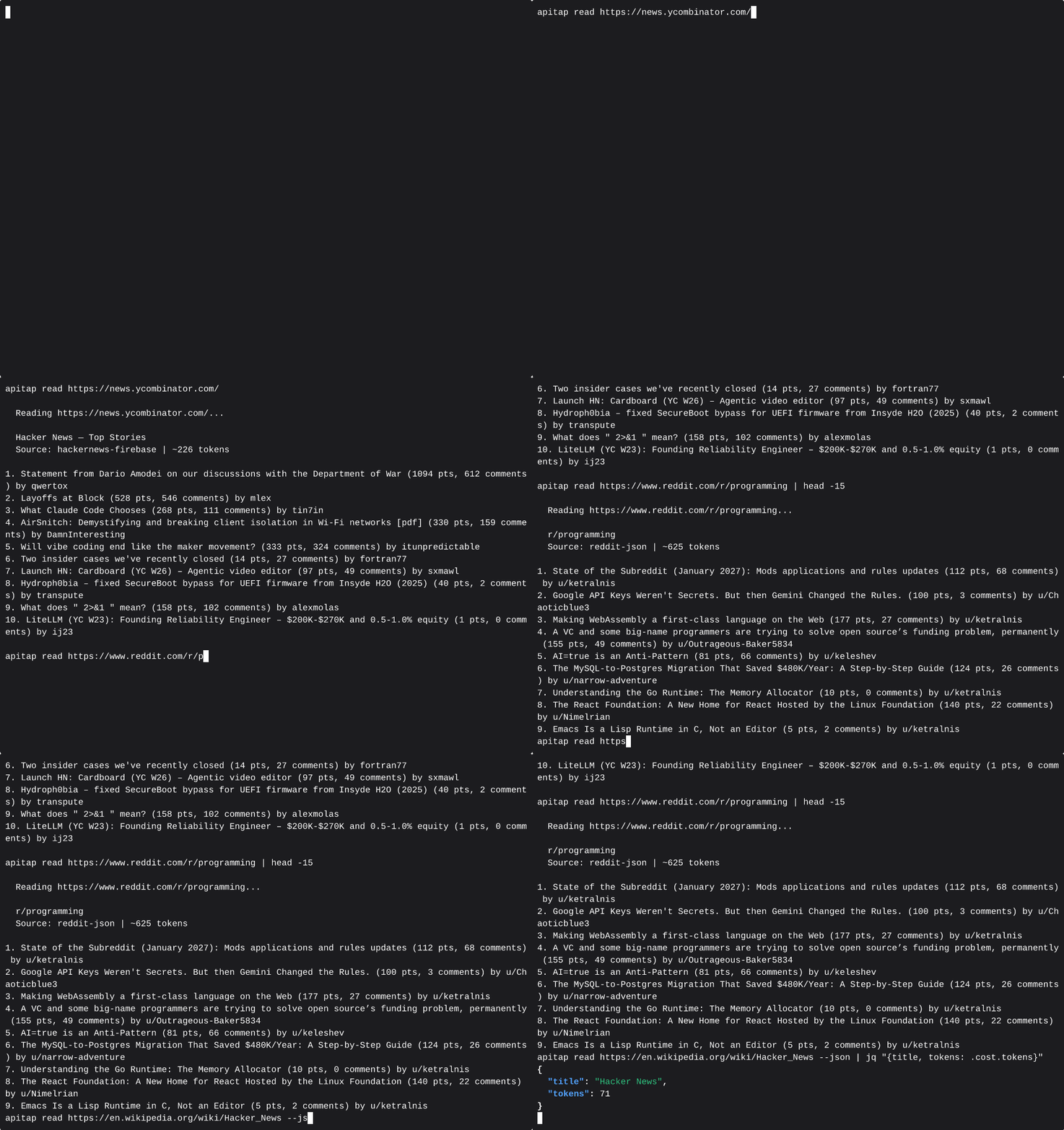
ApiTap includes a text-mode browsing pipeline — peek and read — that lets agents consume web content without launching a browser. Seven built-in decoders extract structured content from popular sites at a fraction of the token cost:
| Site | Decoder | Typical Tokens | vs Raw HTML |
|---|---|---|---|
reddit | ~627 | 93% smaller | |
| YouTube | youtube | ~36 | 99% smaller |
| Wikipedia | wikipedia | ~127 | 97% smaller |
| Hacker News | hackernews | ~200 | 90% smaller |
| Grokipedia | grokipedia | ~150–5000+ | varies by article length |
| Twitter/X | twitter | ~80 | 95% smaller |
| Any other site | generic | varies | ~74% avg |
Average token savings: 74% across 83 tested domains.
# Triage first — zero-cost HEAD request
apitap peek https://reddit.com/r/programming
  ✓ accessible, recommendation: read

# Extract content — no browser needed
apitap read https://reddit.com/r/programming
  ✓ Reddit decoder: 12 posts, ~627 tokens

# Works for any URL — falls back to generic HTML extraction
apitap read https://example.com/blog/post
For MCP agents, apitap_peek and apitap_read are the fastest way to consume web content — use them before reaching for apitap_browse or apitap_capture.
Tested Sites
ApiTap has been tested against real-world sites:
| Site | Endpoints | Tier | Replay |
|---|---|---|---|
| Polymarket | 3 | Green | 200 |
| 2 | Green | 200 | |
| Discord | 4 | Green | 200 |
| GitHub | 1 | Green | 200 |
| HN (Algolia) | 1 | Yellow | 200 |
| dev.to | 2 | Green | 200 |
| CoinGecko | 6 | Green | 200 |
78% overall replay success rate across 9 tested sites (green tier: 100%).
Why ApiTap?
Why not just use the public API? Most sites don't have one, or it's heavily rate-limited. The internal API that powers the SPA is often richer, faster, and already handles auth.
Why not just use Playwright/Puppeteer? Browser automation costs 50-200K tokens per page for an AI agent. ApiTap captures the API once, then your agent calls it directly at 1-5K tokens. No DOM, no selectors, no flaky waits.
Why not reverse-engineer the API manually? You could open DevTools and copy headers by hand. ApiTap does it in 30 seconds and gives you a portable file any agent can use.
Isn't this just a MITM proxy? No. ApiTap is read-only — it uses Chrome DevTools Protocol to observe responses. No certificate setup, no request modification, no code injection.
Replayability Tiers
Every captured endpoint is classified by replay difficulty:
| Tier | Meaning | Replay |
|---|---|---|
| Green | Public, permissive CORS, no signing | Works with fetch() |
| Yellow | Needs auth, no signing/anti-bot | Works with stored credentials |
| Orange | CSRF tokens, session binding | Fragile — may need browser refresh |
| Red | Request signing, anti-bot (Cloudflare) | Needs full browser |
GET endpoints are auto-verified during capture by comparing Playwright responses with raw fetch() responses.
MCP Server
ApiTap includes an MCP server with 12 tools for Claude Desktop, Cursor, Windsurf, and other MCP-compatible clients.
# Start the MCP server
apitap-mcp
Claude Code — see Install above.
Claude Desktop / Cursor / Windsurf — add to your MCP config:
{
  "mcpServers": {
    "apitap": {
      "command": "apitap-mcp"
    }
  }
}
VS Code (GitHub Copilot) — add .vscode/mcp.json:
{
  "servers": {
    "apitap": {
      "command": "apitap-mcp"
    }
  }
}
MCP Tools
| Tool | Description |
|---|---|
apitap_browse | High-level "just get me the data" (discover + replay in one call) |
apitap_peek | Zero-cost URL triage (HEAD only) |
apitap_read | Extract content without a browser (7 decoders) |
apitap_discover | Detect a site's APIs without launching a browser |
apitap_search | Search available skill files |
apitap_replay | Replay a captured API endpoint |
apitap_replay_batch | Replay multiple endpoints in parallel across domains |
apitap_capture | Capture API traffic via instrumented browser |
apitap_capture_start | Start an interactive capture session |
apitap_capture_interact | Interact with a live capture session (click, type, scroll) |
apitap_capture_finish | Finish or abort a capture session |
apitap_auth_request | Request human authentication for a site |
You can also serve a single skill file as a dedicated MCP server with apitap serve <domain> — each endpoint becomes its own tool.
Auth Management
ApiTap automatically detects and stores auth credentials (Bearer tokens, API keys, cookies) during capture. Credentials are encrypted at rest with AES-256-GCM.
# View auth status
apitap auth api.example.com

# List all domains with stored auth
apitap auth --list

# Refresh expired tokens via browser
apitap refresh api.example.com

# Force fresh token before replay
apitap replay api.example.com get-data --fresh

# Clear stored auth
apitap auth api.example.com --clear
Skill Files
Skill files are JSON documents stored at ~/.apitap/skills/<domain>.json. They contain everything needed to replay an API — endpoints, headers, query params, request bodies, pagination patterns, and response shapes.
{
  "version": "1.1",
  "domain": "gamma-api.polymarket.com",
  "baseUrl": "https://gamma-api.polymarket.com",
  "endpoints": [
    {
      "id": "get-events",
      "method": "GET",
      "path": "/events",
      "queryParams": { "limit": { "type": "string", "example": "10" } },
      "headers": {},
      "responseShape": { "type": "object", "fields": ["id", "title", "slug"] }
    }
  ]
}
Skill files are portable and shareable. Auth credentials are stored separately in encrypted storage — never in the skill file itself.
Import / Export
# Import a skill file from someone else
apitap import ./reddit-skills.json

# Import validates: signature check → SSRF scan → confirmation
Imported files are re-signed with your local key and marked with imported provenance.
Security
ApiTap handles untrusted skill files from the internet and replays HTTP requests on your behalf. That's a high-trust position, and we treat it seriously.
Defense in Depth
- Auth encryption — AES-256-GCM with PBKDF2 key derivation, keyed to your machine
- PII scrubbing — Emails, phones, IPs, credit cards, SSNs detected and redacted during capture
- SSRF protection — Multi-layer URL validation blocks access to internal networks (see below)
- Header injection protection — Allowlist prevents skill files from injecting dangerous HTTP headers (
Host,X-Forwarded-For,Cookie,Authorization) - Redirect validation — Manual redirect handling with SSRF re-check prevents redirect-to-internal-IP attacks
- DNS rebinding prevention — Resolved IPs are pinned to prevent TOCTOU attacks where DNS returns different IPs on second lookup
- Skill signing — HMAC-SHA256 signatures detect tampering; three-state provenance tracking (self/imported/unsigned)
- No phone-home — Everything runs locally. No external services, no telemetry
- Read-only capture — Playwright intercepts responses only. No request modification or code injection
Why SSRF Protection Matters
Since skill files can come from anywhere — shared by colleagues, downloaded from GitHub, or imported from untrusted sources — a malicious skill file is the primary threat vector. Here's what ApiTap defends against:
The attack: An attacker crafts a skill file with baseUrl: "http://169.254.169.254" (the AWS/cloud metadata endpoint) or baseUrl: "http://localhost:8080" (your internal services). When you replay an endpoint, your machine makes the request, potentially leaking cloud credentials or hitting internal APIs.
The defense: ApiTap validates every URL at multiple points:
Skill file imported
  → validateUrl(): block private IPs, internal hostnames, non-HTTP schemes
  → validateSkillFileUrls(): scan baseUrl + all endpoint example URLs

Endpoint replayed
  → resolveAndValidateUrl(): DNS lookup + verify resolved IP isn't private
  → IP pinning: fetch uses resolved IP directly (prevents DNS rebinding)
  → Header filtering: strip dangerous headers from skill file
  → Redirect check: if server redirects, validate new target before following
Blocked ranges: 127.0.0.0/8, 10.0.0.0/8, 172.16.0.0/12, 192.168.0.0/16, 169.254.0.0/16 (cloud metadata), 0.0.0.0, IPv6 equivalents (::1, fe80::/10, fc00::/7, ::ffff: mapped addresses), localhost, .local, .internal, file://, javascript: schemes.
This is especially relevant now that MCP servers are being used as attack vectors in the wild — Google's Threat Intelligence Group recently documented underground toolkits built on compromised MCP servers. ApiTap is designed to be safe even when processing untrusted inputs.
CLI Reference
All commands support --json for machine-readable output.
| Command | Description |
|---|---|
apitap browse <url> | Discover + replay in one step |
apitap peek <url> | Zero-cost URL triage (HEAD only) |
apitap read <url> | Extract content without a browser |
apitap discover <url> | Detect APIs without launching a browser |
apitap capture <url> | Capture API traffic from a website |
apitap list | List available skill files |
apitap show <domain> | Show endpoints for a domain |
apitap search <query> | Search skill files by domain or endpoint |
apitap replay <domain> <id> [key=val...] | Replay an API endpoint |
apitap import <file> | Import a skill file with safety validation |
apitap refresh <domain> | Refresh auth tokens via browser |
apitap auth [domain] | View or manage stored auth |
apitap serve <domain> | Serve a skill file as an MCP server |
apitap inspect <url> | Discover APIs without saving |
apitap stats | Show token savings report |
apitap --version | Print version |
Capture flags
| Flag | Description |
|---|---|
--all-domains | Capture traffic from all domains (default: target domain only) |
--preview | Include response data previews |
--duration <sec> | Stop capture after N seconds |
--port <port> | Connect to specific CDP port |
--launch | Always launch a new browser |
--attach | Only attach to existing browser |
--no-scrub | Disable PII scrubbing |
--no-verify | Skip auto-verification of GET endpoints |
Development
git clone https://github.com/n1byn1kt/apitap.git
cd apitap
npm install
npm test          # 789 tests, Node built-in test runner
npm run typecheck # Type checking
npm run build     # Compile to dist/
npx tsx src/cli.ts capture <url>  # Run from source
Contact
Questions, feedback, or issues? → hello@apitap.io
License
Business Source License 1.1 — free for all non-competing use (personal, internal, educational, research, open source). Cannot be rebranded and sold as a competing service. Converts to Apache 2.0 on February 7, 2029.