AUQ - Ask User Questions



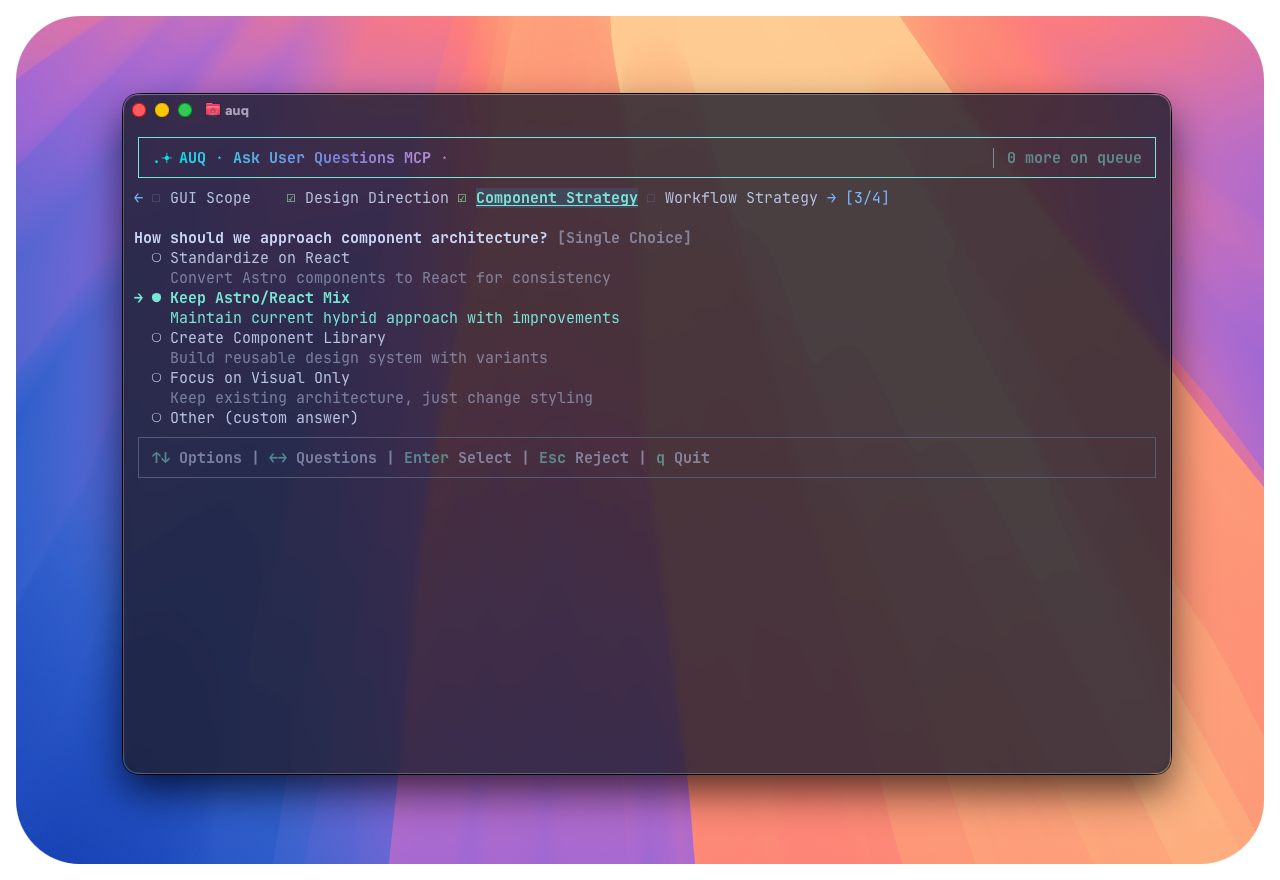
A lightweight CLI tool that allows your LLMs to ask questions to you in a separate space with clean terminal UX. Supports both MCP server and official OpenCode plugin integration. Made for multi-agent parallel coding workflows.
🤔 Why do I need it when I already have question tool in CC/OC?
What does it do?
AUQ lets your AI assistants generate clarifying questions consisting of multiple-choice/single-choice questions (with an "Other" option for custom input) while coding or working, and wait for your answers through a separate CLI tool without messing up your workflow.
You can keep the CLI running in advance, or start it when questions are pending. With simple arrow key navigation, you can select answers and send them back to the AI—all within a clean terminal interface.
Background
In AI-assisted coding, guiding LLMs to ask clarifying questions have been widely recognized as a powerful prompt engineering technique to overcome LLM hallucination and generate more contextually appropriate code [1].
On October 18th, Claude Code 2.0.21 introduced an internal ask-user-question tool. Inspired by it, I decided to build a similar tool that is:
- Integration-flexible - Works with MCP clients (Claude Desktop, Cursor, etc.) and has official OpenCode plugin support
- Non-invasive - Doesn't heavily integrate with your coding CLI workflow or occupy UI space
- Multi-agent friendly - Supports receiving questions from multiple agents simultaneously in parallel workflows
✨ Features
https://github.com/user-attachments/assets/3a135a13-fcb1-4795-9a6b-f426fa079674
🖥️ CLI-Based
- Lightweight: Adds only ~150 tokens to your context per question
- SSH-compatible: Use over remote connections
- Fast: Instant startup, minimal resource usage
📦 100% Local
All information operates based on your local file system. No data leaves your machine.
🔄 Resumable & Stateless
The CLI app doesn't need to be running in advance. Whether the model calls the MCP first and you start the CLI later, or you keep it running—you can immediately answer pending questions in FIFO order.
❌ Question Set Rejection with Feedback Loop
When the LLM asks about the wrong domain entirely, you can reject the question set, optionally providing the reason to the LLM. The rejection feedback is sent back to the LLM, allowing it to ask more helpful questions or align on what's important for the project.
📋 Question Set Queuing
Recent AI workflows often use parallel sub-agents for concurrent coding. AUQ handles multiple simultaneous LLM calls gracefully—when a new question set arrives while you're answering another, it's queued and processed sequentially. Perfect for multi-agent parallel coding workflows.
🤔 Why AUQ vs. Built-in Ask Tools?
Why should I use AUQ instead of the built-in "Question" tools in OpenCode, Claude Code, or other coding agents?
AUQ is designed for the era of parallel multi-agent workflows, with several key advantages:
🚀 Non-Blocking Parallel Operation
Unlike built-in ask tools that halt the entire AI workflow until you respond, AUQ doesn't block the AI from continuing work. Questions are queued asynchronously, allowing your AI assistants to keep coding while you review and answer questions at your own pace.
🎯 Multi-Agent Question Set Support
AUQ can handle question sets from multiple agents simultaneously. In modern AI coding workflows, you often have several sub-agents working in parallel—each might need clarification on different aspects of your codebase. With AUQ:
- No more screen switching between different agent conversations
- Unified queue for all agent questions, regardless of which AI tool they're coming from
- Sequential processing of questions from multiple sources in one interface
🌐 Question Set Rejection Support
Skip irrelevant question sets entirely - reject whole question batches that don't apply to your current context, saving time and maintaining focus on relevant AI-agent questions.
Setup Instructions
🚀 Install CLI Tool
First, install the AUQ CLI tool:
Global Installation (Recommended)
# Install globally
npm install -g auq-mcp-server
Local Installation (Project-specific)
# Install in your project
npm install auq-mcp-server
Session Storage:
- Global install:
~/Library/Application Support/auq/sessions(macOS),~/.local/share/auq/sessions(Linux) - Local install:
.auq/sessions/in your project root
🔌 Choose Your Integration Method
AUQ supports multiple AI coding environments. Choose the one that fits your workflow:
Option A: MCP Server
Cursor

Claude Code (CLI)
Method 1: Using CLI (Recommended)
claude mcp add --transport stdio ask-user-questions -- npx -y auq-mcp-server server
Method 2: Manual Configuration
Add to .mcp.json in your project root (for team-wide sharing):
{
  "mcpServers": {
    "ask-user-questions": {
      "type": "stdio",
      "command": "npx",
      "args": ["-y", "auq-mcp-server", "server"]
    }
  }
}
Or add to ~/.claude.json for global access across all projects.
Verify setup: Type /mcp in Claude Code to check server status.
Codex CLI
Add to ~/.codex/config.toml:
[mcp_servers.ask-user-questions]
command = "npx"
args = ["-y", "auq-mcp-server", "server"]
Full configuration example (with optional settings):
[mcp_servers.ask-user-questions]
command = "npx"
args = ["-y", "auq-mcp-server", "server"]

# Optional: Additional environment variables
# env = { "AUQ_SESSION_DIR" = "/custom/path" }

# Optional: Whitelist additional env vars
# env_vars = ["AUQ_SESSION_DIR"]


# Optional: Working directory
# cwd = "/Users/<user>/projects"
Restart Codex CLI after saving the configuration.
Claude Desktop
Add to ~/Library/Application Support/Claude/claude_desktop_config.json (macOS) or %APPDATA%\Claude\claude_desktop_config.json (Windows):
{
  "mcpServers": {
    "ask-user-questions": {
      "command": "npx",
      "args": ["-y", "auq-mcp-server", "server"]
    }
  }
}
Restart Claude Desktop after saving.
Option B: Official OpenCode Plugin
We now have official OpenCode plugin support! We support OpenCode because OpenCode's MCP server seems to have some limitations (timeout), so we created an OpenCode-specific plugin that works perfectly together with OpenCode.
The OpenCode plugin allows OpenCode to call auq ask directly (without MCP), providing seamless integration with OpenCode's workflow.
Configuration
Add to opencode.json:
{
  "plugin": ["@paulp-o/opencode-auq"]
}
💻 Usage
Starting the CLI tool
auq  # if you installed globally
npx auq  # if you installed locally
Then just start working with your coding agent or AI assistant. You may prompt to ask questions with the tool the agent got; it will mostly just get what you mean.
Commands
# you won't likely need these at all
auq server       # Start MCP server
auq --version    # Show version
auq --help       # Show help
Manual session cleanup
Sessions auto-clean after completion or timeout. However, you can manually clean them up if you want to.
# Global install
rm -rf ~/Library/Application\ Support/auq/sessions/*  # macOS
rm -rf ~/.local/share/auq/sessions/*                  # Linux

# Local install
rm -rf .auq/sessions/*
🚀 Roadmap
- Light & dark mode themes
- MCP prompt mode switch (Anthropic style / minimal)
- Custom color themes
- Multi-language support
- Audio notifications on new question
- Simple option to prompt the LLM to/not ask more questions after answering.
- Optional 'context' field privided by the LLM, that describes the context of the questions - will be useful for multi-agent coding
📄 License
MIT License - see LICENSE file for details.
[1] arXiv:2308.13507 https://arxiv.org/abs/2308.13507