AutoEQ MCP Server





pip install autoeq-mcp
An MCP (Model Context Protocol) server that gives AI assistants access to the AutoEQ headphone equalization database — 8,800+ headphones and IEMs with parametric EQ settings, sound signature analysis, and Harman preference scores.
What It Does
Ask your AI assistant things like:
- "Get me the EQ settings for the HD650"
- "Compare the HE400se and HD600"
- "Recommend warm-sounding over-ear headphones"
- "What are the top-ranked IEMs by Harman score?"
The server automatically analyzes frequency response measurements across 8 bands and classifies each headphone's sound signature (Neutral, Warm, Bright, Dark, V-shaped, etc.).
Demo
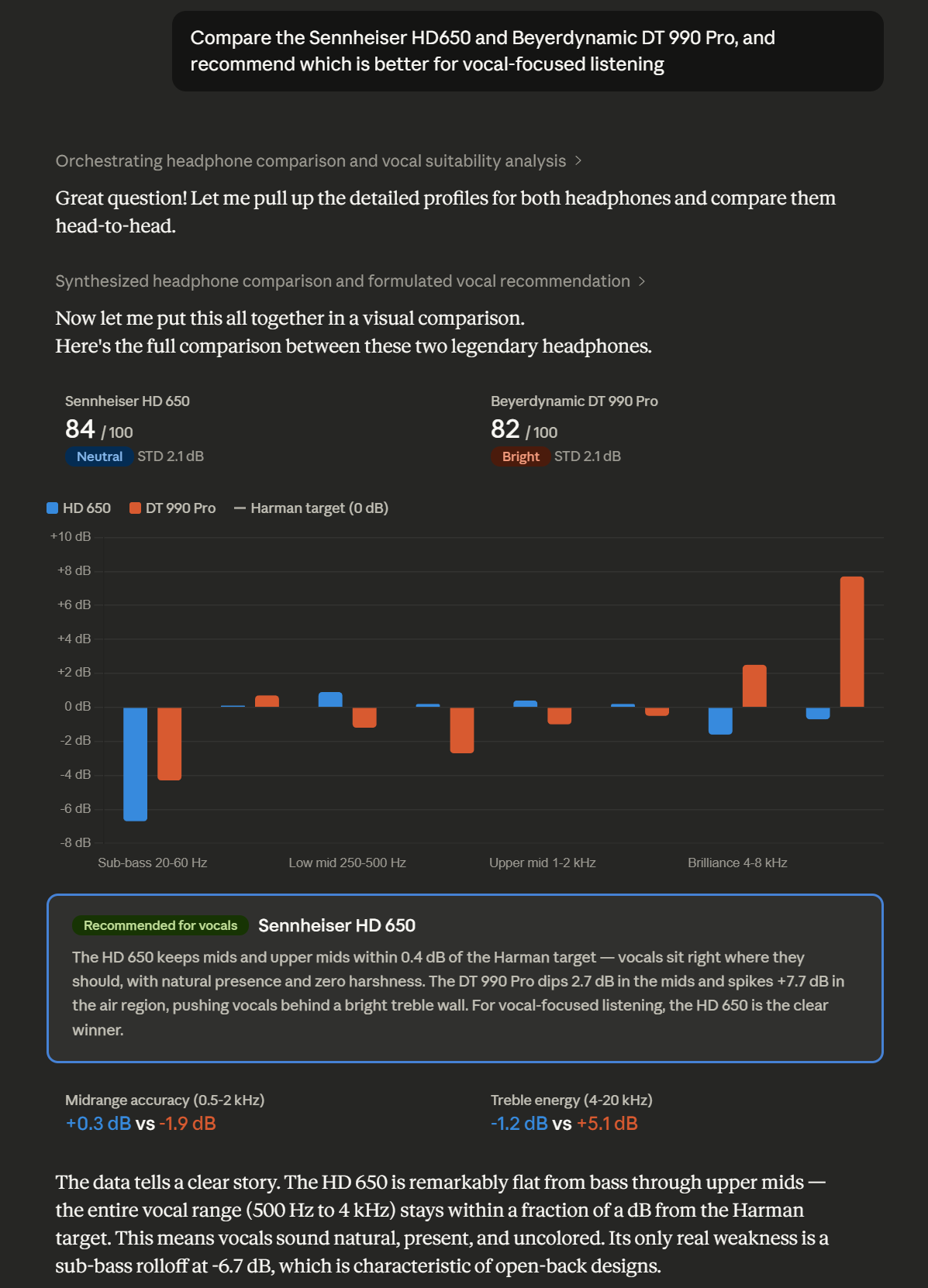
Headphone comparison with vocal suitability analysis
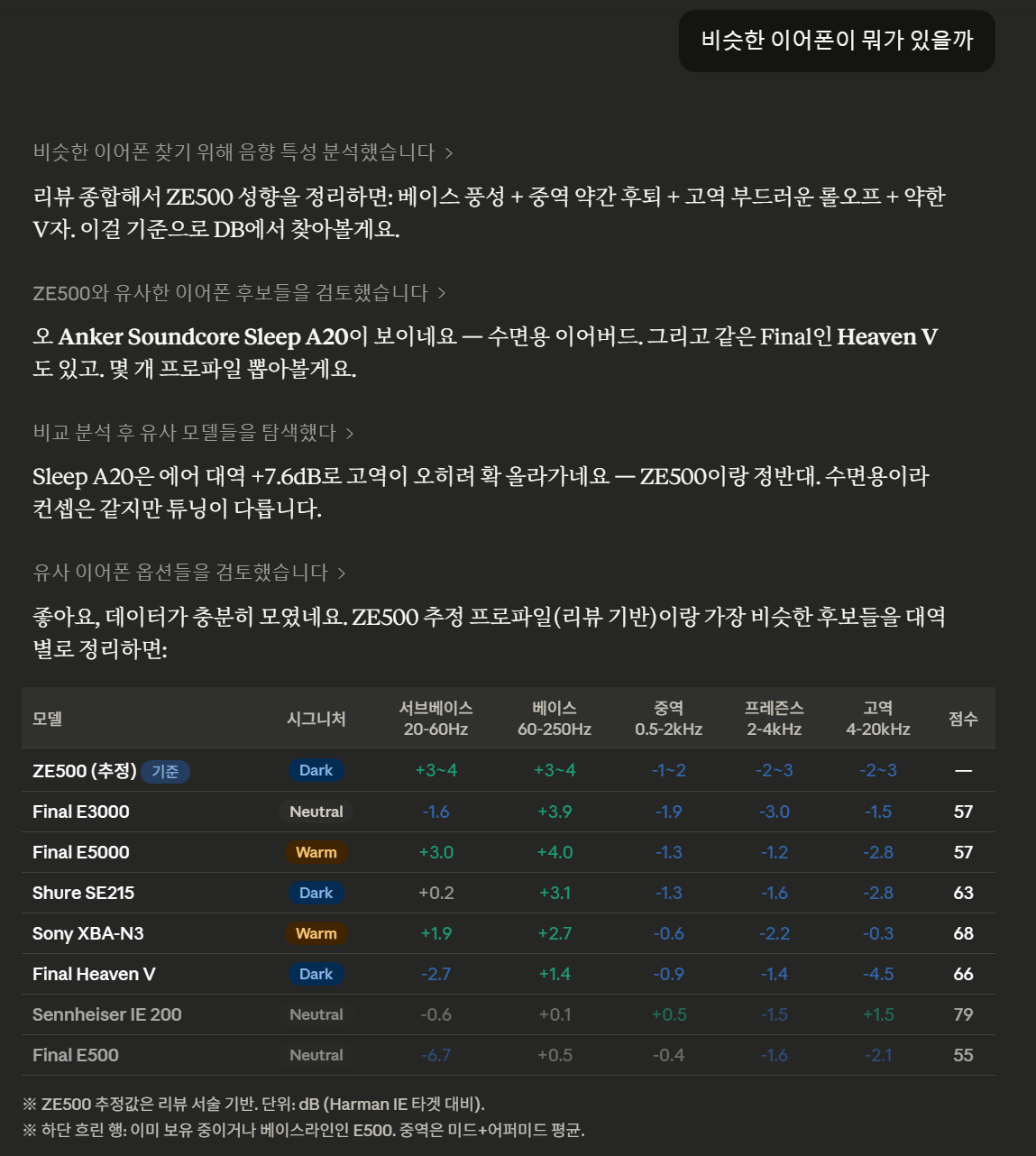
Finding similar IEMs by sound signature
Tools
| Tool | Description |
|---|---|
eq_search | Search by name, type (over-ear/in-ear/earbud), sound signature, or measurement source |
eq_profile | Get full EQ profile — parametric EQ, fixed band EQ, per-band analysis with visual bars |
eq_compare | Side-by-side comparison of two headphones across all frequency bands |
eq_recommend | Recommendations by preference (neutral, warm, bright, bass, vocal, fun, analytical) |
eq_ranking | Harman headphone listener preference score rankings |
eq_targets | List all 61 available target curves (Harman, Diffuse Field, etc.) |
eq_sync | Pull latest data from AutoEQ GitHub and rebuild the database |
Example Output
# Sennheiser HD 650
- Source: oratory1990
- Type: over-ear
- Harman preference score: 84.0
- Sound signature: Neutral, Harman-like

## Per-band analysis (deviation from target, dB)
  Sub-bass (20-60Hz):   -3.2 dB [·······▓▓▓|··········] sub-bass lacking
  Bass (60-250Hz):      +0.8 dB [··········|··········] close to target
  Mid (500-1kHz):       -0.3 dB [··········|··········] close to target
  Presence (2k-4kHz):   +1.4 dB [··········|▓·········] detail emphasis
  Air (8k-20kHz):       -2.1 dB [········▓▓|··········] closed / lacking air

## Parametric EQ (Preamp: -6.5 dB)
  #  Type        Fc (Hz)      Q  Gain (dB)
  1  LowShelf        105   0.70       +6.5
  2  Peaking        1800   1.20       -2.3
  ...
Installation
Claude Code / Claude Desktop (stdio)
# Install
pip install autoeq-mcp

# Initial database sync (clones AutoEQ repo + builds SQLite DB, ~20s)
autoeq-mcp --sync

# Add to Claude Code
claude mcp add autoeq_mcp -- autoeq-mcp
For Claude Desktop, add to your config file:
{
  "mcpServers": {
    "autoeq": {
      "command": "autoeq-mcp"
    }
  }
}
SSE Mode (Remote / Multi-client)
# Start SSE server
AUTOEQ_MCP_PORT=3008 autoeq-mcp --sse

# With allowed hosts for DNS rebinding protection
AUTOEQ_MCP_ALLOWED_HOSTS="your-domain.com,localhost" autoeq-mcp --sse
From Source
git clone https://github.com/verIdyia/autoeq-mcp
cd autoeq-mcp
pip install -e .
autoeq-mcp --sync
Configuration
All configuration is via environment variables:
| Variable | Default | Description |
|---|---|---|
AUTOEQ_DATA_DIR | ~/.autoeq-mcp | Directory for repo clone and SQLite DB |
AUTOEQ_MCP_PORT | 3008 | SSE server port |
AUTOEQ_MCP_HOST | 0.0.0.0 | SSE server host |
AUTOEQ_MCP_ALLOWED_HOSTS | (none) | Comma-separated allowed hosts for SSE |
Data Source
All headphone data comes from AutoEQ by Jaakko Pasanen (MIT License).
- 8,800+ headphone/IEM profiles
- 22 measurement sources (oratory1990, crinacle, Rtings, and more)
- 61 target curves (Harman 2018/2019, Diffuse Field, etc.)
- 2,300+ Harman preference scores
The database syncs from the AutoEQ GitHub repository. Run eq_sync or autoeq-mcp --sync to update.
How Sound Signatures Work
The server analyzes each headphone's frequency response error (deviation from target) across 8 bands and classifies it:
| Signature | Characteristics |
|---|---|
| Neutral | All bands within ±2 dB of target |
| Warm | Elevated bass, flat/recessed treble |
| Bright | Elevated treble, flat/recessed bass |
| Dark | Recessed treble |
| V-shaped | Elevated bass + treble, recessed mids |
| U-shaped | Elevated bass + treble |
| Bass-heavy | Strongly elevated bass (>3 dB) |
| Mid-forward | Elevated mids, flat bass/treble |
| Harman-like | Total deviation < 1.5 dB average |
License
MIT — See LICENSE