automcp
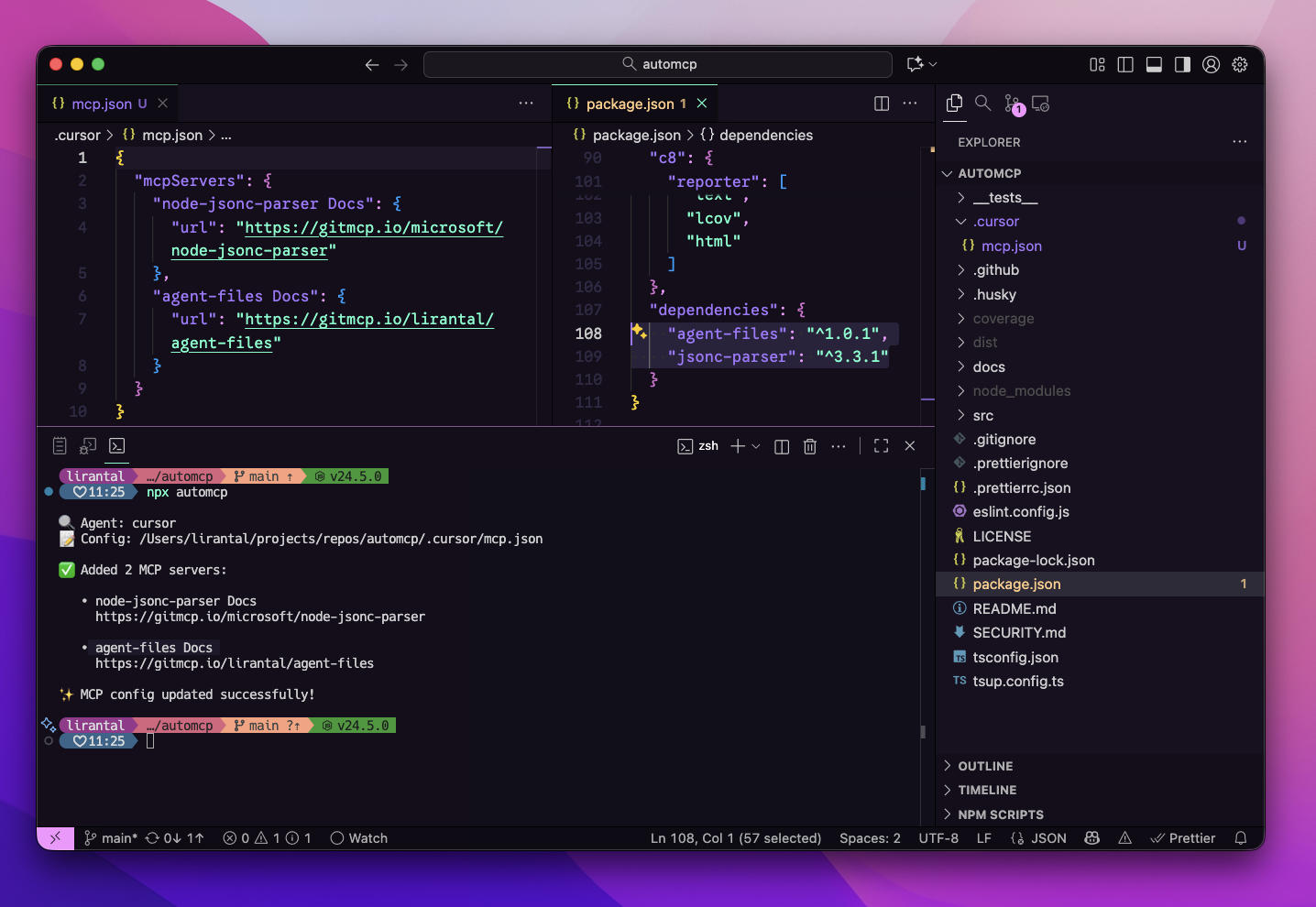
AutoMCP detects your package manifest file and automatically adds relevant MCP (Model Context Protocol) servers to the coding agents it detects



Features
- 🔍 Auto-detects your coding agent (Cursor, VS Code, Claude Desktop)
- 📦 Scans your project dependencies from package.json
- 🔗 Resolves each package to its GitHub repository
- 🌐 Generates GitMCP server URLs automatically
- ✅ Never overwrites existing MCP server configurations
- 🚫 Prevents duplicates via smart URL normalization
- 🏃 Fast concurrent resolution with connection pooling
- 🧪 Dry-run mode to preview changes safely
- 🎯 Zero runtime dependencies — uses only Node.js built-ins
Install
You can run automcp with npx (no install required) or add it to your project.
npx automcp
# or
npm add -D automcp
Usage: CLI
https://github.com/user-attachments/assets/305f75f8-0fec-4dd2-886c-d5f23a5e8a7e
npx automcp [options]
Options
--dry-run: Show planned changes without writing--agent <name>: Override detected agent (e.g., cursor, vscode)--config <path>: Override MCP config file path--include-dev: Include devDependencies (default: false)--silent: Minimal output--json: JSON summary output-h,--help: Show help-v,--version: Show version
Examples
# Preview changes only
npx automcp --dry-run

# Explicitly target Cursor and a custom config path
npx automcp --agent cursor --config ~/.cursor/mcp.json

# Include devDependencies
npx automcp --include-dev

# JSON output for CI/automation
npx automcp --json
Understanding --agent and --config Flags
The --agent and --config flags are flexible and work independently or together. You don't need to provide both!
Usage Patterns
| Command | Agent Detection | Config Path | When to Use |
|---|---|---|---|
npx automcp | Auto-detected from .cursor/ or .vscode/ | Auto-detected | ✅ Recommended: Let AutoMCP detect everything |
npx automcp --agent cursor | Use "cursor" | Auto-resolves to .cursor/mcp.json | When you have multiple agents and want to target one |
npx automcp --config /path/to/mcp.json | Inferred from path | Use specified path | When config is in a custom location |
npx automcp --agent cursor --config /custom/path.json | Use "cursor" | Use specified path | Full manual control |
How Each Flag Works
Using --agent alone:
- Resolves the config path automatically based on the agent name
cursor→.cursor/mcp.jsonin your projectvscode→.vscode/mcp.jsonin your project- Creates the file if it doesn't exist
Using --config alone:
- Infers the agent name from the path
- Path contains "cursor" → agent = "cursor"
- Path contains "vscode" → agent = "vscode"
- Path contains "claude" → agent = "claude-desktop"
- Otherwise → agent = "unknown"
Using both together:
- Explicitly sets both values with no auto-detection
- Useful for custom setups or non-standard paths
Examples
# Let AutoMCP detect both (most common)
npx automcp

# Target Cursor specifically, auto-resolve config path
npx automcp --agent cursor

# Use a custom config path, agent inferred as "cursor"
npx automcp --config ~/.cursor/mcp.json

# Use a custom config path, agent inferred as "unknown"
npx automcp --config /tmp/my-mcp-config.json

# Explicitly set both for full control
npx automcp --agent cursor --config /custom/location/mcp.json
How It Works
- Detects your coding agent (Cursor, VS Code) and locates its local project MCP config file
- Reads your package.json dependencies
- Resolves each dependency to its GitHub repository via
npm view - Builds GitMCP URLs in the format
https://gitmcp.io/owner/repo - Updates your MCP config without overwriting existing entries or creating duplicates
Note: AutoMCP only updates local project configurations (e.g.,
.cursor/mcp.jsonor.vscode/mcp.jsonin your project directory). It does not modify global agent configurations in your home directory.
Quick Start
# Run in your project directory
cd my-project
npx automcp

# Preview changes first
npx automcp --dry-run

# Include devDependencies
npx automcp --include-dev
Real-World Example
Given a project with these dependencies:
{
  "dependencies": {
    "express": "^4.18.0",
    "lodash": "^4.17.21",
    "axios": "^1.6.0"
  }
}
Running npx automcp will:
- Detect your agent (e.g., Cursor at
.cursor/mcp.jsonin your project) - Resolve GitHub repos:
- express → expressjs/express
- lodash → lodash/lodash
- axios → axios/axios
- Add to your MCP config:
{
  "mcpServers": {
    "express Docs": {
      "url": "https://gitmcp.io/expressjs/express"
    },
    "lodash Docs": {
      "url": "https://gitmcp.io/lodash/lodash"
    },
    "axios Docs": {
      "url": "https://gitmcp.io/axios/axios"
    }
  }
}
Supported Agents
AutoMCP looks for agent configurations in the following locations:
- Cursor —
.cursor/mcp.json(in your project directory) - VS Code —
.vscode/mcp.json(in your project directory)
Use --agent and --config flags to override auto-detection or to specify a custom config location.
Important: AutoMCP only updates local project configurations. If no local agent configuration is found (e.g., no
.cursor/or.vscode/directory in your project), the tool will exit without making changes. This prevents accidental updates to global configurations.
Troubleshooting
Agent not detected
npx automcp --agent cursor --config ~/.cursor/mcp.json
Permission errors Ensure you have write access to the MCP config directory.
Non-GitHub packages skipped
Only packages with GitHub repositories are supported. Packages without a repository field or with non-GitHub URLs will be skipped.
URL resolution timeouts
The CLI runs npm view with a 10-second timeout per package. Slow network or large dependency lists may take time.
Output Example
Standard output:
🔍 Agent: cursor
📝 Config: /Users/username/.cursor/mcp.json

✅ Added 3 MCP servers:

   • express Docs
     https://gitmcp.io/expressjs/express

   • lodash Docs
     https://gitmcp.io/lodash/lodash

   • axios Docs
     https://gitmcp.io/axios/axios

✨ MCP config updated successfully!
With dry-run:
🔍 Agent: cursor
📝 Config: /Users/username/.cursor/mcp.json
🧪 Dry-run mode: no files will be modified

✅ Added 5 MCP servers:

   • express Docs
     https://gitmcp.io/expressjs/express

   • lodash Docs
     https://gitmcp.io/lodash/lodash

💡 Run without --dry-run to apply these changes.
With duplicates:
🔍 Agent: cursor
📝 Config: /Users/username/.cursor/mcp.json

⏭️  Skipped 2 duplicates:

   • express Docs
     https://gitmcp.io/expressjs/express

   • lodash Docs
     https://gitmcp.io/lodash/lodash
JSON output (for CI/automation):
npx automcp --json
{
  "ok": true,
  "result": {
    "added": 3,
    "skipped": 0,
    "errors": 0,
    "addedServers": [
      {
        "name": "express Docs",
        "url": "https://gitmcp.io/expressjs/express"
      }
    ],
    "skippedServers": [],
    "configPath": "/Users/username/.cursor/mcp.json",
    "agentName": "cursor",
    "dryRun": false
  }
}
Node.js Compatibility
- Requires: Node.js >= 22.0.0
- Uses ES2022+ features and Node.js built-in APIs
- No external runtime dependencies
CI/CD Integration
Use --json and --silent flags for automation:
# GitHub Actions example
- name: Update MCP config
  run: |
    npx automcp --json --silent > result.json
    cat result.json
Exit codes:
0: Success (including when nothing to add)1: Fatal error (config parse failure, permission denied, missing package.json)
Contributing
Please consult CONTRIBUTING for guidelines on contributing to this project.
Author
automcp © Liran Tal, Released under the Apache-2.0 License.