




Your AI starts every session from scratch. Your best ideas vanish before you can write them down. Cairn fixes both — persistent memory for agents and humans, stored once and found always.
Agents remember across sessions. Decisions, learnings, and dead ends are captured automatically. Session markers (cairns) let the next agent pick up where the last one left off. Humans capture thoughts instantly. Type a thought, slash-command it into a category, and move on. Grab a URL from your browser with one click. Share from your phone. Everything lands in the same searchable pool.
Three containers. One docker compose up. 13 MCP tools, a REST API, a web dashboard, and browser/mobile capture.
What you get
- Session continuity — Cairns mark the trail. Motes capture what happened. Narratives synthesize why it mattered. Next session starts warm, not cold.
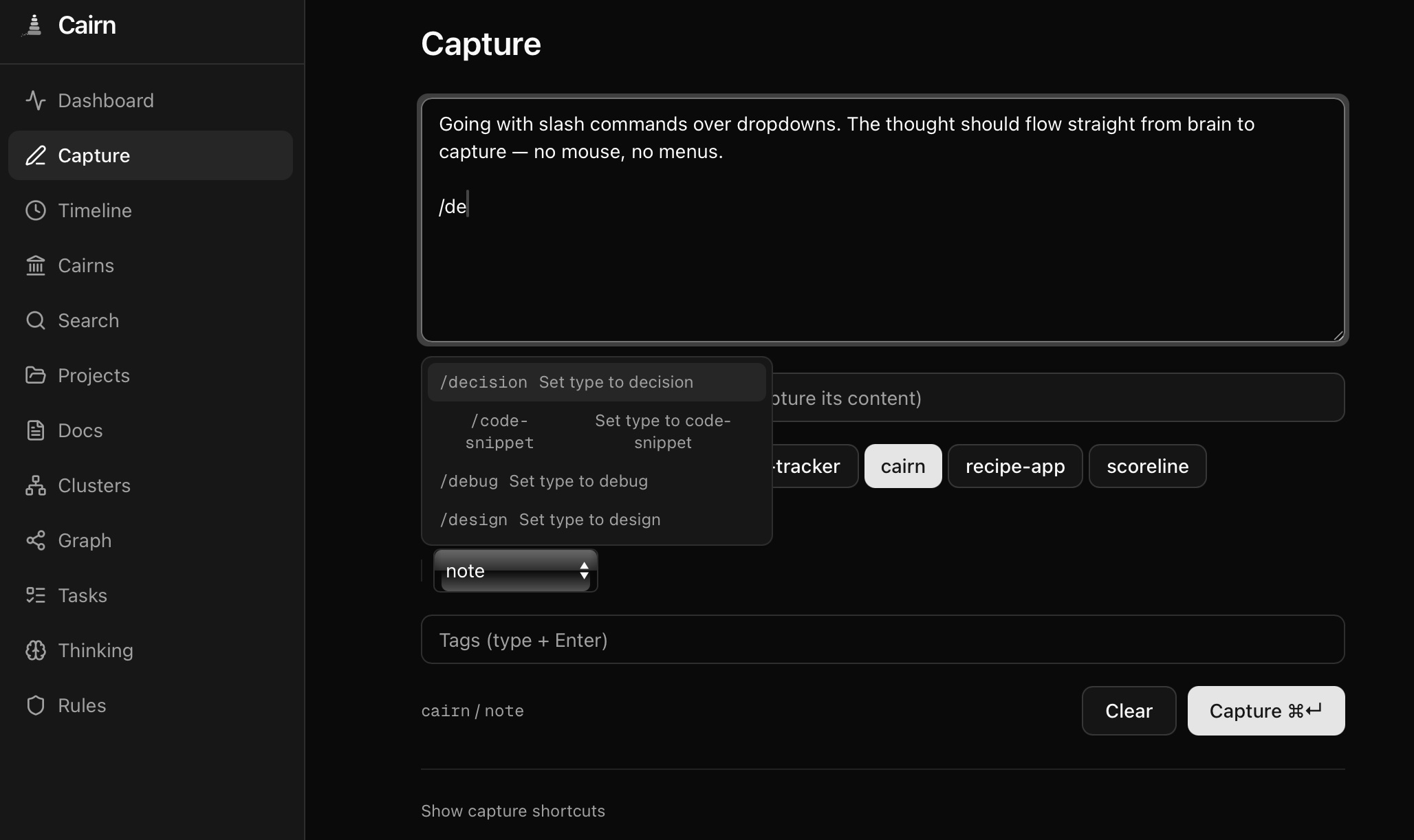
- Quick capture — Slash commands (
/decision,/learning), URL extraction, browser bookmarklet, iOS Shortcut. Keyboard-first, Tana-inspired. - Smart ingestion — Text, URLs, or both. Auto-classifies, chunks large documents, deduplicates, and routes. One endpoint, many doorways.
- Hybrid search — Vector similarity + full-text + tag matching via Reciprocal Rank Fusion. 83.8% recall@10. Contradiction-aware ranking.
- Auto-enrichment — Every memory gets an LLM-generated summary, tags, importance score, and relationship links on store.
- Pattern discovery — HDBSCAN clustering finds themes across memories. LLM writes the labels. Clusters refresh lazily.
- Web dashboard — 11 pages. Timeline with activity heatmap, search with score breakdowns, knowledge graph, thinking trees, Cmd+K, keyboard nav, dark mode.
- Three containers, done — MCP at
/mcp, REST at/api, same process. PostgreSQL + pgvector. Bring your own LLM — Ollama, Bedrock, Gemini, or anything OpenAI-compatible.
Quick Start
1. Pull and run
curl -O https://raw.githubusercontent.com/jasondostal/cairn-mcp/main/docker-compose.yml
docker compose up -d
This starts three containers:
- cairn — MCP server + REST API on port 8000
- cairn-ui — Web dashboard on port 3000
- cairn-db — PostgreSQL 16 with pgvector
Migrations run automatically. Ready in under a minute.
docker-compose.yml
services:
  cairn:
    image: ghcr.io/jasondostal/cairn-mcp:latest
    container_name: cairn
    restart: unless-stopped
    environment:
      CAIRN_DB_HOST: "${CAIRN_DB_HOST:-cairn-db}"
      CAIRN_DB_PORT: "${CAIRN_DB_PORT:-5432}"
      CAIRN_DB_NAME: "${CAIRN_DB_NAME:-cairn}"
      CAIRN_DB_USER: "${CAIRN_DB_USER:-cairn}"
      CAIRN_DB_PASS: "${CAIRN_DB_PASS:-cairn-dev-password}"
      CAIRN_LLM_BACKEND: "${CAIRN_LLM_BACKEND:-ollama}"
      CAIRN_BEDROCK_MODEL: "${CAIRN_BEDROCK_MODEL:-us.meta.llama3-2-90b-instruct-v1:0}"
      CAIRN_OLLAMA_URL: "${CAIRN_OLLAMA_URL:-http://host.docker.internal:11434}"
      CAIRN_OLLAMA_MODEL: "${CAIRN_OLLAMA_MODEL:-qwen2.5-coder:7b}"
      CAIRN_CORS_ORIGINS: "${CAIRN_CORS_ORIGINS:-*}"
      CAIRN_AUTH_ENABLED: "${CAIRN_AUTH_ENABLED:-false}"
      CAIRN_API_KEY: "${CAIRN_API_KEY:-}"
      CAIRN_AUTH_HEADER: "${CAIRN_AUTH_HEADER:-X-API-Key}"
      CAIRN_TRANSPORT: "${CAIRN_TRANSPORT:-http}"
      CAIRN_EVENT_ARCHIVE_DIR: "${CAIRN_EVENT_ARCHIVE_DIR:-/data/events}"
      # AWS credentials for Bedrock (ignored when using Ollama)
      AWS_ACCESS_KEY_ID: "${AWS_ACCESS_KEY_ID:-}"
      AWS_SECRET_ACCESS_KEY: "${AWS_SECRET_ACCESS_KEY:-}"
      AWS_DEFAULT_REGION: "${AWS_DEFAULT_REGION:-us-east-1}"
    ports:
      - "${CAIRN_HTTP_PORT:-8000}:8000"
    volumes:
      - cairn-events:/data/events
    # Uncomment to mount AWS credentials for Bedrock:
    # volumes (append to above):
    #   - ~/.aws/credentials:/home/cairn/.aws/credentials:ro
    healthcheck:
      test: ["CMD-SHELL", "python -c \"import urllib.request; urllib.request.urlopen('http://localhost:8000/api/status')\""]
      interval: 15s
      timeout: 5s
      retries: 3
      start_period: 30s
    depends_on:
      cairn-db:
        condition: service_healthy

  cairn-ui:
    image: ghcr.io/jasondostal/cairn-mcp-ui:latest
    container_name: cairn-ui
    restart: unless-stopped
    environment:
      CAIRN_API_URL: http://cairn:8000
      CAIRN_API_KEY: "${CAIRN_API_KEY:-}"
    ports:
      - "${CAIRN_UI_PORT:-3000}:3000"
    healthcheck:
      test: ["CMD-SHELL", "node -e \"fetch('http://localhost:3000/').then(r=>{if(!r.ok)process.exit(1)}).catch(()=>process.exit(1))\""]
      interval: 15s
      timeout: 5s
      retries: 3
      start_period: 10s
    depends_on:
      - cairn

  cairn-db:
    image: pgvector/pgvector:pg16
    container_name: cairn-db
    restart: unless-stopped
    environment:
      POSTGRES_DB: "${CAIRN_DB_NAME:-cairn}"
      POSTGRES_USER: "${CAIRN_DB_USER:-cairn}"
      POSTGRES_PASSWORD: "${CAIRN_DB_PASS:-cairn-dev-password}"
    volumes:
      - cairn-pgdata:/var/lib/postgresql/data
    healthcheck:
      test: ["CMD-SHELL", "pg_isready -U cairn"]
      interval: 5s
      timeout: 5s
      retries: 5

volumes:
  cairn-pgdata:
  cairn-events:
2. Connect your agent
Claude Code (HTTP — recommended):
claude mcp add --transport http cairn http://localhost:8000/mcp
Or add to your .mcp.json:
{
  "mcpServers": {
    "cairn": {
      "type": "http",
      "url": "http://localhost:8000/mcp"
    }
  }
}
Other MCP clients (stdio — single-client, same host):
{
  "mcpServers": {
    "cairn": {
      "command": "docker",
      "args": ["exec", "-i", "cairn", "python", "-m", "cairn.server"]
    }
  }
}
3. Store your first memory
Once connected, your agent can immediately use all 13 tools. Try:
"Remember that we chose PostgreSQL with pgvector for the storage layer because it gives us hybrid search without a separate vector database."
Cairn will store it, generate a summary, auto-tag it, and score its importance.
Prerequisites
Cairn needs an LLM backend for enrichment, relationship extraction, and session narrative synthesis. Choose one:
| Backend | Setup | Best for |
|---|---|---|
| Ollama (default) | Install Ollama, pull a model (ollama pull qwen2.5-coder:7b). Cairn connects to host.docker.internal:11434. | Local development, no cloud dependency |
| AWS Bedrock | Set CAIRN_LLM_BACKEND=bedrock, export AWS credentials. Requires model access in your AWS account. | Production, larger models |
| Google Gemini | Set CAIRN_LLM_BACKEND=gemini, add CAIRN_GEMINI_API_KEY. Free tier available. | Quick start, no infrastructure |
| OpenAI-compatible | Set CAIRN_LLM_BACKEND=openai, add CAIRN_OPENAI_API_KEY and optionally CAIRN_OPENAI_BASE_URL. | OpenAI, Groq, Together, Mistral, LM Studio, vLLM — anything that speaks the OpenAI chat format |
The LLM backend is pluggable. Custom providers can be registered via register_llm_provider(name, factory_fn) in Python. Gemini and OpenAI implementations use zero external SDKs — just urllib with built-in retry logic.
No LLM? Cairn still works. Core features — store, search, recall, cairns, rules — function without an LLM. You lose auto-enrichment (summaries, tags, importance scoring), relationship extraction, and session narrative synthesis. Memories are still embedded and searchable.
Security note: The default
docker-compose.ymlships with a development database password (cairn-dev-password). This is intentional for quick local setup. For any network-exposed deployment, override it:CAIRN_DB_PASS=your-secure-password docker compose up -d. You can also enable API key auth: setCAIRN_AUTH_ENABLED=trueandCAIRN_API_KEY=your-secretto protect all/apiroutes.
Three-Tier Knowledge Capture
Most agent memory systems require the agent to explicitly decide what's worth remembering. Cairn captures knowledge at three levels simultaneously, with each tier working independently:
| Tier | How it works | Agent effort | What's captured |
|---|---|---|---|
| Tier 3: Hook-automated | Claude Code lifecycle hooks silently log every tool call as a mote (lightweight event). At session end, the full event stream is crystallized into a cairn with an LLM-synthesized narrative. | Zero | Everything — files read, edits made, commands run, searches performed |
| Tier 2: Tool-assisted | Agent calls cairns(action="set") at session end to mark a trail marker. Works without hooks. | One tool call | All memories stored during the session |
| Tier 1: Organic | Agent stores memories via behavioral rules — decisions, learnings, dead ends. Works without cairns. | Per-insight | Deliberate observations the agent deems important |
The tiers are additive and degrade gracefully. With all three active, a session produces: a rich narrative synthesized from both the mote timeline and stored memories, linked trail markers for next session's context, and individually searchable memories with auto-enrichment. Remove the hooks? Tier 2 and 1 still work. Agent forgets to set a cairn? The organic memories are still there.
Next session, the agent walks the trail back. Session-start hooks load recent cairn narratives into context — the agent picks up where the last one left off, not from a blank slate.
Session Capture & Hooks
Cairn can automatically capture your entire session — every tool call logged as a lightweight event (mote), crystallized into a cairn when the session ends. Next session, the agent starts with context instead of a blank slate.
Quick setup:
git clone https://github.com/jasondostal/cairn-mcp.git
./cairn-mcp/scripts/setup-hooks.sh
The setup script checks dependencies (jq, curl), tests Cairn connectivity, creates event directories, and generates a ready-to-paste Claude Code settings.json snippet. See examples/hooks/README.md for manual setup, other MCP clients, verification steps, and troubleshooting.
What happens (Pipeline v2):
- Session starts — hook fetches recent cairns for context, creates an event log in
~/.cairn/events/ - Every tool call — hook captures full
tool_inputandtool_response(capped at 2000 chars), appends to the log. Every 25 events, a batch is shipped toPOST /api/events/ingestin the background. - Between batches — DigestWorker on the server digests each batch into a 2-4 sentence LLM summary, producing rolling context.
- Session ends — hook ships any remaining events, then POSTs a cairn. The server synthesizes a narrative from the pre-digested summaries — not raw events. Events are archived to
~/.cairn/events/archive/.
The agent (via MCP tool) and the hook (via REST POST) can both set a cairn for the same session — whichever arrives first creates it, the second merges in what was missing. No race conditions.
No hooks? No problem. The cairns tool works without them — the agent can call cairns(action="set") directly. And even without cairns, memories stored with a session_name are still grouped and searchable.
MCP Tools — 13 tools
| Tool | What it does |
|---|---|
store | Persist a memory with auto-enrichment, relationship extraction, and rule conflict detection |
search | Hybrid semantic search with query expansion and optional confidence gating |
recall | Expand memory IDs to full content with cluster context |
modify | Update, soft-delete, reactivate, or move memories between projects |
rules | Behavioral guardrails — global or per-project |
insights | HDBSCAN clustering with LLM-generated pattern summaries |
projects | Documents (briefs, PRDs, plans, primers, writeups, guides) and cross-project linking |
tasks | Task lifecycle — create, complete, list, link to memories |
think | Structured reasoning sequences with branching |
status | System health, counts, embedding model info, active LLM capabilities |
synthesize | Synthesize session memories into a coherent narrative |
consolidate | Find duplicate memories, recommend merges/promotions/inactivations |
cairns | Session markers — set at session end, walk the trail back, compress old ones |
REST API — 25 endpoints
REST endpoints at /api — powers the web UI, hook scripts, and scripting. Optional API key auth when CAIRN_AUTH_ENABLED=true.
| Endpoint | Description |
|---|---|
GET /api/status | System health, memory counts, cluster info |
GET /api/search?q=&project=&type=&mode=&limit= | Hybrid search |
GET /api/memories/:id | Single memory with cluster context |
GET /api/projects | All projects with memory counts |
GET /api/projects/:name | Project docs and links |
GET /api/docs?project=&doc_type= | Browse documents across projects |
GET /api/docs/:id | Single document with full content |
GET /api/clusters?project=&topic= | Clusters with member lists |
GET /api/tasks?project= | Tasks for a project |
GET /api/thinking?project=&status= | Thinking sequences |
GET /api/thinking/:id | Sequence detail with all thoughts |
GET /api/rules?project= | Behavioral rules |
GET /api/timeline?project=&type=&days= | Memory activity feed |
GET /api/cairns?project= | Session trail — cairns newest first |
GET /api/cairns/:id | Single cairn with linked memories |
POST /api/cairns | Set a cairn (used by session-end hook) |
GET /api/events?session_name=&project= | Event batches with digest status |
POST /api/events/ingest | Ship event batch (202 Accepted, idempotent) |
POST /api/ingest | Smart ingestion — text, URL, or both. Classify, chunk, dedup, route. |
POST /api/ingest/doc | Create a single project document |
POST /api/ingest/docs | Batch create multiple documents (partial success) |
POST /api/ingest/memory | Store a memory via REST (full pipeline) |
GET /api/bookmarklet.js | Browser bookmarklet script for one-click capture |
GET /api/clusters/visualization?project= | t-SNE 2D coordinates for scatter plot |
GET /api/export?project=&format= | Export project memories (JSON or Markdown) |
GET /api/graph?project=&relation_type= | Knowledge graph nodes and edges |
curl http://localhost:8000/api/status
curl "http://localhost:8000/api/search?q=architecture&limit=5"
Architecture
Browser         Bookmarklet / iOS     MCP Client (Claude, etc.)     curl / scripts
   |                  |                      |                            |
   | HTTPS            | POST /api/ingest     | stdio or streamable-http   | REST
   |                  |                      |                            |
+--v---+          +---v----------------------v----------------------------v------+
| Next | -proxy-> |  /mcp  (MCP protocol)              /api  (REST API)          |
| .js  |          |                                                               |
| UI   |          |  cairn.server  (MCP tool definitions)                         |
+------+          |  cairn.api     (FastAPI endpoints + ingest pipeline)          |
cairn-ui          |                                                               |
                  |  core: memory, search, enrichment, clustering, ingest        |
                  |        projects, tasks, thinking, cairns                     |
                  |        synthesis, consolidation, digest                      |
                  |                                                               |
                  |  embedding: local (MiniLM), Bedrock (Titan V2) (pluggable)   |
                  |  llm: Ollama, Bedrock, Gemini, OpenAI-compat (pluggable)     |
                  |  storage: PostgreSQL 16 + pgvector (HNSW)                    |
                  +---------------------------------------------------------------+
                      |
                      v
                  PostgreSQL 16 + pgvector (16 tables, 8 migrations)
Search
Cairn fuses three signals with Reciprocal Rank Fusion (RRF):
| Signal | Weight | How |
|---|---|---|
| Vector similarity | 60% | Cosine distance via pgvector HNSW index. Local (MiniLM, 384-dim) or Bedrock Titan V2 (up to 1024-dim) — configurable. |
| Keyword search | 25% | PostgreSQL ts_rank full-text search |
| Tag matching | 15% | Intersection of query-derived tags with memory tags |
Filter by project, memory type, file path, recency, or set custom limits. Three modes: semantic (hybrid, default), keyword, or vector.
Configuration
All via environment variables:
| Variable | Default | Description |
|---|---|---|
CAIRN_DB_HOST | cairn-db | PostgreSQL host |
CAIRN_DB_PORT | 5432 | PostgreSQL port |
CAIRN_DB_NAME | cairn | Database name |
CAIRN_DB_USER | cairn | Database user |
CAIRN_DB_PASS | (required) | Database password |
CAIRN_LLM_BACKEND | ollama | ollama, bedrock, gemini, or openai |
CAIRN_OLLAMA_URL | http://host.docker.internal:11434 | Ollama API URL |
CAIRN_OLLAMA_MODEL | qwen2.5-coder:7b | Ollama model name |
CAIRN_BEDROCK_MODEL | us.meta.llama3-2-90b-instruct-v1:0 | Bedrock model ID |
AWS_ACCESS_KEY_ID | (empty) | AWS access key for Bedrock |
AWS_SECRET_ACCESS_KEY | (empty) | AWS secret key for Bedrock |
AWS_DEFAULT_REGION | us-east-1 | AWS region for Bedrock |
CAIRN_GEMINI_MODEL | gemini-2.0-flash | Google Gemini model name |
CAIRN_GEMINI_API_KEY | (empty) | Gemini API key |
CAIRN_OPENAI_BASE_URL | https://api.openai.com | OpenAI-compatible API base URL |
CAIRN_OPENAI_MODEL | gpt-4o-mini | OpenAI-compatible model name |
CAIRN_OPENAI_API_KEY | (empty) | OpenAI-compatible API key |
CAIRN_TRANSPORT | stdio | stdio or http |
CAIRN_HTTP_HOST | 0.0.0.0 | HTTP bind address |
CAIRN_HTTP_PORT | 8000 | HTTP listen port |
CAIRN_CORS_ORIGINS | * | Comma-separated CORS origins, or * for all |
CAIRN_AUTH_ENABLED | false | Enable API key authentication on /api routes |
CAIRN_API_KEY | (empty) | API key (required when auth enabled) |
CAIRN_AUTH_HEADER | X-API-Key | Header name to check for API key (configurable for auth proxy compatibility) |
CAIRN_EVENT_ARCHIVE_DIR | (disabled) | File path for event archive (e.g. /data/events) |
CAIRN_EMBEDDING_BACKEND | local | Embedding provider: local (SentenceTransformer), bedrock (Titan V2), or custom registered name |
CAIRN_EMBEDDING_MODEL | all-MiniLM-L6-v2 | Sentence transformer model (local backend) |
CAIRN_EMBEDDING_DIMENSIONS | 384 | Embedding vector dimensions. Auto-reconciled on startup if changed. |
CAIRN_EMBEDDING_BEDROCK_MODEL | amazon.titan-embed-text-v2:0 | Bedrock embedding model ID |
CAIRN_EMBEDDING_BEDROCK_REGION | us-east-1 | AWS region for Bedrock embedding (falls back to AWS_DEFAULT_REGION) |
CAIRN_INGEST_CHUNK_SIZE | 512 | Tokens per chunk for document ingestion |
CAIRN_INGEST_CHUNK_OVERLAP | 64 | Overlap tokens between chunks |
CAIRN_LLM_QUERY_EXPANSION | true | Expand search queries with related terms |
CAIRN_LLM_RELATIONSHIP_EXTRACT | true | Auto-detect relationships between memories on store |
CAIRN_LLM_RULE_CONFLICT_CHECK | true | Check new rules for conflicts with existing rules |
CAIRN_LLM_SESSION_SYNTHESIS | true | Enable session narrative synthesis |
CAIRN_LLM_CONSOLIDATION | true | Enable memory consolidation recommendations |
CAIRN_LLM_CONFIDENCE_GATING | false | Post-search quality assessment (advisory, high reasoning demand) |
CAIRN_LLM_EVENT_DIGEST | true | Digest event batches into rolling LLM summaries |
Development
git clone https://github.com/jasondostal/cairn-mcp.git
cd cairn-mcp
cp .env.example .env   # edit with your settings
docker compose up -d --build
Testing
Tests (run inside container or local venv):
docker exec cairn pip install pytest
docker cp tests/ cairn:/app/tests/
docker exec cairn python -m pytest tests/ -v
Admin Scripts
Maintenance utilities in scripts/ (run inside the container):
| Script | Purpose |
|---|---|
scripts/reembed.py | Re-embed memories with NULL embeddings after switching embedding backends |
scripts/bulk_ops.py demote-progress | Batch-lower importance of progress-type memories |
scripts/bulk_ops.py move-project --from X --to Y | Move all memories + related data between projects |
scripts/bulk_ops.py cleanup-projects | Inventory projects with active/inactive counts |
All bulk operations support --dry-run for preview.
Database Schema
16 tables across 8 migrations:
| Migration | Tables |
|---|---|
| 001 Core | projects, memories, memory_related_files, memory_related_memories |
| 002 Clustering | clusters, cluster_members, clustering_runs |
| 003 Phase 4 | project_documents, project_links, tasks, task_memory_links, thinking_sequences, thoughts |
| 004 Cairns | cairns + cairn_id FK on memories |
| 005 Indexes | Partial indexes on memories for timeline and session queries |
| 006 Events | session_events — streaming event batches with LLM digests |
| 007 Doc Title | title column on project_documents |
| 008 Ingestion | ingestion_log — content-hash dedup, source tracking, chunk counts |
Search Quality
Cairn includes an evaluation framework (eval/) for measuring search quality. Current results on our internal benchmark:
| Metric | Score |
|---|---|
| Recall@10 | 83.8% |
| Precision@5 | 72.0% |
| MRR | 0.81 |
| NDCG@10 | 0.78 |
Methodology and limitations:
- Corpus: 50 synthetic memories, fabricated to cover diverse topic areas. Not derived from real usage data.
- Queries: 25 hand-labeled queries with binary relevance judgments (relevant / not relevant), authored by the developer.
- No graded relevance — a partially-relevant result scores the same as irrelevant (0). This inflates recall and obscures ranking quality.
- No error bars — 25 queries is a small sample. The true recall likely has a wide confidence interval.
- Small corpus effect — with 50 memories and a candidate pool of
limit * 5, the system examines a significant fraction of the entire corpus before ranking. Performance at 500+ memories is untested. - RRF weights (vector 60%, keyword 25%, tag 15%) and
k=60are based on initial tuning, not exhaustive ablation.
The eval runs without LLM features (no query expansion, no confidence gating) — results reflect base search quality only. Query expansion's impact on recall has not been measured separately.
The eval framework supports model comparison (MiniLM-L6-v2 vs. all-mpnet-base-v2 evaluated, smaller model chosen with +1.5% recall advantage) and includes a keyword-only control to isolate embedding quality.
We plan to grow the corpus, add graded relevance, test query expansion impact, and measure at larger scales. Contributions to the eval set are welcome.