Campus Copilot
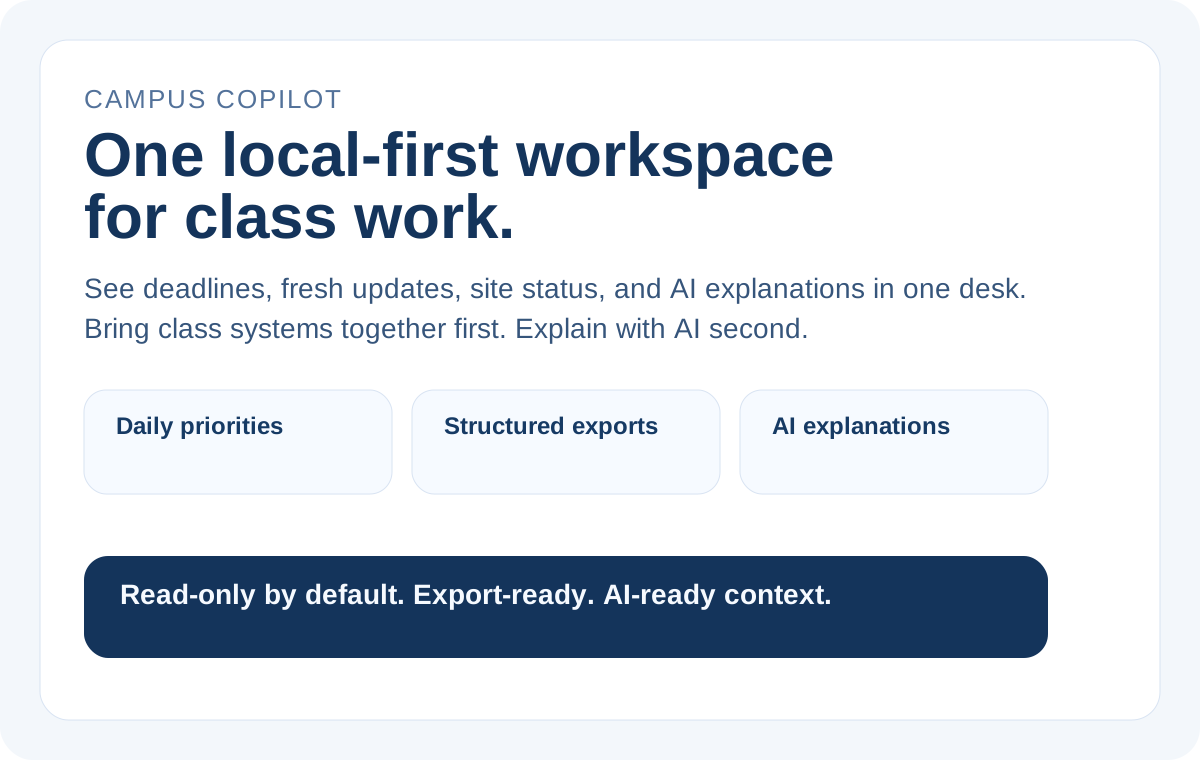
A local-first academic decision workspace for students who want Canvas, Gradescope, EdStem, and MyUW in one structured place, then want clear answers to what changed, what matters first, and what to export or ask with cited AI.
Docs · Quickstart · Integrations · Distribution · Privacy · Product Brief · User Surfaces · Verification Matrix · Contributing · AI Collaboration · Security · License
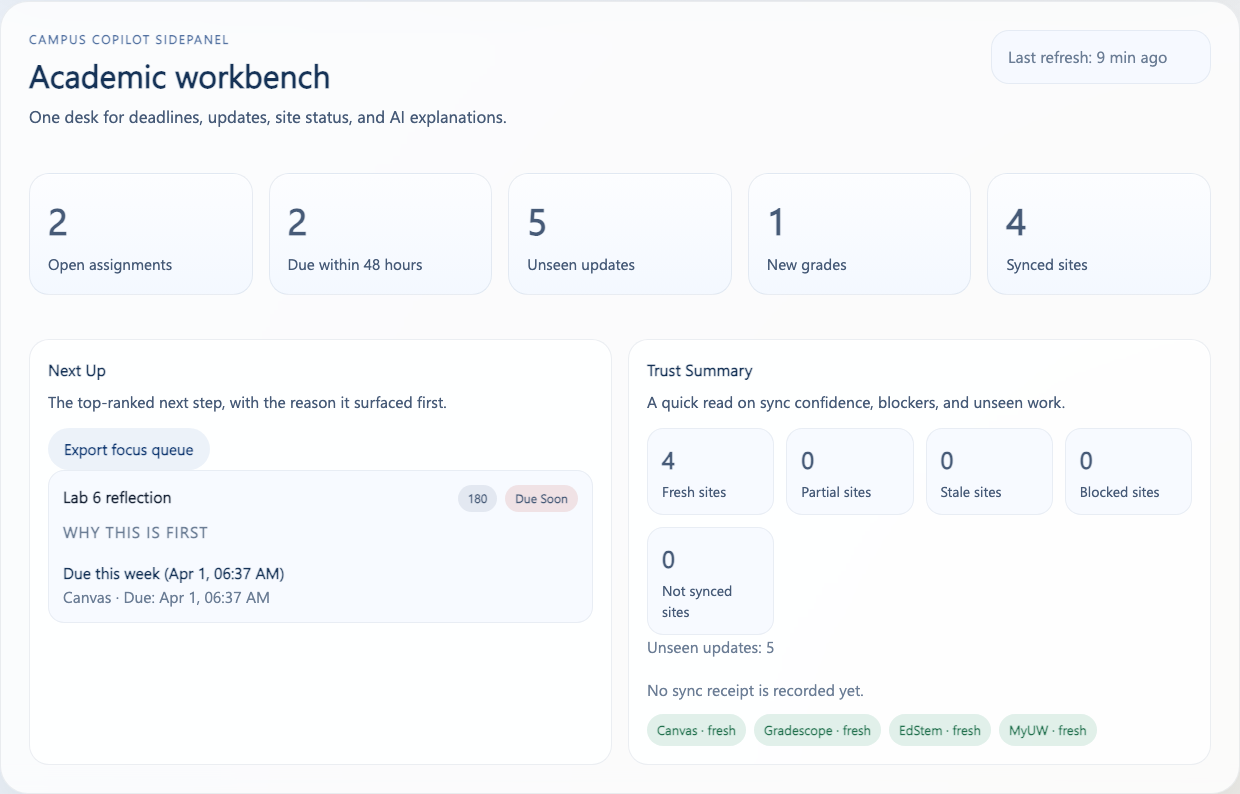
Real workbench proof, not concept art:
Start Here In 60 Seconds
Campus Copilot takes four campus sites and turns them into one local workspace. The default student loop is:
- sync
Canvas,Gradescope,EdStem, andMyUWinto one workbench - open the decision layer to see what changed, what is still open, and what to do first
- export the same structured view or ask cited AI to explain it
That is the main story of the repo. It is not "open a blank chat box and hope the model figures school out for you."
Why This Exists
Campus Copilot is not a generic AI shell.
It is an academic decision workspace for students who want one place to answer questions like:
- What assignments are still open?
- What changed recently across my classes?
- What should I pay attention to first?
The product stays intentionally narrow:
- Structured data first: adapters normalize site-specific data into one shared schema.
- Local-first by default: storage, workbench views, filtering, and export live locally.
- AI after structure: AI can summarize or explain the workbench result, but it does not read raw DOM, raw HTML, or cookies.
- Export is a first-class feature: Markdown, CSV, JSON, and ICS are part of the core product, not an afterthought.
You can think of it like a school desk instead of a chat window: first gather the papers into one pile, then mark what changed, then ask for help on top of that organized pile.
What Changes After The First Sync
After the first real sync, the value is supposed to feel concrete:
- you stop hopping between four campus sites just to rebuild the same mental map
Focus Queue,Weekly Load, andChange Journaltell you what changed and what should come first- export presets carry the same structured evidence into Markdown, CSV, JSON, or ICS
- cited AI explains the same structured workspace instead of inventing its own hidden source of truth
What To Do First
If you are new, follow this order:
- Understand the student-facing loop in this README.
- Run the local workbench through Quickstart.
- Read the product contract in docs/01-product-prd.md and docs/06-export-and-user-surfaces.md.
- Only after that, use the proof and builder routes that match your intent.
That ordering matters. Proof is there to verify the workbench is real. Builder surfaces are there to consume the same substrate. Neither should replace the student-first story on the front door.
Pick The Right Entry Surface
If you already know why the product exists and just need the fastest truthful entry point, use this table instead of guessing:
| If you are | Start here | Current state | Quick proof |
|---|---|---|---|
| a GitHub visitor or reviewer | DISTRIBUTION.md and docs/storefront-assets.md | public front door is live | GitHub Pages returns HTTP 200 |
| a student trying the product locally | Quickstart and docs/chrome-web-store-submission-packet.md | build-ready local-first product | pnpm verify |
| a Codex / Claude MCP consumer | packages/mcp-server/README.md and examples/integrations/README.md | public-ready (repo-local) | pnpm proof:public |
| a team that wants one containerized local HTTP surface | DISTRIBUTION.md, docs/container-publication-prep.md, and packages/mcp-server/README.md | container-ready (repo-local) | docker build -t campus-copilot-api:local . and pnpm smoke:docker:api |
| a skill consumer who wants machine-readable bundle truth | skills/catalog.json, skills/README.md, and skills/clawhub-submission.packet.json | public-ready (repo-local) with generic upstream packet ready | pnpm check:skill-catalog |
| a package or registry reviewer | docs/14-public-distribution-scoreboard.md and docs/16-distribution-preflight-packets.md | repo-side packets are ready, official listing is still later | pnpm proof:public |
Fastest Launch Paths
If you already know what kind of user you are, use this shorter router instead of reading every package description first:
| I am trying to... | Start here | Current truthful state |
|---|---|---|
| understand the product in one screen | this README + docs/assets/hero-workbench-overview.svg | public front door, GitHub-first |
| run the student-facing local workbench | Quickstart | ready now |
| connect one generic stdio MCP server | packages/mcp-server/README.md | public-ready (repo-local) |
| run a local Docker path with health checks | DISTRIBUTION.md | container-ready (repo-local) for the thin local BFF |
| load the unpacked browser extension | docs/chrome-web-store-submission-packet.md | build-ready, owner-side store submission later |
| inspect the public read-only skill pack | skills/README.md, skills/catalog.json, and skills/clawhub-submission.packet.json | public-ready (repo-local), generic upstream packet ready, not officially listed |
Current Product Shape
Today the repository already includes:
- a multi-site extension runtime for
Canvas,Gradescope,EdStem, andMyUW - a local canonical data layer backed by shared schema and Dexie read models
- a learning decision layer with local overlay,
Focus Queue,Weekly Load, andChange Journal - Wave 2 read-only depth for assignment submission context, discussion highlights, and class/exam location context on the same entity contract
- workbench surfaces for
sidepanel,popup, andoptions - a standalone read-only Web workbench that imports the same workspace contract into the same storage/read-model pipeline
- export presets for current view, weekly assignments, recent updates, deadlines, focus queue, weekly load, and change journal
- a shared AI consumer seam for
OpenAI,Gemini, and an optional localSwitchyardruntime on the same semantic contract - cited AI responses over structured workbench outputs
Repo-Local Proof Path
If you want to prove the repo is real after the student loop makes sense, use this order:
docs/storefront-assets.mdfor the workbench proof surfacedocs/assets/weekly-assignments-example.mdfor one concrete export artifactexamples/current-view-triage-example.mdandexamples/site-overview-audit-example.mdfor plain-language, read-only output examplesdocs/verification-matrix.mdfor what the repo can and cannot prove deterministically- run
pnpm proof:publicwhen you want the fresh repo-local builder/package proof loop docs/launch-packet.mdfor the launch-facing proof bundle
That is intentionally repo-local proof. It is not the same thing as official listing, marketplace publication, or owner-side platform settings.
If you need publication truth later, use:
DISTRIBUTION.mdfor the shortest truthful current-state routerINTEGRATIONS.mdfor the shortest truthful local bundle/router mapdocs/14-public-distribution-scoreboard.mdfor the bundle-vs-listing ledgerdocs/15-publication-submission-packet.mdfor owner-only submission orderdocs/mcp-registry-submission-prep.mdfor the focused MCP Registry packetdocs/skill-publication-prep.mdfor the focused skill / ClawHub packetdocs/container-publication-prep.mdfor the focused container / image packetdocs/16-distribution-preflight-packets.mdfor the consolidated registry / skill / container packet ledgerdocs/chrome-web-store-submission-packet.mdfor the extension-store last mile
Student Questions This Repo Tries To Answer
The product is designed around three recurring student questions:
- what is still open?
- what changed recently?
- what should I do first, and why?
Everything else on the front door should support those questions instead of distracting from them.
Quickstart
You can think of Quickstart like the “front desk” of a hotel: it should tell you only what you need to enter the building, not every internal operating detail.
1. Install dependencies
pnpm install
2. Start the local API and build the extension
pnpm start:api
pnpm build:extension
2b. Build the standalone web workbench
pnpm --filter @campus-copilot/web build
3. Load the unpacked extension
Load this directory in Chrome:
apps/extension/dist/chrome-mv3
If you want AI responses from the sidepanel, set BFF base URL in Options to:
http://127.0.0.1:8787
Verification
Not every validation lane means the same thing. Some checks are deterministic repository gates, while others are manual or environment-dependent probes.
For public collaboration, the default PR lane stays GitHub-hosted, deterministic, and secret-free. Manual live or provider-dependent checks remain outside the required gate unless the repository explicitly promotes them.
Use docs/verification-matrix.md as the single source of truth for:
- required repository gates
- optional local coverage audit and test-pyramid context
- optional local smoke checks
- manual live validation
- governance-only deterministic checks
- what each lane can and cannot prove
Manual live/browser diagnostics only inspect the repo-owned Chrome lane through CDP or DevTools target surfaces. They do not fall back to AppleScript, GUI automation, or arbitrary desktop Chrome windows.
The default local deterministic gate is:
pnpm verify
That local gate intentionally stays lighter than the hosted PR lane:
- it covers governance, typecheck, tests, local BFF health, and the build contracts for the web and extension surfaces
- it does not require a local Playwright browser download just to keep the default pre-push path usable
The GitHub-hosted required lane re-runs the heavier browser contract through:
pnpm verify:hosted
Use this five-layer split as the default operating model:
| Layer | Default entry | What it owns |
|---|---|---|
pre-commit | pnpm verify:governance + actionlint | fast governance and workflow hygiene |
pre-push | pnpm verify + history secret scans | local deterministic repo gate without hosted-only browser setup |
hosted | GitHub Verify / Security Hygiene / Dependency Review / CodeQL on PRs | required remote re-checks on GitHub-hosted runners |
nightly | pnpm verify:nightly plus scheduled CodeQL | heavier deterministic drift checks without slowing every push |
manual | provider/browser proof lanes and storefront audit | environment-dependent proof and owner-side closeout |
If you want the heavier repo-local publication/build proof on demand instead of waiting for the nightly lane, run:
pnpm proof:public
If you want the same closeout lane to run before local commits and pushes, install the repo-owned hooks:
pnpm hooks:install
Those hooks intentionally split the local hook path into two layers:
pre-commit:pnpm verify:governanceplusactionlintpre-push:pnpm verifyplus reachable-git-history secret scans throughgitleaksandtrufflehog
If you already use pre-commit, you can optionally prefetch the managed hook environments with:
python3 -m pip install --user pre-commit
pnpm hooks:install
The pre-push secret scans inspect tracked history, not ignored local-only materials such as .env or .agents/Conversations.
If you do not have gitleaks or trufflehog installed locally yet, the hook fails honestly and the CI Security Hygiene workflow remains the authoritative remote lane.
If you want an optional local coverage and test-pyramid snapshot for the current repo-owned test surfaces, run:
pnpm test:coverage
Supported Boundaries
Formal product paths
- Local-first read-only workflow
- Shared schema + Dexie read models
- Local user-state overlay and derived decision views
- Manual sync from supported sites
- Export from normalized data
- Thin BFF for
OpenAIandGeminiAPI-key flows - Optional thin BFF bridge for a local
Switchyardruntime - Cited AI answers over structured results
Not formal product paths
web_session- automatic multi-provider routing
- Anthropic
- uncontrolled raw-page ingestion by AI
- automatic write operations such as posting, submitting, or mutating site state
Integration Boundaries
Not every integration surface has the same stability or sensitivity level.
See docs/integration-boundaries.md for the canonical registry of:
- official vs internal surfaces
- session-backed and DOM/state fallbacks
- privacy sensitivity
- validation level
- public-safe wording
Documentation Map
Use docs/README.md as the docs router.
Recommended order:
- Product requirements
- Wave 1B contract freeze matrix
- System architecture
- Domain schema
- Adapter specification
- AI provider and runtime
- Export and user surfaces
- Security / privacy / compliance
- Phase plan and repo writing brief
- Implementation decisions
- Builder API and ecosystem fit
- Wave 4-7 omnibus ledger
- Site depth exhaustive ledger
- Live validation runbook
If your intent is specifically Codex / Claude Code / OpenClaw / MCP onboarding, take this shorter route:
- Builder quick paths
- Consumer onboarding matrix
- Plugin bundles
- Builder examples
- Public skills
- Public distribution ledger
- Builder API and ecosystem fit
Builder Quick Paths
If you are here for MCP, SDK, CLI, or coding-agent integration, start here after the student-facing loop and repo-local proof path already make sense.
Use this order when you want the shortest honest builder route:
- examples/README.md
- examples/toolbox-chooser.md
- examples/integrations/README.md
- examples/mcp/README.md if you already know you want the site-sidecar route
- skills/README.md, skills/catalog.json, and skills/clawhub-submission.packet.json
- docs/16-distribution-preflight-packets.md if you care about repo-side submission packets and preflight checks
- the package READMEs under
packages/*/README.mdfor the exact surface you want to consume - docs/10-builder-api-and-ecosystem-fit.md
- skills/openclaw-readonly-consumer/SKILL.md if your workflow is specifically an OpenClaw-style local runtime
The guardrail stays simple:
Campus Copilot can be a strong read-only context surface for builders. It is still not a hosted autonomy layer, a public MCP platform, or a write-capable browser-control product.
Consumer Onboarding Matrix
If you want the fastest truthful starting point for a specific consumer, use this routing table instead of guessing:
| Consumer | Start here | Best when you want | Keep this boundary |
|---|---|---|---|
| Codex | examples/integrations/codex-mcp.example.json | one generic stdio MCP server over the local BFF plus imported snapshots when repo-root launch or cwd support is available | read-only, local-first, not browser control |
Codex without cwd support | examples/integrations/codex-mcp-shell.example.json | the same generic MCP server, but with an explicit repo-root shell wrapper | still local-first and read-only |
| Claude Code / Claude Desktop | examples/integrations/claude-code-mcp.example.json and examples/mcp/claude-desktop.example.json | the same read-only MCP path, either generic or site-scoped | snapshot-first or thin-BFF-first, never write-capable |
Claude Code without cwd support | examples/integrations/claude-code-mcp-shell.example.json | the same generic MCP path, but with an explicit repo-root shell wrapper | still local-first and read-only |
| OpenClaw-style local runtimes | examples/openclaw-readonly.md | a local operator/runtime that can launch stdio MCP tools but should keep Campus Copilot as a context provider | use command snippets directly unless your runtime explicitly supports the same mcpServers shape |
| CLI-first builder checks | examples/cli-usage.md | quick status, provider readiness, per-site inspection, or export from a terminal | local BFF or snapshot only |
| SDK-first builder code | examples/sdk-usage.ts | embedding the read-side contract in your own scripts or tools | shared schema/snapshot/BFF substrate only |
For deterministic first-run examples, prefer examples/workspace-snapshot.sample.json before you involve any live browser state.
If you are already sure you want a builder-facing surface but do not know whether to choose MCP, a site sidecar, CLI, workspace-sdk, or site-sdk, start with examples/toolbox-chooser.md.
Current Scope vs Next Phase
The easiest way to keep the repo honest is to separate four layers instead of mixing them into one big promise:
- Current formal scope: the four-site workbench, shared schema/read-model truth, Wave 2 read-only depth already normalized into assignment/message/event/resource detail, extension + standalone web workbench surfaces, export, cited AI, and the shared BFF seam for
OpenAI/Gemini/ optional localSwitchyard - Current builder preview: repo-public read-only SDK / CLI / MCP surfaces plus a repo-local provider-runtime seam package over imported snapshots and the thin BFF
- Current internal direction: browser control-plane diagnostics stay internal, and Wave 5 continues the
Switchyard-firstcutover without giving away Campus-owned answer semantics or student-facing stop-rule logic - Later ambition: broader publication, release-channel distribution, and launch-facing
SEO / videowork
Use docs/11-wave1-contract-freeze-gap-matrix.md, docs/12-wave4-7-omnibus-ledger.md, and docs/13-site-depth-exhaustive-ledger.md as the canonical matrices for that split.
Builder-Facing Surface
Today the builder-facing surface is intentionally narrow, but it is no longer just "future direction":
- Current API layer: a thin local BFF in
apps/apifor formalOpenAI/GeminiAPI-key calls plus the shared localSwitchyardbridge - Current machine-readable contract: docs/api/openapi.yaml for the thin local HTTP edge that exists today
- Current shared substrate: normalized schema, derived storage read models, and export-ready structured outputs
- Current provider seam:
@campus-copilot/provider-runtimefor the Campus-to-provider seam and optional localSwitchyardbridge - Current read-only toolbox preview:
@campus-copilot/sdk@campus-copilot/workspace-sdk@campus-copilot/site-sdk@campus-copilot/cli@campus-copilot/mcp@campus-copilot/mcp-server@campus-copilot/mcp-readonly- repo-local public skills and Codex / Claude Code integration examples
The honest statement is:
Campus Copilot already has a real AI/runtime spine and a real read-only builder toolbox preview, but it is not a hosted autonomy platform, a live-browser control product, or a write-capable MCP server.
If you want the full builder-facing explanation, read docs/10-builder-api-and-ecosystem-fit.md. If you want the bundle-grade vs listing-grade truth behind those surfaces, read docs/14-public-distribution-scoreboard.md.
Trust Signals
This repository already contains some real governance anchors:
- MIT License
- Security policy
- Contribution guide
- AI collaborator contract
- Verification workflow
- CodeQL workflow
- Security hygiene workflow
- Dependabot configuration
Those files exist in the repository and can be verified directly.
What this README does not treat as repository-proven facts:
- GitHub settings that live outside git-tracked files
- live site counts from a specific manual browser session
- platform-side alert visibility before a real CodeQL upload lands
Those belong in manual checklists or runbooks, not in the repository’s primary product landing page.
Project Status
Status: Active development
The strongest parts of the repository today are:
- architecture boundaries
- local-first data flow
- failure modeling
- deterministic repository verification
The weakest parts are:
- fully repeatable non-mock live validation
- owner-side publication settings outside git
- GitHub settings alignment, which must be checked outside the repository
Roadmap Focus
The current top priorities are:
- sharpen the first-wave decision layer with better focus ordering, weekly load heuristics, and clearer change receipts
- keep deepening site capabilities that directly improve the existing decision workspace before opening new public packaging layers
- keep extension and standalone web surfaces on one schema/storage/export/AI contract
- continue improving live validation honesty without expanding the formal boundary first
The current roadmap is not:
- “turn this into another generic AI assistant”
- “expand to every model/auth path first”
- “open write-capable MCP or hosted autonomy first”
- “treat the standalone web workbench as a live-sync shell, or treat public MCP, public SDK, CLI, Skills, plugins, SEO, or video as already-promised current scope”
Security and Collaboration
- Start with Contributing
- Report sensitive issues through Security
- Review the repository surface checklist in docs/github-surface-checklist.md
Why Star This Now
If this project is useful to you, the best reason to star it is not “it already does everything.”
The reason to star it now is:
it already has the hard part — a real local-first data model and multi-site integration skeleton — and the next stage is about turning that strong engineering core into a stronger learning decision workspace.