CanvasXpress MCP Server
Natural language → CanvasXpress JSON configs, served over HTTP on port 8100.
Describe a chart in plain English and get back a ready-to-use CanvasXpress JSON config object. No CanvasXpress expertise required.
"Clustered heatmap with RdBu colors and dendrograms on both axes"
"Volcano plot with log2 fold change on x-axis and -log10 p-value on y-axis"
"Violin plot of gene expression by cell type, Tableau colors"
"Survival curve for two treatment groups"
"PCA scatter plot colored by Treatment with regression ellipses"
How it works
- Your description is matched against few-shot examples using semantic vector search (sqlite-vec)
- The top 6 most relevant examples are included as context (RAG)
- A tiered system prompt is built based on request complexity — adding more knowledge base content only when needed (see below)
- Claude generates a validated CanvasXpress JSON config
- If headers/data are provided, all column references are validated against them
- The config is returned ready to pass to
new CanvasXpress()
Setup
1. Python environment
python3.11 -m venv .venv
source .venv/bin/activate
pip install -r requirements.txt
2. Build the vector index (one-time)
python build_index.py
Embeds all examples in data/few_shot_examples.json into data/embeddings.db.
Re-run whenever you update the examples file.
If you skip this step the server still works — it falls back to text similarity matching and logs a warning.
3. Set your Anthropic API key
export ANTHROPIC_API_KEY="sk-ant-..."
4. Start the server
python src/server.py
Server starts at: http://localhost:8100/mcp
To run on a different port:
MCP_PORT=9000 python src/server.py
Server starts at: http://localhost:9000/mcp
Then point your test clients at the new port:
MCP_URL=http://localhost:9000/mcp python test_client.py
MCP_URL=http://localhost:9000/mcp perl test_client.pl
MCP_URL=http://localhost:9000/mcp node test_client.mjs
Debug mode
To see the full reasoning trace for every request — retrieval results, prompt, token usage, raw LLM response, parsed config, and header validation:
CX_DEBUG=1 python src/server.py
Each request prints 6 steps to stderr:
── STEP 1 — RETRIEVAL ──  query matched, 6 examples in 8ms
── STEP 2 — PROMPT ──     system 4821 chars, user 2103 chars
── STEP 3 — LLM CALL ──   1243ms, 3847 input tokens, 89 output tokens
── STEP 4 — RAW RESPONSE  {"graphType": "Violin", ...}
── STEP 5 — PARSED CONFIG graphType: Violin, keys: [...]
── STEP 6 — VALIDATION ── ✅ All column references valid
Test clients
Three test clients are included. Each accepts an optional description and either comma-separated headers or a JSON array of arrays (first row = column names).
All three clients accept the same arguments in any order after the description:
- A comma-separated string → treated as column headers
- A JSON array of arrays → treated as data (first row = headers)
- A JSON object → treated as
column_typesmapping
Python
# Default — built-in sample data + types
python test_client.py

# Headers only
python test_client.py "Violin plot by cell type" "Gene,CellType,Expression"

# Headers + column types
python test_client.py "Scatter plot" "Gene,Expression,Treatment" '{"Gene":"string","Expression":"numeric","Treatment":"factor"}'

# Full data array
python test_client.py "Heatmap" '[["Gene","S1","S2","Treatment"],["BRCA1",1.2,3.4,"Control"]]'

# Data array + column types
python test_client.py "Heatmap" '[["Gene","S1","Treatment"],["BRCA1",1.2,"Control"]]' '{"Gene":"string","S1":"numeric","Treatment":"factor"}'
Perl
# Default — built-in sample data + types
perl test_client.pl

# Headers only
perl test_client.pl "Volcano plot" "Gene,log2FC,pValue"

# Headers + column types
perl test_client.pl "Scatter plot" "Gene,Expression,Treatment" '{"Gene":"string","Expression":"numeric","Treatment":"factor"}'

# Full data array + types
perl test_client.pl "Heatmap" '[["Gene","S1","Treatment"],["BRCA1",1.2,"Control"]]' '{"Gene":"string","S1":"numeric","Treatment":"factor"}'
Node.js
# Default — built-in sample data + types
node test_client.mjs

# Headers only
node test_client.mjs "Scatter plot by Treatment" "Gene,Sample1,Treatment"

# Headers + column types
node test_client.mjs "Scatter plot" "Gene,Expression,Treatment" '{"Gene":"string","Expression":"numeric","Treatment":"factor"}'

# Full data array + types
node test_client.mjs "Heatmap" '[["Gene","S1","Treatment"],["BRCA1",1.2,"Control"]]' '{"Gene":"string","S1":"numeric","Treatment":"factor"}'
Response format
All clients return the same structure:
{
  "config": {
    "graphType": "Heatmap",
    "xAxis": ["Gene"],
    "samplesClustered": true,
    "variablesClustered": true,
    "colorScheme": "RdBu",
    "heatmapIndicator": true
  },
  "valid": true,
  "warnings": [],
  "invalid_refs": {},
  "headers_used": ["Gene", "Sample1", "Sample2", "Treatment"],
  "types_used": {"Gene": "string", "Sample1": "numeric", "Sample2": "numeric", "Treatment": "factor"}
}
| Field | Description |
|---|---|
config | The CanvasXpress JSON config — pass directly to new CanvasXpress() |
valid | true if all column references exist in the provided columns |
warnings | List of column validation warnings (empty if valid) |
invalid_refs | Map of config key → missing column names |
headers_used | The column names actually used for validation (extracted from data row 0, or from headers) |
types_used | The column_types dict that was passed in (if provided) |
Tools
| Tool | Description |
|---|---|
generate_canvasxpress_config | Main tool — plain English + headers → validated JSON config |
list_chart_types | All 70+ chart types organised by category |
explain_config_property | Explains any CanvasXpress config property |
get_minimal_parameters | Required parameters for a given graph type |
generate_canvasxpress_config arguments
| Argument | Type | Required | Description |
|---|---|---|---|
description | string | ✅ | Plain English chart description |
headers | string[] | ❌ | Column names — e.g. ["Gene","Sample1","Treatment"] |
data | array[][] | ❌ | CSV-style array of arrays — first row must be column headers. Takes precedence over headers if both supplied |
column_types | object | ❌ | Map of column name → type. Valid types: "string", "numeric", "factor", "date". Guides axis assignment — numerics → yAxis, factors → groupingFactors/colorBy, dates → time axis |
temperature | float | ❌ | LLM creativity 0–1 (default 0.0) |
Adding more few-shot examples
Edit data/few_shot_examples.json — each example needs a description and a config:
{
  "id": 67,
  "type": "Scatter2D",
  "description": "Scatter plot with loess smooth fit and confidence bands",
  "config": {
    "graphType": "Scatter2D",
    "xAxis": ["X"],
    "yAxis": ["Y"],
    "showLoessFit": true,
    "showConfidenceIntervals": true
  }
}
Then rebuild the index:
python build_index.py
The server scales to 3,000+ examples with no performance impact thanks to sqlite-vec semantic search (~10ms retrieval regardless of corpus size).
Configuration
| Env var | Default | Description |
|---|---|---|
ANTHROPIC_API_KEY | — | Required. Your Anthropic API key |
MCP_HOST | 0.0.0.0 | Host to bind to |
MCP_PORT | 8100 | Port to listen on |
CX_DEBUG | 0 | Set to 1 to enable debug trace output |
EMBEDDING_MODEL | all-MiniLM-L6-v2 | Sentence-transformers model for indexing |
Knowledge base
All prompt content sourced from neuhausi/canvasxpress-LLM:
| File | Tier | Used for |
|---|---|---|
RULES.md | 1 | Axis rules, decoration rules, sorting constraints |
DECISION-TREE.md | 1 | Graph type selection logic |
MINIMAL-PARAMETERS.md | 1 | Required parameters per graph type |
SCHEMA.md | 2 | Key parameter definitions (groupingFactors, transforms, visual params) |
CONTEXT.md | 2 | Data format guide (2D array vs y/x/z structure) |
CONTRADICTIONS.md | 3 | Contradiction resolution strategies |
How the knowledge base is utilized
The diagram below shows exactly how each part of the knowledge base is used on every request.
See knowledge_base_flow.svg in this folder to open it in a browser.
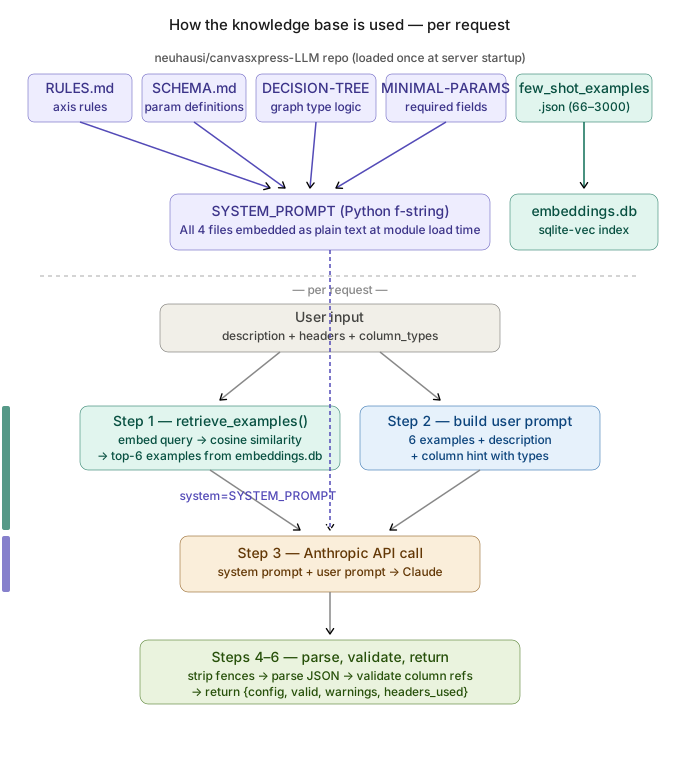
There are two distinct paths:
Path 1 — hardcoded into server.py as Python string variables:
The content from the four canvasxpress-LLM files (RULES.md, SCHEMA.md,
DECISION-TREE.md, MINIMAL-PARAMETERS.md) was manually copied into server.py
as Python string variables during development:
# In server.py — these are hardcoded string variables, not file reads
GRAPH_TYPE_CATEGORIES = """
SINGLE-DIMENSIONAL GRAPH TYPES (use xAxis only, never yAxis):
  Alluvial, Area, Bar, Boxplot ...
"""

MINIMAL_PARAMETERS = """
MINIMAL REQUIRED PARAMETERS PER GRAPH TYPE:
  Bar: graphType, xAxis
  Boxplot: graphType, groupingFactors, xAxis ...
"""

DECISION_TREE = """
ONE-DIMENSIONAL DATA:
  Compare categories → Bar (default), Lollipop ...
"""

GRAPH_SPECIFIC_RULES = """
AXIS RULES (CRITICAL):
  Single-Dimensional types: use xAxis ONLY — NEVER include yAxis ...
"""
These variables are then baked into a base system prompt (_SYSTEM_PROMPT_BASE)
at module load time via a Python f-string. This is Tier 1 — always sent.
Tiered prompt system — build_system_prompt() builds the right prompt per request:
| Tier | Tokens | Triggered when | Content added |
|---|---|---|---|
| 1 | ~1,250 | Always (base) | Graph types, decision tree, minimal params, axis rules, color schemes |
| 2 | ~2,050 | headers or data provided | + SCHEMA.md key parameters + CONTEXT.md data format guide |
| 3 | ~2,650 | 2+ chart-type keywords in description | + CONTRADICTIONS.md resolution strategies |
This avoids paying the full token cost on every request — a simple description with no data stays at Tier 1, while complex requests with data and ambiguous descriptions escalate to Tier 3.
def detect_tier(description, headers, data) -> int:
    has_data = headers is not None or data is not None
    keyword_hits = sum(kw in description.lower() for kw in CONTRADICTION_KEYWORDS)
    if keyword_hits >= 2:  return 3   # ambiguous — add contradiction resolution
    if has_data:           return 2   # data provided — add schema + data format
    return 1                          # description only — base prompt only
Cost comparison per request:
| Scenario | Tier | Input tokens | vs old single prompt |
|---|---|---|---|
"clustered heatmap" | 1 | ~5,000 | same |
"heatmap" + headers | 2 | ~5,800 | +16% |
"scatter with regression" + data | 3 | ~6,400 | +28% |
| Old "everything" approach | — | ~22,000 | baseline to avoid |
Path 2 — per request via semantic vector search:
few_shot_examples.json is handled differently. At startup, build_index.py
embeds every example description into a 384-dimensional vector and stores them
in embeddings.db (sqlite-vec). On each request, the user's description is
embedded and the 6 nearest neighbours are retrieved by cosine similarity (~10ms).
Those 6 examples go into the user message — not the system prompt — so each
request gets the most relevant examples for that specific query.
Per-request flow:
User input (description + headers + data + column_types)
    │
    ├─► detect_tier()              ← Tier 1 / 2 / 3 based on inputs
    │
    ├─► build_system_prompt()      ← assembles tiered prompt (1,250–2,650 tokens)
    │
    ├─► retrieve_examples()        ← sqlite-vec cosine search → top-6 examples
    │
    ├─► build user prompt          ← 6 examples + description + column hint
    │
    ├─► Anthropic API call         ← system=tiered prompt, messages=[user prompt]
    │
    ├─► parse JSON response        ← strip fences, parse, handle empty
    │
    └─► validate_config_headers()  ← check column refs against provided headers
            │
            └─► return {config, valid, warnings, headers_used, types_used}
In debug mode (CX_DEBUG=1) each request prints which tier was selected and why.
Project structure
canvasxpress-mcp/
├── src/
│   └── server.py               # FastMCP HTTP server
├── data/
│   ├── few_shot_examples.json  # Few-shot examples (add more here)
│   └── embeddings.db           # sqlite-vec index (built by build_index.py)
├── build_index.py              # One-time vector index builder
├── test_client.py              # Python test client
├── test_client.pl              # Perl test client
├── test_client.mjs             # Node.js test client (Node 18+)
├── requirements.txt
└── README.md