
ChatPipe MCP Server
Publish live web pages from your AI coding agent — instant shareable URLs from your terminal.
Website · Quick Start · Tools · Pricing
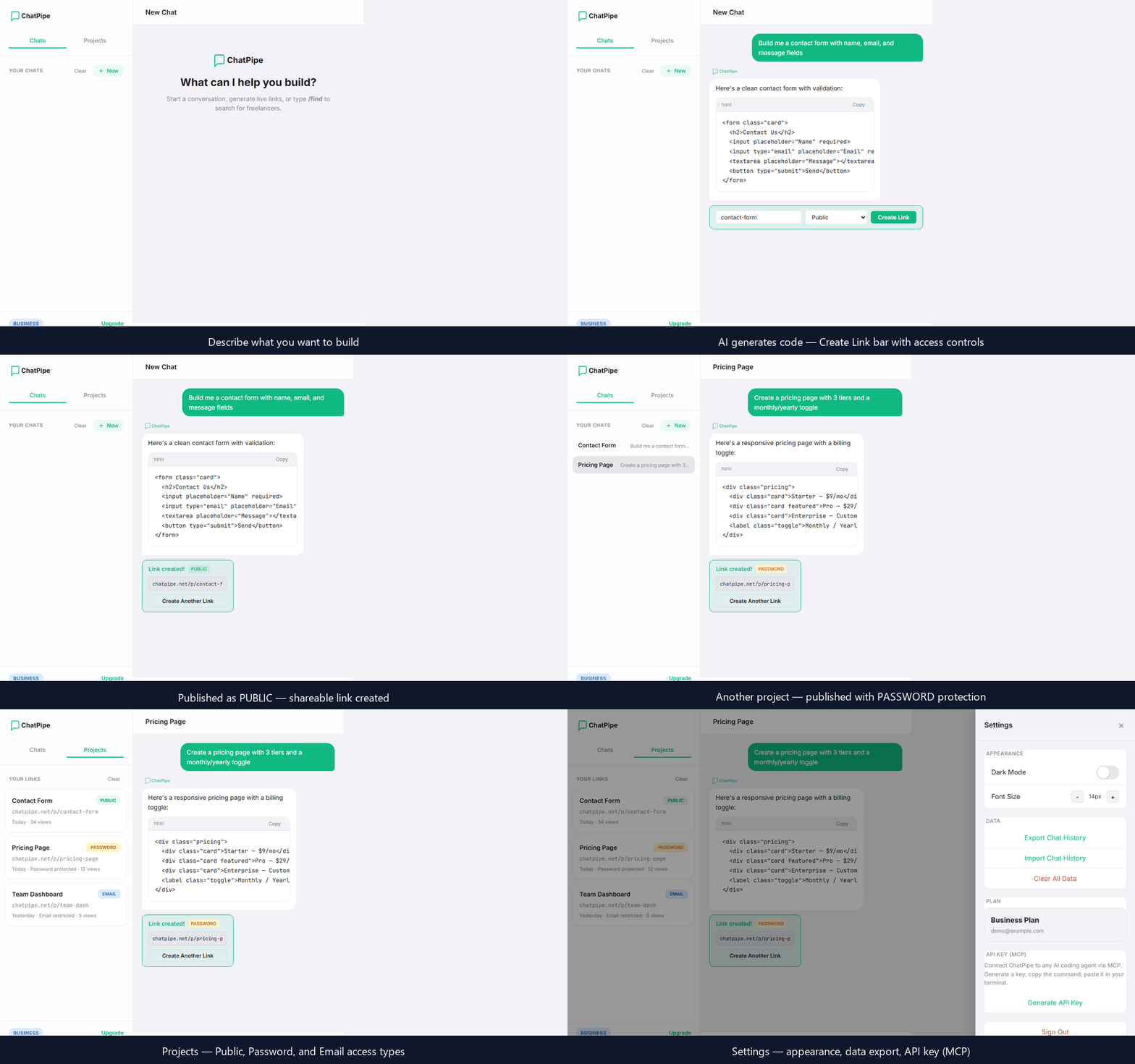
ChatPipe MCP is a Model Context Protocol server that lets AI coding agents publish HTML content as live, shareable web pages. Describe what you need — a dashboard, a landing page, a form — and get a public URL in seconds.
No deployment pipelines. No hosting configuration. No domain setup. Just describe and publish.
Features
- Instant publishing — HTML to live URL in under a second
- Global delivery — Pages load fast from anywhere in the world
- Access control — Public pages or password-protected with encryption
- Update in place — Modify published pages without changing the URL
- Works with any MCP client — Compatible with any AI coding agent that supports the Model Context Protocol
Quick Start
Prerequisites
- A free ChatPipe account
- An MCP-compatible AI coding agent
1. Generate an API key
Sign up at chatpipe.net, then navigate to Settings → API Key (MCP) → Generate API Key.
Note: Copy the key immediately after generation. It will not be shown again. You can regenerate a new key at any time, which revokes the previous one.
2. Install (one command)
Run this in your terminal — replace YOUR_API_KEY with the key from step 1:
claude mcp add chatpipe --transport url https://api.chatpipe.net/mcp --header "Authorization: Bearer YOUR_API_KEY"
That's it. Restart your AI coding agent and ChatPipe tools are ready.
Manual setup (alternative)
If you prefer to configure manually, add this to your MCP client config file:
{
  "mcpServers": {
    "chatpipe": {
      "type": "url",
      "url": "https://api.chatpipe.net/mcp",
      "headers": {
        "Authorization": "Bearer YOUR_API_KEY"
      }
    }
  }
}
Replace YOUR_API_KEY with the key generated in step 1.
3. Start publishing
Try these prompts in your AI coding agent:
"Create a landing page for my project and publish it"
"Build a dashboard showing monthly revenue and publish it as a live page"
"Make a contact form and give me a shareable link"
Available Tools
publish_page
Publish HTML content as a live, shareable page. Returns a public URL.
| Parameter | Type | Required | Description |
|---|---|---|---|
name | string | Yes | Page title (e.g., "Monthly Dashboard") |
slug | string | Yes | URL slug, lowercase with hyphens (e.g., "monthly-dashboard") |
html | string | Yes | Complete HTML content to publish |
access | string | No | "public" (default) or "password" |
password | string | No | Required when access is "password" |
list_projects
List all published pages with their URLs, names, and access levels. Takes no parameters.
update_page
Update the HTML content of an existing page. The URL remains the same.
| Parameter | Type | Required | Description |
|---|---|---|---|
slug | string | Yes | Slug of the page to update |
html | string | Yes | New HTML content |
name | string | No | New page title |
delete_page
Permanently remove a published page.
| Parameter | Type | Required | Description |
|---|---|---|---|
slug | string | Yes | Slug of the page to delete |
Use Cases
| Who | What |
|---|---|
| Consultants | Build client dashboards and share a live URL in your next message |
| Developers | Publish project pages, docs, or demos without a deploy pipeline |
| Sales teams | Generate custom proposals as live pages for each prospect |
| Marketers | Spin up landing pages on the fly and test them immediately |
| Freelancers | Share deliverables as live pages instead of static files |
Pricing
| Free | Pro ($19/mo) | Business ($49/mo) | |
|---|---|---|---|
| Projects | 5 | Unlimited | Unlimited |
| Link expiry | 30 days | Never | Never |
| Password protection | — | Yes | Yes |
| Email-restricted access | — | — | Yes |
| Team seats | — | — | 5 |
Manage your plan at chatpipe.net.
Security
- All communication encrypted over HTTPS
- API keys scoped per user — each key can only access its owner's pages
- Keys can be regenerated at any time (revokes the previous key)
- Password-protected pages are encrypted at rest
Contributing
Found a bug or have a feature request? Open an issue.
Links
- ChatPipe — Create your account and manage projects
- Model Context Protocol — Learn about MCP