ChessAgine MCP

A comprehensive Model Context Protocol (MCP) server that provides advanced chess analysis capabilities by implementing Chess Context Protocol Server and integrating Stockfish engine evaluation, neural net Maia2/Lc0 policy eval, positional theme analysis, opening databases, puzzle training, game visualization, and chess knowledge for enhanced chess understanding and gameplay improvement.
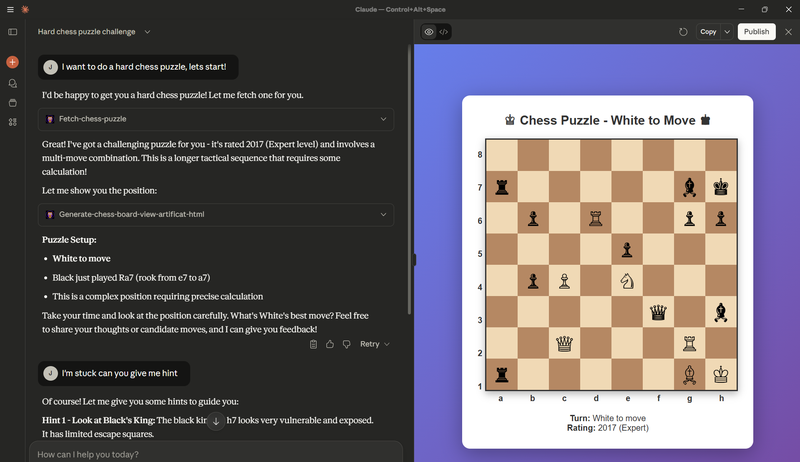
Preview
Features
🔧 Core Analysis Tools
- Stockfish Integration: Deep engine analysis with configurable search depth
- Neural Network Integration: Give LLM access to chess neural net policy and evals
- Theme Analysis: Evaluate material, mobility, space, positional factors, and king safety
- Variation Analysis: Compare multiple lines and track positional changes
- Move Validation: Check move legality and generate board state descriptions
- Game Review: Comprehensive game analysis with theme progression and critical moments
🎮 Interactive Features
- Visual Board Rendering: Generate HTML chess boards for any position
- Dynamic Game Viewer: Interactive game replay with move navigation
- Puzzle Training: Access Lichess puzzle database with theme filtering
- Game Fetching: Retrieve user games from Lichess for analysis
📊 Database Integration
- Lichess Master Games: Access master-level opening statistics and games
- Lichess User Games: Analyze how positions are played across skill levels
- Lichess Puzzle Database: 3+ million tactical puzzles with theme-based filtering
- ChessDB: Query extensive game databases for move evaluations and statistics
🧠 Knowledge Base
- Chess Principles: Silman's imbalances and Fine's 30 principles
- Endgame Theory: Essential endgame knowledge and patterns
- Strategic Concepts: Comprehensive chess improvement guidelines
- Puzzle Themes: 150+ tactical motifs and patterns
Installation
Option 0: Installing via Smithery
To install ChessAgine automatically via Smithery:
npx -y @smithery/cli install @jalpp/chessagine-mcp
Option 1: Using MCPB File (Recommended)
Download the chessagine-mcp.mcpb file and install it directly in Claude Desktop:
- Download the latest release from GitHub releases
- Open Claude Desktop
- Go to Settings → Extensions → Install from file
- Select the
chessagine-mcp.mcpbfile - Restart Claude Desktop
Option 2: Local Development Setup
Prerequisites
- Node.js 22+
- npm or yarn package manager
Clone and Setup
git clone https://github.com/jalpp/chessagine-mcp.git
cd chessagine-mcp
npm install
npm run build:mcp
Configure Claude Desktop
Add to your claude_desktop_config.json:
macOS/Linux:
{
  "mcpServers": {
    "chessagine-mcp": {
      "command": "node",
      "args": ["/absolute/path/to/chessagine-mcp/build/runner/stdio.js"]
    }
  }
}
Windows:
{
  "mcpServers": {
    "chessagine-mcp": {
      "command": "node",
      "args": ["C:\\absolute\\path\\to\\chessagine-mcp\\build\\runner\\stdio.js"]
    }
  }
}
Dev commands
npm run build:mcp  # Build the projects and mcpb file
npm run dev        # test and interact with chessAgine via smithery
npm run debug      # opens MCP inspector to inspect new changes made
Community
- Discord: Join ChessAgine community
License
This project is licensed under the MIT License, the /themes and /protocol are under GPL. See the LICENSE file for details.
Authors
@jalpp