cli-agent-mcp
Unified MCP (Model Context Protocol) server for CLI AI agents. Provides a single interface to invoke Codex, Gemini, Claude, OpenCode CLI tools, and Nano Banana Pro image generation.
Why cli-agent-mcp?
This is more than a CLI wrapper — it's an orchestration pattern for multi-model collaboration.
Can't articulate your requirements clearly? Let Claude orchestrate. Describe what you want, and it will decompose your vague idea into concrete tasks for the right agent. The act of delegation forces clarity.
Planning a grand product vision? Each model brings a unique lens:
- Codex: The critic. Its analytical eye catches what you missed, challenges assumptions, finds edge cases.
- Gemini: The creative. Divergent thinking, unexpected connections, the spark you didn't know you needed.
- Claude: The scribe. Faithful execution, clear documentation, turning ideas into working code.
- Banana: The artist. High-fidelity image generation for UI mockups, product visuals, and creative assets.
Want persistent results? Use save_file to capture agent outputs, then let Claude synthesize insights across multiple analyses.
We don't just wrap CLIs — we provide a thinking framework for human-AI collaboration.
Features
- Unified Interface: Single MCP server exposing multiple CLI agents
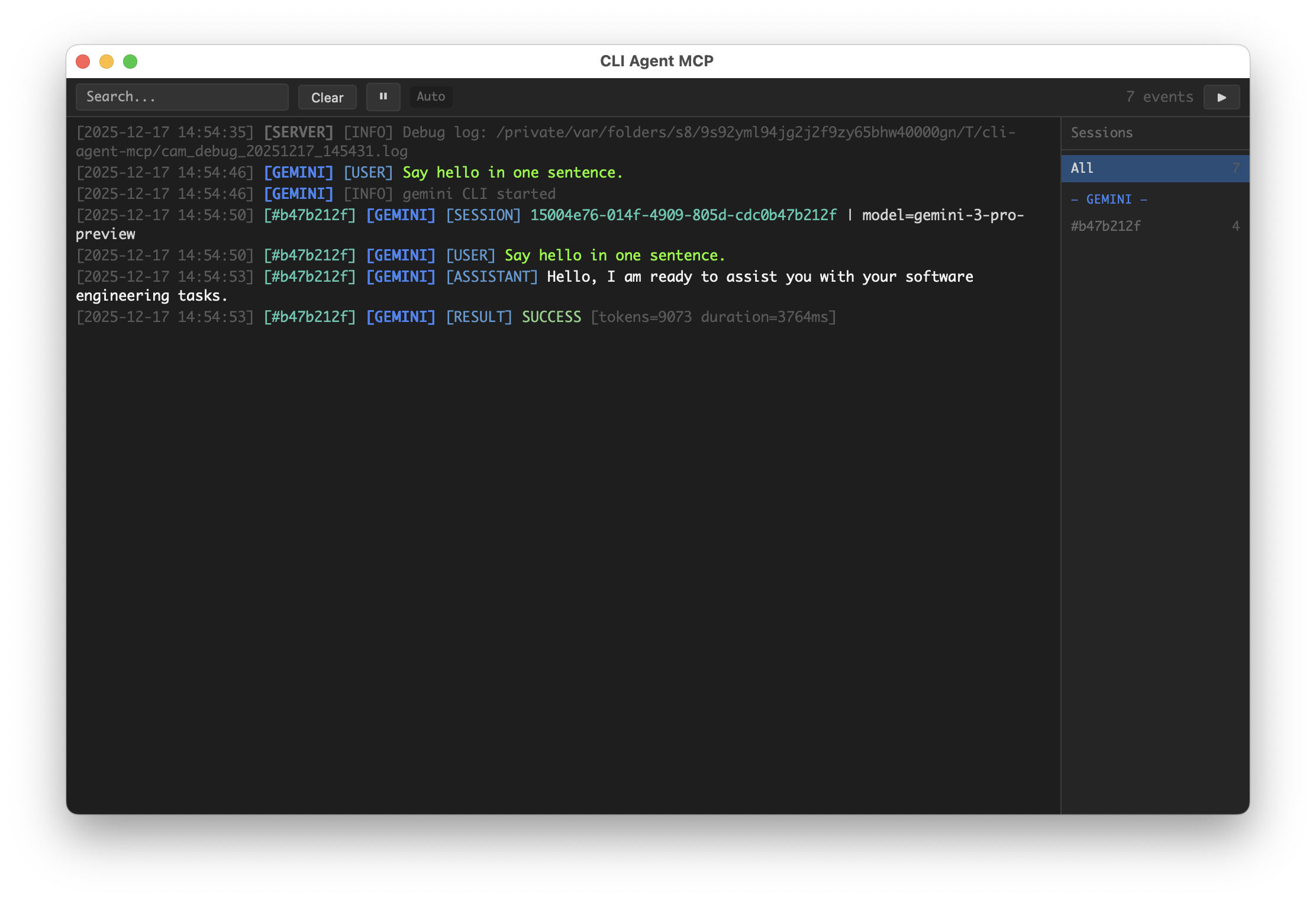
- GUI Dashboard: Real-time task monitoring with pywebview
- Request Isolation: Per-request execution context for safe concurrent usage
- Signal Handling: Graceful cancellation via SIGINT without killing the server
- Debug Logging: Comprehensive subprocess output capture for debugging
Screenshot
Installation
# Install from PyPI (when published)
uvx cli-agent-mcp

# Install from GitHub
uvx --from git+https://github.com/shiharuharu/cli-agent-mcp.git cli-agent-mcp

# Install from source (editable mode for development)
uvx --from /path/to/cli-agent-mcp cli-agent-mcp

# Or use pip
pip install -e .
Configuration
Configure via environment variables:
| Variable | Description | Default |
|---|---|---|
CAM_ENABLE | Comma-separated list of enabled tools (empty = all) | "" (all) |
CAM_DISABLE | Comma-separated list of disabled tools (subtracted from enable) | "" |
CAM_GUI | Enable GUI dashboard | true |
CAM_GUI_DETAIL | GUI detail mode | false |
CAM_GUI_KEEP | Keep GUI on exit | false |
CAM_DEBUG | Include debug info in MCP responses | false |
CAM_LOG_DEBUG | Write debug logs to temp file | false |
CAM_SIGINT_MODE | SIGINT handling (cancel/exit/cancel_then_exit) | cancel |
CAM_SIGINT_DOUBLE_TAP_WINDOW | Double-tap exit window (seconds) | 1.0 |
Tools
codex
Invoke OpenAI Codex CLI agent for deep code analysis and critical review.
Best for: Code review, bug hunting, security analysis
| Parameter | Type | Required | Default | Description |
|---|---|---|---|---|
prompt | string | ✓ | - | Task instruction for the agent |
workspace | string | ✓ | - | Absolute path to the project directory |
continuation_id | string | "" | Pass from previous response to continue conversation | |
permission | string | read-only | Permission level: read-only, workspace-write, unlimited | |
model | string | "" | Model override (only specify if explicitly requested) | |
save_file | string | "" | PREFERRED for large outputs. Writes directly to file, avoiding context overflow | |
report_mode | boolean | false | Generate standalone report format | |
save_file_with_wrapper | boolean | false | Wrap output with <agent-output> XML tags | |
save_file_with_append_mode | boolean | false | Append to file instead of overwriting | |
verbose_output | boolean | false | Return detailed output including reasoning | |
context_paths | array | [] | Reference file/directory paths to provide context | |
image | array | [] | Absolute paths to image files for visual context | |
task_note | string | "" | Display label for GUI | |
debug | boolean | (global) | Override debug setting for this call |
gemini
Invoke Google Gemini CLI agent for UI design and comprehensive analysis.
Best for: UI mockups, image analysis, requirement discovery, full-text analysis
| Parameter | Type | Required | Default | Description |
|---|---|---|---|---|
prompt | string | ✓ | - | Task instruction for the agent |
workspace | string | ✓ | - | Absolute path to the project directory |
continuation_id | string | "" | Pass from previous response to continue conversation | |
permission | string | read-only | Permission level: read-only, workspace-write, unlimited | |
model | string | "" | Model override | |
save_file | string | "" | PREFERRED for large outputs. Writes directly to file, avoiding context overflow | |
report_mode | boolean | false | Generate standalone report format | |
save_file_with_wrapper | boolean | false | Wrap output with <agent-output> XML tags | |
save_file_with_append_mode | boolean | false | Append to file instead of overwriting | |
verbose_output | boolean | false | Return detailed output including reasoning | |
context_paths | array | [] | Reference file/directory paths to provide context | |
task_note | string | "" | Display label for GUI | |
debug | boolean | (global) | Override debug setting for this call |
claude
Invoke Anthropic Claude CLI agent for code implementation.
Best for: Feature implementation, refactoring, code generation
| Parameter | Type | Required | Default | Description |
|---|---|---|---|---|
prompt | string | ✓ | - | Task instruction for the agent |
workspace | string | ✓ | - | Absolute path to the project directory |
continuation_id | string | "" | Pass from previous response to continue conversation | |
permission | string | read-only | Permission level: read-only, workspace-write, unlimited | |
model | string | "" | Model override (sonnet, opus, or full model name) | |
save_file | string | "" | PREFERRED for large outputs. Writes directly to file, avoiding context overflow | |
report_mode | boolean | false | Generate standalone report format | |
save_file_with_wrapper | boolean | false | Wrap output with <agent-output> XML tags | |
save_file_with_append_mode | boolean | false | Append to file instead of overwriting | |
verbose_output | boolean | false | Return detailed output including reasoning | |
context_paths | array | [] | Reference file/directory paths to provide context | |
system_prompt | string | "" | Complete replacement for the default system prompt | |
append_system_prompt | string | "" | Additional instructions appended to default prompt | |
agent | string | "" | Specify agent name (overrides default agent setting) | |
task_note | string | "" | Display label for GUI | |
debug | boolean | (global) | Override debug setting for this call |
opencode
Invoke OpenCode CLI agent for full-stack development.
Best for: Rapid prototyping, multi-framework projects
| Parameter | Type | Required | Default | Description |
|---|---|---|---|---|
prompt | string | ✓ | - | Task instruction for the agent |
workspace | string | ✓ | - | Absolute path to the project directory |
continuation_id | string | "" | Pass from previous response to continue conversation | |
permission | string | read-only | Permission level: read-only, workspace-write, unlimited | |
model | string | "" | Model override (format: provider/model) | |
save_file | string | "" | PREFERRED for large outputs. Writes directly to file, avoiding context overflow | |
report_mode | boolean | false | Generate standalone report format | |
save_file_with_wrapper | boolean | false | Wrap output with <agent-output> XML tags | |
save_file_with_append_mode | boolean | false | Append to file instead of overwriting | |
verbose_output | boolean | false | Return detailed output including reasoning | |
context_paths | array | [] | Reference file/directory paths to provide context | |
file | array | [] | Absolute paths to files to attach | |
agent | string | build | Agent type: build, plan, etc. | |
task_note | string | "" | Display label for GUI | |
debug | boolean | (global) | Override debug setting for this call |
banana
Generate high-fidelity images via the Nano Banana Pro API.
Best for: UI mockups, product visuals, infographics, architectural renders, character art
Nano Banana Pro has exceptional understanding and visual expression capabilities—your prompt creativity is the only limit, not the model.
| Parameter | Type | Required | Default | Description |
|---|---|---|---|---|
prompt | string | ✓ | - | Image generation prompt |
save_path | string | ✓ | - | Base directory for saving images |
task_note | string | ✓ | - | Subdirectory name (English recommended, e.g., 'hero-banner'). Files saved to {save_path}/{task_note}/ |
images | array | [] | Reference images (absolute paths) with optional role and label | |
aspect_ratio | string | "1:1" | Image aspect ratio: 1:1, 2:3, 3:2, 3:4, 4:3, 4:5, 5:4, 9:16, 16:9, 21:9 | |
resolution | string | "1K" | Image resolution: 1K, 2K, 4K | |
include_thoughts | boolean | false | Include thinking process in response |
Environment Variables:
| Variable | Required | Default | Description |
|---|---|---|---|
BANANA_AUTH_TOKEN | ✓ | - | Google API key or Bearer token |
BANANA_ENDPOINT | https://generativelanguage.googleapis.com | API endpoint (version path auto-appended) |
Prompt Best Practices:
- Explicitly request an image (e.g., start with "Generate an image:" or include
"output":"image") - Use structured specs (JSON / XML tags / labeled sections) for complex requests
- Use
MUST/STRICT/CRITICALfor non-negotiable constraints - Add negative constraints (e.g., "no watermark", "no distorted hands")
image
Generate images via OpenRouter-compatible or OpenAI-compatible endpoints.
Best for: General image generation when you need compatibility with various providers. For best results with Gemini models, use the banana tool instead.
| Parameter | Type | Required | Default | Description |
|---|---|---|---|---|
prompt | string | ✓ | - | Image generation prompt |
save_path | string | ✓ | - | Base directory for saving images |
task_note | string | ✓ | - | Subdirectory name (English recommended, e.g., 'hero-banner'). Files saved to {save_path}/{task_note}/ |
images | array | [] | Reference images (absolute paths) with optional role and label | |
aspect_ratio | string | "1:1" | Image aspect ratio: 1:1, 2:3, 3:2, 3:4, 4:3, 4:5, 5:4, 9:16, 16:9, 21:9 | |
resolution | string | "1K" | Image resolution: 1K, 2K, 4K | |
model | string | (env) | Model to use for generation | |
api_type | string | (env) | API type: openrouter_chat, openai_images, openai_responses |
Environment Variables:
| Variable | Required | Default | Description |
|---|---|---|---|
IMAGE_AUTH_TOKEN | ✓ | - | API key for image generation |
IMAGE_ENDPOINT | https://openrouter.ai/api | API endpoint (version path auto-appended) | |
IMAGE_MODEL | gpt-image-1 | Default model | |
IMAGE_API_TYPE | openrouter_chat | API type: openrouter_chat, openai_images, openai_responses |
get_gui_url
Get the GUI dashboard URL. Returns the HTTP URL where the live event viewer is accessible.
No parameters required.
Prompt Injection
Some parameters automatically inject additional content into the prompt using <mcp-injection> XML tags. These tags make it easy to debug and identify system-injected content.
report_mode
When save_file and report_mode are both set, output format requirements are injected:
<your prompt>

<mcp-injection type="output-format">
  <output-requirements>
    <rule>This response will be saved as a standalone document.</rule>
    <rule>Write so it can be understood WITHOUT any prior conversation context.</rule>
    <rule>Do NOT reference "above", "previous messages", or "as discussed".</rule>
    <rule>Use the same language as the user's request.</rule>
  </output-requirements>
  <structure>
    <section name="Summary">3-7 bullet points with key findings and conclusions</section>
    <section name="Context">Restate the task/problem so readers understand without chat history</section>
    <section name="Analysis">Step-by-step reasoning with evidence; include file:line references</section>
    <section name="Recommendations">Actionable next steps ordered by priority</section>
  </structure>
  <note>Write with enough detail to be useful standalone, but avoid unnecessary filler.</note>
</mcp-injection>
context_paths
When context_paths is provided, reference paths are injected:
<your prompt>

<mcp-injection type="reference-paths">
  <description>
    These paths are provided as reference for project structure.
    You may use them to understand naming conventions and file organization.
  </description>
  <paths>
    <path>/src/api/handlers.py</path>
    <path>/config/settings.json</path>
  </paths>
</mcp-injection>
Stateless Design
Important: Each tool call is stateless - the agent has NO memory of previous calls.
- New conversation (no
continuation_id): Include ALL relevant context in your prompt - background, specifics, constraints, and prior findings. - Continuing conversation (with
continuation_id): The agent retains context from that session, so you can be brief.
If your request references prior context (e.g., "fix that bug", "continue the work"), you must either:
- Provide
continuation_idfrom a previous response, OR - Expand the reference into concrete details
File Output Options
save_file_with_wrapper
When enabled, output is wrapped with XML tags containing metadata:
<agent-output agent="gemini" continuation_id="abc123">
... agent response ...
</agent-output>
save_file_with_append_mode
When enabled, new output is appended to existing file instead of overwriting. Combined with save_file_with_wrapper, enables multi-agent collaboration:
<agent-output agent="codex" continuation_id="...">
Critical analysis of the codebase...
</agent-output>

<agent-output agent="gemini" continuation_id="...">
Creative suggestions for improvement...
</agent-output>

<agent-output agent="claude" continuation_id="...">
Implementation summary...
</agent-output>
Response Format
All responses are wrapped in XML format:
Success Response
<response>
  <thought_process>...</thought_process>  <!-- Only when verbose_output=true -->
  <answer>
    Agent's response content...
  </answer>
  <continuation_id>session-id-here</continuation_id>
  <debug_info>...</debug_info>  <!-- Only when debug=true -->
</response>
Error Response
Error responses include partial progress to enable retry:
<response>
  <error>Error message</error>
  <thought_process>...</thought_process>  <!-- Collected steps before error -->
  <partial_answer>...</partial_answer>    <!-- Partial output if any -->
  <continuation_id>session-id</continuation_id>
  <hint>Task failed. Above is the output collected so far. You can send 'continue' with this continuation_id to retry.</hint>
  <debug_info>...</debug_info>
</response>
Permission Levels
| Level | Description | Codex | Gemini | Claude | OpenCode | Banana |
|---|---|---|---|---|---|---|
read-only | Can only read files | --sandbox read-only | Read-only tools only | --tools Read,Grep,Glob | edit: deny, bash: deny | Read workspace images only |
workspace-write | Can modify files within workspace | --sandbox workspace-write | All tools + sandbox | --tools Read,Edit,Write,Bash | edit: allow, bash: ask | Write to workspace only |
unlimited | Full system access (use with caution) | --sandbox danger-full-access | All tools, no sandbox | --tools default | edit: allow, bash: allow | Full access |
Debug Mode
Enable debug mode to get detailed execution information:
# Enable debug info in responses
export CAM_DEBUG=true

# Enable detailed log file
export CAM_LOG_DEBUG=true
When CAM_LOG_DEBUG=true, logs are written to:
/tmp/cli-agent-mcp/cam_debug_YYYYMMDD_HHMMSS.log
Debug output includes:
- Full subprocess command
- Complete stdout/stderr output
- Return codes
- MCP request/response summaries
MCP Configuration
Add to your MCP client configuration (e.g., Claude Desktop claude_desktop_config.json):
Basic Configuration
{
  "mcpServers": {
    "cli-agent-mcp": {
      "command": "uvx",
      "args": ["cli-agent-mcp"]
    }
  }
}
Install from GitHub
{
  "mcpServers": {
    "cli-agent-mcp": {
      "command": "uvx",
      "args": [
        "--from",
        "git+https://github.com/shiharuharu/cli-agent-mcp.git",
        "cli-agent-mcp"
      ]
    }
  }
}
With Debug Mode
{
  "mcpServers": {
    "cli-agent-mcp": {
      "command": "uvx",
      "args": [
        "--from",
        "git+https://github.com/shiharuharu/cli-agent-mcp.git",
        "cli-agent-mcp"
      ],
      "env": {
        "CAM_DEBUG": "true",
        "CAM_LOG_DEBUG": "true"
      }
    }
  }
}
Disable GUI
{
  "mcpServers": {
    "cli-agent-mcp": {
      "command": "uvx",
      "args": ["cli-agent-mcp"],
      "env": {
        "CAM_GUI": "false"
      }
    }
  }
}
Limit Available Tools
{
  "mcpServers": {
    "cli-agent-mcp": {
      "command": "uvx",
      "args": ["cli-agent-mcp"],
      "env": {
        "CAM_ENABLE": "claude,gemini"
      }
    }
  }
}
Disable Image Tools
{
  "mcpServers": {
    "cli-agent-mcp": {
      "command": "uvx",
      "args": ["cli-agent-mcp"],
      "env": {
        "CAM_DISABLE": "banana,image"
      }
    }
  }
}
Project Structure
cli-agent-mcp/
├── src/cli_agent_mcp/
│   ├── __init__.py          # Package exports
│   ├── __main__.py          # Entry point
│   ├── app.py               # Server lifecycle (run_server, main)
│   ├── server.py            # MCP protocol adapter (create_server)
│   ├── tool_schema.py       # Tool descriptions and JSON schemas
│   ├── config.py            # Configuration management
│   ├── gui_manager.py       # GUI dashboard manager
│   ├── orchestrator.py      # Request registry
│   ├── signal_manager.py    # Signal handling (SIGINT/SIGTERM)
│   ├── handlers/            # Tool handlers
│   │   ├── base.py          # ToolContext, ToolHandler base class
│   │   ├── cli.py           # CLI tools (codex/gemini/claude/opencode)
│   │   ├── parallel.py      # Parallel execution (*_parallel tools)
│   │   └── image_tools.py   # Image tools (banana/image)
│   ├── utils/               # Utility functions
│   │   ├── xml_wrapper.py   # XML escaping and wrapper building
│   │   └── prompt_injection.py  # Prompt injection helpers
│   └── shared/              # Shared modules
│       ├── invokers/        # CLI invoker implementations
│       ├── parsers/         # Output parsers
│       ├── gui/             # GUI components
│       └── response_formatter.py  # Response formatting
└── tests/
Development
# Install dev dependencies
pip install -e ".[dev]"

# Run tests
pytest
License
MIT