CodeLedger
Token-level cost intelligence for Claude Code.



CodeLedger is a Claude Code plugin that tracks where your AI coding tokens go — per-project, per-agent, per-skill — and separates your actual coding work from background plugin overhead. Ask questions conversationally via MCP tools, or browse the local dashboard.
Setup & MCP Tools
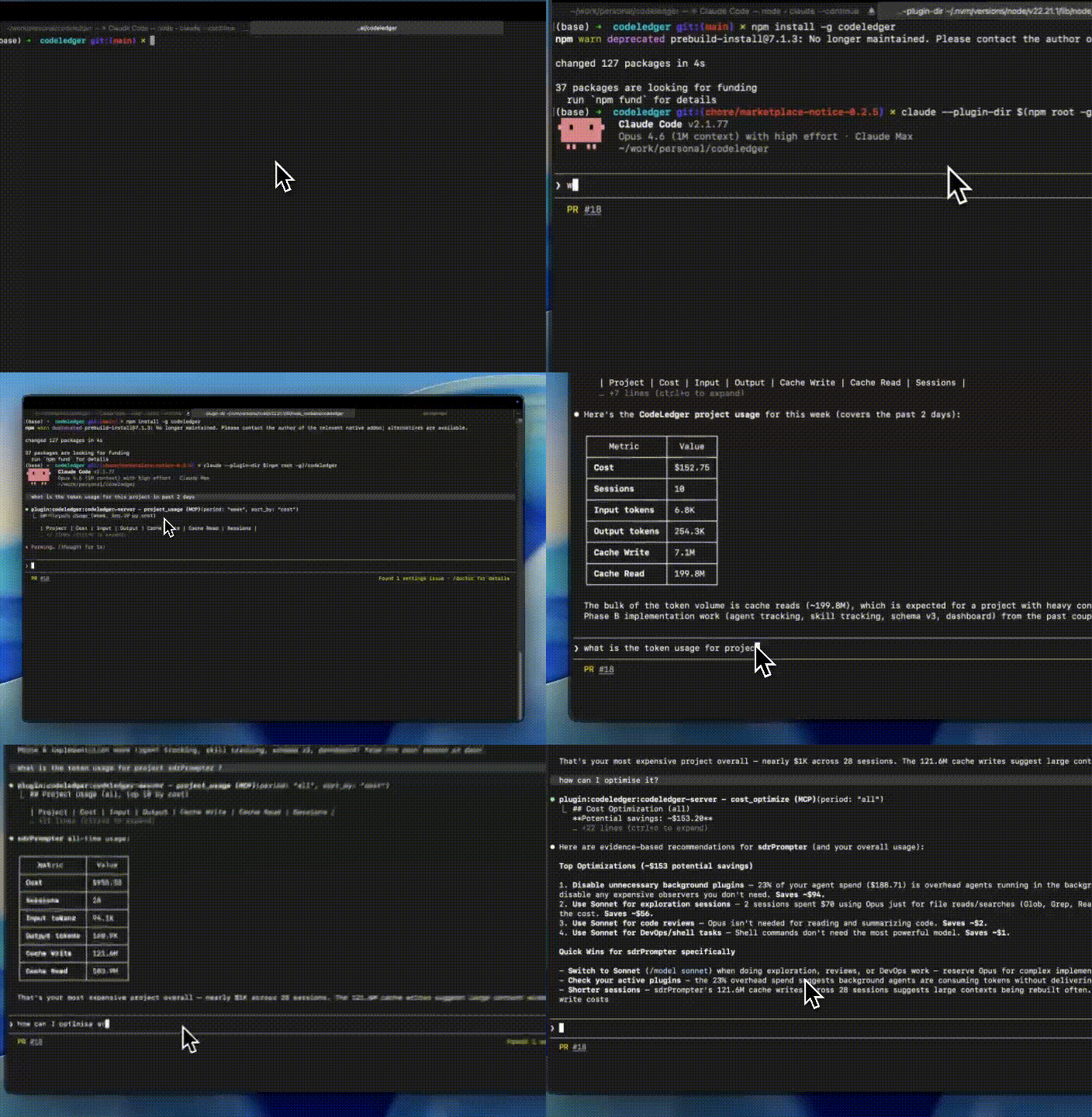
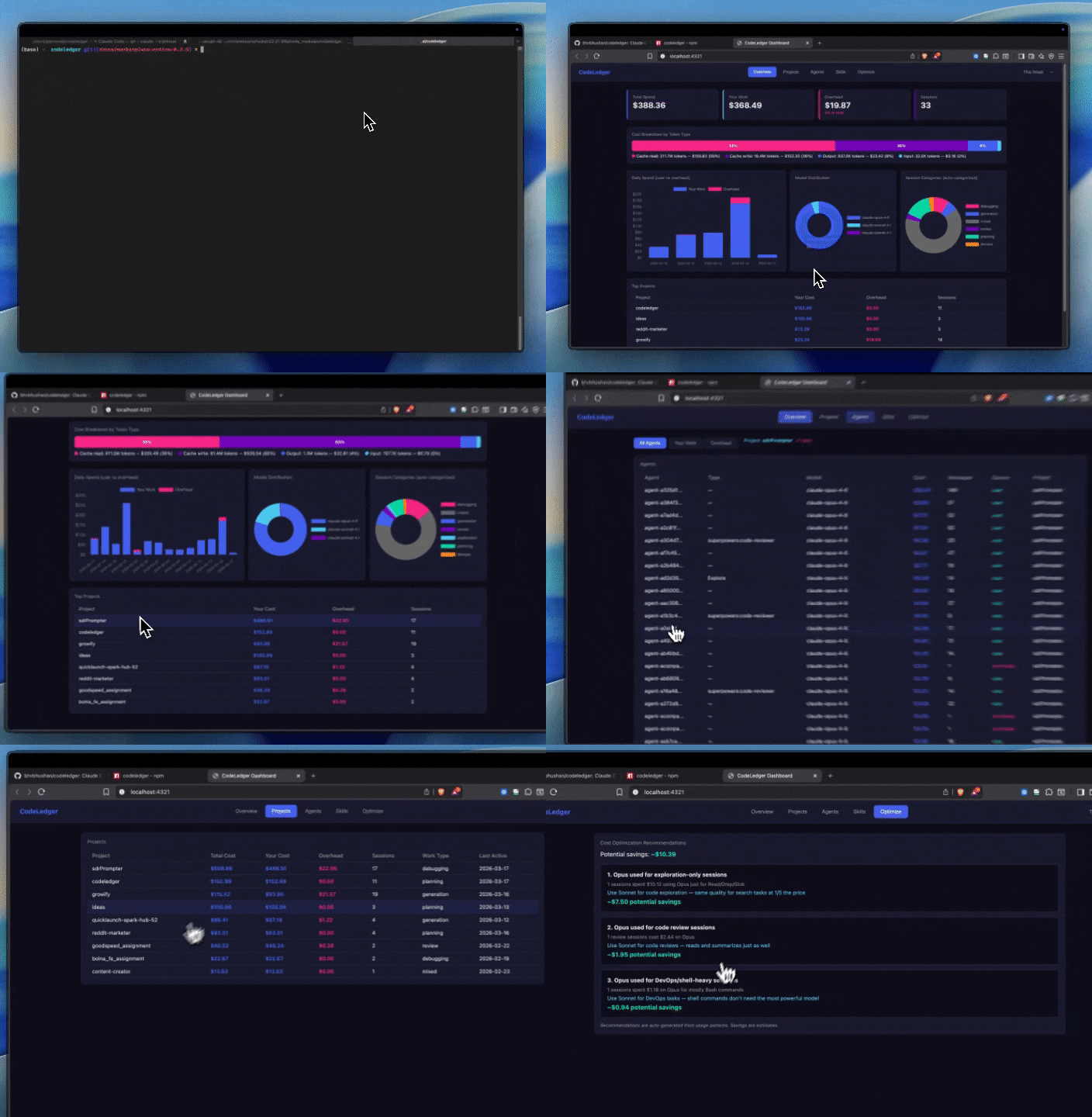
Dashboard
Why CodeLedger?
Running Claude Code agents can burn through tokens fast. A single session with 49 parallel subagents can cost $8,000-$15,000. But you have zero visibility into:
- Which project costs the most?
- Which agent burned the most tokens?
- How much is plugin overhead (claude-mem observers, auto-compaction) vs your actual work?
- Are you using Opus for tasks that Sonnet handles just as well?
No existing tool answers these questions. CodeLedger does.
What Makes It Different
| Capability | ccusage | Agentlytics | tokscale | CodeLedger |
|---|---|---|---|---|
| Per-project tracking | Yes | Yes | No | Yes |
| Per-agent token breakdown | No | No | No | Yes |
| Per-skill attribution | No | No | No | Yes (~estimated) |
| User vs overhead cost split | No | No | No | Yes |
| Session category classification | No | No | No | Yes |
| Cost optimization recommendations | No | No | No | Yes |
| Conversational querying via MCP | No | No | No | Yes |
| Local web dashboard | No | Yes | No | Yes |
| Runs as Claude Code plugin | No | No | No | Yes |
Quick Start
Install from npm
npm install -g codeledger
Run Claude Code with the plugin
macOS / Linux:
claude --plugin-dir $(npm root -g)/codeledger
Windows (PowerShell):
claude --plugin-dir "$(npm root -g)\codeledger"
Windows (CMD):
for /f "delims=" %i in ('npm root -g') do claude --plugin-dir "%i\codeledger"
This loads everything — 6 MCP tools, 4 hooks (real-time tracking), and slash commands.
Anthropic Plugin Marketplace: CodeLedger has been submitted to the official Claude Code plugin directory and is pending approval. Once approved, installation will be simply:
/plugin install codeledgerUntil then, use the npm install method above.
Start the dashboard
npx codeledger dashboard
Opens a local dashboard at http://localhost:4321 with charts, tables, and drill-downs.
Install from source (development)
git clone https://github.com/bhvbhushan/codeledger.git
cd codeledger && npm install && npm run build
claude --plugin-dir .
Features
6 MCP Tools (conversational querying)
Ask Claude directly — no dashboards needed:
usage_summary— "How much have I spent today?"project_usage— "Which project costs the most?"model_stats— "What's my model distribution?"agent_usage— "Which agents burned the most tokens?"skill_usage— "How much does brainstorming cost vs code review?" (~estimated)cost_optimize— "How can I reduce my costs?" (evidence-based recommendations)
User vs Overhead Classification
CodeLedger automatically separates your actual coding work from background noise:
This Week — $142.62
  Your coding agents:     $122.76 (86%)
  Background overhead:     $19.87 (14%)
    Plugin observers (acompact-*)
    System agents (aprompt_suggestion-*)
Zero configuration. Works by detecting agent ID prefixes — a structural signal present in all Claude Code versions.
Session Categories (auto-classified)
Every session is classified by what kind of work it does, based on tool usage patterns:
| Category | Signal |
|---|---|
| generation | Write + Edit > 40% of tool calls |
| exploration | Read + Grep + Glob > 60% |
| debugging | Bash + Edit combos |
| review | Read-heavy, no Write/Edit |
| planning | Agent delegation dominant |
| devops | Bash-heavy, no editing |
| mixed | No dominant pattern |
Classification is heuristic (~70-80% accuracy). Always labeled "auto-categorized."
Cost Optimization
Evidence-based recommendations with dollar amounts:
1. Opus used for exploration-only sessions
   12 sessions spent $45.00 using Opus just for Read/Grep/Glob
   Recommendation: Use Sonnet — same quality at 1/5 the price
   Potential savings: ~$36.00

2. Background plugin overhead exceeds 15%
   $19.87 spent on overhead agents (14% of total)
   Recommendation: Review active plugin configuration
   Potential savings: ~$9.94
Local Dashboard
Dark-themed web dashboard at localhost:4321:
- Overview — KPI cards, daily spend chart (user vs overhead), model distribution pie chart, top projects
- Projects — per-project table with drill-down to sessions and agents
- Agents — filter by user/overhead, click project to see its agents
- Skills — per-skill estimated token attribution
- Optimize — actionable cost reduction recommendations
How It Works
~/.claude/projects/*/              Claude Code JSONL session files
         │
         ├── SessionEnd hook ──────── Parses JSONL on session completion
         ├── SubagentStop hook ────── Parses agent JSONL files
         ├── PostToolUse hook ─────── Logs skill invocations
         └── Background scanner ───── Catches missed sessions (every 5 min)
                    │
                    ▼
         ~/.codeledger/codeledger.db   SQLite (WAL mode)
                    │
          ┌─────────┼──────────┐
          ▼         ▼          ▼
      MCP Tools  Dashboard  Classifier
     (6 tools)  (:4321)   (categories)
All data stays local. Zero network calls. The SQLite database at ~/.codeledger/codeledger.db is readable, exportable, and deletable at any time.
Configuration
| Environment Variable | Default | Purpose |
|---|---|---|
CODELEDGER_DB_PATH | ~/.codeledger/codeledger.db | Database location |
CLAUDE_DATA_DIR | ~/.claude | Claude Code data directory |
Dashboard port: npx codeledger dashboard --port 8080
Development
git clone https://github.com/bhvbhushan/codeledger.git
cd codeledger
npm install
npm run build     # tsup: src/ → dist/
npm test          # vitest (117 tests)
npm run lint      # tsc --noEmit
npm run dev       # tsup --watch
Privacy
- 100% local. All data stays in
~/.codeledger/. Zero network calls. - Read-only parsing. CodeLedger reads JSONL files but never modifies them.
- No code or prompts stored. Only aggregated metrics: token counts, costs, model names, tool names.
- User-owned data. Delete
~/.codeledger/at any time to remove all data.
Roadmap
- Per-project and per-session tracking
- Per-agent token breakdown with overhead classification
- Per-skill estimated token attribution
- Session category classification
- Cost optimization recommendations
- Local web dashboard
- Team dashboard (hosted, multi-user aggregation)
- Budget alerts and anomaly detection
- Multi-tool support (Cursor, Copilot)
Contributing
Contributions are welcome! Please read the Contributing Guidelines before submitting a PR.
- Bug reports and feature requests — use Issue Templates
- Questions — use GitHub Discussions
- Security vulnerabilities — see Security Policy
All contributors are expected to follow the Code of Conduct.