codesession-cli
Track what your AI agents actually cost — session tracker for Claude Code, OpenClaw, Codex, Cursor & more


Track agent runs • Monitor files • Log commits • Enforce budgets
If this tool saves you money, consider sponsoring or giving it a star


What's New in v2.4.0
- Extended Codex Pricing —
codex-mini-latest,gpt-5.1-codex-max,gpt-5.1-codex-mini,gpt-5.3-codexadded to auto-pricing table - Security Hardening — Shell injection fix,
/api/resetnow requires?confirm=true, input validation onlog-ai - Stability Fixes — Watcher crash on filesystem errors fixed, git polling race condition resolved, 15s timeout on all git operations
- Community Files —
CODE_OF_CONDUCT,CONTRIBUTING,SECURITY, issue templates, PR template
Dashboard Preview
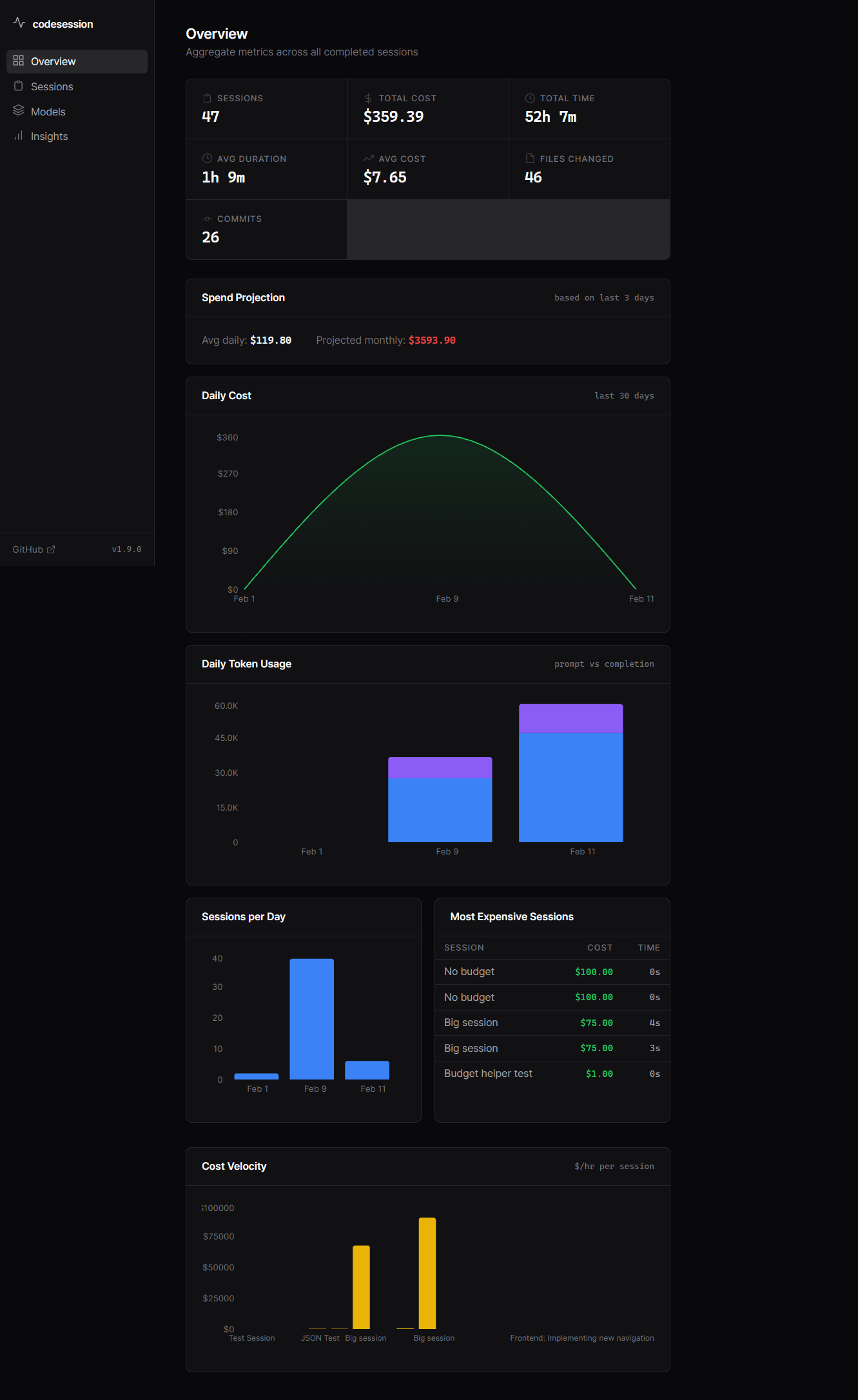
Real-time cost tracking, session analytics, and model breakdown
View More Screenshots
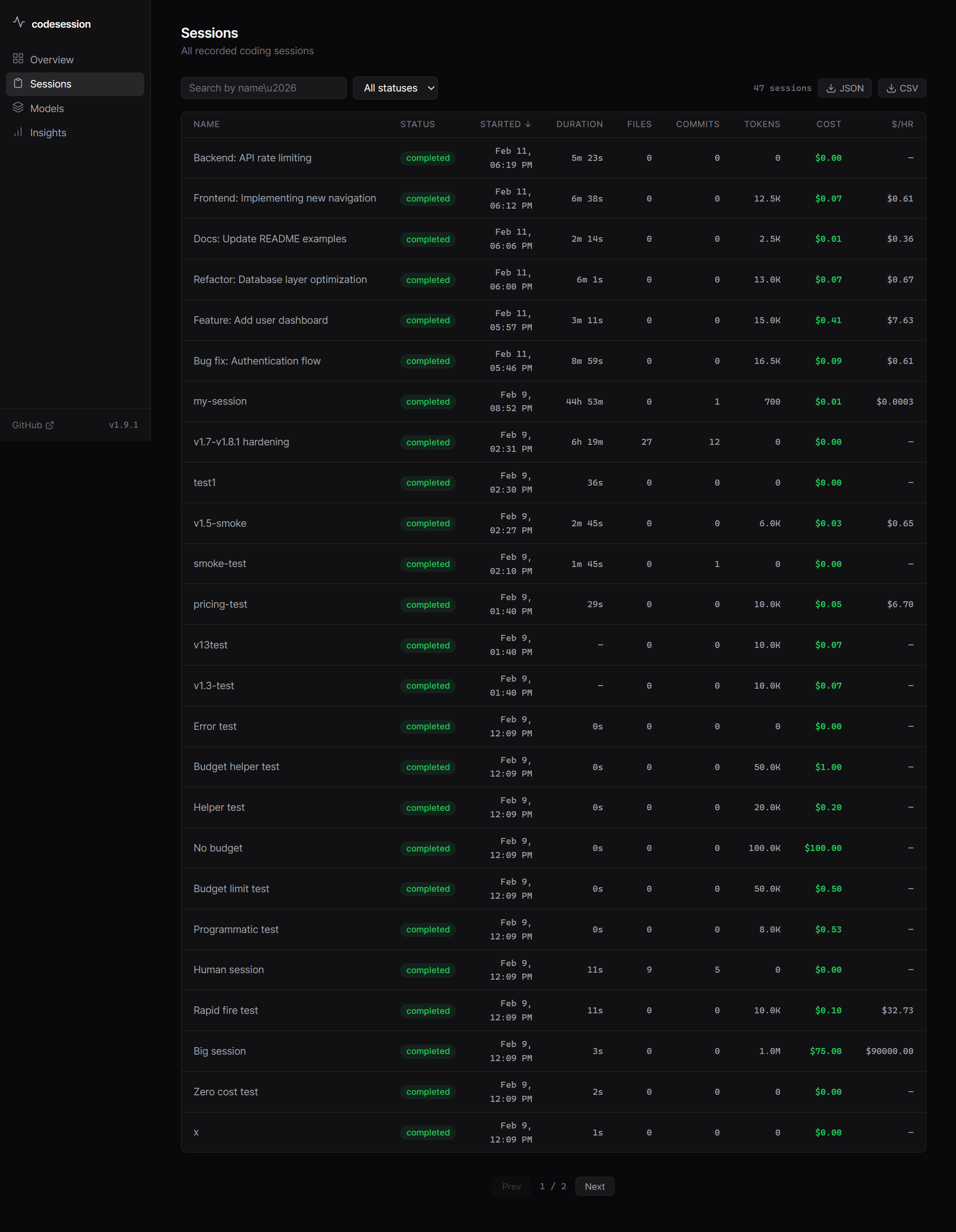
Session Detail View
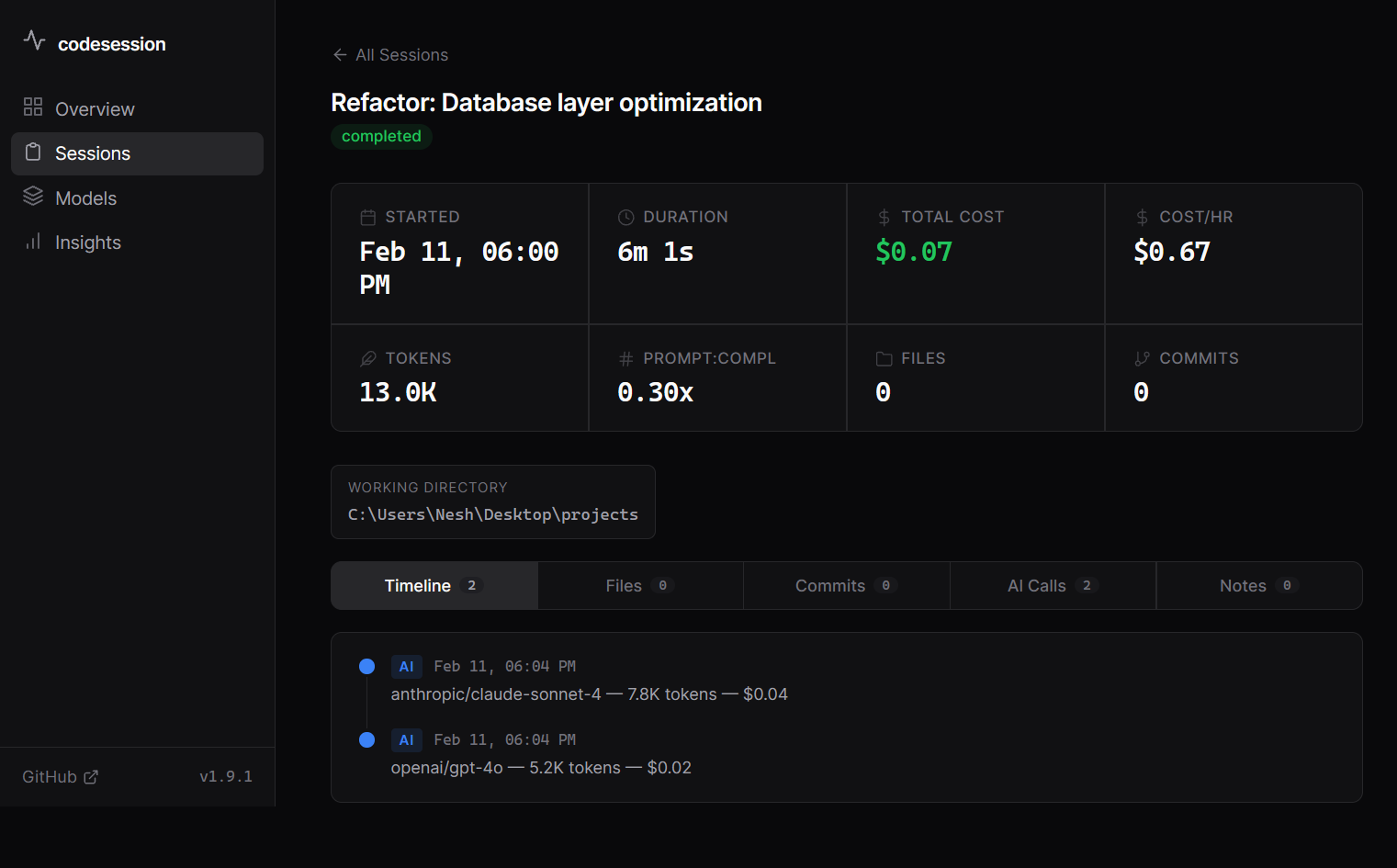
AI Usage with Agent Tracking
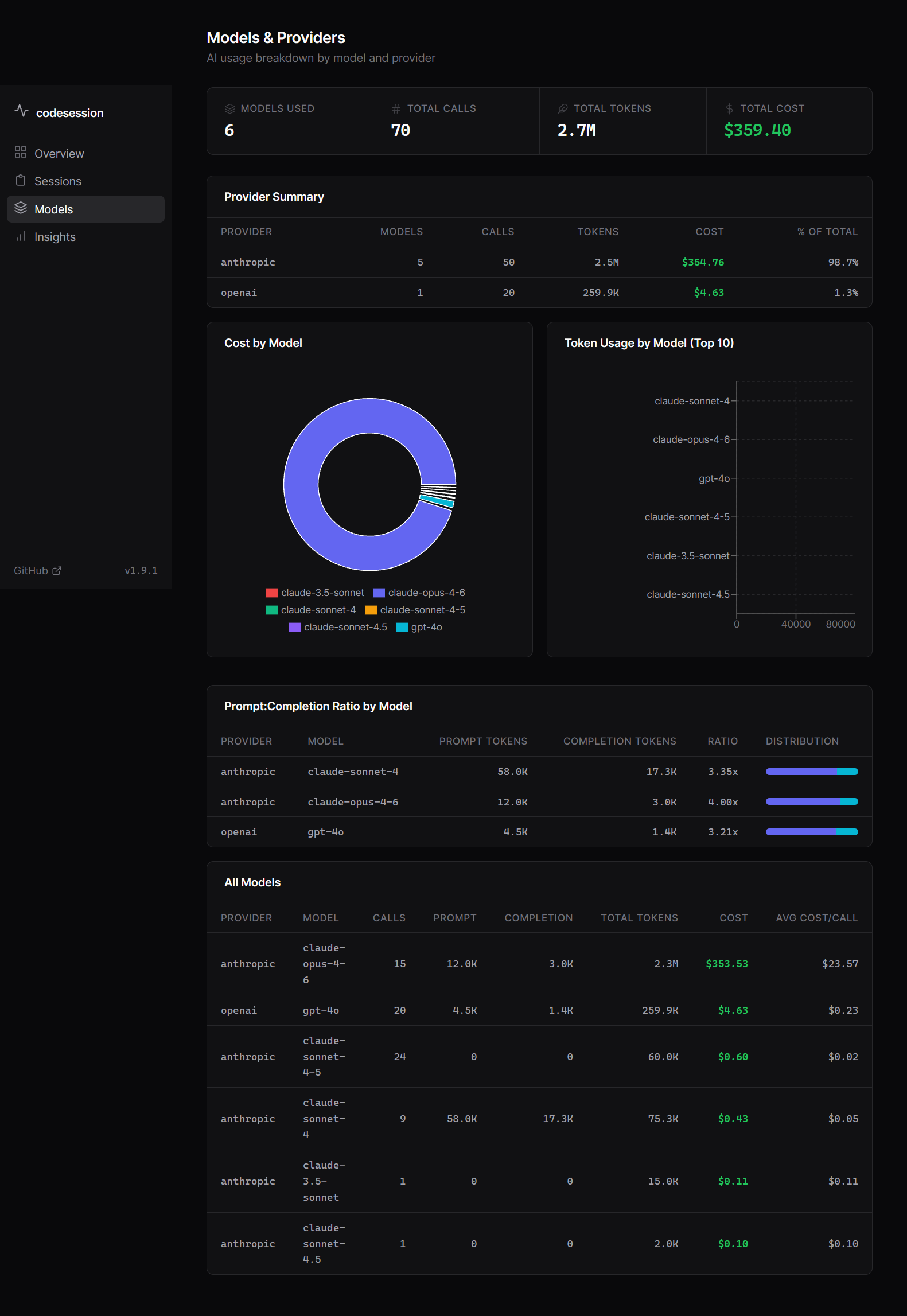
Cost Charts & Analytics
The Problem
Your AI agent just ran for 45 minutes. It made 23 API calls, edited 15 files, and created 4 commits.
You have no idea what it cost.
OpenClaw, Claude Code, custom agents — they all burn tokens with zero visibility. You find out when the bill arrives.
The Solution
One command to start tracking. Everything logged automatically.
# Start tracking an agent run
cs start "Fix authentication bug"

# Agent does its thing... (files, commits, AI calls tracked automatically)

# End and see the damage
cs end
# Session: 47m • 15 files • 4 commits • $8.47 AI cost
Works With
- OpenClaw — Ships as an OpenClaw skill (install from ClawHub)
- Claude Code — Track autonomous coding sessions
- Custom agents — Programmatic API with budget enforcement
- Manual sessions — Track your own coding time and costs
Installation
Prerequisites
codesession-cli uses an embedded SQLite database (better-sqlite3) which requires C/C++ build tools to compile:
| OS | Install build tools |
|---|---|
| Ubuntu/Debian | sudo apt-get install -y build-essential python3 |
| macOS | xcode-select --install |
| Windows | npm install -g windows-build-tools or install Visual Studio Build Tools |
| Alpine | apk add build-base python3 |
Note: If prebuilt binaries are available for your platform, compilation is skipped automatically.
Install
npm install -g codesession-cli
Quick Start (for Agents)
If you use OpenClaw, Claude Code, or any AI agent framework, this is for you. All commands support --json for machine-readable output:
# Start tracking (--close-stale handles crashed sessions)
cs start "Fix authentication bug" --close-stale --json
# {"schemaVersion":1,"id":42,"name":"Fix authentication bug","status":"active",...}

# Log each AI call (cost auto-calculated from built-in pricing)
cs log-ai -p anthropic -m claude-sonnet-4 --prompt-tokens 8000 --completion-tokens 2000 --agent "Code Review Bot" --json

# Check spend mid-session
cs status --json
# {"id":42,"aiCost":3.47,"aiTokens":89000,...}

# End session
cs end -n "Auth complete, all tests passing" --json
# {"id":42,"duration":847,"filesChanged":12,"aiCost":4.80,...}
Files and git commits are tracked automatically -- no extra commands needed.
Agent Workflow
graph LR
    A[Start Session] --> B[Agent Works]
    B --> C[Log AI Calls]
    C --> D{More Work?}
    D -->|Yes| B
    D -->|No| E[End Session]
    E --> F[View Dashboard]

    B -.->|Auto-tracked| G[File Changes]
    B -.->|Auto-tracked| H[Git Commits]
    C -.->|Tracked| I[Tokens & Cost]

    style A fill:#4CAF50
    style E fill:#2196F3
    style F fill:#FF9800
Typical agent flow:
cs start "Task name" --json --close-stale- Creates session- Agent performs work (files, commits auto-tracked)
cs log-ai -p anthropic -m claude-sonnet-4 --agent "Agent Name" --json- Log each AI callcs status --json- Check costs mid-sessioncs end -n "Task complete" --json- Finalize and summarizecs dashboard- Review analytics
CLI Usage (Manual / Interactive)
For human developers tracking their own sessions:
# Start a session
cs start "Build user auth"

# Log AI usage
cs log-ai -p anthropic -m claude-sonnet-4 --prompt-tokens 8000 --completion-tokens 2000

# Or provide cost manually
cs log-ai -p anthropic -m claude-opus-4-6 -t 15000 -c 0.30

# Check current costs mid-session
cs status

# End session
cs end -n "Auth complete, all tests passing"

# View session history
cs list
cs show --files --commits
cs stats

# Export sessions
cs export --format csv
cs export --format json --limit 10
Web Dashboard
See all your session data in a browser:
cs dashboard
Opens a local web app at http://localhost:3737 with five pages:
Overview
- KPI cards: total sessions, cost, time, avg duration, avg cost, files changed, commits
- Daily cost area chart (30 days) with spend projection (avg daily + projected monthly)
- Daily token usage bar chart (prompt vs completion)
- Sessions per day chart
- Most expensive sessions table
- Cost velocity chart ($/hr per session)
Sessions
- Searchable, sortable session table with status badges
- Cost/hr column, pagination, JSON/CSV export buttons
- Click into any session for full detail:
- Unified timeline (files, commits, AI calls, notes in chronological order)
- Tabs: Timeline, Files, Commits, AI Calls, Notes
- Stat row: duration, cost, cost/hr, tokens, prompt:completion ratio, files, commits
- Working directory and Git HEAD metadata
Models & Providers
- Per-model and per-provider cost/token/call breakdown
- Cost by model pie chart
- Token usage by model stacked bar chart (top 10)
- Prompt:completion ratio analysis with inline distribution bars
- Full model table with avg cost/call
Insights
- File Hotspots — most frequently changed files across all sessions with churn bars
- Activity Heatmap — sessions by day-of-week and hour (7x24 grid)
- Projects — per-project cost, sessions, duration, files, commits, tokens; cost bar chart
- Pricing — model pricing table (input/output per 1M tokens)
Alerts
- Set daily, total, and per-session cost thresholds
- Visual progress bars showing spend vs limit
- Alarm mode: browser notifications + sound when budgets are exceeded
- Status badges: active rules, alarm count, triggered alerts
- Sessions over limit table
Start Fresh
- "Start Fresh" button in the sidebar to reset all session data
- Confirmation modal listing everything that will be deleted
- Clears sessions, AI usage, file changes, commits, and alert thresholds
Options:
--port <port>-- custom port (default: 3737)--host <host>-- bind address (default:127.0.0.1; use0.0.0.0to expose on network -- prints a loud warning)--no-open-- don't auto-open browser--json-- machine-readable startup output:{ url, port, pid, host, apiVersion, token? }
Security: The dashboard binds to 127.0.0.1 only by default and exposes only your local session data. It does not send telemetry, phone home, or open any external connections. When bound to a non-localhost address (--host 0.0.0.0), a random session token is generated and required for all API requests.
Port safety: The dashboard writes a PID file (~/.codesession/dashboard-<port>.pid). On restart it only kills a stale process if the PID file matches -- it never blindly kills whatever is on the port.
API versioning: All endpoints are available at /api/v1/* (canonical) and /api/* (backward-compatible alias). Responses include an X-Codesession-Api-Version: 1 header.
OpenClaw Skill
codesession-cli ships as an OpenClaw skill. The skill is at Codesession Three commands to get started:
npm install -g codesession-cli   # 1. Install the CLI
clawhub install codesession      # 2. Install the skill
# 3. Start a new OpenClaw session — the agent picks it up automatically
Full walkthrough with example transcript: docs/integrations/openclaw.md
Manual install (without ClawHub)
cp -r $(npm root -g)/codesession-cli/skills/codesession ~/.openclaw/skills/
What it does
Once installed, the OpenClaw agent will:
- Run
cs start "task name"at the beginning of each task - Log API usage with
cs log-aiafter each AI call - Check costs with
cs status --jsonduring long tasks - Run
cs endwhen the task completes
Example: Agent run tracked by codesession
You: Fix the payment processing bug and add retry logic

Agent: Starting session tracking...
  $ cs start "Fix payment processing + retry"
  Session started

  [Agent works: reads files, edits code, runs tests...]
  $ cs log-ai -p anthropic -m claude-opus-4-6 --prompt-tokens 8000 --completion-tokens 4000
  $ cs log-ai -p anthropic -m claude-opus-4-6 --prompt-tokens 12000 --completion-tokens 6000
  $ cs log-ai -p anthropic -m claude-opus-4-6 --prompt-tokens 5000 --completion-tokens 3000

  $ cs end -n "Fixed payment bug, added exponential backoff retry"
  Session ended

  Session: 12m • 6 files • 2 commits • $0.76 AI cost
After 50 agent runs:
$ cs stats
┌──────────────┬────────────────┐
│ Total Sessions│ 50            │
│ Total Time   │ 8h 34m        │
│ Files Changed│ 312           │
│ Commits      │ 87            │
│ Total AI Cost│ $47.23        │
└──────────────┴────────────────┘
Programmatic API (for agent frameworks)
Build codesession tracking directly into your agent:
import { AgentSession, BudgetExceededError } from 'codesession-cli/agents';

const session = new AgentSession('Refactor auth module', {
  budget: 5.00,        // Hard cap: stop at $5
  directory: './src',   // Watch this directory
  git: true,           // Track commits
});

session.start();

// After each AI call — with granular tokens (cost auto-calculated)
session.logAI('anthropic', 'claude-opus-4-6', 15000, 0.30, {
  promptTokens: 10000,
  completionTokens: 5000,
});

// Pre-flight check
if (!session.canAfford(2.00)) {
  console.log('Switching to cheaper model...');
}

// Budget enforcement is automatic
try {
  session.logAI('openai', 'gpt-4o', 50000, 4.80);
} catch (e) {
  if (e instanceof BudgetExceededError) {
    console.log(`Stopped at $${e.spent} (limit: $${e.budget})`);
  }
}

const summary = session.end();
// { duration: 847, filesChanged: 12, aiCost: 4.80, commits: 3, ... }
runAgentSession helper
Wraps start/end/error handling automatically:
import { runAgentSession } from 'codesession-cli/agents';

const summary = await runAgentSession(
  'Fix all linting errors',
  { budget: 3.00, directory: './src' },
  async (session) => {
    // Your agent logic
    const response = await anthropic.messages.create({ ... });
    session.logAI('anthropic', 'claude-sonnet-4-5', tokens, cost);
  }
);

console.log(`Done: ${summary.filesChanged} files, $${summary.aiCost}`);
All Commands
| Command | Description |
|---|---|
cs start <name> | Start tracking a session |
cs start --resume | Resume existing session for current directory |
cs start --close-stale | Auto-close orphaned sessions, then start |
cs end [-n notes] [-s id] | End session (active or by ID) |
cs status [-s id] | Show active session (or specific session) |
cs show [id] [--files] [--commits] | Show session details |
cs list [-l limit] | List recent sessions |
cs stats | Overall statistics |
cs log-ai -p <provider> -m <model> [opts] | Log AI usage (cost auto-derived or manual) |
cs note <message> [-s id] | Add timestamped annotation to session |
cs recover [--max-age hours] | Auto-end stale sessions older than N hours |
cs export [--format json|csv] [--limit n] | Export sessions as JSON or CSV |
cs dashboard [--port] [--host] [--no-open] [--json] | Open web analytics dashboard |
cs pricing list | Show all model prices (built-in + custom) |
cs pricing set <model> <in> <out> | Set custom pricing per 1M tokens |
cs pricing set --provider <p> <model> <in> <out> | Set pricing namespaced by provider |
cs pricing reset | Remove custom overrides, revert to defaults |
All commands support --json for machine-readable output.
log-ai options
| Flag | Description |
|---|---|
-p, --provider | AI provider (required) |
-m, --model | Model name (required) |
-t, --tokens | Total tokens |
--prompt-tokens | Prompt/input tokens |
--completion-tokens | Completion/output tokens |
-c, --cost | Cost in USD (auto-calculated if omitted for known models) |
-s, --session <id> | Target a specific session instead of the active one |
Concurrency & multiple repos
Multiple agents or repos on the same machine can safely run concurrently:
# Terminal 1 (repo A)
cd ~/project-a && cs start "Fix bug" --close-stale
cs log-ai -p anthropic -m claude-sonnet-4 --prompt-tokens 5000 --completion-tokens 1000

# Terminal 2 (repo B) — target by session ID
cd ~/project-b && cs start "Add feature" --close-stale
cs log-ai -p openai -m gpt-4o -t 8000 -c 0.04 -s 42
SQLite WAL mode ensures writes don't block each other.
Crash resilience
If an agent dies mid-session, the next cs start won't leave orphans:
# Resume the existing session for this directory
cs start "Continue work" --resume

# Or auto-close all stale sessions first
cs start "Fresh start" --close-stale

# Bulk-recover: end all sessions older than 12 hours
cs recover --max-age 12
Session annotations
Add timestamped notes within a session for sub-task visibility:
cs note "Starting refactor phase"
cs note "Tests passing, moving to docs"
Annotations appear in cs show --json under the annotations array.
Data Storage
All data stored locally in ~/.codesession/sessions.db (SQLite with WAL mode for concurrent access).
No telemetry. No cloud. 100% local.
Migration from v1.3.x: Data is auto-migrated from
~/.devsession/to~/.codesession/on first run. The migration copies files — it does not delete the old directory. If both directories exist,~/.codesession/wins (the old one is ignored). After confirming everything works, you can safely delete~/.devsession/manually. The migration message is printed to stderr so it doesn't break--jsonstdout.
How tracking works
File changes — Detected via chokidar filesystem watcher (when running in long-lived mode, i.e. cs start without --json). Watches the working directory for add, change, and unlink events. Ignores node_modules, dist, build, .git, and dotfiles. Rapid changes to the same file are deduplicated within a 1-second window.
Commits — Detected by polling git log every 10 seconds (via simple-git). Picks up the latest commit hash in the current repository. Only tracks commits made during the session.
AI usage — Explicitly logged via cs log-ai (CLI) or session.logAI() (API). No API call interception — you report what you used, and codesession records it.
Note: In
--jsonmode (typical for agents), the file watcher and commit poller are not started — agents callcs log-aiandcs endas discrete commands. However, oncs end, ifstartGitHeadwas captured at session start, codesession runsgit diff --name-status <startHead>..HEADandgit log <startHead>..HEADto backfill accurate file and commit counts — even in agent mode.
Session scoping: git root
Sessions are scoped by git root, not by the exact directory you ran cs start from. If you run cs start from repo/apps/web, the session's working directory is resolved to the git repository root (e.g. repo/). This prevents accidental session fragmentation when agents or humans run from different subdirectories of the same repo.
If you're not in a git repo, the exact cwd is used as-is.
cs status --json includes a gitRoot field so you can see the resolved scope.
Configurable pricing
codesession ships with built-in pricing for 17 models. Override or add models:
# See current pricing
cs pricing list

# Add a custom/fine-tuned model
cs pricing set my-ft-model 5.00 15.00

# Reset to defaults
cs pricing reset
Custom pricing is stored in ~/.codesession/pricing.json and merged with built-in defaults.
Model names can collide across providers. Use --provider to namespace:
cs pricing set gpt-4o 2.50 10.00 --provider openai
cs pricing set gpt-4o 3.00 12.00 --provider azure
# Stored as "openai/gpt-4o" and "azure/gpt-4o"
cs log-ai checks provider/model first, then falls back to plain model.
Example Output
$ cs show

Session: Build user auth

┌──────────────┬────────────────────────────┐
│ Metric       │ Value                      │
├──────────────┼────────────────────────────┤
│ Status       │ Completed                  │
│ Started      │ Feb 09, 2026 14:30         │
│ Ended        │ Feb 09, 2026 16:45         │
│ Duration     │ 2h 15m                     │
│ Files Changed│ 12                         │
│ Commits      │ 5                          │
│ AI Tokens    │ 45,000                     │
│ AI Cost      │ $2.34                      │
│ Notes        │ Completed basic auth flow  │
└──────────────┴────────────────────────────┘
Example cs show --json output
{
  "id": 42,
  "name": "Fix payment processing + retry",
  "status": "completed",
  "startTime": "2026-02-09T14:30:00.000Z",
  "endTime": "2026-02-09T14:42:17.000Z",
  "duration": 737,
  "durationFormatted": "12m",
  "workingDirectory": "/home/user/project",
  "filesChanged": 6,
  "commits": 2,
  "aiTokens": 46000,
  "aiCost": 1.065,
  "notes": "Fixed payment bug, added exponential backoff retry",
  "files": [
    { "id": 1, "sessionId": 42, "filePath": "src/payments.ts", "changeType": "modified", "timestamp": "2026-02-09T14:32:11.000Z" },
    { "id": 2, "sessionId": 42, "filePath": "src/retry.ts", "changeType": "created", "timestamp": "2026-02-09T14:35:44.000Z" },
    { "id": 3, "sessionId": 42, "filePath": "tests/payments.test.ts", "changeType": "modified", "timestamp": "2026-02-09T14:38:20.000Z" }
  ],
  "commits": [
    { "id": 1, "sessionId": 42, "hash": "a1b2c3d", "message": "fix: payment processing null check", "timestamp": "2026-02-09T14:36:00.000Z" },
    { "id": 2, "sessionId": 42, "hash": "e4f5g6h", "message": "feat: add exponential backoff retry", "timestamp": "2026-02-09T14:41:00.000Z" }
  ],
  "aiUsage": [
    { "id": 1, "sessionId": 42, "provider": "anthropic", "model": "claude-opus-4-6", "tokens": 12000, "promptTokens": 8000, "completionTokens": 4000, "cost": 0.42, "timestamp": "2026-02-09T14:31:05.000Z" },
    { "id": 2, "sessionId": 42, "provider": "anthropic", "model": "claude-opus-4-6", "tokens": 18000, "promptTokens": 12000, "completionTokens": 6000, "cost": 0.63, "timestamp": "2026-02-09T14:34:22.000Z" },
    { "id": 3, "sessionId": 42, "provider": "anthropic", "model": "claude-sonnet-4", "tokens": 16000, "promptTokens": 14000, "completionTokens": 2000, "cost": 0.072, "timestamp": "2026-02-09T14:39:50.000Z" }
  ],
  "annotations": [
    { "id": 1, "sessionId": 42, "message": "Starting retry logic implementation", "timestamp": "2026-02-09T14:35:00.000Z" },
    { "id": 2, "sessionId": 42, "message": "Tests passing, cleaning up", "timestamp": "2026-02-09T14:40:30.000Z" }
  ]
}
All
--jsonresponses includeschemaVersion(currently1) andcodesessionVersion(e.g."2.0.0") at the top level.
License
MIT
Integration Contract (for agent frameworks)
If you're building an agent framework integration (OpenClaw, Claude Code, custom), here's the contract:
Schema versioning
All --json outputs include metadata fields for forward compatibility:
{
  "schemaVersion": 1,
  "codesessionVersion": "2.0.0",
  ...
}
Check schemaVersion before parsing. If it's higher than what you expect, your integration should warn or degrade gracefully — never silently break.
Exit codes
| Code | Meaning |
|---|---|
0 | Success |
1 | Error (always — including --json mode) |
All errors exit 1, even in --json mode. No ambiguity.
Structured error shape
JSON errors always follow this shape:
{
  "schemaVersion": 1,
  "codesessionVersion": "2.0.0",
  "error": {
    "code": "no_active_session",
    "message": "No active session"
  }
}
Error codes: session_active, no_active_session, session_not_found, missing_tokens, unknown_model. Parse error.code — never string-compare error.message.
Non-interactive guarantees
- All commands with
--jsonare fully non-interactive (no prompts, no TTY input) cs startwith--jsoncallsprocess.exit(0)— safe forexecSync- Use
--close-staleor--resumeto avoidsession_activeerrors in automation - On Windows:
where csinstead ofwhich csfor install detection; all commands work identically on Windows/macOS/Linux
cs status --json contract
Always returns these fields when a session is active:
{
  "schemaVersion": 1,
  "codesessionVersion": "1.7.0",
  "id": 42,
  "name": "...",
  "status": "active",
  "gitRoot": "/home/user/project",
  "aiCost": 1.23,
  "aiTokens": 45000,
  "liveDuration": 847,
  "liveDurationFormatted": "14m"
}
When no session: {"schemaVersion":1,"error":{"code":"no_active_session","message":"No active session"}} (exit code 1)
Pricing source transparency
cs log-ai --json returns a pricing object so you can debug cost calculations:
{
  "pricing": {
    "source": "built-in",
    "modelKnown": true,
    "inputPer1M": 3.0,
    "outputPer1M": 15.0
  }
}
source is "built-in" | "custom" | "manual". If modelKnown is false, the agent should provide -c <cost> explicitly.
Failsafe: cs not installed
Agent skills should check which cs (or where cs on Windows) before attempting to track. If not available, degrade gracefully — don't block the agent's primary task.
Recommended agent lifecycle
cs start "task" --close-stale --json  →  capture session ID
cs note "phase 1: analysis" --json
[do work, log AI calls]
cs log-ai -p ... -m ... --prompt-tokens ... --completion-tokens ... --json
cs note "phase 2: implementation" --json
[do more work]
cs end -n "summary" --json              →  get final totals
Author
Built by Brian Mwirigi
Know what your agents cost. Ship with confidence.
If codesession-cli saves you money, consider sponsoring, buying me a coffee, or giving it a star
Keywords
codesession, codesession-cli, code session, code-session, cs cli, AI cost tracker, AI session tracker, AI agent cost tracking, token tracker, token counter, token usage monitor, LLM cost tracker, LLM spending, API cost monitor, Claude Code cost tracking, Claude Code plugin, Claude Code MCP, OpenClaw skill, Codex cost tracker, GPT cost tracker, Gemini cost tracker, DeepSeek cost tracker, Cursor AI costs, Windsurf AI costs, Cline AI costs, AI budget enforcement, AI spending dashboard, developer tools, devtools, agent observability, agent analytics, session management, coding session tracker, AI developer tools, MCP server, Model Context Protocol