English | 한국어 | 中文 | 日本語 | Español
Codingbuddy


AI Expert Team for Your Code
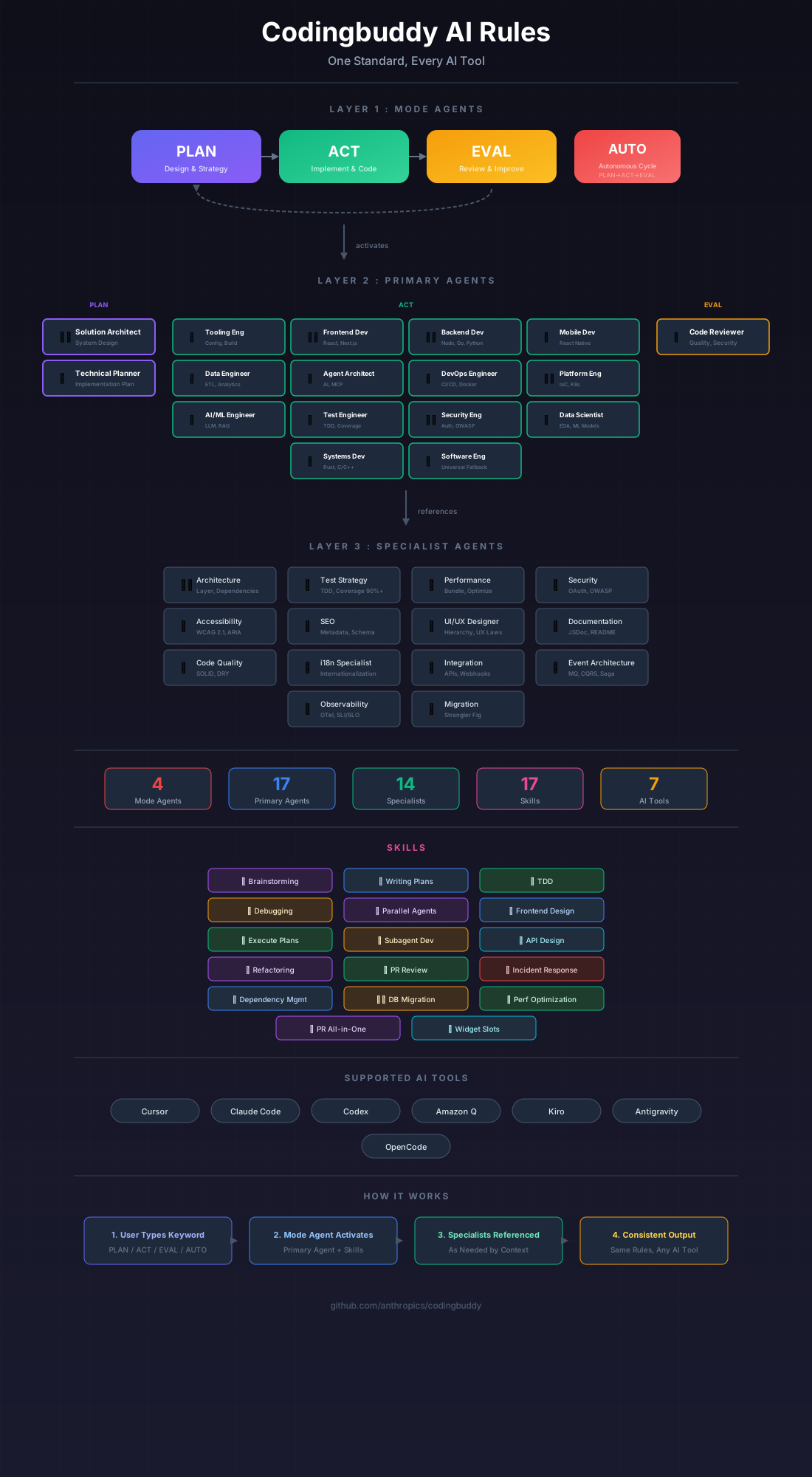
Codingbuddy orchestrates 29 specialized AI agents to deliver human-expert-team-level code quality.
A single AI can't be an expert at everything. Codingbuddy creates an AI development team—architects, developers, security specialists, accessibility experts, and more—that collaborate to review, verify, and refine your code until it meets professional standards.
The Vision
The Problem
When you ask an AI to write code, you get a single perspective. No security review. No accessibility check. No architecture validation. Just one AI doing everything "okay" but nothing excellently.
Human development teams have specialists:
- Architects who design systems
- Security engineers who find vulnerabilities
- QA specialists who catch edge cases
- Performance experts who optimize bottlenecks
Our Solution
Codingbuddy brings the specialist team model to AI coding.
Instead of one AI trying to do everything, Codingbuddy coordinates multiple specialized agents that collaborate:
┌─────────────────────────────────────────────────────────────┐
│                    Your Request                              │
│            "Implement user authentication"                   │
└─────────────────────────────────────────────────────────────┘
                            │
                            ▼
┌─────────────────────────────────────────────────────────────┐
│ 📋 PLAN: Solution Architect + Architecture Specialist       │
│          → Design system architecture                       │
│          → Define security requirements                     │
└─────────────────────────────────────────────────────────────┘
                            │
                            ▼
┌─────────────────────────────────────────────────────────────┐
│ 🚀 ACT: Backend Developer + Test Strategy Specialist        │
│         → Implement with TDD                                │
│         → Follow quality standards                          │
└─────────────────────────────────────────────────────────────┘
                            │
                            ▼
┌─────────────────────────────────────────────────────────────┐
│ 🔍 EVAL: Code Reviewer + Parallel Specialists               │
│          🔒 Security    → JWT vulnerabilities?              │
│          ♿ Accessibility → WCAG compliance?                 │
│          ⚡ Performance  → Optimization needed?              │
│          📏 Quality      → SOLID principles?                │
└─────────────────────────────────────────────────────────────┘
                            │
              ┌─────────────┴─────────────┐
              │                           │
        Critical > 0?              Critical = 0 AND
        High > 0?                  High = 0
              │                           │
              ▼                           ▼
        Return to PLAN              ✅ Quality Achieved
        with improvements           Ship with confidence
Multi-Agent Architecture
3-Tier Agent System
| Tier | Agents | Role |
|---|---|---|
| Mode Agents | plan-mode, act-mode, eval-mode | Workflow orchestration |
| Primary Agents | solution-architect, frontend-developer, backend-developer, code-reviewer, +8 more | Core implementation |
| Specialist Agents | security, accessibility, performance, test-strategy, +15 more | Domain expertise |
Agent Collaboration Example
When you request a feature, agents automatically collaborate:
🤖 solution-architect    → Designs the approach
   └── 👤 architecture-specialist  → Validates layer boundaries
   └── 👤 test-strategy-specialist → Plans test coverage

🤖 backend-developer     → Implements the code
   └── 👤 security-specialist      → Reviews auth patterns
   └── 👤 event-architecture       → Designs message flows

🤖 code-reviewer         → Evaluates quality
   └── 👤 4 specialists in parallel → Multi-dimensional review
Quality Assurance Cycle
The PLAN → ACT → EVAL Loop
Codingbuddy enforces a quality-driven development cycle:
- PLAN: Design before coding (architecture, test strategy)
- ACT: Implement with TDD and quality standards
- EVAL: Multi-specialist review (security, performance, accessibility, quality)
- Iterate: Continue until quality targets met
AUTO Mode: Autonomous Quality Achievement
# Just describe what you want
AUTO: Implement JWT authentication with refresh tokens

# Codingbuddy automatically:
# → Plans the implementation
# → Writes code following TDD
# → Reviews with 4+ specialists
# → Iterates until: Critical=0 AND High=0
# → Delivers production-ready code
Exit Criteria
| Severity | Must Fix Before Ship |
|---|---|
| 🔴 Critical | Yes - Immediate security/data issues |
| 🟠 High | Yes - Significant problems |
| 🟡 Medium | Optional - Technical debt |
| 🟢 Low | Optional - Enhancement |
What Makes It Different
| Traditional AI Coding | Codingbuddy |
|---|---|
| Single AI perspective | 29 specialist agent perspectives |
| "Generate and hope" | Plan → Implement → Verify |
| No quality gates | Critical=0, High=0 required |
| Manual review needed | Automated multi-dimensional review |
| Inconsistent quality | Iterative refinement until standards met |
Quick Start
Prerequisites
- Node.js 18.x or higher
- npm 9.x+ or yarn 4.x+
- A supported AI tool (Claude Code, Cursor, GitHub Copilot, etc.)
Installation
# Initialize your project
npx codingbuddy init

# Add to Claude Desktop config
# macOS: ~/Library/Application Support/Claude/claude_desktop_config.json
# Windows: %APPDATA%\Claude\claude_desktop_config.json
{
  "mcpServers": {
    "codingbuddy": {
      "command": "npx",
      "args": ["codingbuddy", "mcp"]
    }
  }
}
Start Using
PLAN: Implement user registration with email verification
→ AI team plans the architecture

ACT
→ AI team implements with TDD

EVAL
→ AI team reviews from 8+ perspectives

AUTO: Build a complete auth system
→ AI team iterates until quality achieved
Claude Code Plugin (Optional)
For enhanced integration with Claude Code:
# Add the marketplace
claude marketplace add JeremyDev87/codingbuddy

# Install the plugin
claude plugin install codingbuddy@jeremydev87

# Install MCP server for full functionality
npm install -g codingbuddy
| Documentation | Description |
|---|---|
| Plugin Setup Guide | Installation and configuration |
| Quick Reference | Commands and modes at a glance |
| Architecture | How plugin and MCP work together |
Supported AI Tools
| Tool | Status |
|---|---|
| Claude Code | ✅ Full MCP + Plugin |
| Cursor | ✅ Supported |
| GitHub Copilot | ✅ Supported |
| Antigravity | ✅ Supported |
| Amazon Q | ✅ Supported |
| Kiro | ✅ Supported |
| OpenCode | ✅ Supported |
Configuration
AI Model Settings
Configure the default AI model in codingbuddy.config.json:
module.exports = {
  ai: {
    defaultModel: 'claude-sonnet-4-20250514', // Default
    // Options: claude-opus-4-*, claude-sonnet-4-*, claude-haiku-3-5-*
  }
}
| Model | Best For |
|---|---|
claude-opus-4-* | Complex architecture, deep analysis |
claude-sonnet-4-* | General development (default) |
claude-haiku-3-5-* | Quick lookups (not recommended for coding) |
Verbosity Settings
Optimize token usage with verbosity levels:
module.exports = {
  verbosity: 'compact', // Options: 'minimal', 'compact', 'standard', 'detailed'
}
| Level | Use Case |
|---|---|
minimal | Maximum token savings, essential info only |
compact | Balanced, reduced formatting (default) |
standard | Full formatting, structured responses |
detailed | Extended explanations, examples included |
Documentation
| Document | Description |
|---|---|
| Getting Started | Installation and quick setup |
| Philosophy | Vision and design principles |
| Agent System | Complete agent reference |
| Supported Tools | AI tool integration guides |
| Configuration | Config file options |
| API Reference | MCP server capabilities |
Contributing
We welcome contributions! See CONTRIBUTING.md for guidelines.
License
MIT © Codingbuddy