ConferenceHaven Community
Welcome to the ConferenceHaven Community repository! 👋
This is the public home for feedback, documentation, and discussions about ConferenceHaven - your AI-powered conference assistant.
Website: conferencehaven.com
Web Chat: conferencehaven.com/chat
MCP Endpoint: https://mcp.conferencehaven.com/api/mcp
What is ConferenceHaven?
Discover conference sessions with AI - Search thousands of technical sessions across major conferences using your favorite AI assistant. Works in your browser, with AI desktop clients, and supports agent-to-agent (A2A) integration.
🌟 Why ConferenceHaven?
- 🔍 Smart Search - Natural language search across Microsoft Ignite, Live360, ESPC, and more
- 📅 Calendar Integration - Add sessions directly to your calendar with a single request
- 🌐 Multiple Ways to Connect - Web chat, AI desktop clients (Claude, ChatGPT, LM Studio), or A2A integration
- 🚀 Zero Friction - Web chat requires no installation or authentication
- 🤖 A2A Ready - Conference organizers can integrate via agent-to-agent protocols
- 🔒 Privacy Options - Use local models (LM Studio, Ollama) for complete privacy
🎯 Supported Conferences
- Microsoft Ignite 2025 - Nov 18-21, 2025, San Francisco (1,545 sessions)
- Live360 Orlando 2025 - Nov 16-21, 2025, Orlando (196 sessions)
- TechCon365 Dallas 2025 - Nov 3-7, 2025, Dallas (174 sessions)
- ESPC25 Dublin 2025 - Dec 1-4, 2025, Dublin (145 sessions)
- More conferences added regularly!
🚀 Quick Start - Choose Your Path
Path 1: Web Chat (Easiest - No Installation!)
Best for: Everyone who wants instant access
👉 Just visit: conferencehaven.com/chat
No downloads. No setup. No authentication. Just open your browser and start asking:
You: "Show me AI sessions at TechCon365"
Agent: [Returns sessions with speakers, times, locations]

You: "Send me a calendar invite for session 957 to email@example.com"
Agent: ✅ Calendar invite sent! Check your email.
Why web chat?
- ✅ Works on any device (desktop, mobile, tablet)
- ✅ HTTPS trusted by all browsers (no security warnings)
- ✅ Accessible at conferences on your phone
- ✅ Zero setup - instant gratification
Path 2: AI Desktop Clients (MCP Integration)
Best for: Power users who want ConferenceHaven integrated into their AI workflow
ConferenceHaven implements the Model Context Protocol (MCP), which means it works as a tool inside your favorite AI assistant:
User: "Find Copilot sessions at Microsoft Ignite"
  ↓
AI Agent (Claude Desktop, ChatGPT, LM Studio, etc.)
  ↓
ConferenceHaven MCP Tool
  ↓
Natural Language Response with Sessions
Supported AI Clients
| Client | Best For | Setup Time | Privacy |
|---|---|---|---|
| Claude Desktop | Power users | 5 min | Cloud |
| LM Studio | Privacy-focused | 5 min | Local (100% private) |
| ChatGPT | Plus/Pro users | 2 min | Cloud |
| Copilot Studio | Enterprise | 2 min | Cloud |
| GitHub Copilot | Developers | 5 min | Cloud |
Quick Setup Options
Simple URL-Based Setup
Modern AI clients support direct HTTP MCP connections - no packages, no Node.js, no downloads:
| Platform | Plan Required | Status | Setup |
|---|---|---|---|
| Claude Desktop | Any (Free/Pro) | ✅ Stable | Add https://mcp.conferencehaven.com/api/mcp in MCP settings |
| ChatGPT | Plus/Pro ($20/mo) | ✅ Stable | Add URL + OAuth Client ID in Apps & Connectors (details →) |
| LM Studio | Free | ✅ Stable | Add https://mcp.conferencehaven.com/api/mcp in MCP settings |
| Copilot Studio | Microsoft 365 | ✅ Stable | Add https://mcp.conferencehaven.com/api/mcp as MCP connector |
✨ Why this is better: Direct HTTP connections are faster, simpler, and work across all platforms!
Note: ChatGPT requires OAuth Client ID for organizer analytics (see ChatGPT setup guide for details).
Jump to detailed setup instructions ↓
Path 3: Agent-to-Agent (A2A) Integration
Best for: Conference organizers and developers building multi-agent systems
ConferenceHaven supports the A2A (Agent-to-Agent) protocol - an open standard for agent interoperability. Your AI agents can discover and collaborate with ConferenceHaven as a specialized conference session expert.
Discover ConferenceHaven's capabilities:
curl https://agent-chat.agreeablehill-3054e8bb.eastus2.azurecontainerapps.io/.well-known/agent.json
A2A Agent Card tells your system:
- What ConferenceHaven can do (search, calendar invites, etc.)
- How to communicate (A2A endpoint)
- What authentication is needed (none for public tools)
Example A2A flow:
User: "Find AI sessions at ESPC and add the best one to my calendar"
     ↓
Your Host Agent (Orchestrator)
     ↓ discovers ConferenceHaven via agent card
     ↓ delegates conference tasks
     ↓
ConferenceHaven Agent
     ↓ search_sessions("AI", conference="espc")
     ↓ send_calendar_invite(session_id, email)
     ↓
Response back to user
Why A2A?
- ✅ Standard protocol (Google, Microsoft, 50+ partners)
- ✅ Agents specialize (ConferenceHaven = conference expert)
- ✅ Works with any A2A-compatible orchestrator
- ✅ Built on MCP for tool execution
📖 Full A2A Integration Guide →
Interested in A2A integration? Email: conferencehaven@adotob.com
📚 Documentation
- Building with AI Agents - Our journey through MCP and A2A (recommended read!)
- Setup Guides - How to configure ConferenceHaven with different AI clients
- A2A Integration Guide - Agent-to-Agent protocol integration
- FAQ - Frequently asked questions
- Troubleshooting - Common issues and solutions
- Architecture Overview - High-level technical overview
Detailed Setup Instructions
Choose your AI client and get started:
Option 1: Microsoft Copilot Studio (Browser-based)
Best for: Enterprise users with Microsoft 365
- Open Copilot Studio
- Navigate to: Actions → Add an action → Add MCP Connector
- Enter URL:
https://mcp.conferencehaven.com/api/mcp - Save and start asking: "List all conferences"
View detailed Copilot Studio setup guide →
Option 2: Claude Desktop
Best for: Power users who want full MCP integration
- Open Claude Desktop Settings
- Navigate to: Developer → Edit Config
- Add the MCP server URL:
{
  "mcpServers": {
    "conferencehaven": {
      "url": "https://mcp.conferencehaven.com/api/mcp"
    }
  }
}
- Restart Claude Desktop
- Look for 🔌 icon and ask: "What conferences are available?"
View detailed Claude Desktop setup guide →
Option 3: LM Studio (Local & Private)
Best for: Privacy-focused users who want local AI models
- Download LM Studio
- Download a model with function calling support (Llama 3.2, Mistral, Qwen)
- Settings → MCP Servers → Add Server:
{
  "mcpServers": {
    "conferencehaven": {
      "url": "https://mcp.conferencehaven.com/api/mcp"
    }
  }
}
- Start chat and try: "Find sessions about AI"
🛡️ Complete Privacy: Your searches never leave your computer—no cloud providers, no tracking!
View detailed LM Studio setup guide →
Also Works With:
- ChatGPT Desktop - Via Apps & Connectors (requires OAuth Client ID for analytics) → Setup guide
- GitHub Copilot - VS Code integration
- Ollama - Local model runtime
- Any MCP-compatible client
💬 Providing Feedback
We welcome all feedback! Here's how to contribute:
🐛 Bug Reports
Found a bug? Create a bug report
✨ Feature Requests
Have an idea for a new feature? Submit a feature request
🎤 Conference Requests
Want to add your conference to ConferenceHaven? Request a conference
💭 General Feedback
Just want to share thoughts? Open a general feedback issue
📧 No GitHub Account?
No problem! Email feedback to: conferencehaven@adotob.com
🤝 Contributing
We appreciate contributions from the community! Here's how you can help:
Documentation
- Improve existing guides
- Add tutorials
- Translate documentation
Feedback
- Report bugs you encounter
- Suggest features that would help you
- Share your use cases
Spread the Word
- Share ConferenceHaven with your network
- Write blog posts or tweets about your experience
- Present at user groups or conferences
📊 Roadmap
Check out our public roadmap to see what's coming next!
Current Focus:
- ✅ Web chat interface (LIVE!)
- ✅ Analytics dashboard with full observability (LIVE!)
- ✅ A2A Agent Card - ConferenceHaven discoverable via
/.well-known/agent.json(LIVE!) - ✅ A2A Integration Guide - Documentation for agent developers (LIVE!)
- ✅ A2A Foundry Demo - Two-LLM Host Agent at https://a2a.conferencehaven.com (LIVE!)
- ✅ Conference integrations - Ignite (1,545), Live360 (196), ESPC (145), TechCon365 (174) sessions loaded!
- 📋 Session recommendations based on interests
- 📋 Speaker profiles across conferences
- 📋 Embeddable widget for conference websites
📊 Analytics & Insights (November 2025)
ConferenceHaven now features a comprehensive analytics dashboard providing real-time insights into how attendees discover and engage with conference sessions.
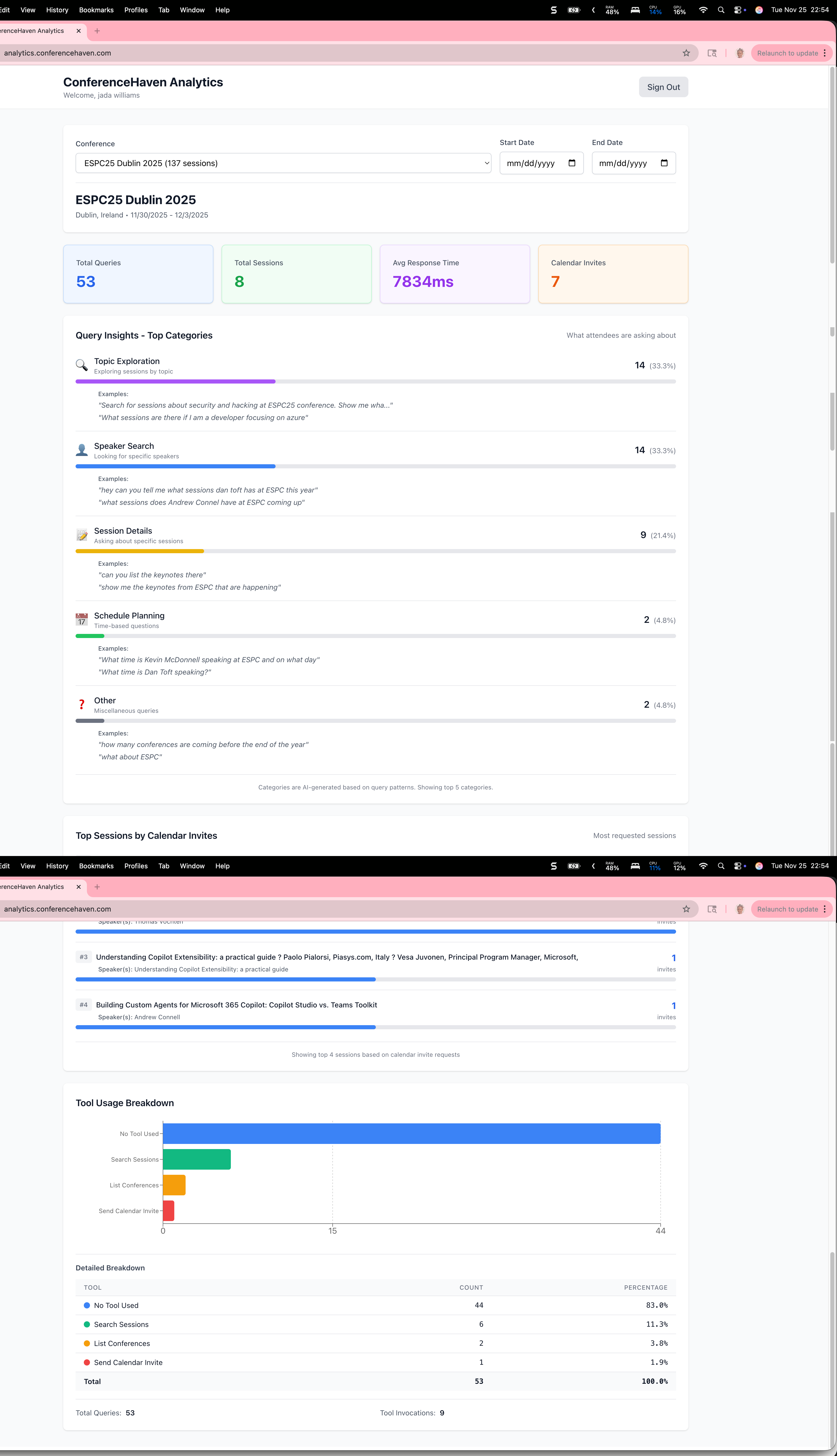
What We Track:
- Query Patterns: AI-categorized analysis of attendee questions (Topic Exploration, Speaker Search, Session Details, Schedule Planning)
- Tool Usage: Complete tracking of all interactions - search sessions, calendar invites, conference listings
- Session Popularity: Most requested sessions by calendar invite requests
- Performance Metrics: Average response times and system health
- Real-Time Stats: Live updates of total queries, sessions, and calendar invites
Why This Matters:
For conference organizers, the analytics dashboard reveals:
- Which session topics generate the most interest
- Popular speakers and tracks
- Optimal times for sessions based on search patterns
- Calendar invite conversion rates
For the community, this demonstrates:
- Full transparency into system usage
- OpenTelemetry-based observability standards
- Privacy-conscious analytics (no PII tracked)
- Open data approach to conference engagement
Technical Stack:
- FastAPI + SQLAlchemy for backend analytics engine
- React + Recharts for dashboard visualizations
- Auth0 for secure organizer access
- OpenTelemetry for distributed tracing
- Azure SQL Database for analytics storage
Latest Updates (Nov 25, 2025):
- ✅ Calendar invite tracking fully operational
- ✅ Complete tool usage breakdown with all agent interactions
- ✅ Real-time query categorization using AI
- ✅ Multi-conference analytics support
Visit analytics.conferencehaven.com to see live metrics!
❓ Support
Need help?
- Check the FAQ
- Review Troubleshooting
- Open an issue
- Email: conferencehaven@adotob.com
📜 License
ConferenceHaven is free to use. This community repository is for feedback and documentation.
🙏 Acknowledgments
Built with ❤️ by Fabian Williams and powered by:
- Microsoft Agent Framework - Agent orchestration
- Model Context Protocol (MCP) - Standardized agent-tool communication
- OpenTelemetry - Observability and tracing
- Azure - Cloud infrastructure
- The amazing tech conference community
Let's make conference discovery accessible to everyone - whether you're using a browser, desktop AI client, or building agent-to-agent systems! 🚀