CRASH
Cascaded Reasoning with Adaptive Step Handling
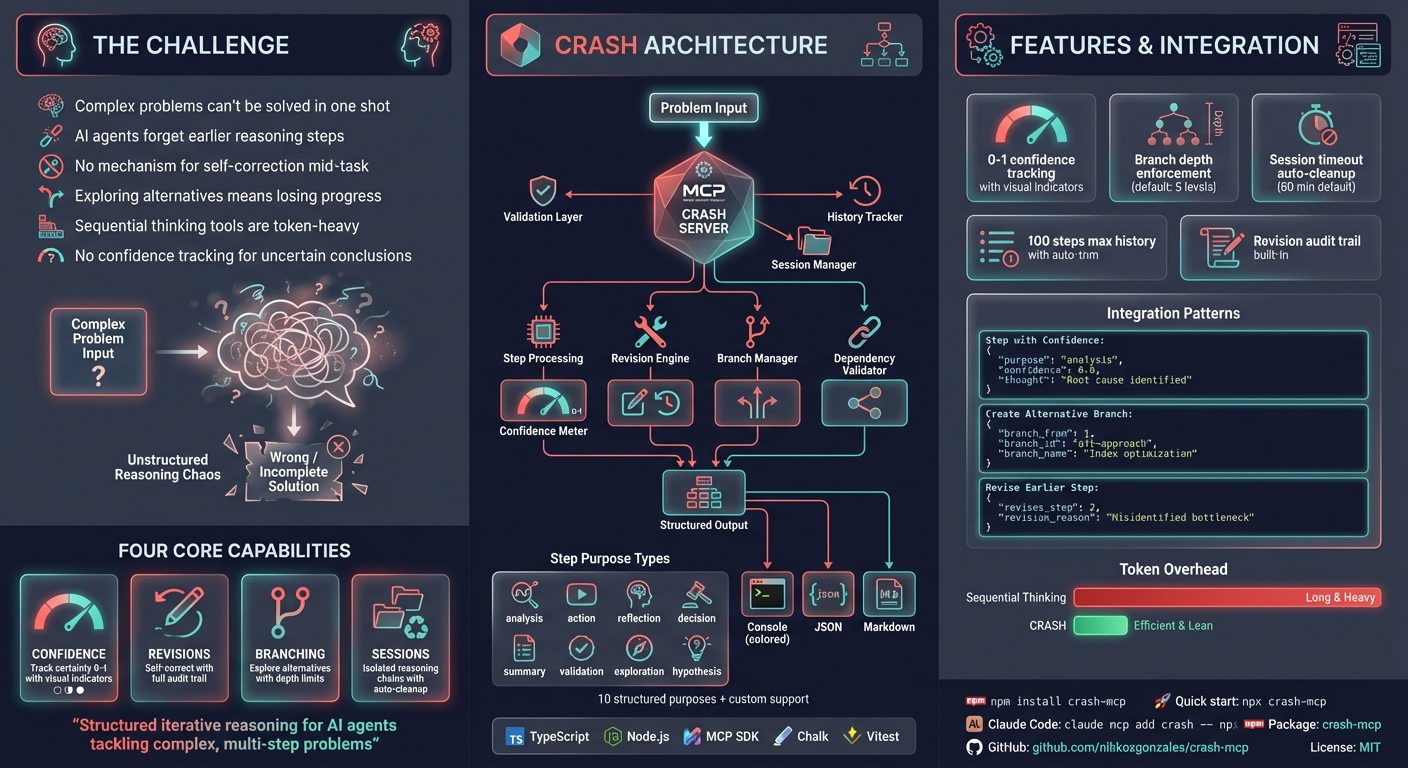
An MCP (Model Context Protocol) server for structured, iterative reasoning. CRASH helps AI assistants break down complex problems into trackable steps with confidence tracking, revision support, and branching for exploring alternatives.
Inspired by MCP Sequential Thinking Server
Why CRASH?
I created this because typing "use sequential_thinking" was cumbersome. Now I can simply say "use crash" instead.
CRASH is more token-efficient than sequential thinking - it doesn't include code in thoughts and has streamlined prompting. It's my go-to solution when an agent can't solve an issue in one shot or when plan mode falls short.
Claude Code's Assessment
CRASH helped significantly for this specific task:

Where CRASH helped:
- Systematic analysis: Forced me to break down the issue methodically
- Solution exploration: Explored multiple approaches before settling on the best one
- Planning validation: Each step built on the previous one logically

The key difference:
CRASH forced me to be more thorough in the analysis phase. Without it, I might have
rushed to implement the first solution rather than exploring cleaner approaches.

Verdict: CRASH adds value for complex problems requiring systematic analysis of
multiple solution paths. For simpler tasks, internal planning is sufficient and faster.
Features
- Structured reasoning steps - Track thought process, outcomes, and next actions
- Confidence tracking - Express uncertainty with 0-1 scores, get warnings on low confidence
- Revision mechanism - Correct previous steps, with original steps marked as revised
- Branching support - Explore multiple solution paths with depth limits
- Dependency validation - Declare and validate step dependencies
- Session management - Group related reasoning chains with automatic timeout cleanup
- Multiple output formats - Console (colored), JSON, or Markdown
- Flexible validation - Strict mode for rigid rules, flexible mode for natural language
Installation
npm install crash-mcp
Or use directly with npx:
npx crash-mcp
Quick Setup
Most MCP clients use this JSON configuration:
{
  "mcpServers": {
    "crash": {
      "command": "npx",
      "args": ["-y", "crash-mcp"]
    }
  }
}
Configuration by Client
| Client | Setup Method |
|---|---|
| Claude Code | claude mcp add crash -- npx -y crash-mcp |
| Cursor | Add to ~/.cursor/mcp.json |
| VS Code | Add to settings JSON under mcp.servers |
| Claude Desktop | Add to claude_desktop_config.json |
| Windsurf | Add to MCP config file |
| JetBrains | Settings > Tools > AI Assistant > MCP |
| Others | Use standard MCP JSON config above |
Windows Users
Use the cmd wrapper:
{
  "mcpServers": {
    "crash": {
      "command": "cmd",
      "args": ["/c", "npx", "-y", "crash-mcp"]
    }
  }
}
With Environment Variables
{
  "mcpServers": {
    "crash": {
      "command": "npx",
      "args": ["-y", "crash-mcp"],
      "env": {
        "CRASH_STRICT_MODE": "false",
        "MAX_HISTORY_SIZE": "100",
        "CRASH_OUTPUT_FORMAT": "console",
        "CRASH_SESSION_TIMEOUT": "60",
        "CRASH_MAX_BRANCH_DEPTH": "5"
      }
    }
  }
}
Using Docker
FROM node:18-alpine
WORKDIR /app
RUN npm install -g crash-mcp
CMD ["crash-mcp"]
{
  "mcpServers": {
    "crash": {
      "command": "docker",
      "args": ["run", "-i", "--rm", "crash-mcp"]
    }
  }
}
Alternative Runtimes
Bun:
{ "command": "bunx", "args": ["-y", "crash-mcp"] }
Deno:
{
  "command": "deno",
  "args": ["run", "--allow-env", "--allow-net", "npm:crash-mcp"]
}
Configuration
| Variable | Default | Description |
|---|---|---|
CRASH_STRICT_MODE | false | Enable strict validation (requires specific prefixes) |
MAX_HISTORY_SIZE | 100 | Maximum steps to retain in history |
CRASH_OUTPUT_FORMAT | console | Output format: console, json, markdown |
CRASH_NO_COLOR | false | Disable colored console output |
CRASH_SESSION_TIMEOUT | 60 | Session timeout in minutes |
CRASH_MAX_BRANCH_DEPTH | 5 | Maximum branch nesting depth |
CRASH_ENABLE_SESSIONS | false | Enable session management |
Usage
Required Parameters
| Parameter | Type | Description |
|---|---|---|
step_number | integer | Sequential step number (starts at 1) |
estimated_total | integer | Estimated total steps (adjustable) |
purpose | string | Step category: analysis, action, validation, exploration, hypothesis, correction, planning, or custom |
context | string | What's already known to avoid redundancy |
thought | string | Current reasoning process |
outcome | string | Expected or actual result |
next_action | string/object | Next action (simple string or structured with tool details) |
rationale | string | Why this next action was chosen |
Optional Parameters
| Parameter | Type | Description |
|---|---|---|
is_final_step | boolean | Mark as final step to complete reasoning |
confidence | number | Confidence level 0-1 (warnings below 0.5) |
uncertainty_notes | string | Describe doubts or assumptions |
revises_step | integer | Step number being corrected |
revision_reason | string | Why revision is needed |
branch_from | integer | Step to branch from |
branch_id | string | Unique branch identifier |
branch_name | string | Human-readable branch name |
dependencies | integer[] | Step numbers this depends on |
session_id | string | Group related reasoning chains |
tools_used | string[] | Tools used in this step |
external_context | object | External data relevant to step |
Examples
Basic Usage
{
  "step_number": 1,
  "estimated_total": 3,
  "purpose": "analysis",
  "context": "User requested optimization of database queries",
  "thought": "I need to first understand the current query patterns before proposing changes",
  "outcome": "Identified slow queries for optimization",
  "next_action": "analyze query execution plans",
  "rationale": "Understanding execution plans will reveal bottlenecks"
}
With Confidence and Final Step
{
  "step_number": 3,
  "estimated_total": 3,
  "purpose": "summary",
  "context": "Analyzed queries and tested index optimizations",
  "thought": "The index on user_id reduced query time from 2s to 50ms",
  "outcome": "Performance issue resolved with new index",
  "next_action": "document the change",
  "rationale": "Team should know about the optimization",
  "confidence": 0.9,
  "is_final_step": true
}
Revision Example
{
  "step_number": 4,
  "estimated_total": 5,
  "purpose": "correction",
  "context": "Previous analysis missed a critical join condition",
  "thought": "The join was causing a cartesian product, not the index",
  "outcome": "Corrected root cause identification",
  "next_action": "fix the join condition",
  "rationale": "This is the actual performance issue",
  "revises_step": 2,
  "revision_reason": "Overlooked critical join in initial analysis"
}
Branching Example
{
  "step_number": 3,
  "estimated_total": 6,
  "purpose": "exploration",
  "context": "Two optimization approaches identified",
  "thought": "Exploring the indexing approach first as it's lower risk",
  "outcome": "Branch created for index optimization testing",
  "next_action": "test index performance",
  "rationale": "This approach has lower risk than query rewrite",
  "branch_from": 2,
  "branch_id": "index-optimization",
  "branch_name": "Index-based optimization"
}
When to Use CRASH
Good fit:
- Complex multi-step problem solving
- Code analysis and optimization
- System design with multiple considerations
- Debugging requiring systematic investigation
- Exploring multiple solution paths
- Tasks where you need to track confidence
Not needed:
- Simple, single-step tasks
- Pure information retrieval
- Deterministic procedures with no uncertainty
Development
npm install        # Install dependencies
npm run build      # Build TypeScript
npm run dev        # Run with MCP inspector
npm start          # Start built server
Troubleshooting
Module Not Found Errors
Try using bunx instead of npx:
{ "command": "bunx", "args": ["-y", "crash-mcp"] }
ESM Resolution Issues
Try the experimental VM modules flag:
{ "args": ["-y", "--node-options=--experimental-vm-modules", "crash-mcp"] }
Credits
- MCP Sequential Thinking Server - Primary inspiration
- MCP Protocol Specification
Author
Nikko Gonzales - nikkoxgonzales
License
MIT