CSS Noop Checker


Chrome DevTools (Elements sidebar) extension that detects CSS properties that currently have no effect on the selected element.
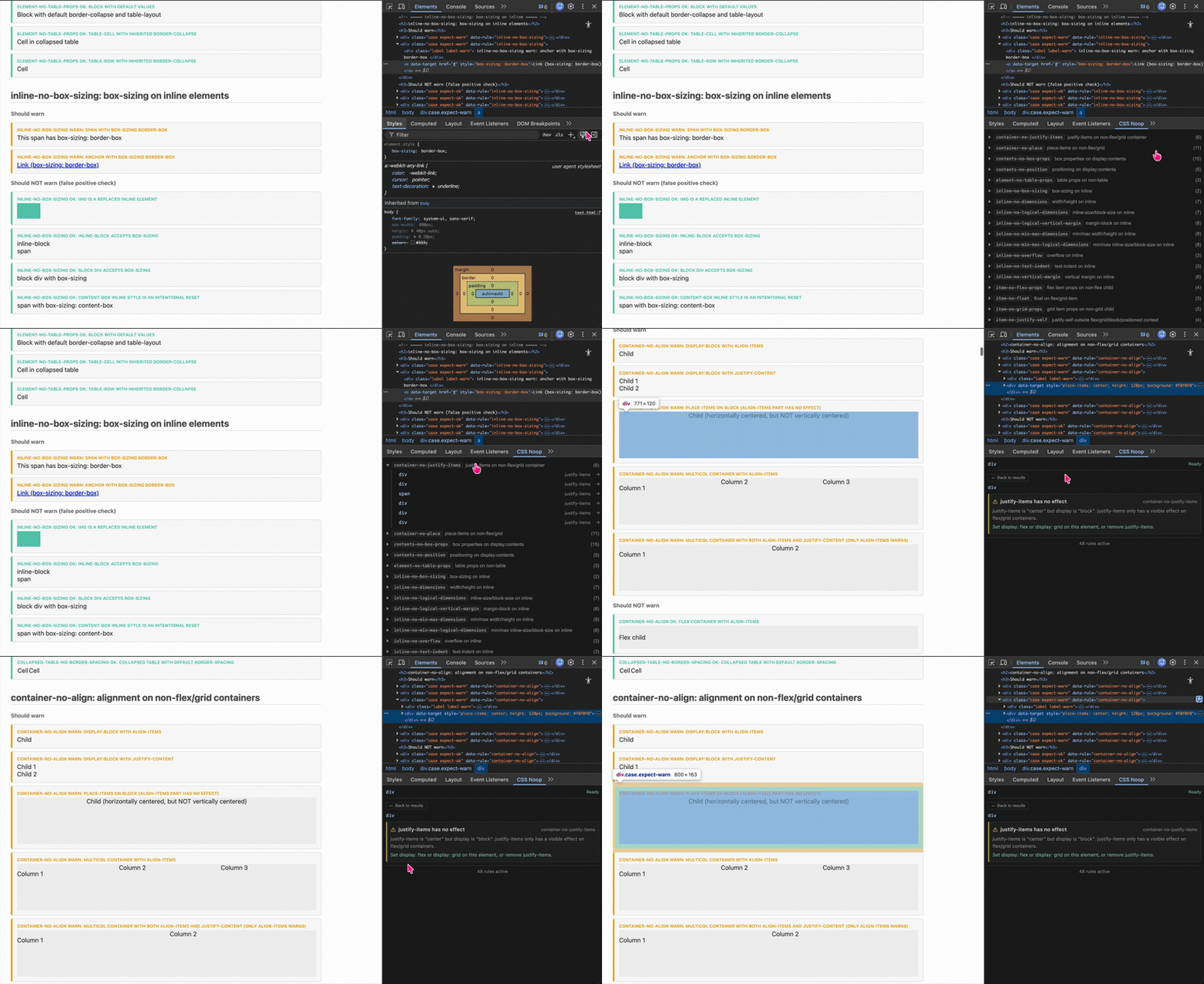
Features
- Selected-element mode — inspects the currently selected element in DevTools
- Full-page scan — scans all elements on a page for violations
- Detection rules — categorized by context (inline, block, container, item, static, positioned, overflow, etc.)
- MCP server — exposes rules as tools for AI-assisted analysis via Playwright
- Actionable warnings — each warning includes a title, explanation, and fix suggestion
Detected Patterns
CSS Noop Checker finds CSS properties that have no visible effect on the element they are applied to. These "no-op" declarations are not syntax errors — they are valid CSS that the browser silently ignores due to layout context. For example, width on an inline <span>, or gap on a non-flex/grid container.
[!NOTE] Rule correctness in this project is based primarily on current Chromium behavior, not on spec interpretation alone. A declaration may be valid CSS, partially effective, or browser-dependent. For nuanced cases, the source of truth is the real-browser coverage in
examples/test.html+ Playwright, not unit tests alone.
Inline
| Rule | Description |
|---|---|
inline-no-box-sizing | box-sizing on inline |
inline-no-dimensions | width/height on inline |
inline-no-logical-dimensions | inline-size/block-size on inline |
inline-no-logical-vertical-margin | margin-block on inline |
inline-no-min-max-dimensions | min/max width/height on inline |
inline-no-min-max-logical-dimensions | min/max inline-size/block-size on inline |
inline-no-overflow | overflow on inline |
inline-no-text-indent | text-indent on inline |
inline-no-vertical-margin | vertical margin on inline |
Block
| Rule | Description |
|---|---|
block-no-vertical-align | vertical-align on block-level element |
Container (flex/grid)
| Rule | Description |
|---|---|
container-no-align | align/justify on non-flex/grid/multi-column |
container-no-columns | column properties on flex/grid container |
container-no-flex-props | flex-direction/wrap on non-flex |
container-no-gap | gap on non-flex/grid |
container-no-grid-props | grid container props on non-grid |
container-no-justify-items | justify-items outside grid/block layout |
container-no-place | place-items outside grid/flex/block layout |
Item (flex/grid)
| Rule | Description |
|---|---|
item-no-flex-props | flex item props on non-flex child |
item-no-float | float on flex/grid item |
item-no-grid-props | grid item props on non-grid child |
item-no-justify-self | justify-self outside grid/table-wrapper/block/positioned context |
item-no-order | order on non-flex/grid item |
item-no-self-align | align-self on non-flex/grid item |
Static positioning
| Rule | Description |
|---|---|
static-no-logical-offset | logical offset on static position |
static-no-offset | offset on static position |
static-no-z-index | z-index on static non-flex/grid element |
Positioned
| Rule | Description |
|---|---|
positioned-no-clear | clear on absolute/fixed positioned element |
positioned-no-float | float on out-of-flow positioned element |
Table
| Rule | Description |
|---|---|
collapsed-table-no-border-spacing | border-spacing on collapsed table |
element-no-table-props | table props on non-table |
nontable-no-border-spacing | border-spacing on non-table |
nontable-no-empty-cells | empty-cells on non-table-cell |
table-no-margin | margin on internal table element |
table-no-padding | padding on table internals |
Overflow
| Rule | Description |
|---|---|
visible-overflow-no-resize | resize on visible overflow |
visible-overflow-no-text-overflow | text-overflow on visible overflow |
Scroll
| Rule | Description |
|---|---|
scroll-no-scroll-padding | scroll-padding on non-scroll container |
scroll-snap-no-align-without-type | scroll-snap child properties without parent scroll-snap-type |
Transform & Perspective
| Rule | Description |
|---|---|
perspective-no-origin | perspective-origin without perspective |
transform-no-origin | transform-origin without transform |
Animation
| Rule | Description |
|---|---|
animation-no-sub-props | animation properties without animation-name |
Other
| Rule | Description |
|---|---|
contents-no-box-props | box properties on display:contents |
contents-no-position | positioning on display:contents |
multicol-no-column-rule | column-rule/column-fill on non-multicol container |
nonfloat-no-shape-outside | shape-outside on non-floated element |
nonreplaced-no-aspect-ratio | aspect-ratio on inline non-replaced element |
nonreplaced-no-object-fit | object-fit/object-position on non-replaced element |
outline-no-style | outline properties without outline-style |
Rule IDs follow Stylelint's thing-no-qualifier convention. See individual source files for details, or run list_rules via the MCP server.
Quick Start
pnpm install
pnpm build
- Open
chrome://extensionsand enable Developer mode. - Click Load unpacked and select the
dist/directory. - Open DevTools on any page → Elements tab → CSS Noop sidebar pane.
For development with watch-mode rebuilds:
pnpm dev
Commands
| Command | Description |
|---|---|
pnpm dev | Watch-mode build (vite build --watch) |
pnpm build | Type-check + production build |
pnpm test | Run Vitest unit tests |
pnpm test:e2e | Run Playwright browser integration tests |
pnpm lint | Lint with Oxlint |
pnpm fmt | Format with Oxfmt |
pnpm fmt:check | Check formatting without writing |
MCP Server
The mcp-server/ directory provides an MCP server that exposes the rules engine as tools for AI-assisted analysis. It uses Playwright to open pages, extract computed styles, and run all detection rules.
See mcp-server/README.md for setup instructions.
Tech Stack
React 19 · TypeScript 5.9 · Vite 7 · Oxlint / Oxfmt · Vitest · Playwright · pnpm
How It Works
- Analysis uses
getComputedStyleand lightweight heuristics — no external network calls. - Rules are pure functions with zero Chrome API dependency, making them fully testable.
- Browser integration tests are the main safeguard against false positives and false negatives in nuanced layout cases.
- The extension targets only the current DevTools selection (
$0) or scans all visible elements on the page. - Each rule file is named after its rule ID (e.g.
container-no-gap.ts), following Stylelint'sthing-no-qualifiernaming convention.
Contributing
Contributions are welcome! See CONTRIBUTING.md for setup, adding new rules, coding style, and PR conventions.