Email MCP Server
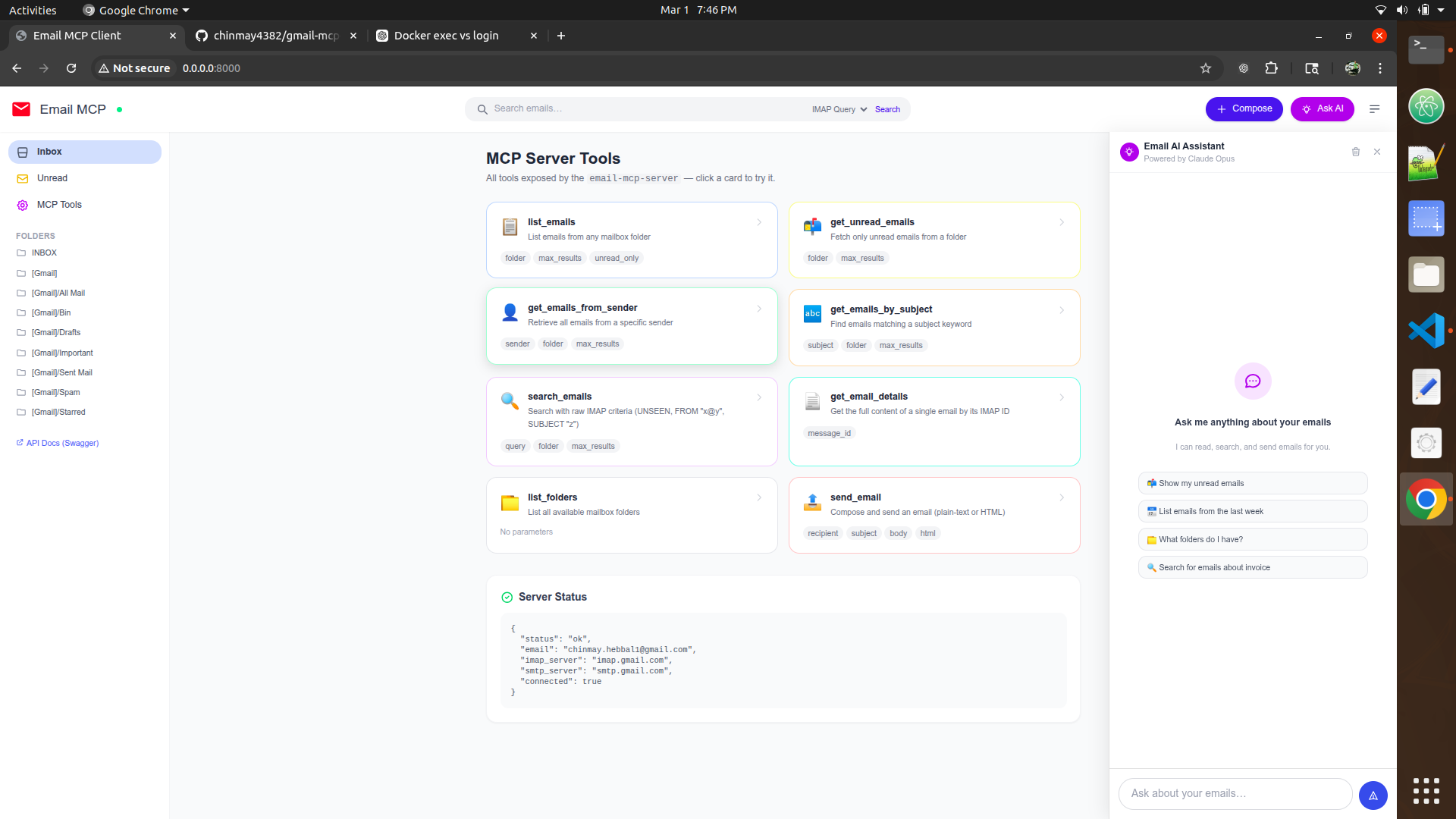
An MCP (Model Context Protocol) server for reading and sending emails via IMAP/SMTP. This server exposes email operations as MCP tools that can be used by Claude and other AI models. Works with Gmail, Outlook, and any email provider that supports IMAP/SMTP.
Features
- List Emails: Retrieve emails from any mailbox folder
- Get Unread Emails: Fetch only unread messages
- Search Emails: Search with IMAP search criteria (e.g., by sender, date, subject)
- Get Emails from Sender: Retrieve all emails from a specific sender
- Get Emails by Subject: Search by subject text
- Send Emails: Compose and send emails via SMTP
- List Folders: View all available mailbox folders
- Get Email Details: Fetch complete details of a specific email
Prerequisites
- Python 3.10 or higher
- An email account (Gmail, Outlook, etc.) with IMAP/SMTP enabled
Quick Start
1. For Gmail Users
- Enable 2-Factor Authentication in your Gmail account: https://myaccount.google.com/security
- Generate an "App Password" for Mail: https://myaccount.google.com/apppasswords
- Use your Gmail address and the generated app password
2. For Other Email Providers
- Outlook: Use your Microsoft account password (or create app password if 2FA enabled)
- Yahoo: Generate an "App Password": https://login.yahoo.com/account/security
- Other providers: Consult your provider's IMAP/SMTP documentation
3. Installation
# Clone or navigate to the server directory
cd gmail-server

# Install dependencies
pip install -r requirements.txt
# or
pip install -e .
4. Configuration
Create a .env file in the project directory:
Edit .env with your email credentials:
EMAIL_ADDRESS=your_email@gmail.com
EMAIL_PASSWORD=your_app_password_or_password

# Optional: Custom IMAP/SMTP servers
# IMAP_SERVER=imap.gmail.com
# SMTP_SERVER=smtp.gmail.com
5. Run the Server
python gmail_mcp_server.py
The server will start and be ready to use with Claude or other MCP clients.
Available Tools
list_emails
List emails from a folder.
Parameters:
max_results(int, default: 10): Number of emails to retrieveunread_only(bool, default: false): Only return unread emailsfolder(string, default: "INBOX"): Mailbox folder name
Example:
list_emails(max_results=20, unread_only=true, folder="INBOX")
get_unread_emails
Get unread emails from a folder.
Parameters:
max_results(int, default: 10): Number of unread emails to retrievefolder(string, default: "INBOX"): Mailbox folder name
get_emails_from_sender
Get emails from a specific sender.
Parameters:
sender(string): Email address of the sendermax_results(int, default: 10): Number of emails to retrievefolder(string, default: "INBOX"): Mailbox folder name
search_emails
Search emails using IMAP search criteria.
Parameters:
query(string): IMAP search querymax_results(int, default: 10): Maximum results to returnfolder(string, default: "INBOX"): Mailbox folder to search
Query Examples:
UNSEEN- Unread messagesFROM "user@example.com"- Emails from specific senderSUBJECT "invoice"- Emails with "invoice" in subjectFLAGGED- Starred/flagged emailsUNFLAGGED- Unstarred emailsALL- All emails (default search)BEFORE <date>- Emails before a date (e.g.,BEFORE "1-Jan-2024")SINCE <date>- Emails since a dateLARGER <bytes>- Emails larger than size
You can combine criteria: UNSEEN FROM "user@example.com" or SUBJECT "urgent" FLAGGED
get_emails_by_subject
Get emails by subject text.
Parameters:
subject(string): Subject text to search formax_results(int, default: 10): Maximum emails to retrievefolder(string, default: "INBOX"): Mailbox folder to search
send_email
Send an email.
Parameters:
recipient(string): Recipient email addresssubject(string): Email subjectbody(string): Email body texthtml(bool, default: false): If true, body is treated as HTML
get_email_details
Get full details of a specific email.
Parameters:
message_id(string): Email ID from IMAP
list_folders
List all available mailbox folders.
Supported Email Providers
Gmail
- IMAP Server:
imap.gmail.com(port 993) - SMTP Server:
smtp.gmail.com(port 587) - Requires: App Password (not your regular Gmail password)
Configuration
The server uses environment variables for configuration:
EMAIL_ADDRESS: Your email address (required)EMAIL_PASSWORD: Your password or app password (required)IMAP_SERVER: IMAP server address (default: imap.gmail.com)SMTP_SERVER: SMTP server address (default: smtp.gmail.com)
Usage Example with Claude
You can use this MCP server with Claude by adding it to your Claude configuration. After setting up the server, it will be available as a tool set that Claude can use to read, search, and send emails.
Troubleshooting
"Authentication failed"
- For Gmail: Make sure you're using an App Password, not your regular Gmail password
- For other providers: Verify your password is correct
- Make sure IMAP/SMTP is enabled in your email account settings
"Connection refused"
- Check your IMAP/SMTP server addresses
- Verify your email provider's IMAP/SMTP ports
- Check if your firewall blocks these ports
"Certificate verification failed"
- This usually happens with corporate firewalls
- The server uses SSL certificates for secure connections
"No module named 'mcp'"
- Run:
pip install -r requirements.txt
Security Notes
- Never commit
.envfile to version control - Never hardcode credentials in scripts
- The server requires your email password - store it safely
- Use app-specific passwords when available (Gmail, Yahoo, etc.)
- The server only supports read-only access to IMAP unless you explicitly allow send
File Structure
gmail-server/
├── gmail_mcp_server.py      # Main MCP server implementation
├── gmail_client.py          # IMAP/SMTP email client wrapper
├── pyproject.toml           # Project configuration
├── requirements.txt         # Python dependencies
├── .env.example             # Example environment variables
├── .gitignore              # Git ignore rules
├── setup.py                # Setup validation script
├── mcp-config.json         # MCP configuration example
└── README.md               # This file
License
MIT License