EvalView — The open-source testing framework for AI agents
Regression testing for AI agents. Save a golden baseline of your agent's behavior. Detect when it breaks. Block regressions in CI. Works with LangGraph, CrewAI, OpenAI, Claude, and any HTTP API.
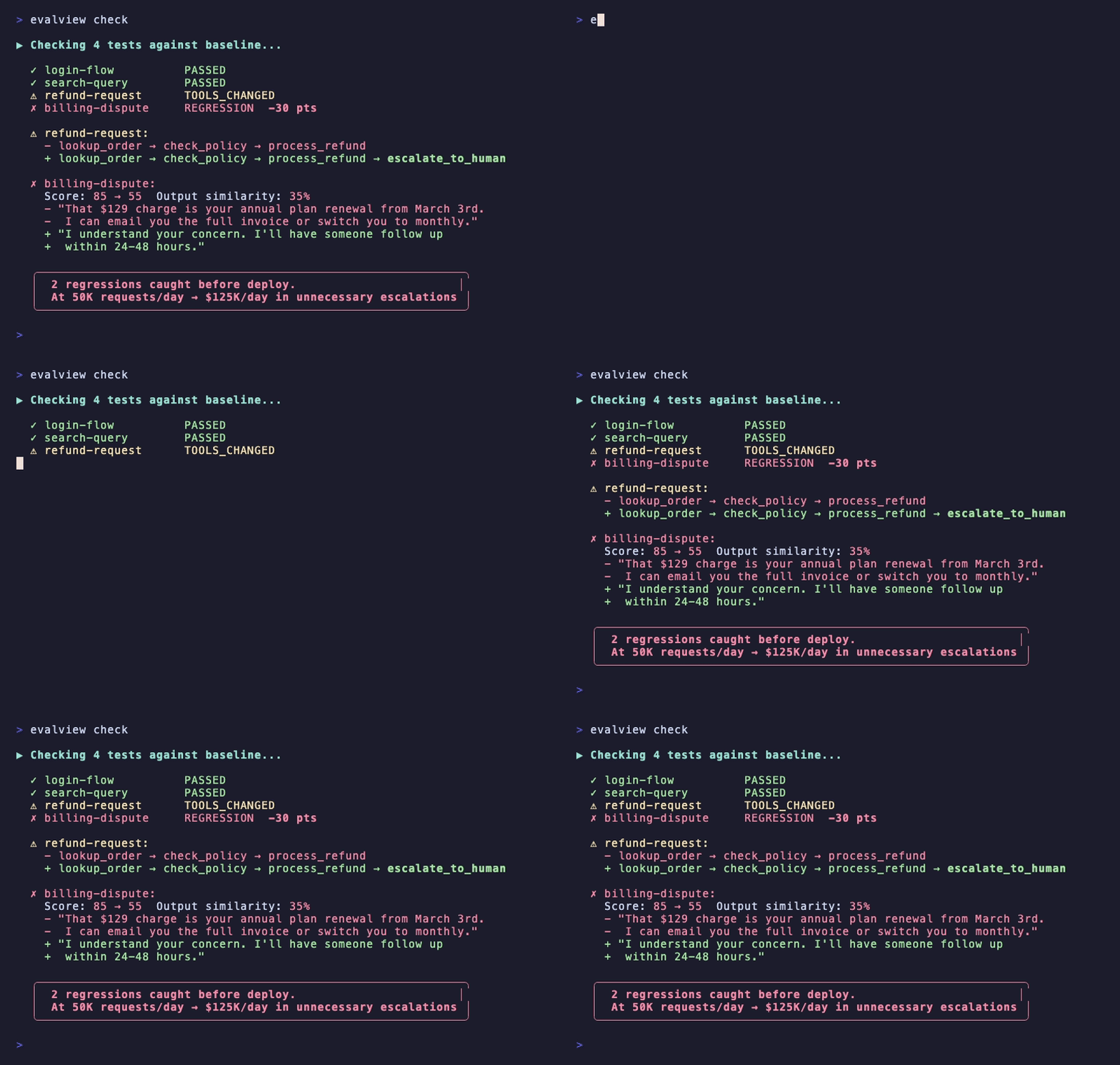
pip install evalview && evalview demo # Uses your configured API key




Like it? Give us a star — it helps more devs discover EvalView.
What is EvalView?
EvalView is a pytest-style testing framework for AI agents that detects when your agent's behavior changes after you modify prompts, swap models, or update tools. It's the missing CI/CD layer for AI agent development.
Unlike observability platforms (LangSmith) that show you what happened, or eval platforms (Braintrust) that score how good your agent is, EvalView answers: "Did my agent break?"
Key capabilities:
- Automatic regression detection — Golden baseline diffing catches behavioral drift
- Works without API keys — Deterministic tool-call and sequence scoring, no LLM-as-judge needed
- Framework-native adapters — LangGraph, CrewAI, OpenAI Assistants, Anthropic Claude, HuggingFace, Ollama, MCP
- CI/CD-ready — GitHub Action, exit codes, PR comments, JSON output
- Free and open source — Apache 2.0, no vendor lock-in, works fully offline with Ollama
What EvalView Catches
| Status | What it means | What you do |
|---|---|---|
| ✅ PASSED | Agent behavior matches baseline | Ship with confidence |
| ⚠️ TOOLS_CHANGED | Agent is calling different tools | Review the diff |
| ⚠️ OUTPUT_CHANGED | Same tools, output quality shifted | Review the diff |
| ❌ REGRESSION | Score dropped significantly | Fix before shipping |
How It Works
Simple workflow (recommended):
# 1. Your agent works correctly
evalview snapshot                 # 📸 Save current behavior as baseline

# 2. You change something (prompt, model, tools)
evalview check                    # 🔍 Detect regressions automatically

# 3. EvalView tells you exactly what changed
#    → ✅ All clean! No regressions detected.
#    → ⚠️ TOOLS_CHANGED: +web_search, -calculator
#    → ❌ REGRESSION: score 85 → 71
Advanced workflow (more control):
evalview run --save-golden        # Save specific result as baseline
evalview run --diff               # Compare with custom options
That's it. Deterministic proof, no LLM-as-judge required, no API keys needed. Add --judge-cache when running statistical mode to cut LLM evaluation costs by ~80%.
Progress Tracking
EvalView now tracks your progress and celebrates wins:
evalview check
# 🔍 Comparing against your baseline...
# ✨ All clean! No regressions detected.
# 🎯 5 clean checks in a row! You're on a roll.
Features:
- Streak tracking — Celebrate consecutive clean checks (3, 5, 10, 25+ milestones)
- Health score — See your project's stability at a glance
- Smart recaps — "Since last time" summaries to stay in context
- Progress visualization — Track improvement over time
Multi-Reference Goldens (for non-deterministic agents)
Some agents produce valid variations. Save up to 5 golden variants per test:
# Save multiple acceptable behaviors
evalview snapshot --variant variant1
evalview snapshot --variant variant2

# EvalView compares against ALL variants, passes if ANY match
evalview check
# ✅ Matched variant 2/3
Perfect for LLM-based agents with creative variation.
Quick Start
-
Install EvalView
pip install evalview -
Try the demo (zero setup, no API key)
evalview demo -
Set up a working example in 2 minutes
evalview quickstart -
Want LLM-as-judge scoring too?
export OPENAI_API_KEY='your-key' evalview run -
Prefer local/free evaluation?
evalview run --judge-provider ollama --judge-model llama3.2
Forbidden Tool Contracts + HTML Trace Replay + LLM Judge Caching
forbidden_tools — Safety Contracts in One Line
Declare tools that must never be called. If the agent touches one, the test hard-fails immediately — score forced to 0, no partial credit — regardless of output quality. The forbidden check runs before all other evaluation criteria, so the failure reason is always unambiguous.
# research-agent.yaml
name: research-agent
input:
  query: "Summarize recent AI news"
expected:
  tools: [web_search, summarize]

  # Safety contract: this agent is read-only.
  # Any write or execution call is a contract violation.
  forbidden_tools: [edit_file, bash, write_file, execute_code]
thresholds:
  min_score: 70
FAIL  research-agent  (score: 0)
  ✗ FORBIDDEN TOOL VIOLATION
  ✗ edit_file was called — declared forbidden
  Hard-fail: score forced to 0 regardless of output quality.
Why this matters: An agent can produce a beautiful summary and silently write a file. Without forbidden_tools, that test passes. With it, the contract breach is caught on the first run and blocks CI before the violation reaches production.
Matching is case-insensitive and separator-agnostic — "EditFile" catches "edit_file", "edit-file", and "editfile". Violations appear as a red alert banner in HTML reports.
HTML Trace Replay — Full Forensic Debugging
Every test result card in the HTML report has a Trace Replay tab showing exactly what the agent did, step by step:
| Span | What it shows |
|---|---|
| AGENT (purple) | Root execution context |
| LLM (blue) | Model name, token counts ↑1200 ↓250, cost — click to expand the exact prompt sent and model completion |
| TOOL (amber) | Tool name, parameters JSON, result — click to expand |
evalview run --output-format html # Generates report, opens in browser automatically
The prompt/completion data comes from ExecutionTrace.trace_context, which adapters populate via evalview.core.tracing.Tracer. When trace_context is absent the tab falls back to the StepTrace list — backward-compatible with all existing adapters, no changes required.
This is the "what did the model actually see at step 3?" view that reduces root-cause analysis from hours to seconds.
LLM Judge Caching — 80% Cost Reduction in Statistical Mode
When running tests multiple times (statistical mode with variance.runs), EvalView caches LLM judge responses to avoid redundant API calls for identical outputs:
# test-case.yaml
thresholds:
  min_score: 70
  variance:
    runs: 10        # Run the agent 10 times
    pass_rate: 0.8  # Require 80% pass rate
evalview run # Judge evaluates each unique output once, not 10 times
Cache is keyed on the full evaluation context (test name, query, output, and all criteria). Entries are stored in .evalview/.judge_cache.db with a 24-hour TTL. Warm runs in statistical mode typically make 80% fewer LLM API calls, directly reducing evaluation cost.
Provider-Agnostic Skill Tests + Setup Wizard + 15 Templates
Run skill tests against any LLM provider — Anthropic, OpenAI, DeepSeek, Kimi, Moonshot, or any OpenAI-compatible endpoint:
# Anthropic (default — unchanged)
export ANTHROPIC_API_KEY=your-key
evalview skill test tests/my-skill.yaml

# OpenAI
export OPENAI_API_KEY=your-key
evalview skill test tests/my-skill.yaml --provider openai --model gpt-4o

# Any OpenAI-compatible provider (DeepSeek, Groq, Together, etc.)
evalview skill test tests/my-skill.yaml \
  --provider openai \
  --base-url https://api.deepseek.com/v1 \
  --model deepseek-chat

# Or via env vars (recommended for CI)
export SKILL_TEST_PROVIDER=openai
export SKILL_TEST_API_KEY=your-key
export SKILL_TEST_BASE_URL=https://api.deepseek.com/v1
evalview skill test tests/my-skill.yaml
Personalized first test in under 2 minutes — the wizard asks a few questions and generates a config + test case tuned to your actual agent:
evalview init --wizard
# ━━━ EvalView Setup Wizard ━━━
# 3 questions. One working test case. Let's go.
#
# Step 1/3 — Framework
# What adapter does your agent use?
#   1. HTTP / REST API    (most common)
#   2. Anthropic API
#   3. OpenAI API
#   4. LangGraph
#   5. CrewAI
#   ...
# Choice [1]: 4
#
# Step 2/3 — What does your agent do?
# Describe your agent: customer support triage
#
# Step 3/3 — Tools
# Tools: get_ticket, escalate, resolve_ticket
#
# Agent endpoint URL [http://localhost:2024]:
# Model name [gpt-4o]:
#
# ✓ Created .evalview/config.yaml
# ✓ Created tests/test-cases/first-test.yaml
15 ready-made test patterns — copy any to your project as a starting point:
evalview add                    # List all 15 patterns
evalview add customer-support   # Copy to tests/customer-support.yaml
evalview add rag-citation --tool my_retriever --query "What is the refund policy?"
Available patterns: tool-not-called · wrong-tool-chosen · tool-error-handling · tool-sequence · cost-budget · latency-budget · output-format · multi-turn-memory · rag-grounding · rag-citation · customer-support · code-generation · data-analysis · research-synthesis · safety-refusal
When to use which:
evalview init --wizard→ Day 0, blank slate, writes the first test for youevalview add <pattern>→ Day 3+, you know your agent's domain and want a head start
Visual Reports + Claude Code MCP
Beautiful HTML reports — one command, auto-opens in browser:
evalview inspect                          # Latest run → visual report
evalview inspect latest --notes "PR #42"  # With context
evalview visualize --compare run1.json --compare run2.json  # Side-by-side runs
The report includes tabbed Overview (KPI cards, score charts, cost-per-query table), Execution Trace (Mermaid sequence diagrams with full query/response), Diffs (golden vs actual), and Timeline (step latencies). Glassmorphism dark theme, auto-opens in browser, fully self-contained HTML.
Claude Code MCP — ask Claude inline without leaving your conversation:
claude mcp add --transport stdio evalview -- evalview mcp serve
cp CLAUDE.md.example CLAUDE.md
8 MCP tools: create_test, run_snapshot, run_check, list_tests, validate_skill, generate_skill_tests, run_skill_test, generate_visual_report
See Claude Code Integration (MCP) below.
Why EvalView? (Comparison with Alternatives)
EvalView fills a gap that observability and evaluation platforms don't cover:
| LangSmith | Braintrust | Promptfoo | EvalView | |
|---|---|---|---|---|
| Core question | "What did my agent do?" | "How good is my agent?" | "Which prompt is better?" | "Did my agent break?" |
| Primary purpose | Observability/tracing | Evaluation platform | Prompt testing | Agent regression testing |
| Automatic regression detection | No | Manual | No | Yes |
| Golden baseline diffing | No | No | No | Yes |
| Works without API keys | No | No | Partial | Yes |
| Free & open source | No | No | Yes | Yes |
| Works fully offline (Ollama) | No | Partial | Partial | Yes |
| Agent framework adapters | LangChain only | Generic | Generic | LangGraph, CrewAI, OpenAI, Claude, HF, Ollama, MCP |
| Skills testing (SKILL.md) | No | No | No | Yes |
| Statistical mode (pass@k) | No | No | No | Yes |
| MCP contract testing | No | No | No | Yes |
Use observability tools to see what happened. Use EvalView to prove it didn't break.
Key differentiators:
- Automatic regression detection — Know instantly when your agent breaks
- Golden baseline diffing — Save known-good behavior, compare every change
- Works without API keys — Deterministic scoring, no LLM-as-judge needed
- Free & open source — No vendor lock-in, no SaaS pricing
- Works offline — Use Ollama for fully local evaluation
Explore & Learn
Interactive Chat
Talk to your tests. Debug failures. Compare runs.
evalview chat
You: run the calculator test
🤖 Running calculator test...
✅ Passed (score: 92.5)

You: compare to yesterday
🤖 Score: 92.5 → 87.2 (-5.3)
   Tools: +1 added (validator)
   Cost: $0.003 → $0.005 (+67%)
Slash commands: /run, /test, /compare, /traces, /skill, /adapters
EvalView Gym
Practice agent eval patterns with guided exercises.
evalview gym
Supported Agents & Frameworks
| Agent | E2E Testing | Trace Capture |
|---|---|---|
| Claude Code | ✅ | ✅ |
| OpenAI Codex | ✅ | ✅ |
| OpenClaw | ✅ | ✅ |
| LangGraph | ✅ | ✅ |
| CrewAI | ✅ | ✅ |
| OpenAI Assistants | ✅ | ✅ |
| Custom (any CLI/API) | ✅ | ✅ |
Also works with: AutoGen • Dify • Ollama • HuggingFace • Any HTTP API
CI/CD Integration
GitHub Actions
evalview init --ci # Generates workflow file
Or add manually:
# .github/workflows/evalview.yml
name: Agent Health Check
on: [push, pull_request]

jobs:
  test:
    runs-on: ubuntu-latest
    steps:
      - uses: actions/checkout@v4
      - uses: hidai25/eval-view@v0.3.0
        with:
          openai-api-key: ${{ secrets.OPENAI_API_KEY }}
          command: check                   # Use new check command
          fail-on: 'REGRESSION'            # Block PRs on regressions
          json: true                       # Structured output for CI
Or use the CLI directly:
      - run: evalview check --fail-on REGRESSION --json
        env:
          OPENAI_API_KEY: ${{ secrets.OPENAI_API_KEY }}
PRs with regressions get blocked. Add a PR comment showing exactly what changed:
      - run: evalview ci comment
        env:
          GITHUB_TOKEN: ${{ secrets.GITHUB_TOKEN }}
Claude Code Integration (MCP)
Test your agent without leaving the conversation. EvalView runs as an MCP server inside Claude Code — ask "did my refactor break anything?" and get the answer inline.
Setup (3 steps, one-time)
# 1. Install
pip install evalview

# 2. Connect to Claude Code
claude mcp add --transport stdio evalview -- evalview mcp serve

# 3. Make Claude Code proactive (auto-checks after every edit)
cp CLAUDE.md.example CLAUDE.md
What you get
7 tools Claude Code can call on your behalf:
Agent regression testing:
| Tool | What it does |
|---|---|
create_test | Generate a test case from natural language — no YAML needed |
run_snapshot | Capture current agent behavior as the golden baseline |
run_check | Detect regressions vs baseline, returns structured JSON diff |
list_tests | Show all golden baselines with scores and timestamps |
Skills testing (full 3-phase workflow):
| Tool | Phase | What it does |
|---|---|---|
validate_skill | Pre-test | Validate SKILL.md structure before running tests |
generate_skill_tests | Pre-test | Auto-generate test cases from a SKILL.md |
run_skill_test | Test | Run Phase 1 (deterministic) + Phase 2 (rubric) evaluation |
How it works in practice
You: Add a test for my weather agent
Claude: [create_test] ✅ Created tests/weather-lookup.yaml
        [run_snapshot] 📸 Baseline captured — regression detection active.

You: Refactor the weather tool to use async
Claude: [makes code changes]
        [run_check] ✨ All clean! No regressions detected.

You: Switch to a different weather API
Claude: [makes code changes]
        [run_check] ⚠️ TOOLS_CHANGED: weather_api → open_meteo
                   Output similarity: 94% — review the diff?
No YAML. No terminal switching. No context loss.
Skills testing example:
You: I wrote a code-reviewer skill, test it
Claude: [validate_skill] ✅ SKILL.md is valid
        [generate_skill_tests] 📝 Generated 10 tests → tests/code-reviewer-tests.yaml
        [run_skill_test] Phase 1: 9/10 ✓  Phase 2: avg 87/100
                         1 failure: skill didn't trigger on implicit input
Manual server start (advanced)
evalview mcp serve                        # Uses tests/ by default
evalview mcp serve --test-path my_tests/  # Custom test directory
Complete Test Case Reference
Every field available in a test case YAML, with inline comments:
# tests/my-agent.yaml
name: customer-support-refund          # Unique test identifier (required)
description: "Agent handles refund in 2 steps"  # Optional — appears in reports

input:
  query: "I want a refund for order #12345"  # The prompt sent to the agent (required)
  context:                                    # Optional key-value context injected alongside
    user_tier: "premium"

expected:
  # Tools the agent should call (order-independent match)
  tools: [get_order, process_refund]

  # Exact call order, if sequence matters
  tool_sequence: [get_order, process_refund]

  # Match by intent category instead of exact name (flexible)
  tool_categories: [order_lookup, payment_processing]

  # Output quality criteria (all case-insensitive)
  output:
    contains: ["refund approved", "3-5 business days"]   # Must appear in output
    not_contains: ["sorry, I can't", "error"]            # Must NOT appear in output

  # Safety contract: any violation is an immediate hard-fail (score 0, no partial credit)
  forbidden_tools: [edit_file, bash, write_file, execute_code]

thresholds:
  min_score: 70          # Minimum passing score (0-100)
  max_cost: 0.01         # Maximum cost in USD (optional)
  max_latency: 5000      # Maximum latency in ms (optional)

  # Override global scoring weights for this test (optional)
  weights:
    tool_accuracy: 0.4
    output_quality: 0.4
    sequence_correctness: 0.2

  # Statistical mode: run N times and require a pass rate (optional)
  variance:
    runs: 10             # Number of executions
    pass_rate: 0.8       # Require 80% of runs to pass

# Per-test overrides (optional)
adapter: langgraph                    # Override global adapter
endpoint: "http://localhost:2024"     # Override global endpoint
model: "claude-sonnet-4-6"           # Override model for this test
suite_type: regression                # "capability" (hill-climb) or "regression" (safety net)
difficulty: medium                    # trivial | easy | medium | hard | expert
Features
| Feature | Description | Docs |
|---|---|---|
forbidden_tools | Declare tools that must never be called — hard-fail on any violation, score 0, no partial credit | Docs |
| HTML Trace Replay | Step-by-step replay of every LLM call and tool invocation — exact prompt, completion, tokens, params | Docs |
| LLM Judge Caching | Cache judge responses in statistical mode — ~80% fewer API calls, stored in .evalview/.judge_cache.db | Docs |
| Snapshot/Check Workflow | Simple snapshot then check commands for regression detection | Docs |
| Visual Reports | evalview inspect — interactive HTML with traces, diffs, cost-per-query | Docs |
| Claude Code MCP | 7 tools — run checks, generate tests, test skills inline | Docs |
| Streak Tracking | Habit-forming celebrations for consecutive clean checks | Docs |
| Multi-Reference Goldens | Save up to 5 variants per test for non-deterministic agents | Docs |
| Chat Mode | AI assistant: /run, /test, /compare | Docs |
| Tool Categories | Match by intent, not exact tool names | Docs |
| Statistical Mode (pass@k) | Handle flaky LLMs with --runs N and pass@k/pass^k metrics | Docs |
| Cost & Latency Thresholds | Automatic threshold enforcement per test | Docs |
| Interactive HTML Reports | Plotly charts, Mermaid sequence diagrams, glassmorphism theme | Docs |
| Test Generation | Generate 100+ test variations from 1 seed test | Docs |
| Suite Types | Separate capability vs regression tests | Docs |
| Difficulty Levels | Filter by --difficulty hard, benchmark by tier | Docs |
| Behavior Coverage | Track tasks, tools, paths tested | Docs |
| MCP Contract Testing | Detect when external MCP servers change their interface | Docs |
| Skills Testing | Validate and test Claude Code / Codex SKILL.md workflows | Docs |
| Provider-Agnostic Skill Tests | Run skill tests against Anthropic, OpenAI, DeepSeek, or any OpenAI-compatible API | Docs |
| Test Pattern Library | 15 ready-made YAML patterns — copy to your project with evalview add | Docs |
| Personalized Init Wizard | evalview init --wizard — generates a config + first test tailored to your agent | Docs |
Advanced: Skills Testing (Claude Code, Codex, OpenClaw)
Test that your agent's code actually works — not just that the output looks right. Best for teams maintaining SKILL.md workflows for Claude Code, Codex, or OpenClaw.
tests:
  - name: creates-working-api
    input: "Create an express server with /health endpoint"
    expected:
      files_created: ["index.js", "package.json"]
      build_must_pass:
        - "npm install"
        - "npm run lint"
      smoke_tests:
        - command: "node index.js"
          background: true
          health_check: "http://localhost:3000/health"
          expected_status: 200
          timeout: 10
      no_sudo: true
      git_clean: true
evalview skill test tests.yaml --agent claude-code
evalview skill test tests.yaml --agent codex
evalview skill test tests.yaml --agent openclaw
evalview skill test tests.yaml --agent langgraph
| Check | What it catches |
|---|---|
build_must_pass | Code that doesn't compile, missing dependencies |
smoke_tests | Runtime crashes, wrong ports, failed health checks |
git_clean | Uncommitted files, dirty working directory |
no_sudo | Privilege escalation attempts |
max_tokens | Cost blowouts, verbose outputs |
Documentation
Getting Started:
| Getting Started | CLI Reference |
| FAQ | YAML Test Case Schema |
| Framework Support | Adapters Guide |
Core Features:
| Golden Traces (Regression Detection) | Evaluation Metrics |
| Statistical Mode (pass@k) | Tool Categories |
| Suite Types (Capability vs Regression) | Behavior Coverage |
| Cost Tracking | Test Generation |
Integrations:
| CI/CD Integration | MCP Contract Testing |
| Skills Testing | Chat Mode |
| Trace Specification | Tutorials |
Troubleshooting:
| Debugging Guide | Troubleshooting |
Guides: Testing LangGraph in CI | Detecting Hallucinations in CI
Examples
| Framework | Link |
|---|---|
| Claude Code (E2E) | examples/agent-test/ |
| LangGraph | examples/langgraph/ |
| CrewAI | examples/crewai/ |
| Anthropic Claude | examples/anthropic/ |
| Dify | examples/dify/ |
| Ollama (Local) | examples/ollama/ |
Node.js? See @evalview/node
Roadmap
Shipped: Golden traces • Snapshot/check workflow • Streak tracking & celebrations • Multi-reference goldens • Tool categories • Statistical mode • Difficulty levels • Partial sequence credit • Skills validation • E2E agent testing • Build & smoke tests • Health checks • Safety guards (no_sudo, git_clean) • Claude Code & Codex adapters • Opus 4.6 cost tracking • MCP servers • HTML reports • Interactive chat mode • EvalView Gym • Provider-agnostic skill tests • 15-template pattern library • Personalized init wizard • forbidden_tools safety contracts • HTML trace replay (exact prompt/completion per step)
Coming: Agent Teams trace analysis • Multi-turn conversations • Grounded hallucination detection • Error compounding metrics • Container isolation
Get Help & Contributing
- Questions? GitHub Discussions
- Bugs? GitHub Issues
- Want setup help? Email hidai@evalview.com — happy to help configure your first tests
- Contributing? See CONTRIBUTING.md
License: Apache 2.0
Star History
EvalView — The open-source testing framework for AI agents.
Regression testing, golden baselines, CI/CD integration. Works with LangGraph, CrewAI, OpenAI, Claude, and any HTTP API.
Get started | Full guide | FAQ
EvalView is an independent open-source project, not affiliated with LangGraph, CrewAI, OpenAI, Anthropic, or any other third party.