Explain Changes
AI peer review for your code changes.
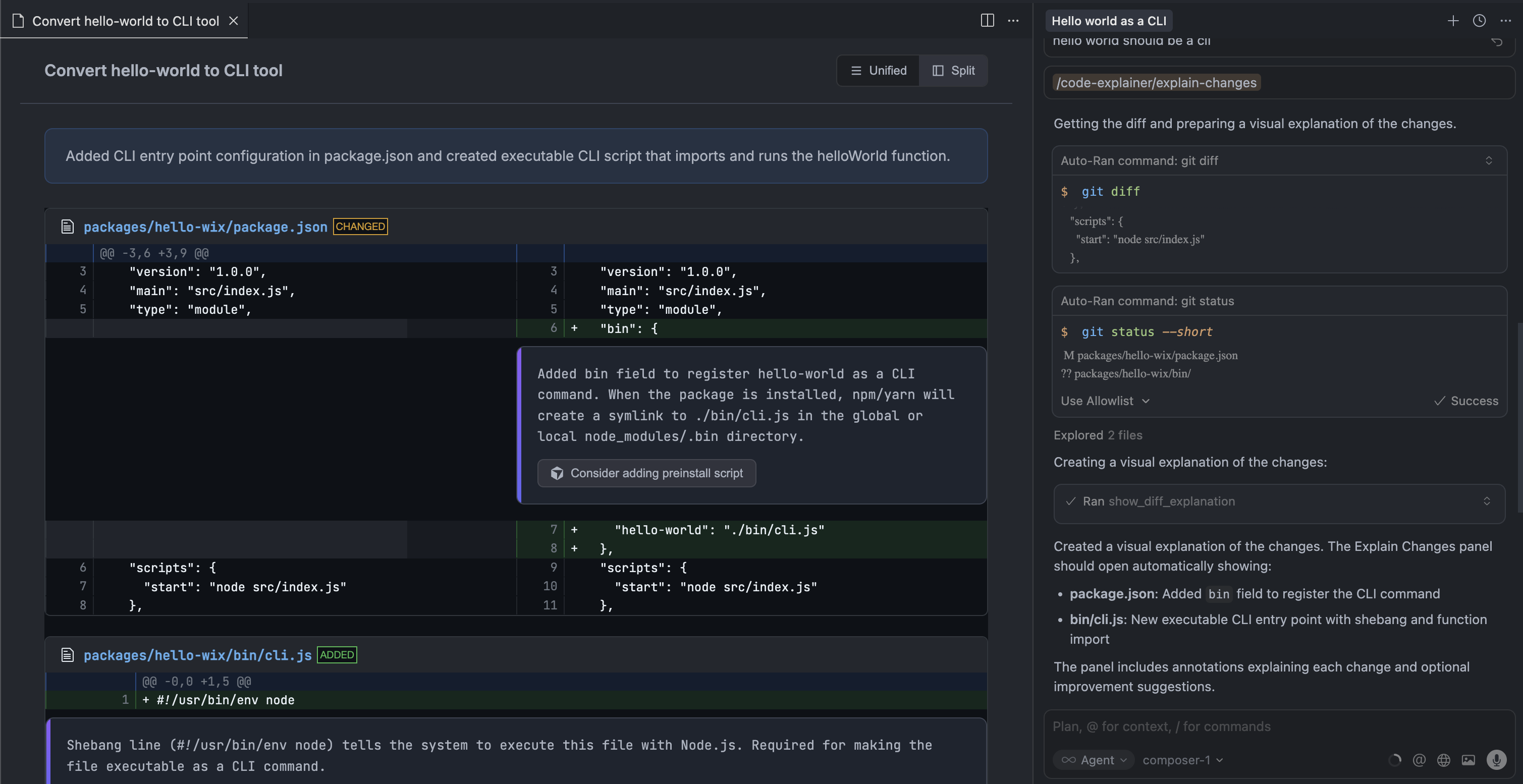
Just like humans review each other's PRs, your AI reviews its own changes — with inline annotations that appear directly in a VS Code/Cursor panel.
Why AI Peer Review?
When humans write code, we do peer review. When AI writes code, we... scroll through chat hoping we understood what it did?
The asymmetry is broken. AI generates multi-file changes in seconds, but understanding those changes still requires you to:
- Read the chat explanation
- Open the diff
- Mentally map one to the other
This extension gives AI the same workflow humans use: review the diff, annotate the changes, explain the reasoning.
How It Works
AI makes changes → AI reviews its own diff → Panel opens with annotated diff
The AI calls show_diff_explanation after completing a task. You get a visual diff with inline annotations — exactly where a human reviewer would leave comments.
Action buttons let you send improvement suggestions directly to Cursor chat.
Features
- Visual diff — Side-by-side or unified view powered by diff2html
- Inline annotations — Review comments appear directly after relevant code lines
- Action buttons — Click to send prompts to Cursor chat ("Refactor this", "Add tests")
- Click to open — File names link directly to the source
- Workspace-aware — Only shows in the window matching your project
- Auto-install MCP — Extension configures the MCP server automatically
Installation
1. Install the Extension
Download the .vsix from releases and install:
VS Code / Cursor:
- Extensions →
...→ "Install from VSIX..."
The extension automatically configures the MCP server in Cursor and Windsurf on first activation.
2. Use with AI
In Cursor chat, use the slash command:
/explain-changes
This triggers the MCP prompt which guides the AI to analyze your changes and call the tool automatically.
Manual MCP Configuration
If auto-install doesn't work, configure manually:
Cursor
Add to ~/.cursor/mcp.json:
{
  "mcpServers": {
    "explain-changes": {
      "command": "npx",
      "args": ["-y", "explain-changes-mcp"]
    }
  }
}
Claude Desktop
Add to claude_desktop_config.json:
{
  "mcpServers": {
    "explain-changes": {
      "command": "npx",
      "args": ["-y", "explain-changes-mcp"]
    }
  }
}
Windsurf
Add to ~/.codeium/windsurf/mcp_config.json:
{
  "mcpServers": {
    "explain-changes": {
      "command": "npx",
      "args": ["-y", "explain-changes-mcp"]
    }
  }
}
Packages
| Package | Description |
|---|---|
| packages/extension | VS Code/Cursor extension that displays diff explanations |
| packages/mcp | MCP server with the show_diff_explanation tool |
Architecture
┌─────────────────┐     writes JSON      ┌─────────────────┐
│   MCP Server    │ ──────────────────▶  │ ~/.explain-     │
│                 │                      │ changes/        │
│ show_diff_      │                      │ pending.json    │
│ explanation     │                      └────────┬────────┘
└─────────────────┘                               │
                                                  │ watches
                                                  ▼
                                         ┌─────────────────┐
                                         │  VS Code/Cursor │
                                         │   Extension     │
                                         │                 │
                                         │  Webview Panel  │
                                         └─────────────────┘
Development
# Install dependencies
npm install

# Build all packages
npm run build

# Build extension only
npm run build:extension

# Build MCP only
npm run build:mcp

# Package extension as .vsix
cd packages/extension && npm run package
License
MIT