



The first and only open‑source, self‑hostable fax platform with a GUI‑first Admin Console, multi‑backend adapters (cloud + self‑hosted), and AI assistant integration.
GUI‑first: Admin Console
- One place to configure backends, keys, inbound, storage, and run diagnostics.
- Open http://localhost:8080 and use the Admin Console (served by the API).
- Traits‑first UI: screens render only what your active provider supports.
Why Faxbot
- One API, many backends: Phaxio, Documo, Sinch, SignalWire, and more (cloud), or self‑hosted FreeSWTICH, SIP/Asterisk, or anything else you can dream up.
- Ability to mix and match outbound and inbound providers, total freedom, fit to your infrastructure.
- HIPAA‑aligned controls: HMAC webhook verification, short‑TTL tokens, compliant logging.
- AI integration: official MCP servers (Node & Python) for stdio/HTTP/SSE with Webhook support.
- Identical SDKs: Node.js and Python with the same surface.
Quick start (Docker Compose)
- Copy
.env(see.env.example). Pick a backend:
- Phaxio (recommended): set
FAX_BACKEND=phaxioandPHAXIO_API_KEY/PHAXIO_API_SECRET. - Sinch: set
FAX_BACKEND=sinch,SINCH_PROJECT_ID/SINCH_API_KEY/SINCH_API_SECRET.
Or one of 20 others that we have pre-made manifests for you to quickly load.
- SIP/Asterisk: set
FAX_BACKEND=sipand AMI vars (see docs).
- Start the API (and Admin Console):
docker compose up -d --build api
- Open the Admin Console: http://localhost:8080
Health checks:
- API:
curl http://localhost:8080/health - Ready:
curl -i http://localhost:8080/health/ready
Optional MCP servers:
docker compose --profile mcp up -d --build faxbot-mcp
docker compose --profile mcp up -d --build faxbot-mcp-sse
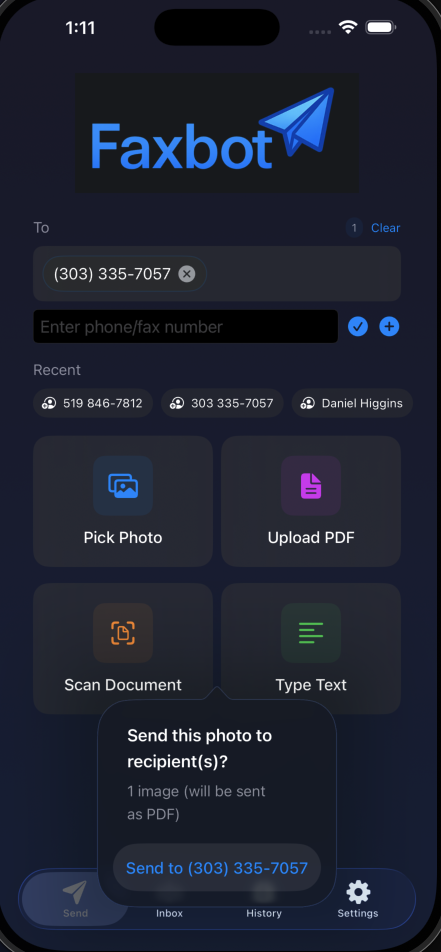
iOS App (TestFlight)
The iOS companion lets you send faxes and check status from your phone. Email david@faxbot.net for an invite.
SDKs
- Python:
pip install faxbot - Node.js:
npm install faxbot→ SDK Usage
Architecture highlights
- Traits‑first capabilities:
/admin/providersand/admin/configexpose active providers + traits; UI and API gate features by traits. - Canonical event & error model: normalized inbound/outbound events, status mapping, and standard error codes.
- Provider adapters: clean boundaries for verify_webhook/parse_inbound/send/status/cancel.
Docs:
Security
- Use
X-API-Key(multi‑key) for auth. - Enforce HTTPS and HMAC signature verification for cloud webhooks.
- No PHI in logs; only IDs/metadata are surfaced.
Contributing
See CONTRIBUTING.md. Please open issues/PRs; this project is GUI‑first and traits‑first—avoid backend‑name checks in new code.