FinLab AI
Your AI's shortcut to mass-produce alpha-generating quant strategies.




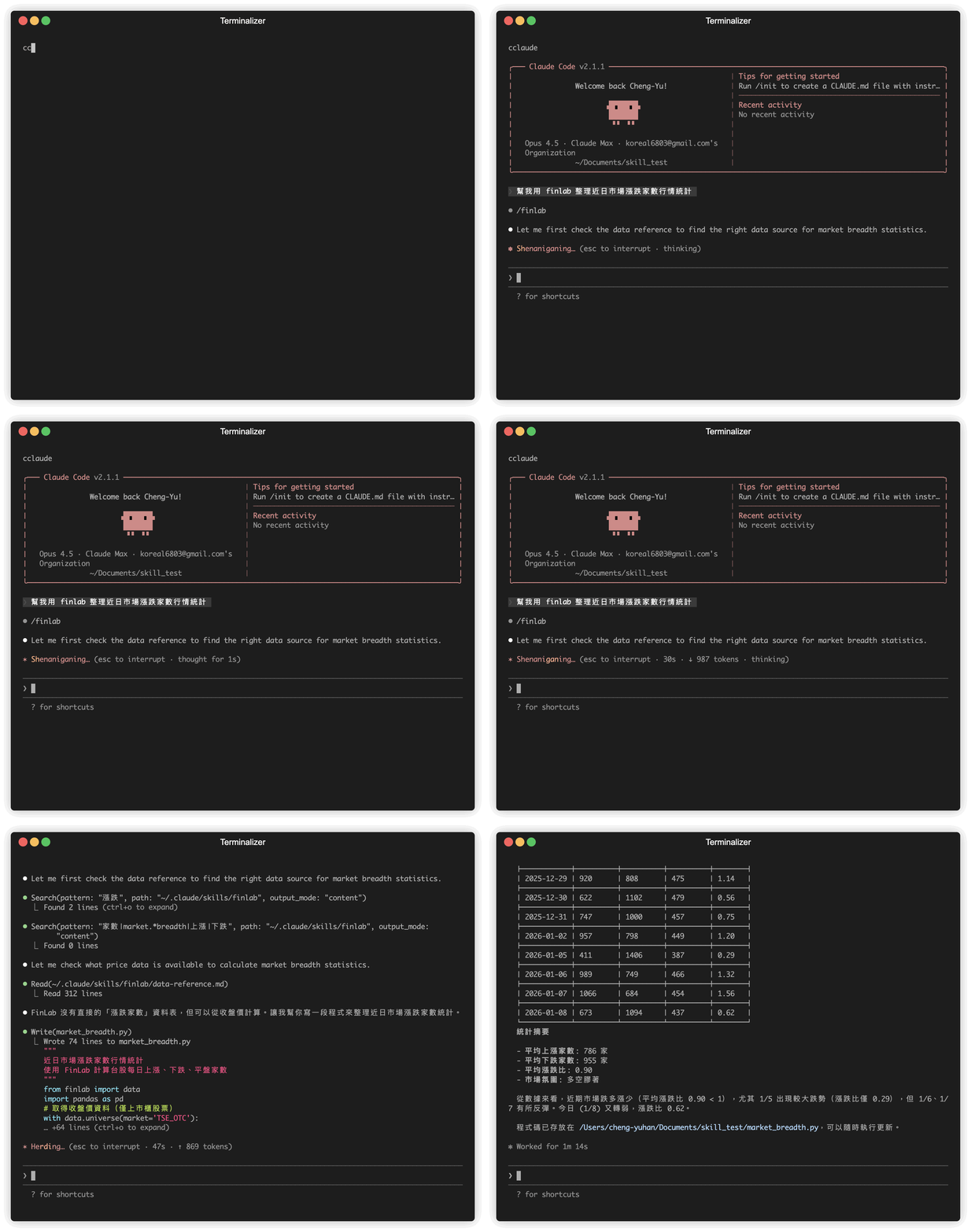
Quick Install
For Cursor Users (One-Click!)

For Cursor / Antigravity IDE Users (Manual)
Add this to your MCP config (~/.cursor/mcp.json):
{
  "mcpServers": {
    "finlab": {
      "url": "https://finlab-ai.koreal6803.workers.dev/mcp"
    }
  }
}
No installation needed - the MCP server is hosted remotely!
For Claude Code / Other AI CLI Users
Simply tell your AI assistant:
"Please look at https://github.com/koreal6803/finlab-ai and install the FinLab skill for me"
This works with Claude Code, ChatGPT Codex CLI, Gemini CLI, and other AI coding assistants.
Features
- Comprehensive Data Access - 900+ data columns: prices, financials, revenue, valuations, institutional trading
- Strategy Development - Factor-based strategies using FinLabDataFrame methods
- Backtesting Engine - Risk management, stop-loss, take-profit, position sizing
- Factor Analysis - IC calculation, Shapley values, centrality analysis
- Machine Learning - Feature engineering and label generation for ML models
Examples
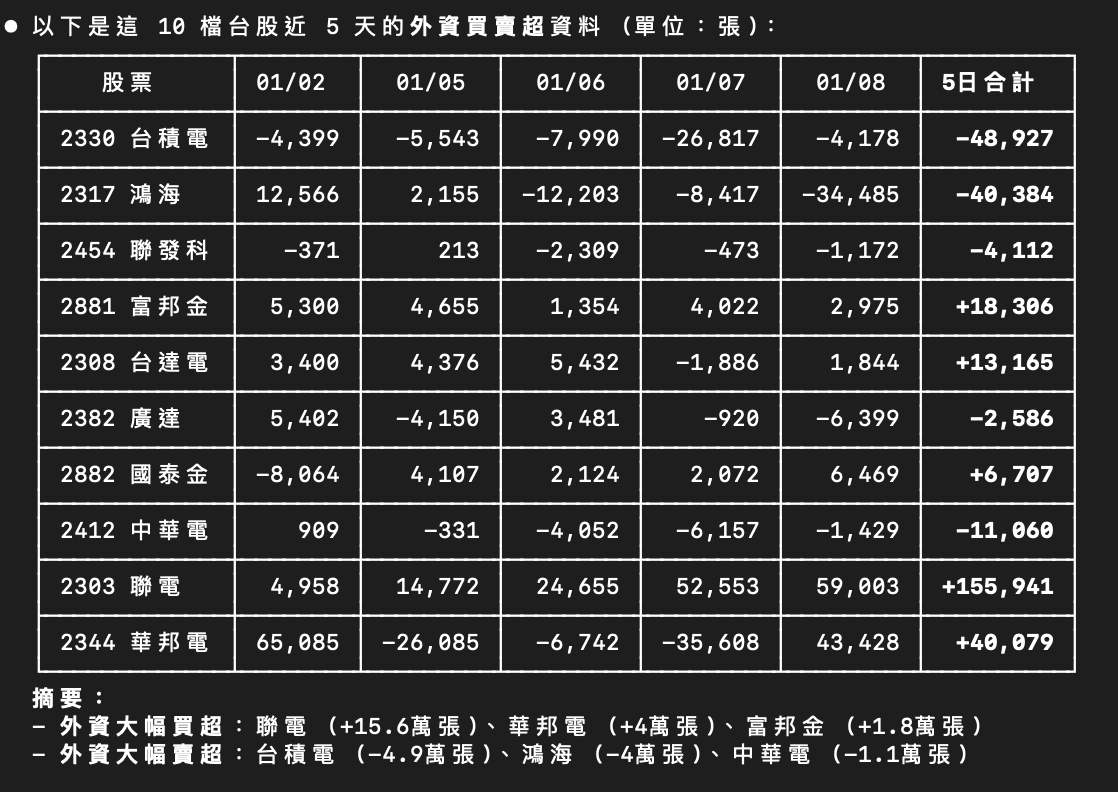
Fetch Institutional Trading Data
Prompt:
"List following TW stocks 近 5 天外資買賣超: 2330, 2317, 2454, 2881, 2308, 2382, 2882, 2412, 2303, 2344"
Result:
Build & Backtest a Strategy
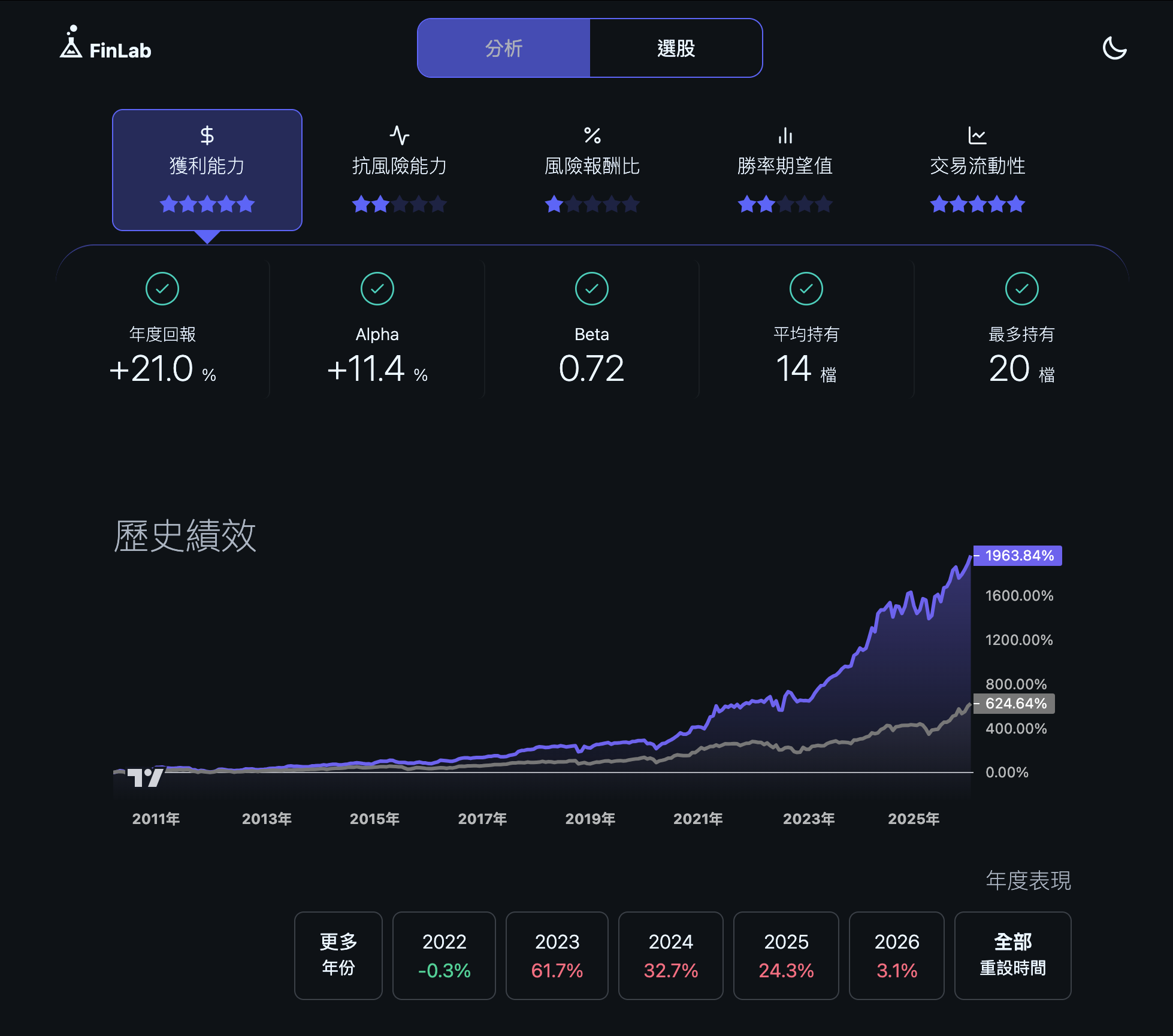
Prompt:
"Build a monthly rebalancing strategy for Taiwan stocks: select stocks with positive revenue YoY growth, P/E ratio below 10, P/B ratio below 1.5 (deep value), and price above 60-day moving average (uptrend). Pick top 20 stocks monthly and backtest."
Result:
Manual Installation
Option 1: Claude Code
# Add marketplace
/install marketplace add koreal6803/finlab-ai

# Install
/install finlab@finlab
Option 2: ChatGPT Codex CLI
git clone https://github.com/koreal6803/finlab-ai.git
cd finlab-ai
Then tell Codex:
請幫我安裝此 finlab 裡的 skills
Option 3: Gemini CLI
# Install skill-porter
npm install -g skill-porter

# Clone and convert
git clone https://github.com/koreal6803/finlab-ai.git
cd finlab-ai
skill-porter convert ./finlab/skills/finlab --to gemini --output ./finlab-gemini-extension
Then install the generated finlab-gemini-extension following Gemini CLI docs.
Option 4: Cursor IDE (MCP Server)
Add to ~/.cursor/mcp.json:
{
  "mcpServers": {
    "finlab": {
      "url": "https://finlab-ai.koreal6803.workers.dev/mcp"
    }
  }
}
Restart Cursor and start using FinLab documentation in your Agent.
Option 5: Antigravity IDE (MCP Server)
- Open Agent session → "..." → MCP Servers → Manage → View raw config
- Add to
mcp_config.json:
{
  "mcpServers": {
    "finlab": {
      "url": "https://finlab-ai.koreal6803.workers.dev/mcp"
    }
  }
}
Option 6: Local MCP Server (Any MCP Client)
# Clone and install
git clone https://github.com/koreal6803/finlab-ai.git
cd finlab-ai
pip install -e .

# Run the MCP server
python -m mcp_server
Configure your MCP client to use stdio transport with command python -m mcp_server.
Prerequisites
Get your FinLab API token: https://ai.finlab.tw/api_token/
export FINLAB_API_TOKEN="your_token_here"
Documentation
Comprehensive reference docs included:
| Document | Content |
|---|---|
| Data Reference | 900+ columns across 80+ tables |
| Backtesting Reference | sim() API, resampling, metrics |
| Factor Examples | 60+ complete strategy examples |
| Best Practices | Patterns, anti-patterns, tips |
| ML Reference | Feature engineering, labels |
License
MIT
Author
FinLab Community