floom
Turn Python functions into live web apps.
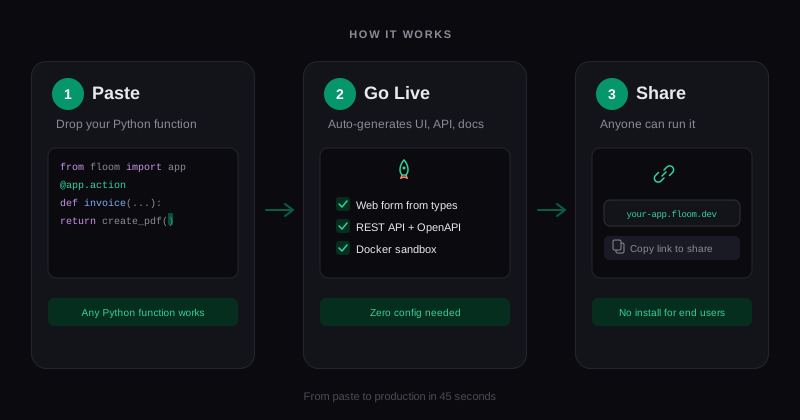
Paste a function. Get a UI, API, and shareable link. Self-hosted with Docker.


Demo
What it does
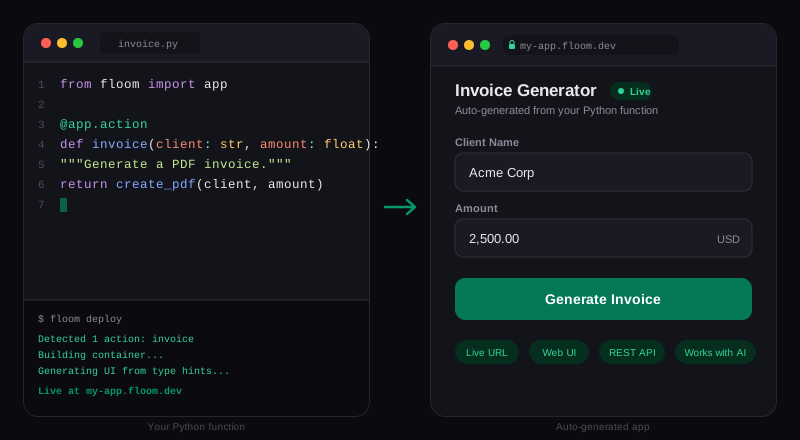
You write this:
from floom import app

@app.action
def generate_invoice(client: str, amount: float, due_date: str):
    pdf = create_pdf(client, amount)
    return {"url": pdf.url}
floom gives you:
- A web form with fields for client, amount, and due_date (auto-generated from type hints)
- A REST API at
/api/generate_invoicewith OpenAPI spec - A shareable link anyone can use
- Docker sandboxing so each run is isolated
No Dockerfile. No frontend code. No deploy config.
Quick Start
docker run -p 3000:3000 -p 3001:3001 \
  -v /var/run/docker.sock:/var/run/docker.sock \
  -v /tmp/floom-workspaces:/tmp/floom-workspaces \
  -v /tmp/floom-storage:/tmp/floom-storage \
  -v floom-data:/data \
  ghcr.io/floomhq/floom
Open localhost:3000. Paste a Python function. Hit "Go Live."
How type hints become UI
| Python type | Generated UI |
|---|---|
str | Text input |
int | Number input |
float | Number input (decimal) |
bool | Checkbox |
Literal["a","b"] | Dropdown select |
dict | JSON editor |
| Default values | Pre-filled placeholders |
Built-in storage
Your app can remember things across runs. No database setup.
from floom import app, remember

@app.action
def count_visits(name: str) -> dict:
    visits = (remember("visits") or 0) + 1
    remember("visits", visits)
    return {"message": f"Hello {name}! Visit #{visits}"}
Paste raw scripts
Got code from ChatGPT with no functions or type hints? floom can handle it.
import requests
city = "Berlin"
response = requests.get(f"https://wttr.in/{city}?format=j1")
data = response.json()
print(f"Temperature in {city}: {data['current_condition'][0]['temp_C']}°C")
With GEMINI_API_KEY set, floom uses AI to detect city as a form input, identify requests as a dependency, and wrap the script in a callable function. Get a free key.
Examples
| Example | What it does |
|---|---|
| Invoice Generator | Create invoices with automatic tax calculation |
| Text Analyzer | Count words, find common phrases, detect sentiment |
| Unit Converter | Convert temperatures and distances between units |
| Visit Counter | Greet visitors and track counts with remember() |
For AI agents
floom is built for AI-assisted workflows. Every app gets an OpenAPI spec, and the MCP server gives agents direct access.
# One command to set up MCP
npx @floomhq/cli setup-mcp

# Discover what an app can do
curl http://localhost:3001/v1/apps/my-app

# Call an action directly
curl -X POST http://localhost:3001/v1/apps/my-app/greet \
  -H 'Content-Type: application/json' \
  -d '{"name": "world"}'
Self-hosting
Docker (recommended)
The Quick Start command above runs the all-in-one container. Encryption key is auto-generated and persisted in the floom-data volume.
From source
git clone https://github.com/floomhq/floom
cd floom
npm run setup:local    # generates encryption key + .env
npm install
docker-compose up --build
- Web UI:
http://localhost:3000 - API:
http://localhost:3001 - Health:
http://localhost:3001/health
Environment variables
| Variable | Required | Default | Description |
|---|---|---|---|
MASTER_ENCRYPTION_KEY | No | Auto-generated | 32-byte base64 key for secrets encryption |
COMPUTE_BACKEND | No | docker | docker for self-hosted |
PORT | No | 3001 | Server port |
API_KEY | No | Bearer token to protect API | |
RUNNER_IMAGE | No | floom-runner:latest | Docker image for code execution |
RUNNER_MEMORY | No | 512m | Memory limit per container |
RUNNER_CPUS | No | 1 | CPU limit per container |
RUNNER_NETWORK | No | none | Network mode (none for isolation) |
GEMINI_API_KEY | No | Enables AI smart ingest for raw scripts |
See .env.example for the full list.
CLI
npm install -g @floomhq/cli

floom deploy my-app.py --name "My App"
floom run greet name=world
floom list
floom logs
floom doctor
floom storage list
floom share create <endpoint_id>
floom setup-mcp
Architecture
Python function (type hints)
        |
   OpenAPI schema extraction
        |
   +----+----+
   |         |
 Web form   REST API
   |         |
   Docker sandbox (isolated execution)
        |
     SQLite (state + storage)
floom/
├── apps/web/                  # Next.js frontend
├── packages/
│   ├── cli/                   # CLI tool
│   ├── client/                # TypeScript API client
│   ├── mcp-server/            # MCP tools for AI agents
│   ├── openapi-form/          # Form generation from OpenAPI
│   ├── shared/                # Shared types
│   └── ui/                    # Shared React components
└── services/
    ├── control-plane/         # Hono.js API server
    └── runner/                # Python execution runtime + SDK
Development
npm install
npm run build   # Build all packages
npm test        # Run all tests
Known Limitations
- Single instance only: The control plane uses in-memory state for run progress and deploy tracking. Running multiple control plane instances will cause state to be lost between them. A Redis-backed implementation is planned for multi-instance deployments.
- Artifact serving: Artifacts larger than 1MB are not served inline. S3-backed artifact storage is planned for production use.
Contributing
See CONTRIBUTING.md.
License
MIT. See LICENSE.