flutter-skill
Give any AI agent eyes and hands inside any running app.
8 platforms. Zero test code. One MCP server.


Demo • Quick Start • Platforms • vs Others • Docs
30-Second Demo
https://github.com/user-attachments/assets/d4617c73-043f-424c-9a9a-1a61d4c2d3c6
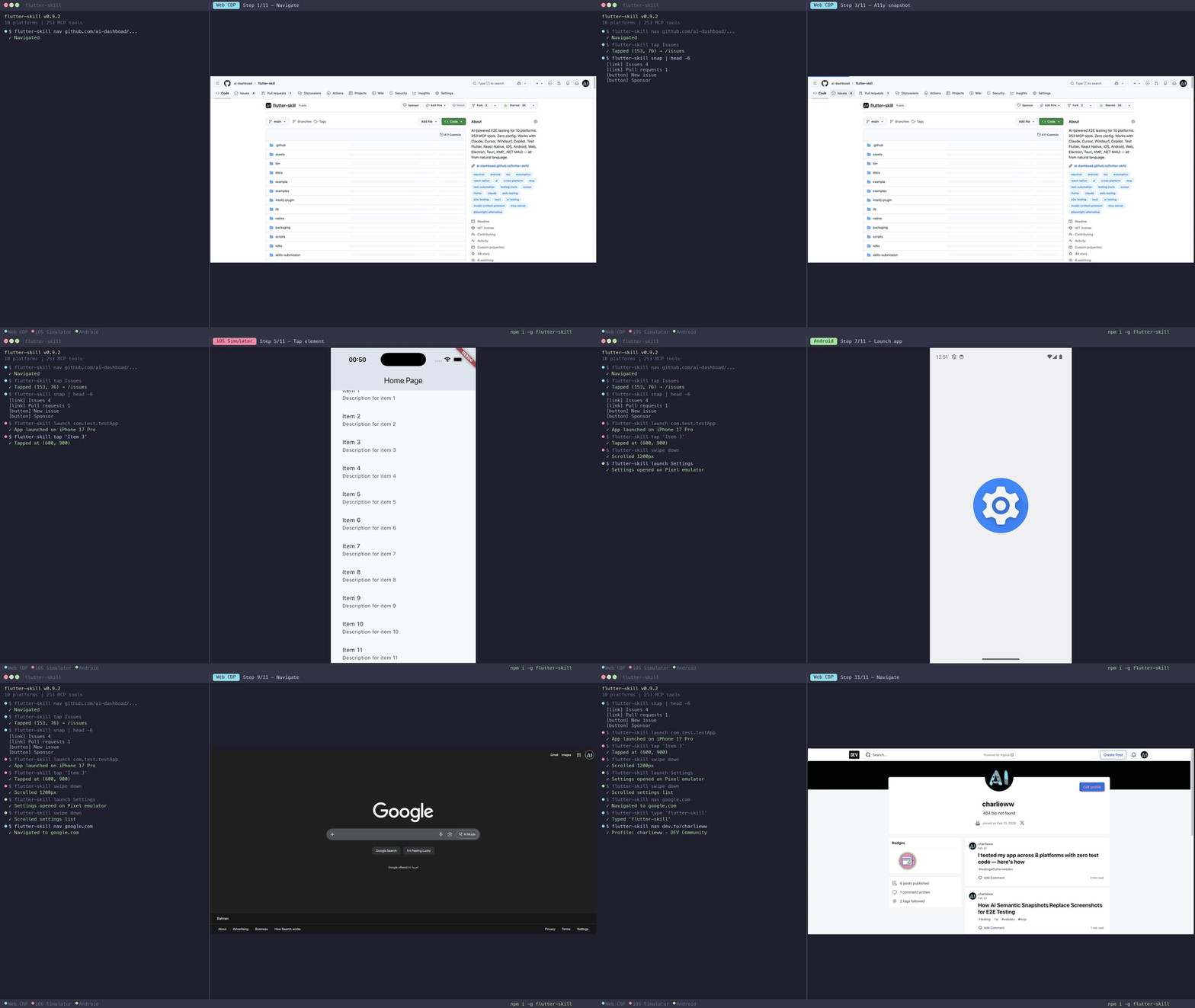
One prompt. 28 AI-driven actions. Zero test code. The AI explores a TikTok clone, navigates tabs, scrolls feeds, tests search, fills forms — all autonomously.
Why This Exists
Writing E2E tests is painful. Maintaining them is worse.
flutter-skill connects your AI agent (Claude, Cursor, Windsurf, Copilot, OpenClaw) directly to your running app via MCP. The agent can see the screen, tap buttons, type text, scroll — like a human tester who never sleeps.
You: "Test the checkout flow with an empty cart, then add 3 items and complete purchase"

Your AI agent handles the rest — screenshots, taps, text entry, assertions, navigation.
No Page Objects. No XPath. No brittle selectors. Just plain English.
Quick Start
1. Install (30 seconds)
npm install -g flutter-skill
2. Add to your AI (copy-paste into MCP config)
{
  "mcpServers": {
    "flutter-skill": {
      "command": "flutter-skill",
      "args": ["server"]
    }
  }
}
Works with Claude Desktop, Cursor, Windsurf, Copilot, Cline, OpenClaw — any MCP-compatible agent.
3. Add to your app (2 lines for Flutter)
import 'package:flutter_skill/flutter_skill.dart';

void main() {
  if (kDebugMode) FlutterSkillBinding.ensureInitialized();
  runApp(MyApp());
}
4. Test — just talk to your AI:
"Launch my app, explore every screen, and report any bugs"
That's it. Zero configuration. Zero test code.
📦 More install methods (Homebrew, Scoop, Docker, IDE, Agent Skill)
| Method | Command |
|---|---|
| npm | npm install -g flutter-skill |
| Homebrew | brew install ai-dashboad/flutter-skill/flutter-skill |
| Scoop | scoop install flutter-skill |
| Docker | docker pull ghcr.io/ai-dashboad/flutter-skill |
| pub.dev | dart pub global activate flutter_skill |
| VSCode | Extensions → "Flutter Skill" |
| JetBrains | Plugins → "Flutter Skill" |
| Agent Skill | npx skills add ai-dashboad/flutter-skill |
| Zero-config | flutter-skill init (auto-detects & patches your app) |
8 Platforms, One Tool
Most testing tools work on 1-2 platforms. flutter-skill works on 8.
| Platform | SDK | Test Score |
|---|---|---|
| Flutter (iOS/Android/Web) | flutter_skill | ✅ 188/195 |
| React Native | sdks/react-native | ✅ 75/75 |
| Electron | sdks/electron | ✅ 75/75 |
| Tauri (Rust) | sdks/tauri | ✅ 75/75 |
| Android (Kotlin) | sdks/android | ✅ 74/75 |
| KMP Desktop | sdks/kmp | ✅ 75/75 |
| .NET MAUI | sdks/dotnet-maui | ✅ 75/75 |
| iOS (Swift/UIKit) | sdks/ios | ✅ 19/19 |
Total: 656/664 tests passing (98.8%) — each platform tested against a complex social media app with 50+ elements.
Why Not Playwright / Appium / Detox?
| flutter-skill | Playwright | Appium | Detox | |
|---|---|---|---|---|
| Setup time | 30 sec | Minutes | Hours | Hours |
| Test code needed | ❌ None | ✅ Yes | ✅ Yes | ✅ Yes |
| AI-native (MCP) | ✅ | ❌ | ❌ | ❌ |
| Platforms | 8 | 3 (web) | Mobile | React Native |
| Natural language | ✅ | ❌ | ❌ | ❌ |
| Maintenance | Zero | High | High | Medium |
| Flutter support | ✅ Native | Partial | Partial | ❌ |
| Desktop apps | ✅ | ✅ | ❌ | ❌ |
flutter-skill is the only AI-native E2E testing tool that works across mobile, web, and desktop.
What It Can Do
👀 See
|
👆 Interact
|
🔍 Inspect (v0.8.0)
|
🚀 Control
|
40+ tools — full reference
Launch & Connect: launch_app, scan_and_connect, hot_reload, hot_restart, list_sessions, switch_session, close_session
Screen: screenshot, screenshot_region, screenshot_element, native_screenshot, inspect, inspect_interactive, get_widget_tree, find_by_type, get_text_content
Interaction: tap, double_tap, long_press, enter_text, set_text, clear_text, swipe, scroll_to, drag, go_back, press_key, native_tap, native_input_text, native_swipe
Assertions: assert_text, assert_visible, assert_not_visible, assert_element_count, wait_for_element, wait_for_gone, get_checkbox_state, get_slider_value, get_text_value
Debug: get_logs, get_errors, get_performance, get_memory_stats
Platform Setup
Flutter (iOS / Android / Web)
dependencies:
  flutter_skill: ^0.8.0
import 'package:flutter_skill/flutter_skill.dart';

void main() {
  if (kDebugMode) FlutterSkillBinding.ensureInitialized();
  runApp(MyApp());
}
React Native
npm install flutter-skill-react-native
import FlutterSkill from 'flutter-skill-react-native';
FlutterSkill.start();
Electron
npm install flutter-skill-electron
const { FlutterSkillBridge } = require('flutter-skill-electron');
FlutterSkillBridge.start(mainWindow);
iOS (Swift)
// Swift Package Manager: FlutterSkillSDK
import FlutterSkill
FlutterSkillBridge.shared.start()

Text("Hello").flutterSkillId("greeting")
Android (Kotlin)
implementation("com.flutterskill:flutter-skill:0.8.0")

FlutterSkillBridge.start(this)
Tauri (Rust)
[dependencies]
flutter-skill-tauri = "0.8.0"
KMP Desktop
Add Gradle dependency — see sdks/kmp for details.
.NET MAUI
Add NuGet package — see sdks/dotnet-maui for details.
Example Prompts
Just tell your AI what to test:
| Prompt | What happens |
|---|---|
| "Test login with wrong password" | Screenshots → enters creds → taps login → verifies error |
| "Explore every screen and report bugs" | Systematically navigates all screens, tests all elements |
| "Fill registration with edge cases" | Tests emoji 🌍, long strings, empty fields, special chars |
| "Compare checkout flow on iOS and Android" | Runs same test on both platforms, compares screenshots |
| "Take screenshots of all 5 tabs" | Taps each tab, captures state |
Contributing
See CONTRIBUTING.md for guidelines.
git clone https://github.com/ai-dashboad/flutter-skill
cd flutter-skill
dart pub get
dart run bin/flutter_skill.dart server  # Start MCP server
Links
| 📦 pub.dev | 🧩 VSCode |
| 📦 npm | 🧩 JetBrains |
| 🍺 Homebrew | 📖 Docs |
| 🤖 Agent Skill | 📋 Changelog |
⭐ If flutter-skill saves you time, star it so others can find it too!
MIT License © 2025