FocusRelayMCP
A Model Context Protocol (MCP) server for OmniFocus on macOS. Query tasks, projects, and tags using natural language through AI assistants like Claude.
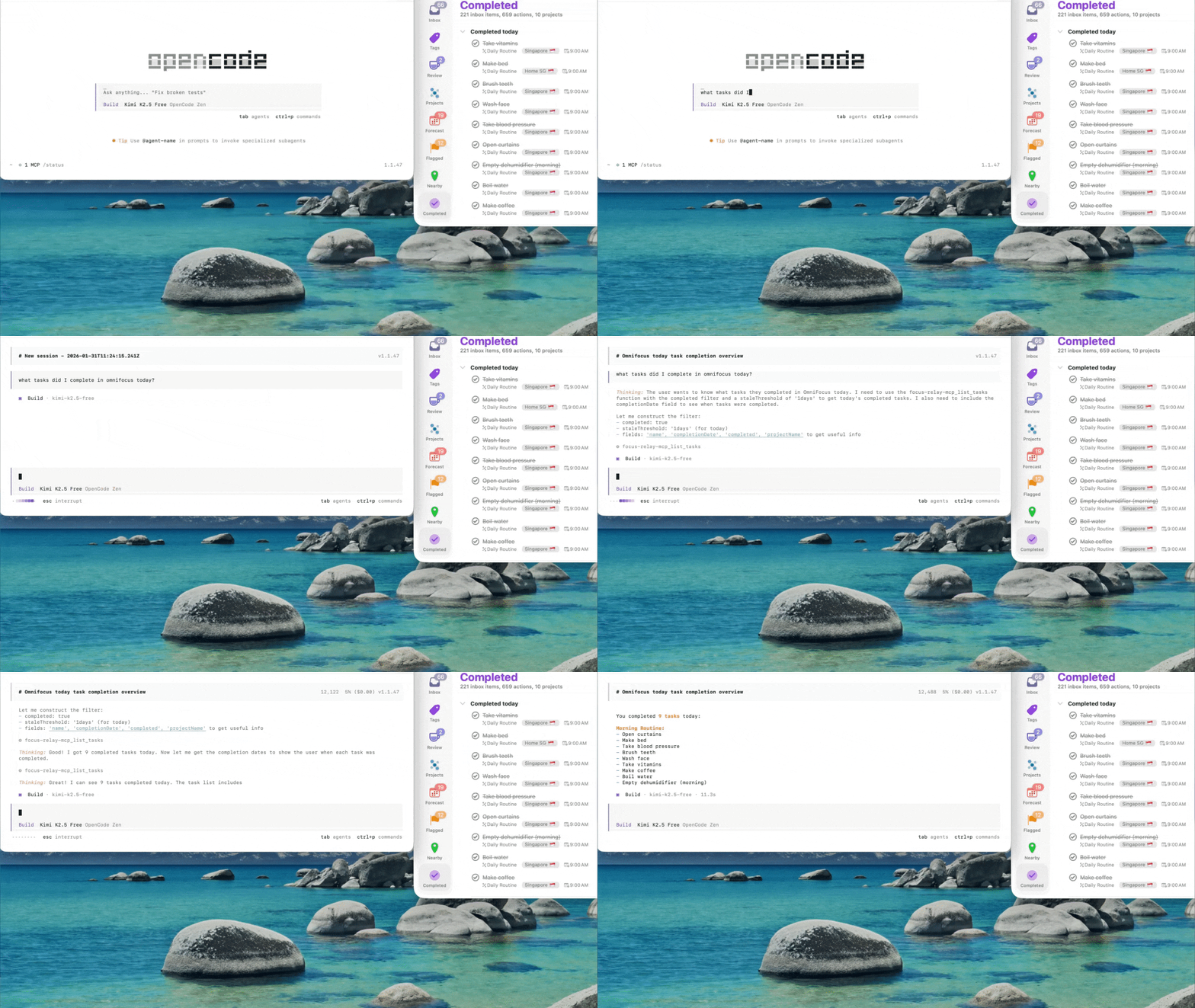
Just ask "What should I do today?" and get instant, filtered results.
What You Can Do
Stop clicking through endless task lists. Just ask:
Daily Planning
- "What should I be doing today?" - Tasks due today, respecting your timezone
- "What about this morning?" - Available tasks for 6am-12pm
- "What can I do this afternoon?" - Tasks for 12pm-6pm
- "What should I work on this evening?" - Tasks for 6pm-10pm
Project Management
- "What projects have no next actions?" - Find stalled projects
- "Show me my stalled projects" - Projects with tasks but nothing available
- "What tasks do I have in my [Project Name] project?"
Context Switching
- "What contexts do I have available?" - See which tags have actionable tasks
- "Show me tasks I can do on my Mac" - Filter by context
- "What calls do I need to make?"
Task Discovery
- "What have I been avoiding?" - Tasks deferred 365+ days ago
- "What am I procrastinating on?" - Tasks deferred recently
- "Find my flagged items"
- "What did I accomplish this week?"
Features
- Time-based Queries: Natural language time period filtering
- Project Health: Detect stalled projects and missing next actions
- Context Awareness: Tag-based filtering and availability
- Stale Task Detection: 7d/30d/90d/180d/365d threshold filtering
- Smart Filtering: By tags, due dates, defer dates, completion, duration
- Timezone Aware: Automatic local timezone detection and handling
- High Performance: Single-pass filtering with early exit optimization
Installation
Option A: Homebrew Installation (Recommended for macOS)
If you have Homebrew installed, this is the easiest method:
# Add the tap (once)
brew tap deverman/focus-relay

# Install the MCP server and OmniFocus plugin
brew install focus-relay-mcp
Then continue with Step 3: Restart OmniFocus below.
Option B: Manual Binary Installation
If you don't want to use Homebrew, download a pre-built binary:
- Download the latest release from the Releases page
- Extract the binary to a location in your PATH (e.g.,
~/bin/or/usr/local/bin/) - Download the plugin:
FocusRelayBridge.omnijsfrom the same release - Copy the plugin to your OmniFocus plugin folder (see Step 2 below)
Option C: Developer Installation (Build from Source)
Prerequisites
- macOS with OmniFocus installed (4.x recommended)
- Swift 6.2+ toolchain
- This has been tested on opencode but should work with Claude Desktop or other tools with MCP integration
Step 1: Clone and Build
git clone <repository-url>
cd FocusRelayMCP
swift build -c release
The binary will be at .build/release/focus-relay-mcp
Step 2: Install the OmniFocus Plugin
./scripts/install-plugin.sh
This installs the FocusRelay Bridge plugin to your OmniFocus plugin directory.
Step 3: Configure MCP
Add to your opencode.json or Claude Desktop config:
{
  "mcp": {
    "focus-relay-mcp": {
      "type": "local",
      "command": ["/path/to/FocusRelayMCP/.build/release/focus-relay-mcp"],
      "enabled": true
    }
  }
}
Step 4: Restart OmniFocus
⚠️ Important: After installing or updating the plugin, you must restart OmniFocus:
osascript -e 'tell application "OmniFocus" to quit' && sleep 2 && open -a "OmniFocus"
Or manually: Quit OmniFocus completely and reopen it.
Step 5: First Time Setup (Security Approval)
⚠️ Critical: The first time you query OmniFocus, a security dialog will appear:
- Ask your AI assistant: "What should I do today?" (or any OmniFocus query)
- OmniFocus will show a security prompt: "Allow script to control OmniFocus?"
- Click "Run Script" (not "Cancel")
- If you don't see the prompt, check if OmniFocus is behind other windows
What happens if you don't approve:
- You'll see "Bridge timed out" or "Plugin not responding" errors
- The MCP server cannot communicate with OmniFocus
- Queries will fail silently or with timeout errors
To fix approval issues:
- In OmniFocus: Automation → Configure Plug-ins...
- Find "FocusRelay Bridge" in the list
- Check if it's enabled, or try removing and reinstalling it
- Restart OmniFocus and try again
Usage Examples
Daily Planning
- "What should I be doing today?"
- "What about this morning?" (6am-12pm)
- "What can I do this afternoon?" (12pm-6pm)
- "What should I work on this evening?" (6pm-10pm)
Project Management
- "What projects have no next actions?"
- "Show me my stalled projects"
- "What tasks do I have in my Leave DFS project?"
Context Switching
- "What contexts do I have available?"
- "Show me tasks I can do on my Mac"
- "What calls do I need to make?"
Task Discovery
- "What have I been avoiding?" (tasks deferred >365 days)
- "What am I procrastinating on?" (tasks deferred recently)
- "Find my flagged items"
Status Queries
- "What did I accomplish this week?"
- "How many tasks are in my inbox?"
- "Show me completed tasks"
Available Tools
list_tasks
Query tasks with various filters:
dueBefore,dueAfter: Filter by due datesdeferBefore,deferAfter: Filter by defer datestags: Filter by specific tagsproject: Filter by projectflagged: Show only flagged taskscompleted: Show completed or remaining tasksstaleThreshold: Convenience filter (7days, 30days, 90days, 180days, 270days, 365days)
list_projects
Query projects with status and task counts:
statusFilter: active, onHold, dropped, done, allincludeTaskCounts: Get available/remaining/completed task counts- Returns: hasChildren, isStalled, nextTask for project health
list_tags
Query tags with task counts:
statusFilter: active, onHold, dropped, allincludeTaskCounts: Get task counts per tag
get_task_counts
Get aggregate counts for any filter combination.
get_project_counts
Get counts of projects and actions.
Timezone Handling
FocusRelayMCP automatically detects your local timezone and uses it for time-based queries. When you ask:
- "What should I do this morning?" → Returns tasks available 6am-12pm your local time
- Tasks due today → Tasks due before end of day in your timezone
The timezone is detected from your macOS system settings and passed to OmniFocus for accurate filtering.
Performance
- Cached Queries: Projects and tags are cached for 5 minutes (faster repeat queries)
- Single-Pass Filtering: All filters applied in one iteration (optimized for speed)
- Early Exit: Stops processing once page limit is reached
- Typical Response Time: ~1 second (limited by OmniFocus IPC)
Troubleshooting
"Bridge timed out" or "Plugin not responding"
This is the most common issue. Several causes:
-
Security approval missing (most common)
- Solution: See Step 5 (First Time Setup) above. You must click "Run Script" in the OmniFocus security dialog.
-
Plugin needs reinstallation
- Solution: Run
./scripts/install-plugin.shagain, then restart OmniFocus completely
- Solution: Run
-
OmniFocus not properly restarted after plugin update
- Solution: Force quit OmniFocus and reopen it
-
Check plug-in configuration
- In OmniFocus: Automation → Configure Plug-ins...
- Verify "FocusRelay Bridge" appears in the list and is enabled
- If you see errors here, remove the plug-in and reinstall
"Wrong time period results"
- Cause: Timezone detection may need refresh after travel
- Solution: Restart both OmniFocus and opencode/Claude Desktop
"Tasks not appearing"
- Check that tasks have proper defer/due dates set
- Verify task is not marked as completed or dropped
- Try querying with
inboxView: "available"for available tasks
Cache Issues
- Projects/Tags cache for 5 minutes
- Task queries are never cached (always fresh)
- Restart opencode/Claude to clear any client-side caching
Development
Build
swift build
Test
swift test
Package Plugin
./scripts/package-plugin.sh
Architecture
- Swift Layer: MCP server, request handling, caching
- OmniFocus Plugin (JavaScript): Executes within OmniFocus, queries database
- IPC: File-based communication between Swift and OmniFocus
- Timezone: Detected in Swift, passed to plugin for local-time calculations
License
MIT
Contributing
Issues and PRs welcome! See AGENTS.md for development notes.