Golden Egg
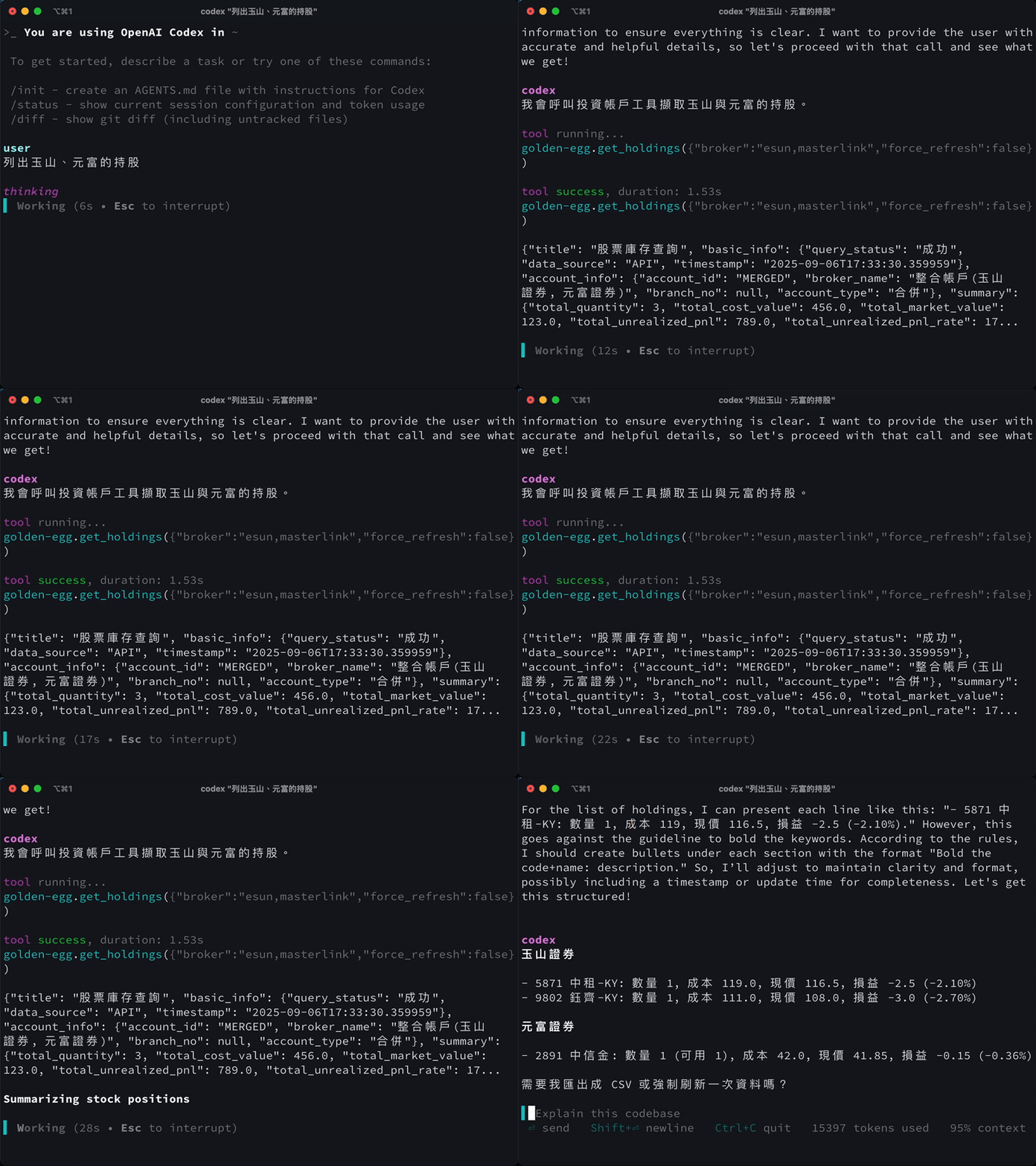
以 MCP Plugin 方式實現台股庫存查詢功能,讓 AI Agent 能夠輕鬆調用。目前支援富邦、永豐、元富、玉山等四間證券公司。
前置需求
- 在要連接的卷商申請交易憑證,查看最下方的卷商文件
- Python 3.13 或更高版本
- UV 套件管理器
卷商文件
- 元富(masterlink): https://ml-fugle-api.masterlink.com.tw/FugleSDK/ (沒有測試環境)
- 富邦: https://www.fbs.com.tw/TradeAPI/docs/welcome/#%E6%B8%AC%E8%A9%A6%E7%92%B0%E5%A2%83 (有獨立的測試環境帳號憑證)
- 玉山: https://www.esunsec.com.tw/trading-platforms/api-trading/docs/prerequisites#run_simulation (有測試環境,但是沒有單獨的帳號)
- 永豐證卷: https://sinotrade.github.io/zh/tutor/simulation/ (有測試環境,但要用自已的憑證)
安裝 UV
macOS / Linux
curl -LsSf https://astral.sh/uv/install.sh | sh
Windows
powershell -c "irm https://astral.sh/uv/install.ps1 | iex"
驗證卷商是否開通
驗證永豐
uv run pytest -W ignore::DeprecationWarning -v -s test/unit/test_shinopac.py
驗證富邦
uv run pytest -W ignore::DeprecationWarning -v -s test/unit/test_fubon_unit.py
驗證玉山證卷
uv run pytest -W ignore::DeprecationWarning -v -s test/unit/test_esun_unit.py
驗證元富證卷
uv run pytest -W ignore::DeprecationWarning -v -s test/unit/test_masterlink_unit.py
其他測試
- 測試所有integration test
pytest -W ignore::DeprecationWarning -v -s - 測試所有unit test
uv run pytest -W ignore::DeprecationWarning -v -s test/unit - 測試所有unit test 不帶 stdout
uv run pytest -W ignore::DeprecationWarning -s test/unit
專案結構
golden-egg/
├── main.py                    # 主程式入口
├── pyproject.toml             # 專案配置
├── uv.lock                    # UV 依賴鎖定檔案
├── start.sh                   # 啟動腳本
├── README.md                  # 專案說明
├── broker/                    # 券商 API 模組
│   ├── __init__.py
│   ├── base.py                # 券商基礎類別
│   ├── esun/                  # 玉山證券 API
│   │   ├── __init__.py
│   │   ├── app.py
│   │   ├── certs/             # 玉山憑證檔案
│   │   ├── client.py
│   │   └── reset.py
│   ├── fubon/                 # 富邦證券 API
│   │   ├── __init__.py
│   │   ├── app.py
│   │   ├── certs/             # 富邦憑證檔案
│   │   ├── client.py
│   │   ├── log/               # 富邦日誌
│   │   ├── ocr_demo.py
│   │   └── ocr.py
│   ├── masterlink/            # 元富證券 API
│   │   ├── __init__.py
│   │   ├── app.py
│   │   ├── certs/             # 元富憑證檔案
│   │   ├── client.py
│   │   ├── Configs/           # 元富設定檔案
│   │   └── log/               # 元富日誌
│   └── sinopac/               # 永豐證券 API
│       ├── __init__.py
│       ├── certs/             # 永豐憑證檔案
│       └── client.py
├── config/                    # 配置模組
│   ├── __init__.py
│   └── settings.py            # 全域設定
├── docs/                      # 文件目錄
│   ├── cursor_mcp_setup.md
│   ├── market_data_api_spec.md
│   └── MCP_TESTING_GUIDE.md
├── log/                       # 全域日誌目錄
├── models/                    # 資料模型
│   ├── __init__.py
│   ├── accounts.py            # 帳戶模型
│   ├── common.py              # 共用模型
│   ├── data/
│   │   └── stock_info.json    # 股票資訊資料
│   ├── holdings.py            # 持股模型
│   └── market_data.py         # 市場資料模型
├── service/                   # 服務層
│   ├── __init__.py
│   ├── holdings_service.py    # 持股服務
│   ├── mcp/
│   │   ├── __init__.py
│   │   ├── prompts.py         # MCP 提示詞
│   │   ├── resources.py       # MCP 資源
│   │   └── tools.py           # MCP 工具
│   ├── mcp_server.py         # MCP 服務器
│   └── storage_service.py     # 儲存服務
├── test/                      # 測試目錄
│   ├── conftest.py            # 測試配置
│   ├── integration/           # 整合測試
│   │   ├── __init__.py
│   │   ├── test_esun_integration.py
│   │   ├── test_fubon_integration.py
│   │   ├── test_masterlink_integration.py
│   │   └── test_sinopac_integration.py
│   ├── log/                   # 測試日誌
│   └── unit/                  # 單元測試
│       ├── __init__.py
│       ├── test_esun_unit.py
│       ├── test_fubon_unit.py
│       ├── test_masterlink_unit.py
│       └── test_shinopac.py
└── wheels/                    # WHL 檔案目錄
    └── README.md
mcp設定
OPEN AI CODEX
# ~/.codex/config.toml
[mcp_servers.golden-egg]
command = "uv"
args = ["run", "--project", "<YOUR_PATH>/golden-egg", "python", "<YOUR_PATH>/golden-egg/main.py"]
CURSOR
# ~/.cursor/mcp.json
{
  "mcpServers": {
    "golden-egg": {
      "command": "<YOUR_PATH>/golden-egg/.venv/bin/python",
      "args": ["<YOUR_PATH>/golden-egg/main.py"],
      "disabled": false
    }
  }
}
VSCODE
#檢視>命令選擇區>add mcp server
"golden-egg": {
      "command": "<YOUR_PATH>/golden-egg/.venv/bin/python",
      "args": ["<YOUR_PATH>/golden-egg/main.py"],
      "type": "stdio"
}
授權
MIT