HANA MCP Server




Model Context Protocol (MCP) server for seamless SAP HANA database integration with AI agents and development tools.
🚀 Quick Start
1. Install
npm install -g hana-mcp-server
2. Configure Claude Desktop
Update your Claude Desktop config file:
macOS: ~/Library/Application Support/Claude/claude_desktop_config.json
Windows: %APPDATA%\claude\claude_desktop_config.json
Linux: ~/.config/claude/claude_desktop_config.json
{
  "mcpServers": {
    "HANA Database": {
      "command": "hana-mcp-server",
      "env": {
        "HANA_HOST": "your-hana-host.com",
        "HANA_PORT": "443",
        "HANA_USER": "your-username",
        "HANA_PASSWORD": "your-password",
        "HANA_SCHEMA": "your-schema",
        "HANA_SSL": "true",
        "HANA_ENCRYPT": "true",
        "HANA_VALIDATE_CERT": "true",
        "HANA_CONNECTION_TYPE": "auto",
        "HANA_INSTANCE_NUMBER": "10",
        "HANA_DATABASE_NAME": "HQQ",
        "LOG_LEVEL": "info",
        "ENABLE_FILE_LOGGING": "true",
        "ENABLE_CONSOLE_LOGGING": "false"
      }
    }
  }
}
3. Restart Claude Desktop
Close and reopen Claude Desktop to load the configuration.
4. Test It!
Ask Claude: "Show me the available schemas in my HANA database"
🎯 What You Get
Database Operations
- Schema Exploration: List schemas, tables, and table structures
- Query Execution: Run SQL queries with natural language
- Data Sampling: Get sample data from tables
- System Information: Monitor database status and performance
AI Integration
- Natural Language Queries: "Show me all tables in the SYSTEM schema"
- Query Building: "Create a query to find customers with orders > $1000"
- Data Analysis: "Get sample data from the ORDERS table"
- Schema Navigation: "Describe the structure of table CUSTOMERS"
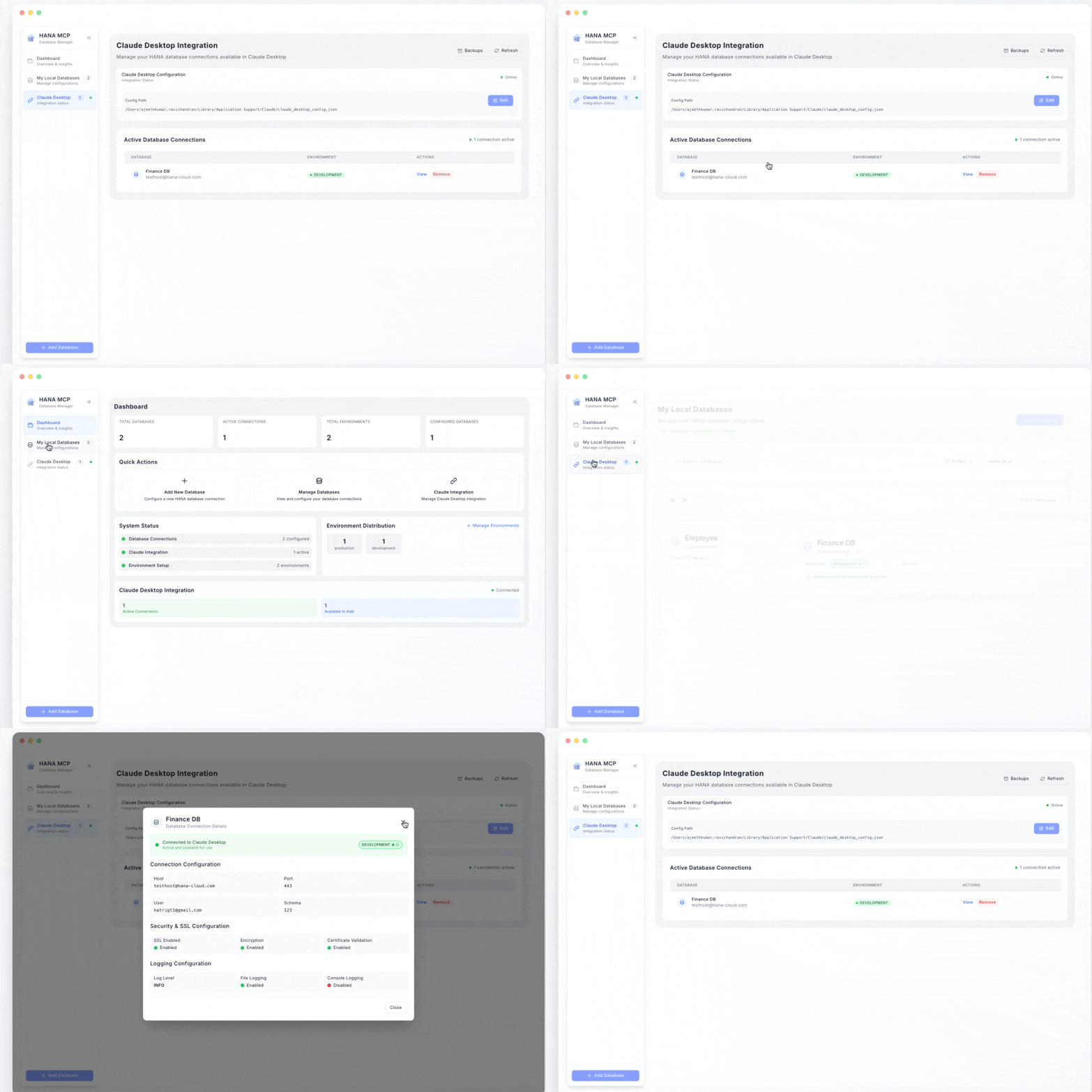
🖥️ Visual Configuration (Recommended)
For easier setup and management, use the HANA MCP UI:
npx hana-mcp-ui
This opens a web interface where you can:
- Configure multiple database environments
- Deploy configurations to Claude Desktop with one click
- Manage active connections
- Test database connectivity
🛠️ Configuration Options
Required Parameters
| Parameter | Description | Example |
|---|---|---|
HANA_HOST | Database hostname or IP address | hana.company.com |
HANA_USER | Database username | DBADMIN |
HANA_PASSWORD | Database password | your-secure-password |
Optional Parameters
| Parameter | Description | Default | Options |
|---|---|---|---|
HANA_PORT | Database port | 443 | Any valid port number |
HANA_SCHEMA | Default schema name | - | Schema name |
HANA_CONNECTION_TYPE | Connection type | auto | auto, single_container, mdc_system, mdc_tenant |
HANA_INSTANCE_NUMBER | Instance number (MDC) | - | Instance number (e.g., 10) |
HANA_DATABASE_NAME | Database name (MDC tenant) | - | Database name (e.g., HQQ) |
HANA_SSL | Enable SSL connection | true | true, false |
HANA_ENCRYPT | Enable encryption | true | true, false |
HANA_VALIDATE_CERT | Validate SSL certificates | true | true, false |
LOG_LEVEL | Logging level | info | error, warn, info, debug |
ENABLE_FILE_LOGGING | Enable file logging | true | true, false |
ENABLE_CONSOLE_LOGGING | Enable console logging | false | true, false |
Database Connection Types
1. Single-Container Database
Standard HANA database with single tenant.
Required: HANA_HOST, HANA_USER, HANA_PASSWORD
Optional: HANA_PORT, HANA_SCHEMA
{
  "HANA_HOST": "hana.company.com",
  "HANA_PORT": "443",
  "HANA_USER": "DBADMIN",
  "HANA_PASSWORD": "password",
  "HANA_SCHEMA": "SYSTEM",
  "HANA_CONNECTION_TYPE": "single_container"
}
2. MDC System Database
Multi-tenant system database (manages tenants).
Required: HANA_HOST, HANA_PORT, HANA_INSTANCE_NUMBER, HANA_USER, HANA_PASSWORD
Optional: HANA_SCHEMA
{
  "HANA_HOST": "192.168.1.100",
  "HANA_PORT": "31013",
  "HANA_INSTANCE_NUMBER": "10",
  "HANA_USER": "SYSTEM",
  "HANA_PASSWORD": "password",
  "HANA_SCHEMA": "SYSTEM",
  "HANA_CONNECTION_TYPE": "mdc_system"
}
3. MDC Tenant Database
Multi-tenant tenant database (specific tenant).
Required: HANA_HOST, HANA_PORT, HANA_INSTANCE_NUMBER, HANA_DATABASE_NAME, HANA_USER, HANA_PASSWORD
Optional: HANA_SCHEMA
{
  "HANA_HOST": "192.168.1.100",
  "HANA_PORT": "31013",
  "HANA_INSTANCE_NUMBER": "10",
  "HANA_DATABASE_NAME": "HQQ",
  "HANA_USER": "DBADMIN",
  "HANA_PASSWORD": "password",
  "HANA_SCHEMA": "SYSTEM",
  "HANA_CONNECTION_TYPE": "mdc_tenant"
}
Auto-Detection
When HANA_CONNECTION_TYPE is set to auto (default), the server automatically detects the type:
- If
HANA_INSTANCE_NUMBER+HANA_DATABASE_NAME→ MDC Tenant - If only
HANA_INSTANCE_NUMBER→ MDC System - If neither → Single-Container
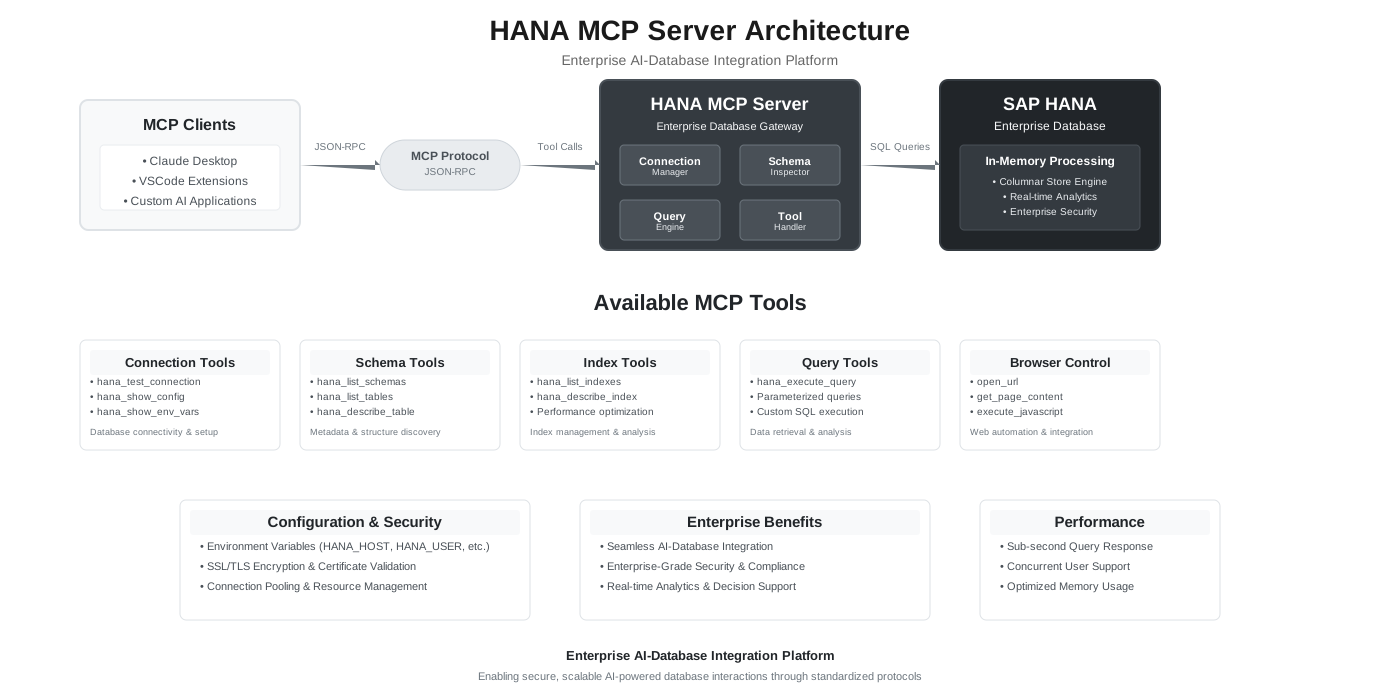
🏗️ Architecture
System Architecture
Component Structure
hana-mcp-server/
├── 📁 src/
│   ├── 🏗️ server/           # MCP Protocol & Server Management
│   │   ├── index.js         # Main server entry point
│   │   ├── mcp-handler.js   # JSON-RPC 2.0 implementation
│   │   └── lifecycle-manager.js # Server lifecycle management
│   ├── 🛠️ tools/            # Tool Implementations
│   │   ├── index.js         # Tool registry & discovery
│   │   ├── config-tools.js  # Configuration management
│   │   ├── schema-tools.js  # Schema exploration
│   │   ├── table-tools.js   # Table operations
│   │   ├── index-tools.js   # Index management
│   │   └── query-tools.js   # Query execution
│   ├── 🗄️ database/         # Database Layer
│   │   ├── hana-client.js   # HANA client wrapper
│   │   ├── connection-manager.js # Connection management
│   │   └── query-executor.js # Query execution utilities
│   ├── 🔧 utils/            # Shared Utilities
│   │   ├── logger.js        # Structured logging
│   │   ├── config.js        # Configuration management
│   │   ├── validators.js    # Input validation
│   │   └── formatters.js    # Response formatting
│   └── 📋 constants/        # Constants & Definitions
│       ├── mcp-constants.js # MCP protocol constants
│       └── tool-definitions.js # Tool schemas
├── 🧪 tests/                # Testing Framework
├── 📚 docs/                 # Documentation
├── 📦 package.json          # Dependencies & Scripts
└── 🚀 hana-mcp-server.js    # Main entry point
📚 Available Commands
Once configured, you can ask Claude to:
- "List all schemas in the database"
- "Show me tables in the SYSTEM schema"
- "Describe the CUSTOMERS table structure"
- "Execute: SELECT * FROM SYSTEM.TABLES LIMIT 10"
- "Get sample data from ORDERS table"
- "Count rows in CUSTOMERS table"
🔧 Troubleshooting
Connection Issues
- "Connection refused": Check HANA host and port
- "Authentication failed": Verify username/password
- "SSL certificate error": Set
HANA_VALIDATE_CERT=falseor install valid certificates
Debug Mode
export LOG_LEVEL="debug"
export ENABLE_CONSOLE_LOGGING="true"
hana-mcp-server
📦 Package Info
- Size: 21.7 kB
- Dependencies: @sap/hana-client, axios
- Node.js: 18+ required
- Platforms: macOS, Linux, Windows
🤝 Support
- Issues: GitHub Issues
- UI Tool: HANA MCP UI
📄 License
MIT License - see LICENSE file for details.