Heroku Code MCP
A token-efficient MCP server for the Heroku Platform API using a Code Mode pattern:
search+execute+auth_status.
Design references:
Context Comparison
| Approach | Tool surface | Approx context cost at tool-list time | Fits in a 200k-token context window? |
|---|---|---|---|
| official Heroku MCP | 37 endpoint-oriented tools | ~6,375 tokens | Yes, but consumes meaningful budget up front |
heroku-code-mcp (this repo) | 3 control tools (search, execute, auth_status) | ~368 tokens | Yes, with minimal up-front overhead |
The practical impact is that the agent starts with a much smaller tool schema, then asks the server for just-in-time endpoint discovery. This keeps prompt budget available for user intent, planning, and response quality instead of spending it on static endpoint metadata.
The Problem
Heroku’s API surface is broad, and an endpoint-per-tool MCP model makes the agent choose between many tools before it has enough task context. That usually increases tool-selection ambiguity, consumes tokens early, and makes multi-step tasks more brittle. The issue is not that many tools are inherently bad, but that model context is scarce and endpoint selection is an agent planning problem, not just a transport problem.
The Approach
This server applies a Code Mode-style control loop with deterministic inputs:
searchmaps natural language intent to rankedoperation_idcandidates.executevalidates and performs the selected Heroku API operation.auth_statusprovides explicit auth state so agents can branch cleanly.
The server holds schema intelligence and safety policy centrally. The agent gets a small control surface and a stable execution contract.
Tools
| Tool | What it does | Why it exists |
|---|---|---|
search | Ranks Heroku operations from schema + docs context | Reduces endpoint selection ambiguity |
execute | Validates params/body and executes by operation_id | Gives one deterministic execution path |
auth_status | Returns {authenticated, scopes, expires_at} | Supports explicit auth-aware planning |
Agent                           MCP Server
  │                                  │
  ├──search({query: "list apps"})──►│ rank operations from catalog/index
  │◄──[GET /apps, ...]───────────────│
  │                                  │
  ├──execute({operation_id: ...})───►│ validate + call Heroku API
  │◄──{status, headers, body}────────│
Benchmark Highlights
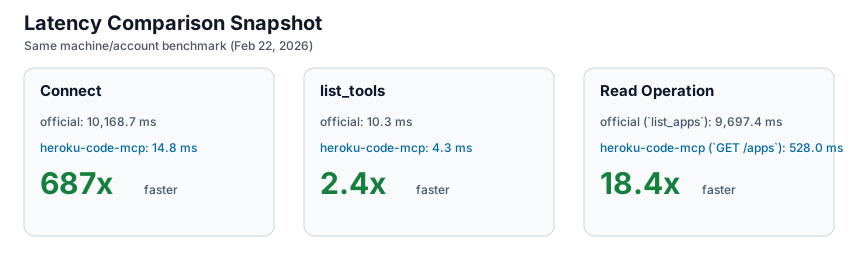
Benchmarks were captured on February 22, 2026 on the same machine and account for both implementations. The numbers below compare this repo’s local HTTP MCP endpoint against the official Heroku MCP server over stdio.
Raw Comparison
| Metric | heroku-code-mcp | official Heroku MCP | Delta |
|---|---|---|---|
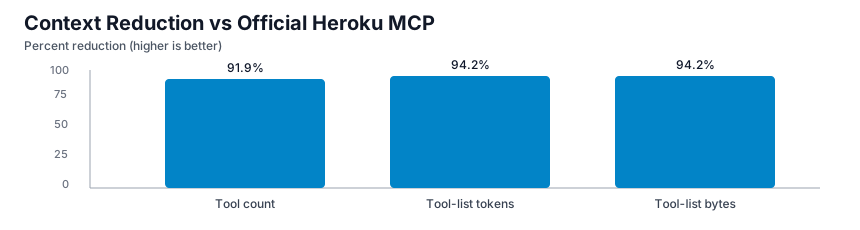
| Tool count | 3 | 37 | 91.9% lower |
| Tool-list payload bytes | 1,469 | 25,500 | 94.2% lower |
| Tool-list approx tokens | 368 | 6,375 | 94.2% lower |
| Connect avg | 14.8 ms | 10,168.7 ms | 687x faster |
list_tools avg | 4.3 ms | 10.3 ms | 2.4x faster |
| Read op avg | 528.0 ms (execute GET /apps) | 9,697.4 ms (list_apps) | 18.4x faster |
Comparison Graphs
These are static charts so labels stay readable in GitHub without giant auto-scaled Mermaid panels.
How to Read These Results
The strongest win is context footprint. A 3-tool interface materially lowers initial prompt overhead and reduces tool-choice branching for the model. The second win is connection and read-path latency under this benchmark harness. In measured runs, the official Heroku MCP paid a much larger connect-time cost, and its measured read operation was substantially slower than execute GET /apps on this server.
This does not mean every endpoint in every environment will always have the same multiplier. It means the measured default experience in this setup favored the Code Mode control surface for both context economy and latency.
Benchmark Methodology
- Date: February 22, 2026.
- Environment: same local machine, same Heroku account, warm network.
- Custom server run count: 10.
- Official server run count: 3.
- Context estimate:
ceil(list_tools_json_bytes / 4)for rough token approximation. - Read comparison pairing:
- Custom:
execute GET /apps - Official:
list_apps
- Custom:
Artifacts:
benchmarks/results/context-footprint-2026-02-22.jsonbenchmarks/results/custom-local-http-2026-02-22.jsonbenchmarks/results/official-heroku-mcp-start-2026-02-22.jsonBENCHMARKS.md
Get Started
MCP URL: http://127.0.0.1:3000/mcp
cd heroku
npm install
npm run build
npm test
Option 1: OAuth (Recommended)
Configure OAuth env vars and use /oauth/start + /oauth/callback.
Option 2: Local token seeding from Heroku CLI
heroku auth:whoami
npm run seed:token
Start server:
TOKEN_STORE_PATH=./data/tokens.integration.json \
TOKEN_ENCRYPTION_KEY_BASE64='<seed-output-key>' \
PORT=3000 HOST=127.0.0.1 npm run dev
Smoke test:
curl -sS http://127.0.0.1:3000/healthz
MCP_URL=http://127.0.0.1:3000/mcp USER_ID=default npm run smoke:mcp
Add to an Agent
Direct streamable HTTP
{
  "mcpServers": {
    "heroku-code-mcp": {
      "transport": "streamable_http",
      "url": "http://127.0.0.1:3000/mcp",
      "headers": {
        "x-user-id": "default"
      }
    }
  }
}
Command bridge (if needed)
{
  "mcpServers": {
    "heroku-code-mcp": {
      "command": "npx",
      "args": ["mcp-remote", "http://127.0.0.1:3000/mcp"],
      "env": {
        "MCP_REMOTE_HEADERS": "{\"x-user-id\":\"default\"}"
      }
    }
  }
}
Typical Workflow
- Call
auth_status. - Call
searchwith intent. - Choose one
operation_id. - Call
executewithpath_params,query_params, andbodyas needed. - For writes, run
dry_run=truefirst, then replay withconfirm_write_tokenandALLOW_WRITES=true.
Example search:
{
  "query": "list apps",
  "limit": 5
}
Example read execute:
{
  "operation_id": "GET /apps"
}
Example write dry-run:
{
  "operation_id": "PATCH /apps/{app_identity}",
  "path_params": {
    "app_identity": "my-app"
  },
  "body": {
    "maintenance": true
  },
  "dry_run": true
}
Safety and Guardrails
- Mutations (
POST,PATCH,PUT,DELETE) are blocked by default. - Mutations require both
ALLOW_WRITES=trueand a matchingconfirm_write_token. - Sensitive headers and body fields are redacted.
- Idempotent retries (
GET/HEAD) are enabled for transient failures.
Performance Design
- 3-tool MCP surface minimizes up-front tool context.
- Persistent catalog cache (
CATALOG_CACHE_PATH) avoids cold-start re-ingestion. - Background refresh decouples ingestion from request path.
- Conditional fetches (
ETag/Last-Modified) reduce refresh cost. - Short read cache (
READ_CACHE_TTL_MS) improves repeated read latency. - Output bounds (
EXECUTE_MAX_BODY_BYTES,EXECUTE_BODY_PREVIEW_CHARS) prevent oversized responses from dominating context.
Configuration
Key env vars:
ALLOW_WRITESREQUEST_TIMEOUT_MSMAX_RETRIESCATALOG_CACHE_PATHREAD_CACHE_TTL_MSEXECUTE_MAX_BODY_BYTESEXECUTE_BODY_PREVIEW_CHARS
Full example: .env.example
Repository Layout
src/schema/*: ingestion + operation normalization + cachesrc/search/*: search index + rankingsrc/execute/*: validation + Heroku API executionsrc/auth/*: OAuth + encrypted token storagetests/*: catalog/search/execute testsbenchmarks/results/*: benchmark artifactsBENCHMARKS.md: benchmark methodology detailsREFERENCES.md: external references
Troubleshooting
- MCP Inspector connection error: confirm URL is
http://127.0.0.1:3000/mcpand server is running. AUTH_REQUIRED: seed token or complete OAuth flow.- Write blocked: set
ALLOW_WRITES=trueand send matchingconfirm_write_token. - Large response body: narrow query scope or lower output caps for stricter truncation.