HomeButler
Manage your homelab from any AI — Claude, ChatGPT, Cursor, or terminal. One binary. Zero dependencies.



A single-binary CLI + MCP server that lets you monitor servers, control Docker, wake machines, and scan your network — from chat, AI tools, or the command line.
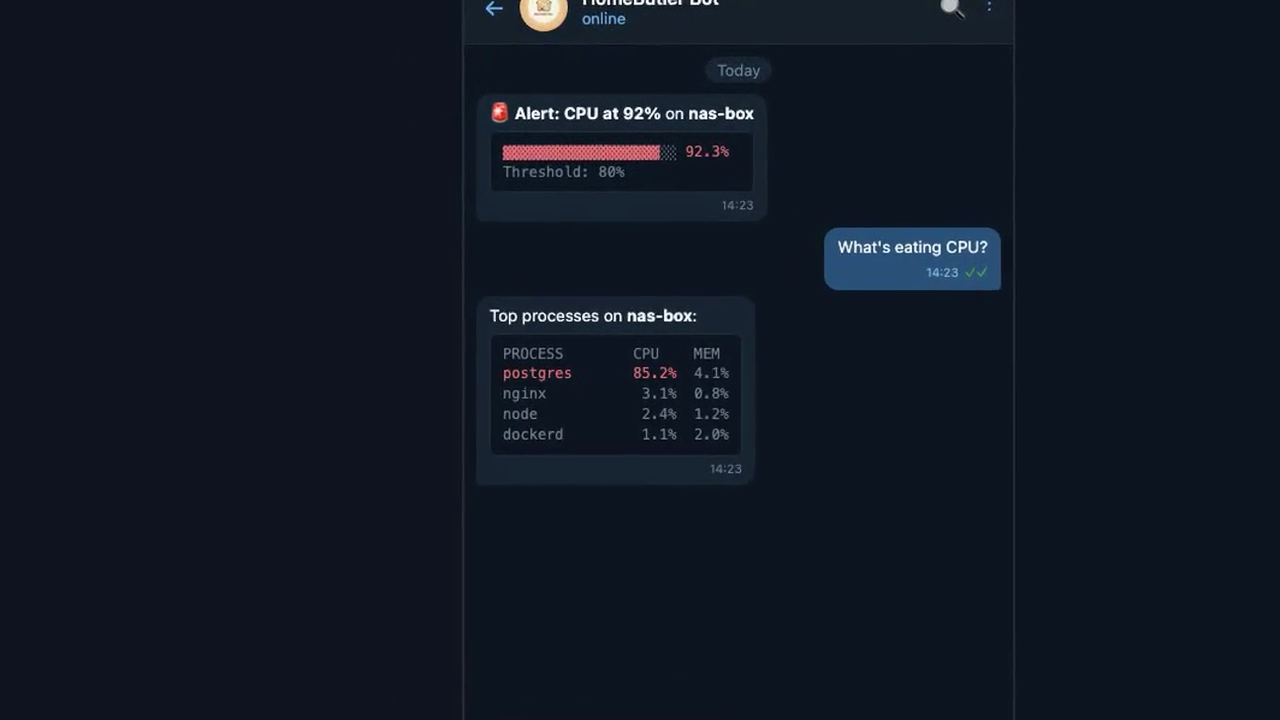
▶️ Click to watch demo — Alert → Diagnose → Fix, all from chat (34s)
Architecture
Goal: Engineers manage servers from chat — not SSH.
Alert fires → AI diagnoses → AI fixes → you get a summary on your phone.
homebutler is the tool layer in an AI ChatOps stack. It doesn't care what's above it — use any chat platform, any AI agent, or just your terminal.
┌──────────────────────────────────────────────────┐
│  Layer 3 — Chat Interface                        │
│  Telegram · Slack · Discord · Terminal · Browser │
│  (Your choice — homebutler doesn't touch this)   │
└──────────────────────┬───────────────────────────┘
                       │
┌──────────────────────▼───────────────────────────┐
│  Layer 2 — AI Agent                              │
│  OpenClaw · LangChain · n8n · Claude Desktop     │
│  (Understands intent → calls the right tool)     │
└──────────────────────┬───────────────────────────┘
                       │  CLI exec or MCP (stdio)
┌──────────────────────▼───────────────────────────┐
│  Layer 1 — Tool (homebutler)       ← YOU ARE HERE │
│                                                   │
│  ┌─────────┐  ┌─────────┐  ┌─────────┐           │
│  │   CLI   │  │   MCP   │  │   Web   │           │
│  │ stdout  │  │  stdio  │  │  :8080  │           │
│  └────┬────┘  └────┬────┘  └────┬────┘           │
│       └────────────┼────────────┘                 │
│                    ▼                              │
│             internal/*                            │
│   system · docker · ports · network               │
│   wake · alerts · remote (SSH)                    │
└───────────────────────────────────────────────────┘
Three interfaces, one core:
| Interface | Transport | Use case |
|---|---|---|
| CLI | Shell stdout/stderr | Terminal, scripts, AI agents via exec |
| MCP | JSON-RPC over stdio | Claude Desktop, ChatGPT, Cursor, any MCP client |
| Web | HTTP (go:embed) | Browser dashboard, on-demand with homebutler serve |
All three call the same internal/ packages — no code duplication.
homebutler is Layer 1. Swap Layer 2 and 3 to fit your stack:
- Terminal only →
homebutler status(no agent needed) - Claude Desktop → MCP server, Claude calls tools directly
- OpenClaw + Telegram → Agent runs CLI commands from chat
- Custom Python bot →
subprocess.run(["homebutler", "status", "--json"]) - n8n / Dify → Execute node calling homebutler CLI
No ports opened by default. CLI and MCP use stdin/stdout only. The web dashboard is opt-in (homebutler serve, binds 127.0.0.1).
Now: CLI + MCP + Web dashboard — you ask, it answers.
Goal: Full AI ChatOps — infrastructure that manages itself.
Features
- Web Dashboard — Beautiful dark-themed web UI with
homebutler serve - TUI Dashboard — Real-time terminal monitoring with
homebutler watch(btop-style) - System Status — CPU, memory, disk, uptime at a glance
- Docker Management — List, restart, stop, logs for containers
- Wake-on-LAN — Power on machines remotely
- Port Scanner — See what's listening and which process owns it
- Network Scan — Discover devices on your LAN
- Alerts — Get notified when resources exceed thresholds
- Backup & Restore — One-command Docker volume backup with compose + env files
- Multi-server — Manage remote servers over SSH (key & password auth)
- MCP Server — Works with Claude Desktop, ChatGPT, Cursor, and any MCP client
- JSON Output — Pipe-friendly, perfect for AI assistants to parse
Why homebutler?
Other tools give you dashboards. homebutler gives you a conversation.
3 AM. Your server disk is 91% full. Here's what happens next:
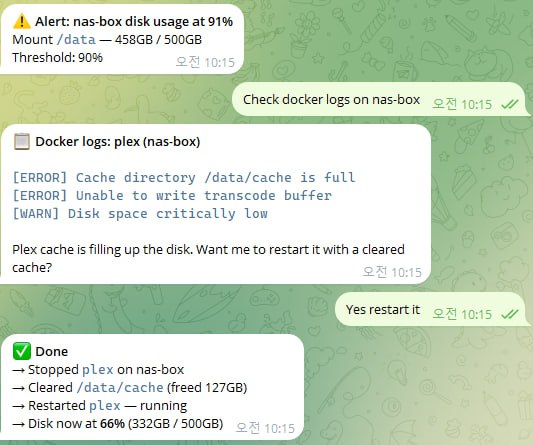
Alert fires → you check logs from bed → AI restarts the problem container → disk drops to 66%. All from your phone. No SSH, no laptop, no dashboard login.
This is what homebutler + OpenClaw looks like in practice.
📊 Comparison with alternatives
| homebutler | Glances/btop | Netdata | CasaOS | |
|---|---|---|---|---|
| TUI dashboard | ✅ Built-in | ✅ | ❌ Web | ❌ Web |
| Web dashboard | ✅ Embedded | ❌ | ✅ | ✅ |
| Single binary | ✅ | ❌ | ❌ | ❌ |
| Optional web server | ✅ On-demand | Always-on | Always-on | Always-on |
| Multi-server SSH | ✅ Parallel | ❌ | ❌ | ❌ |
| MCP support | ✅ Built-in | ❌ | ❌ | ❌ |
| Chat integration | ✅ Native | ❌ | ❌ | ❌ |
| AI-friendly JSON | ✅ | ❌ | ⚠️ API | ⚠️ API |
| Docker control | ✅ | ⚠️ Monitor | ❌ | ✅ |
| Wake-on-LAN | ✅ | ❌ | ❌ | ❌ |
| Network scan | ✅ | ❌ | ❌ | ❌ |
| Remote deploy | ✅ One command | ❌ | ❌ | ❌ |
| Air-gapped install | ✅ Copy binary | ⚠️ apt/brew | ❌ Docker | ❌ Docker |
| Resource usage | ~10MB, 0% idle | Medium | High | High |
Demo
🧠 AI-Powered Management (MCP)
One natural language prompt manages your entire homelab. Claude Code calls homebutler MCP tools in parallel — checking server status, listing Docker containers, and alerting on disk usage across multiple servers. See screenshots & setup →
🌐 Web Dashboard
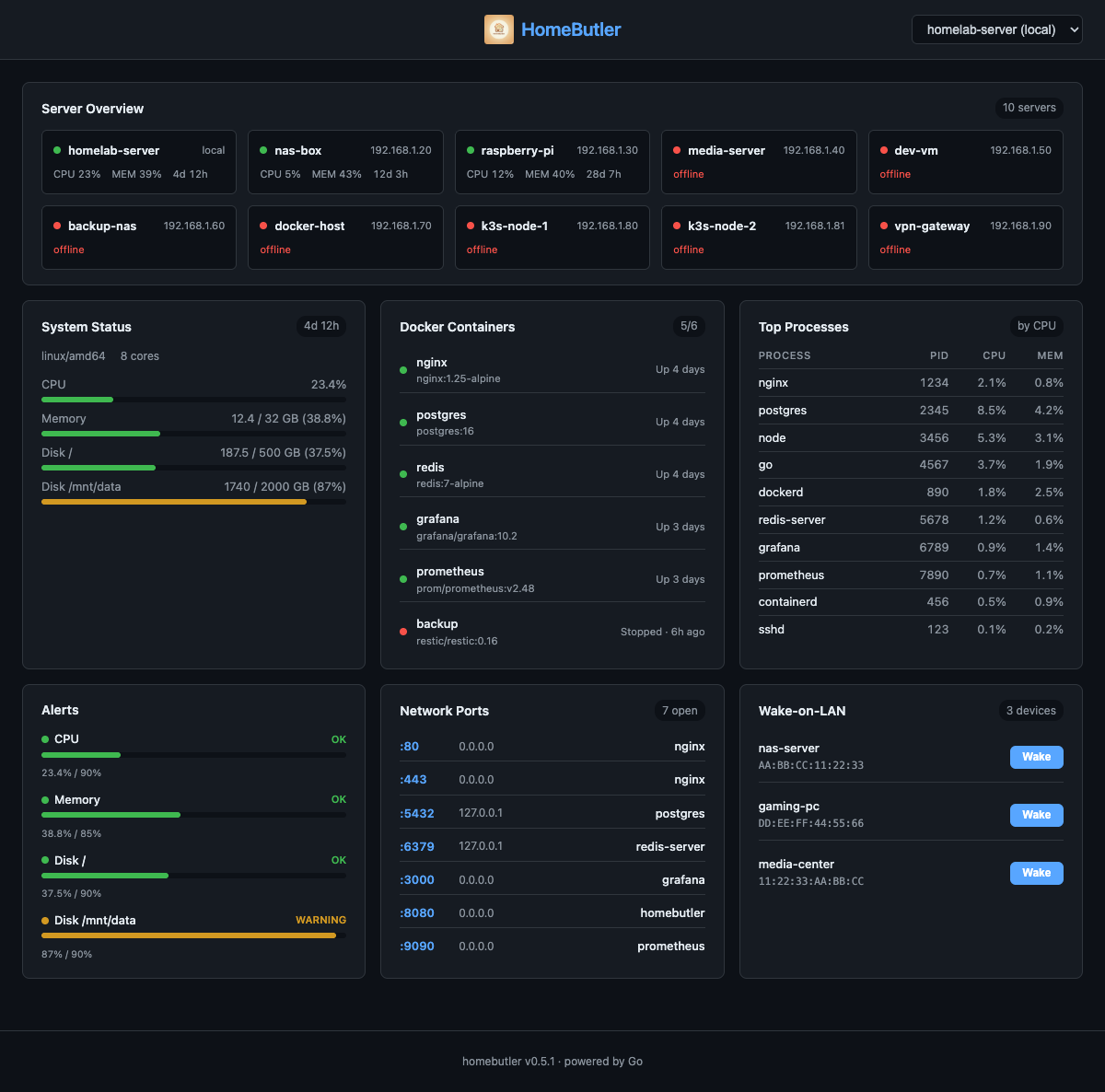
homebutler serve— A real-time web dashboard embedded in the single binary viago:embed. Monitor all your servers, Docker containers, open ports, alerts, and Wake-on-LAN devices from any browser. Dark theme, auto-refresh every 5 seconds, fully responsive.
✨ Web Dashboard Highlights
- Server Overview — See all servers at a glance with color-coded status (green = online, red = offline)
- System Metrics — CPU, memory, disk usage with progress bars and color thresholds
- Docker Containers — Running/stopped status with friendly labels ("Running · 4d", "Stopped · 6h ago")
- Top Processes — Top 10 processes sorted by CPU usage
- Resource Alerts — Threshold-based warnings with visual progress bars (OK / WARNING / CRITICAL)
- Network Ports — Open ports with process names and bind addresses
- Wake-on-LAN — One-click wake buttons for configured devices
- Server Switching — Dropdown to switch between local and remote servers
- Zero dependencies — No Node.js runtime needed. Frontend is compiled into the Go binary at build time
homebutler serve              # Start on port 8080
homebutler serve --port 3000  # Custom port
homebutler serve --demo       # Demo mode with realistic sample data
🖥️ TUI Dashboard

homebutler watch— A terminal-based dashboard powered by Bubble Tea. Monitors all configured servers with real-time updates, color-coded resource bars, and Docker container status. No browser needed.
Quick Start
# One-line install (recommended, auto-detects OS/arch)
curl -fsSL https://raw.githubusercontent.com/Higangssh/homebutler/main/install.sh | sh

# Or via Homebrew
brew install Higangssh/homebutler/homebutler

# Or via npm (MCP server only)
npm install -g homebutler

# Interactive setup — adds your servers in seconds
homebutler init

# Run
homebutler status
homebutler watch             # TUI dashboard (all servers)
homebutler serve             # Web dashboard at http://localhost:8080
homebutler docker list
homebutler wake desktop
homebutler ports
homebutler status --all
Usage
homebutler <command> [flags]

Commands:
  init                Interactive setup wizard
  status              System status (CPU, memory, disk, uptime)
  watch               TUI dashboard (monitors all configured servers)
  serve               Web dashboard (browser-based, go:embed)
  docker list         List running containers
  docker restart <n>  Restart a container
  docker stop <n>     Stop a container
  docker logs <n>     Show container logs
  wake <name>         Send Wake-on-LAN packet
  ports               List open ports with process info
  network scan        Discover devices on LAN
  alerts              Show current alert status
  alerts --watch      Continuous monitoring with real-time alerts
  trust <server>      Register SSH host key (TOFU)
  backup              Backup Docker volumes, compose files, and env
  backup list         List existing backups
  restore <archive>   Restore from a backup archive
  upgrade             Upgrade local + all remote servers to latest
  deploy              Install homebutler on remote servers
  mcp                 Start MCP server (JSON-RPC over stdio)
  version             Print version

Flags:
  --json              JSON output (default: human-readable)
  --server <name>     Run on a specific remote server
  --all               Run on all configured servers in parallel
  --port <number>     Port for serve command (default: 8080)
  --demo              Run serve with realistic demo data
  --watch             Continuous monitoring mode (alerts command)
  --interval <dur>    Watch interval, e.g. 30s, 1m (default: 30s)
  --config <path>     Custom alert thresholds config file
  --local             Upgrade only the local binary (skip remote servers)
  --local <path>      Use local binary for deploy (air-gapped)
  --config <path>     Config file (auto-detected, see Configuration)
  --service <name>    Target a specific Docker service (backup/restore)
  --to <path>         Custom backup destination directory
Web Dashboard
homebutler serve starts an embedded web dashboard — no Node.js, no Docker, no extra dependencies.
homebutler serve                # http://localhost:8080
homebutler serve --port 3000    # custom port
homebutler serve --demo         # demo mode with sample data
TUI Dashboard
homebutler watch launches an interactive terminal dashboard (btop-style):
homebutler watch # monitors all configured servers
Auto-refreshes every 2 seconds. Press q to quit.
Alert Monitoring
homebutler alerts --watch                  # default: 30s interval
homebutler alerts --watch --interval 10s   # check every 10 seconds
Default thresholds: CPU 90%, Memory 85%, Disk 90%. Customizable via config.
Backup & Restore
One-command Docker backup — volumes, compose files, and env variables.
homebutler backup                          # backup everything
homebutler backup --service jellyfin       # specific service
homebutler backup --to /mnt/nas/backups/   # custom destination
homebutler backup list                     # list backups
homebutler restore ./backup.tar.gz         # restore
⚠️ Database services should be paused before backup for data consistency.
📖 Full backup documentation → — how it works, archive structure, security notes.
Configuration
homebutler init # interactive setup wizard
📖 Configuration details → — config file locations, alert thresholds, all options.
Multi-server
Manage multiple servers from a single machine over SSH.
homebutler status --server rpi     # query specific server
homebutler status --all            # query all in parallel
homebutler deploy --server rpi     # install on remote server
homebutler upgrade                 # upgrade all servers
📖 Multi-server setup → — SSH auth, config examples, deploy & upgrade.
MCP Server
Built-in MCP server — manage your homelab from any AI tool with natural language.
{
  "mcpServers": {
    "homebutler": {
      "command": "npx",
      "args": ["-y", "homebutler@latest"]
    }
  }
}
Works with Claude Desktop, ChatGPT, Cursor, Windsurf, and any MCP client.
📖 MCP server setup → — supported clients, available tools, agent skills.
Installation
Homebrew (Recommended)
brew install Higangssh/homebutler/homebutler
Automatically installs to PATH. Works on macOS and Linux.
One-line Install
curl -fsSL https://raw.githubusercontent.com/Higangssh/homebutler/main/install.sh | sh
Auto-detects OS/architecture, downloads the latest release, and installs to PATH.
npm (MCP server)
npm install -g homebutler
Downloads the Go binary automatically. Use npx -y homebutler@latest to run without installing globally.
Go Install
go install github.com/Higangssh/homebutler@latest
Build from Source
git clone https://github.com/Higangssh/homebutler.git
cd homebutler
make build
Uninstall
rm $(which homebutler)           # Remove binary
rm -rf ~/.config/homebutler      # Remove config (optional)
Contributing
Contributions welcome! Please open an issue first to discuss what you'd like to change.