Iconsult MCP
Architecture consulting for multi-agent systems, grounded in the textbook.
Iconsult is an MCP server that reviews your multi-agent architecture against a knowledge graph of 141 concepts and 462 relationships extracted from Agentic Architectural Patterns for Building Multi-Agent Systems (Arsanjani & Bustos, Packt 2026). Every recommendation comes with chapter numbers, page references, and concrete code-level changes — not abstract advice.
See It In Action
We pointed Iconsult at OpenAI's Financial Research Agent — a 5-stage multi-agent pipeline from their Agents SDK — and asked it to find architectural gaps.
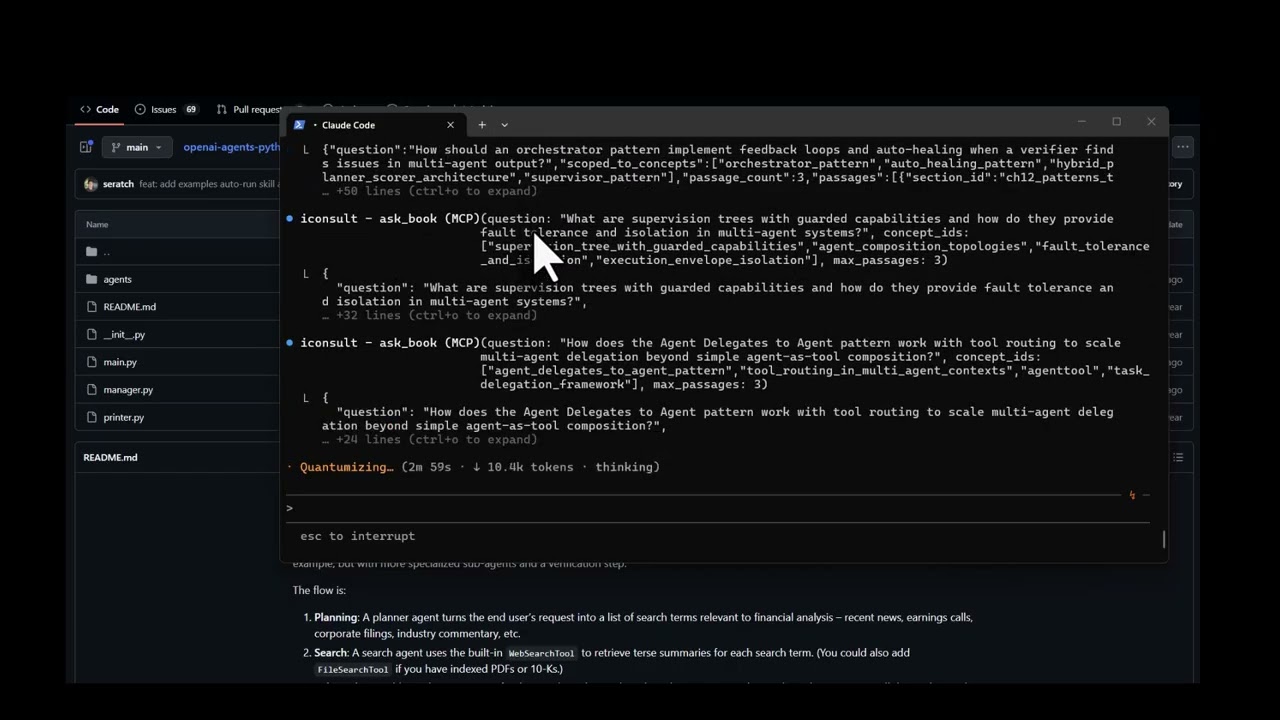
View the full interactive architecture review →
The agent's current architecture
The Financial Research Agent uses a 5-stage sequential pipeline orchestrated by FinancialResearchManager. Search is the only concurrent stage — everything else runs in sequence, and the verifier is a terminal dead end:
flowchart TD
    Q["User Query"] --> MGR["FinancialResearchManager"]
    MGR --> PLAN["PlannerAgent (o3-mini)"]
    PLAN -->|"FinancialSearchPlan"| FAN{"Fan-out N searches"}
    FAN --> S1["SearchAgent"]
    FAN --> S2["SearchAgent"]
    FAN --> SN["SearchAgent"]
    S1 --> W["WriterAgent (gpt-5.2)"]
    S2 --> W
    SN --> W
    W -.-> FA["FundamentalsAgent (.as_tool)"]
    W -.-> RA["RiskAgent (.as_tool)"]
    W --> V["VerifierAgent"]
    V --> OUT["Output"]
What Iconsult found
Solid foundation, but Iconsult's knowledge graph traversal uncovered 4 critical gaps:
| # | Gap | Missing Pattern | Book Reference |
|---|---|---|---|
| R1 | Verifier flags issues but pipeline terminates — no self-correction | Auto-Healing Agent Resuscitation | Ch. 7, p. 216 |
| R2 | Raw search results pass unfiltered to writer | Hybrid Planner+Scorer | Ch. 12, pp. 387-390 |
| R3 | All agents share same trust level — no capability boundaries | Supervision Tree with Guarded Capabilities | Ch. 5, pp. 142-145 |
| R4 | Zero reliability patterns composed (book recommends 2-3 minimum) | Shared Epistemic Memory + Persistent Instruction Anchoring | Ch. 6, p. 203 |
Recommended architecture
Adding a feedback loop, quality gate, shared memory, and retry logic:
flowchart TD
    Q["User Query"] --> SUP["SupervisorManager"]
    SUP --> MEM[("Shared Epistemic Memory")]
    SUP --> PLAN["PlannerAgent"]
    PLAN --> FAN{"Fan-out + Retry Logic"}
    FAN --> S1["SearchAgent"]
    FAN --> S2["SearchAgent"]
    S1 & S2 --> SCR["ScorerAgent (quality gate)"]
    SCR --> W["WriterAgent"]
    W -.-> FA["FundamentalsAgent"]
    W -.-> RA["RiskAgent"]
    W --> V["VerifierAgent"]
    V -->|"issues found"| W
    V -->|"verified"| OUT["Output"]
    MEM -.-> W
    MEM -.-> V
How it got there
The consultation followed Iconsult's guided workflow:
-
Read the codebase — Fetched all source files from
manager.py,agents/*.py. Identified the orchestrator pattern inFinancialResearchManager, the.as_tool()composition, the silentexcept Exception: return Nonein search, and the terminal verifier. -
Match concepts —
match_conceptsembedded the project description and deterministically ranked the most relevant patterns: Orchestrator, Planner-Worker, Agent Delegates to Agent, Tool Use, and Supervisor.
2b. Plan — plan_consultation assessed complexity and generated an adaptive plan — how many concepts to traverse, whether to use subagents, and which critique steps to include.
-
Traverse the graph —
get_subgraphexplored each seed concept's neighborhood. Therequiresedges revealed that the Supervisor pattern requires Auto-Healing — which was entirely missing. Thecomplementsedges surfaced Hybrid Planner+Scorer as a natural addition.log_pattern_assessmentrecorded each finding for deterministic scoring. -
Retrieve book passages —
ask_bookscoped to the discovered concepts returned exact citations: chapter numbers, page ranges, and quotes grounding each recommendation. -
Score + stress test + synthesize —
score_architecturecomputed the maturity scorecard from logged assessments.generate_failure_scenariosproduced concrete cascading failure traces for each gap — showing exactly what breaks and how failures propagate. Then generated the interactive before/after architecture diagram with specific file-level changes, prerequisite checks, and conflict analysis. All recommended patterns are complementary — no conflicts detected.
What It Does
Point it at a codebase (or describe your architecture), and it runs a structured consultation: matching concepts, traversing the knowledge graph for prerequisites and conflicts, scoring maturity against a 6-level model, and generating an interactive HTML review with before/after architecture diagrams.
Tools (17)
Consultation workflow:
| Tool | Role | What it does |
|---|---|---|
match_concepts | Entry point | Embeds a project description → deterministic concept ranking + consultation_id for session tracking |
plan_consultation | Planning | Assesses complexity (simple/moderate/complex) and generates an adaptive step-by-step plan |
get_subgraph | Graph traversal | Priority-queue BFS from seed concepts — discovers alternatives, prerequisites, conflicts, complements |
log_pattern_assessment | Assessment | Records whether each pattern is implemented, partial, missing, or not applicable |
ask_book | Deep context | RAG search against the book — returns passages with chapter, page numbers, and full text |
consultation_report | Coverage | Computes concept/relationship coverage, identifies gaps, optionally diffs two sessions |
score_architecture | Scoring | Deterministic maturity scorecard (L1–L6) from logged pattern assessments |
generate_failure_scenarios | Stress test | Cascading failure traces for each gap — code-grounded or book-grounded, with Ch. 7 recovery chain mapping |
critique_consultation | Quality | Structural critique of consultation completeness with actionable fix suggestions |
supervise_consultation | Supervision | Tracks workflow progress across 9 phases, suggests next action with tool + params |
Coordination:
| Tool | What it does |
|---|---|
write_state / read_state | Shared key-value state for subagent coordination during traversal |
emit_event / get_events | Event-driven reactivity — emit events like gap_found, poll with filters, get reactive suggestions |
Utility:
| Tool | What it does |
|---|---|
list_concepts | Browse/filter the full 138-concept catalogue |
validate_subagent | Schema validation for scatter-gather subagent responses |
health_check | Server health + graph stats |
Prompt
| Prompt | What it does |
|---|---|
consult | Kick off a full architecture consultation — provide your project context and get the guided workflow |
The Knowledge Graph
141 concepts · 786 sections · 462 relationships · 1,248 concept-section mappings
Relationship types span uses, extends, alternative_to, component_of, requires, enables, complements, specializes, precedes, and conflicts_with — discovered through five extraction phases including cross-chapter semantic analysis.
Explore the interactive knowledge graph →
Setup
Prerequisites
- Python 3.10+
- A MotherDuck account (free tier works)
- OpenAI API key (for embeddings used by
ask_book) - Claude Code with the visual-explainer skill installed (required for architecture diagram rendering — see below)
Database Access
The knowledge graph is hosted on MotherDuck and shared publicly. The server automatically detects whether you own the database or need to attach the public share — no extra configuration needed. Just provide your MotherDuck token and it works.
Install visual-explainer (Claude Code skill)
Iconsult renders architecture diagrams as interactive HTML pages using the visual-explainer skill. Install it once:
git clone https://github.com/nicobailon/visual-explainer.git ~/.claude/skills/visual-explainer
mkdir -p ~/.claude/commands
cp ~/.claude/skills/visual-explainer/prompts/*.md ~/.claude/commands/
This gives Claude Code the /generate-web-diagram command used during consultations. Diagrams are written to ~/.agent/diagrams/ and opened in your browser automatically.
Install
pip install git+https://github.com/marcus-waldman/Iconsult_mcp.git
For development:
git clone https://github.com/marcus-waldman/Iconsult_mcp.git
cd Iconsult_mcp
pip install -e .
Environment Variables
export MOTHERDUCK_TOKEN="your-token"    # Required — database
export OPENAI_API_KEY="sk-..."          # Required — embeddings for ask_book
MCP Configuration
Add to your Claude Desktop config (claude_desktop_config.json) or Claude Code settings:
{
  "mcpServers": {
    "iconsult": {
      "command": "iconsult-mcp",
      "env": {
        "MOTHERDUCK_TOKEN": "your-token",
        "OPENAI_API_KEY": "sk-..."
      }
    }
  }
}
Verify
iconsult-mcp --check
License
MIT