





iMCP is an MCP (Model Context Protocol) server that acts as a universal bridge between AI assistants and your existing backend services — whether they are legacy SOAP/WSDL systems, modern REST APIs, IBM AS400/IBMi platforms, SAP, Apigee-hosted APIs, mainframe services, or any HTTP-callable endpoint. It dynamically discovers operations from service contracts (WSDL, OpenAPI, or a lightweight MCP JSON spec), generates structured tool definitions, and brokers authenticated calls — turning your existing services into live AI tools in under an hour.
Originally built to modernize insurance systems without rewrites, iMCP is industry-agnostic. It works equally well in banking, healthcare, logistics, retail, manufacturing, government, or any domain where valuable business logic is locked inside systems that lack an AI-native interface.
Table of Contents
- Why iMCP
- Who Is iMCP For
- How It Works
- Architecture
- Key Features
- Tech Stack
- Quick Start
- Admin Portal Walkthrough
- Supported Spec Types
- MCP JSON Spec Format
- Authentication Types
- API Reference
- Security Model
- Configuration
- Connecting AI Assistants
- Representative Use Cases
- Project Structure
- License
Why iMCP
Organizations across every industry run on battle-tested legacy systems — IBMi/AS400, SAP, mainframes, SOAP services, proprietary REST APIs — that hold irreplaceable business logic built up over decades. These systems work, but they are completely invisible to modern AI assistants.
Whether you are in insurance, banking, healthcare, logistics, retail, or government, the challenge is the same: valuable domain knowledge is locked inside systems that cannot be queried conversationally. The traditional path to fixing this means multi-year rewrites costing millions. iMCP offers a different answer:
| ❌ Traditional Approach | ✅ iMCP Approach |
|---|---|
| 12–18 month full rewrite | Live in < 1 hour per service |
| $2M–$5M+ investment | Minimal integration cost |
| Risk of logic loss and disruption | Zero changes to existing systems |
| Point-in-time integrations | Dynamic discovery — always up to date |
| No AI-native interface | Native MCP tools for any AI assistant |
Real business impact (targets):
| Metric | Target | Timeframe |
|---|---|---|
| Support ticket reduction | 30–40% | 6 months |
| Faster developer integration | 50% | 3 months |
| Time-to-market for new initiatives | 60% reduction | — |
| Cost savings vs. rewrite | > $2M | Year 1 |
Who Is iMCP For
iMCP is built for any organization that has existing backend services — regardless of age, technology, or industry — and wants to make them accessible to AI assistants without a rewrite.
Industries
| Industry | Typical Use Cases |
|---|---|
| Insurance | Policy lookup, claims triage, underwriting checks, customer coverage queries |
| Banking & Finance | Account queries, transaction history, loan status, compliance checks |
| Healthcare | Patient record lookup, appointment scheduling, eligibility verification |
| Logistics & Supply Chain | Shipment tracking, inventory queries, order management |
| Retail & E-commerce | Product catalog, stock availability, order status, returns |
| Manufacturing | Work order status, production metrics, quality control queries |
| Government & Public Sector | Case management, permit status, service request tracking |
| Telecommunications | Subscriber management, service provisioning, fault tracking |
Compatible Backend Systems
iMCP works with any system that exposes a WSDL, OpenAPI spec, or a callable HTTP endpoint:
| System | Integration |
|---|---|
| IBM AS400 / IBMi | SOAP/WSDL services from RPG and COBOL programs |
| SAP | BAPI/RFC services exposed via SAP Web Services |
| Mainframe | CICS, IMS transaction services wrapped in WSDL or REST |
| Oracle / PeopleSoft / Siebel | Enterprise service bus and web service layers |
| Modern REST APIs | Any OpenAPI 2.x / 3.x documented service |
| API Gateways | Apigee, AWS API Gateway, Azure API Management, Kong |
| Internal microservices | Any HTTP service you can describe with MCP JSON |
| On-premise SOAP services | Any WS-* or basic SOAP/HTTP endpoint |
How It Works
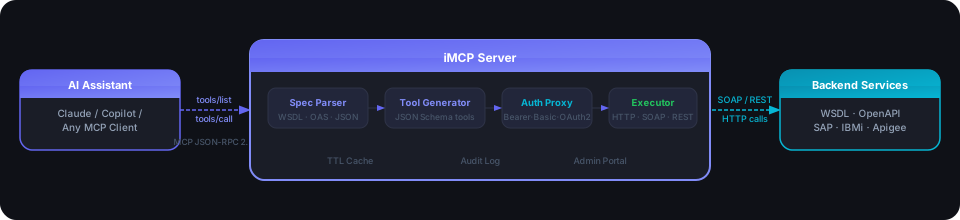
| Step | What Happens |
|---|---|
| 1. Register | Provide a WSDL URL, OpenAPI spec URL, or upload an MCP JSON file. No backend changes needed. |
| 2. Parse & Generate | iMCP parses the spec, extracts operations, converts XSD/JSON Schema types, and generates strongly-typed MCP tool definitions — one tool per operation. |
| 3. Cache & Serve | Generated tools are stored in the database and held in a TTLCache. Any connected AI client receives the full tool list instantly via tools/list. |
| 4. AI Calls a Tool | When the AI issues a tools/call, iMCP validates inputs, injects authentication headers, calls the upstream service (SOAP or REST), and returns the normalized result. |
| 5. Audit & Log | Every call produces a structured audit event: correlation ID, actor, tool name, latency, and a sanitized (secrets-redacted) payload. |
Architecture
Component Diagram
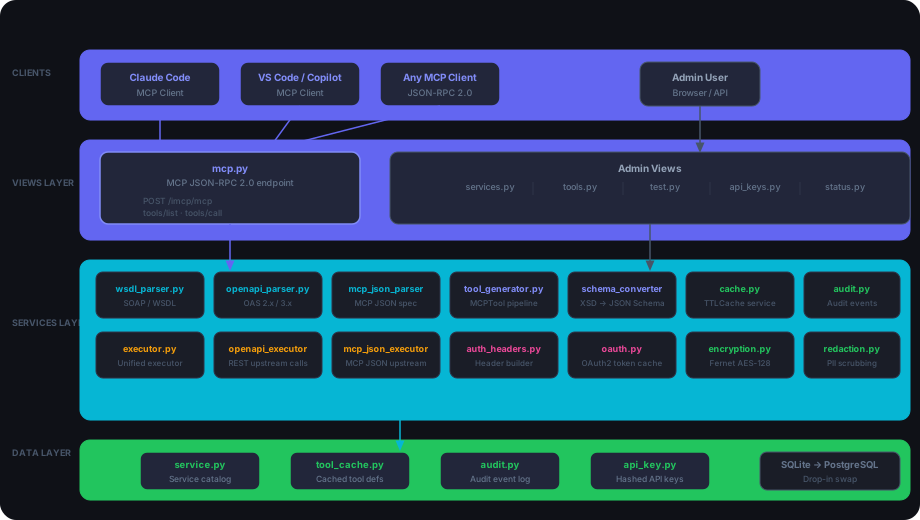
File Structure
imcp/
├── views/
│   ├── mcp.py              # MCP JSON-RPC 2.0 endpoint (tools/list, tools/call)
│   └── admin/
│       ├── services.py     # Service catalog CRUD
│       ├── tools.py        # Tool registry + cache refresh
│       ├── test.py         # Test console execution
│       ├── status.py       # System health + metrics
│       ├── api_keys.py     # API key management
│       └── pages.py        # Portal page rendering
├── services/
│   ├── wsdl_parser.py      # WSDL / SOAP spec parsing
│   ├── openapi_parser.py   # OpenAPI 2.x / 3.x spec parsing
│   ├── mcp_json_parser.py  # Custom MCP JSON spec parsing
│   ├── schema_converter.py # XSD → JSON Schema conversion
│   ├── tool_generator.py   # MCPTool dataclass + generation pipeline
│   ├── executor.py         # Unified tool execution (test console path)
│   ├── openapi_executor.py # OpenAPI upstream HTTP calls
│   ├── mcp_json_executor.py# MCP JSON upstream HTTP calls
│   ├── auth_headers.py     # Auth header builder (sync + async)
│   ├── oauth.py            # OAuth2 client_credentials token cache
│   ├── encryption.py       # Fernet credential encryption at rest
│   ├── cache.py            # TTL tool cache service
│   ├── audit.py            # Structured audit event logging
│   ├── redaction.py        # PII / secret redaction in logs
│   └── health_checker.py   # Upstream service reachability probes
└── models/
    ├── service.py          # Service catalog model
    ├── tool_cache.py       # Cached tool definitions model
    └── audit.py            # Audit event model
Dual Execution Paths
Execution parity: The Admin Portal's Test Console and the live MCP endpoint both run through the same internal execution handler. What you test in the portal is exactly what an AI assistant will call in production — no surprises.
Key Features
Spec-Driven Tool Generation
| Spec Type | What iMCP Does |
|---|---|
| WSDL/SOAP | Parses SOAP services from IBM AS400/IBMi, SAP, Oracle, mainframe. Extracts operations and converts XSD complex types to JSON Schema with full nested object support. |
| OpenAPI 2.x / 3.x | Full spec parsing via prance with $ref resolution. Generates one tool per operation with path, query, and request body schemas. Preserves enum, min/max, pattern constraints. |
| MCP JSON | Lightweight custom format for wrapping any HTTP endpoint directly — no full WSDL or OpenAPI spec required. Ideal for Apigee, Kong, AWS API Gateway routes and quick prototyping. |
Authentication Proxy
iMCP handles all outbound authentication transparently. All credentials are Fernet-encrypted at rest (AES-128-CBC) and never appear in logs or API responses.
| Auth Type | How it Works |
|---|---|
| Bearer Token | Static token injected as Authorization: Bearer ... |
| Basic Auth | Username + password encoded as Authorization: Basic ... |
| Custom Headers | Any arbitrary headers (e.g., X-API-Key, X-Tenant) |
| OAuth2 Client Credentials | Fetches token from a token endpoint, caches for ~58 min, auto-refreshes |
TTL Caching
- Tool definitions are cached in the database and in a module-level
TTLCache - Cache hits tracked on the Status page (hit rate, size, TTL, miss count)
- Per-service cache invalidation available from both portal and API
- OAuth2 tokens cached separately with a 3,500s TTL (safely under the typical 3,600s token lifetime)
Admin Portal
A full-featured management UI built with Django + HTMX + Tailwind CSS:
| Section | Purpose |
|---|---|
| Service Catalog | Add, edit, enable/disable services. Upload spec files or provide URLs. Per-service operation allowlists and denylists. |
| Tool Registry | Browse all generated tools by service. Inspect input schemas. Force-refresh individual services. |
| Test Console | Select any tool, fill in arguments, execute against the real upstream, inspect raw request/response (credentials redacted). |
| Token Manager | Create, revoke, and manage API keys for portal and MCP access. |
| Status Page | Live adapter health, per-service reachability with latency, cache statistics, recent error log. |
Audit Logging
Every tool call, service change, and authentication event produces a structured audit record:
| Field | Description |
|---|---|
correlation_id | Unique per request, propagated to all upstream calls |
actor | API key identity |
action | What was done |
service_id / tool_name | Which service and tool |
status | success / failure |
latency_ms | End-to-end call time |
details | Sanitized payload (all secrets redacted) |
Operation Allow/Deny Control
Each service supports JSON-based allowlists and denylists. Operations outside the allowlist are invisible to AI clients at tools/list — they cannot be discovered or called even if they exist in the spec.
{ "operations": ["searchPolicy", "getCustomer"] }
Tech Stack
| Layer | Technology |
|---|---|
| Web framework | Django 6.x |
| WSGI/ASGI server | Uvicorn |
| Portal UI | HTMX + Tailwind CSS (server-rendered) |
| HTTP client | httpx (async) |
| SOAP/WSDL parsing | zeep + lxml |
| OpenAPI parsing | prance + openapi-spec-validator |
| Caching | cachetools TTLCache |
| Encryption | cryptography (Fernet / AES-128-CBC) |
| Database | SQLite (MVP) → PostgreSQL (production, drop-in swap) |
| Auth tokens | python-jose (JWT) |
| Testing | pytest + pytest-asyncio + pytest-cov |
Quick Start
Prerequisites
- Python 3.11+
- Git
1 — Clone and set up the environment
git clone https://github.com/duvaragesh/iMCP.git
cd iMCP
python -m venv .venv

# Windows
.venv\Scripts\activate
# macOS / Linux
source .venv/bin/activate

pip install -r requirements.txt
2 — Configure environment variables
cp .env.example .env
Edit .env — full variable reference:
# Application
APP_NAME=iMCP
APP_VERSION=0.1.0
DEBUG=True                          # Set to False in production

# Database
DATABASE_URL=sqlite:///./imcp.db    # Swap to postgres://... for production

# Cache
CACHE_TTL_SECONDS=3600              # How long tool definitions are cached
CACHE_MAX_SIZE=1000                 # Max number of cached tool sets

# Rate Limiting
RATE_LIMIT_PER_MINUTE=100

# Authentication
JWT_SECRET=change-me-in-production-use-strong-secret   # Also used for Fernet encryption
JWT_ALGORITHM=HS256
# JWKS_URL=https://your-auth-provider.com/.well-known/jwks.json

# CORS
CORS_ORIGINS=["http://localhost:3000","http://localhost:8000"]

# Logging
LOG_LEVEL=INFO                      # DEBUG | INFO | WARNING | ERROR
LOG_FORMAT=json

# Redaction — fields scrubbed from all audit logs
REDACTION_PATTERNS=["password","token","secret","authorization","bearer","ssn","credit_card"]

# Observability (OpenTelemetry)
OTEL_ENABLED=false
# OTEL_ENDPOINT=http://localhost:4318

# Health Check
HEALTH_CHECK_INTERVAL_MINUTES=5
Important:
JWT_SECRETis also used to derive the Fernet encryption key for stored service credentials. Use a strong random value and keep it consistent across restarts — changing it will invalidate all stored credentials.
3 — Initialize the database
python manage.py migrate
4 — Create a superuser (admin account)
python manage.py createsuperuser
You will be prompted for:
Username: admin
Email address: admin@example.com
Password: ••••••••
Password (again): ••••••••
Superuser created successfully.
This Django superuser is used to log in to the Admin Portal at
/admin/login/. It is separate from iMCP API keys.
5 — Generate an iMCP API Key
Log in to the portal, go to Token Manager, and create an API key. This key is used to:
- Authenticate AI client calls to the MCP endpoint (
/imcp/mcp) - Authenticate calls to the Admin REST API (
/imcp/admin/...)
Name:        my-claude-key
Description: Used by Claude Code MCP client
Roles:       admin
Copy the full key shown — it is only displayed once.
6 — Start the server
python manage.py runserver
# or with async/ASGI support
uvicorn config.asgi:application --reload
7 — Open the portal
- Login:
http://localhost:8000/admin/login/ - Portal:
http://localhost:8000/imcp/portal/
8 — Connect an AI client
# Claude Code CLI
claude mcp add --transport http iMCP http://localhost:8000/imcp/mcp \
  --header "Authorization: Bearer <your-api-key>" \
  --scope project
Run /mcp inside Claude Code to confirm iMCP is listed and tools are available.
Admin Portal Walkthrough
Adding Your First Service
- Go to Services in the sidebar
- Click + Add Service
- Fill in:
| Field | Description | Example |
|---|---|---|
| Name | Unique identifier | Policy Search |
| Spec Type | Format of the spec | WSDL, OpenAPI, or MCP JSON |
| Spec Source | URL or file upload | http://ibmi-host/ws/PolicySearch?wsdl |
| Category | Grouping label | Policy, Claims, Underwriting |
| Auth Type | Authentication method | Basic, Bearer, OAuth2 |
- Click Save — tools are generated and cached automatically
Verifying Generated Tools
- Go to Tools in the sidebar
- Select your service from the filter
- Each tool shows its name, description, input schema, and cache status
- Click Refresh on any service to re-parse its spec and regenerate tools
Testing a Tool
- Go to Test Console in the sidebar
- Select a tool from the dropdown
- Fill in the arguments (JSON editor with schema hints)
- Click Run — results show:
- Normalized response
- Raw upstream HTTP request/response (credentials redacted)
- Correlation ID and latency
Monitoring Health
The Status page shows:
| Metric | Description |
|---|---|
| Adapter health | Up / down per service |
| Service reachability | Live latency probes |
| Cache statistics | Hit rate, size, TTL, miss count |
| Error log | Recent failures with correlation IDs |
Supported Spec Types
WSDL / SOAP — IBM AS400, SAP, Oracle, Mainframe
Point iMCP at any WSDL URL or upload a .wsdl / .xml file. iMCP will:
- Parse all services, ports, and operations
- Extract input message types and convert XSD to JSON Schema
- Handle nested complex types (policies, claims, coverage objects)
- Apply operation allowlists/denylists
# Register via API
POST /imcp/admin/services
{
  "name": "PolicySearch",
  "spec_type": "wsdl",
  "spec_url": "http://ibmi-host/wsservices/PolicySearch?wsdl",
  "auth_type": "basic",
  "auth_config": { "username": "svcuser", "password": "••••" }
}
OpenAPI 2.x / 3.x — REST APIs, API Gateways
Supply an OpenAPI spec as a URL or upload a .yaml / .yml / .json file. iMCP will:
- Resolve all
$refreferences viaprance - Generate one tool per path + method combination
- Map path, query, and request body parameters to the tool
inputSchema - Preserve validation constraints (enums, min/max, patterns)
POST /imcp/admin/services
{
  "name": "ClaimsAPI",
  "spec_type": "openapi",
  "spec_url": "https://api.internal/claims/openapi.yaml",
  "auth_type": "oauth2",
  "auth_config": {
    "token_url": "https://auth.example.com/token",
    "client_id": "imcp-client",
    "client_secret": "••••",
    "scope": "read:claims"
  }
}
MCP JSON — Simple REST, Apigee, Internal microservices
A lightweight custom format for wrapping any HTTP endpoint directly — no full WSDL or OpenAPI spec required. Ideal for quick prototyping and simple API gateway routes.
- No spec file needed — describe tools directly in JSON
- Supports GET / POST / PUT / DELETE
- Query params and request body mapping
- Default values for optional parameters
- One-click template download from the portal
MCP JSON Spec Format
{
  "name": "my-service-name",
  "version": "1.0.0",
  "description": "Brief description of what this service does",
  "tools": [
    {
      "name": "toolName",
      "description": "Describe what this tool does — this text is shown to the AI when selecting tools.",
      "inputSchema": {
        "type": "object",
        "properties": {
          "param1": {
            "type": "string",
            "description": "Description of param1",
            "default": "optional-default-value"
          },
          "param2": {
            "type": "string",
            "description": "Description of param2"
          }
        },
        "required": ["param1"]
      },
      "endpoint": {
        "method": "GET",
        "baseUrl": "https://your-api-base-url.example.com",
        "path": "/your/api/path/",
        "queryParams": ["param1", "param2"]
      }
    }
  ]
}
Field reference:
| Field | Required | Description |
|---|---|---|
name | Yes | Service identifier |
version | No | Version string |
tools[].name | Yes | Tool name exposed to AI clients |
tools[].description | Yes | Natural-language description for the AI |
tools[].inputSchema | Yes | JSON Schema for tool arguments |
tools[].inputSchema.properties[*].default | No | Default value applied if argument is omitted |
tools[].endpoint.method | Yes | HTTP method: GET, POST, PUT, DELETE |
tools[].endpoint.baseUrl | Yes | Base URL of the upstream API |
tools[].endpoint.path | Yes | Path appended to baseUrl |
tools[].endpoint.queryParams | No | Parameter names sent as query string |
Tip: Click Download JSON template in the Add/Edit Service modal (when MCP JSON is selected) to get a pre-filled template file.
Authentication Types
Bearer Token — Static token
{ "token": "your-static-bearer-token" }
Injected as Authorization: Bearer <token> on every upstream call.
Basic Auth — Username + Password
{ "username": "user", "password": "pass" }
Encoded as Authorization: Basic <base64> on every request.
Custom Headers — Arbitrary headers
{ "headers": { "X-API-Key": "abc123", "X-Tenant": "acme-corp" } }
Any headers your backend requires — X-API-Key, X-Tenant, proprietary auth headers, etc.
OAuth2 Client Credentials — Auto-refreshing token
{
  "token_url": "https://auth.example.com/oauth/token",
  "client_id": "your-client-id",
  "client_secret": "your-client-secret",
  "scope": "read:policies"
}
iMCP fetches a token from token_url using the client_credentials grant, caches it for ~58 minutes, and automatically refreshes it — completely transparent to the AI caller.
OAuth2 token flow:
iMCP Executor → oauth.py (cache miss?) → Token Endpoint
                     ↑                        ↓
               Token Cache ←────────── access_token
                     ↓
         Authorization: Bearer … → Upstream Service
API Reference
Request Flow
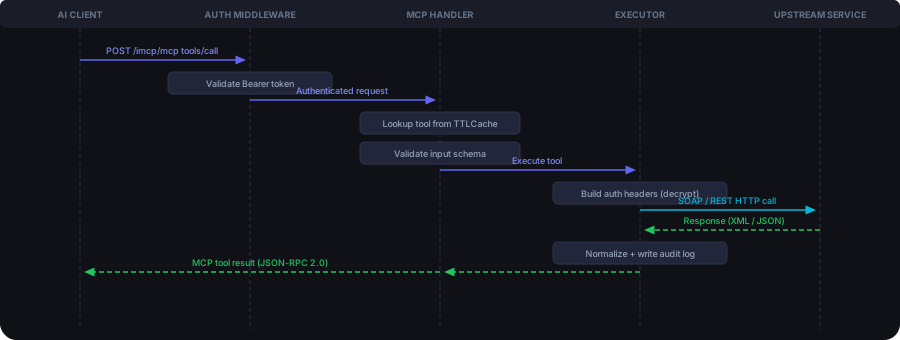
MCP Protocol Endpoint
POST /imcp/mcp
Content-Type: application/json
Authorization: Bearer <token>
List tools:
{ "jsonrpc": "2.0", "id": 1, "method": "tools/list", "params": {} }
Call a tool:
{
  "jsonrpc": "2.0",
  "id": 2,
  "method": "tools/call",
  "params": {
    "name": "searchPolicy",
    "arguments": { "policy-reference": "POL-20241001-001" }
  }
}
REST Convenience Endpoints
| Method | Path | Auth | Description |
|---|---|---|---|
GET | /imcp/health | None | Health check |
POST | /imcp/mcp/tools/list | Bearer | List all available tools |
POST | /imcp/mcp/tools/call | Bearer | Execute a tool |
Admin API
All admin endpoints require Authorization: Bearer <token>.
| Method | Path | Description |
|---|---|---|
GET | /imcp/admin/services | List services (filter: category, spec_type, enabled) |
POST | /imcp/admin/services | Create a service (JSON body or multipart file upload) |
GET | /imcp/admin/services/<id> | Get a single service |
PUT | /imcp/admin/services/<id> | Update a service |
DELETE | /imcp/admin/services/<id> | Disable (soft) or hard-delete |
POST | /imcp/admin/services/<id>/discover-operations | Discover operations from the spec |
GET | /imcp/admin/tools | List cached tools for a service |
POST | /imcp/admin/tools/refresh | Regenerate tools for a service |
POST | /imcp/admin/test/call | Execute a tool via the test console |
GET | /imcp/admin/status | System status and health metrics |
POST | /imcp/admin/status/run-checks | Trigger upstream reachability checks |
GET/POST | /imcp/admin/api-keys | List or create API keys |
DELETE | /imcp/admin/api-keys/<id> | Revoke an API key |
Security Model
| Layer | Mechanism |
|---|---|
| Credential storage | Fernet AES-128-CBC encryption using a key derived from JWT_SECRET via SHA-256. Credentials decrypted only in memory at call time — never returned by GET endpoints. |
| PII redaction | Configurable patterns scrub Authorization, token, password, client_secret, credentials, and custom PII fields from all audit records. |
| Operation governance | Per-service allowlists and denylists. Operations outside the allowlist are invisible at tools/list — undiscoverable and uncallable. |
| API key auth | Keys stored as hashed values only. Never returned by any API. Instant revocation via Token Manager. |
| Audit trail | Every call logged with correlation_id, actor, action, service, tool, status, latency, and redacted payload. |
| Transport | Upstream calls use httpx with TLS. Portal traffic should sit behind Nginx TLS termination. |
| Rate limiting | Configurable per-minute limit per client (in-memory; Redis-backed in production). |
Credential Lifecycle
Register service (plaintext creds)
         ↓
  Fernet encrypt → store in DB
         ↓
  At call time: decrypt in memory → build auth header → call upstream
         ↓
  Discard decrypted value — never logged, never returned
Configuration
All settings are controlled via .env (copy from .env.example):
| Variable | Default | Description |
|---|---|---|
APP_NAME | iMCP | Application name shown in portal |
APP_VERSION | 0.1.0 | Version string |
DEBUG | false | Set to false in production |
DATABASE_URL | sqlite:///./imcp.db | Database — swap to postgres://... for production |
CACHE_TTL_SECONDS | 3600 | Tool definition cache TTL in seconds |
CACHE_MAX_SIZE | 1000 | Max cached tool sets |
RATE_LIMIT_PER_MINUTE | 100 | Max requests per minute per client |
JWT_SECRET | (required) | JWT signing key and Fernet encryption source — keep stable |
JWT_ALGORITHM | HS256 | JWT signing algorithm |
JWKS_URL | (optional) | External JWKS URL for identity provider token validation |
CORS_ORIGINS | ["http://localhost:8000"] | Allowed CORS origins (JSON array) |
LOG_LEVEL | INFO | DEBUG / INFO / WARNING / ERROR |
LOG_FORMAT | json | Log output format |
REDACTION_PATTERNS | see .env.example | JSON array of field names scrubbed from audit logs |
OTEL_ENABLED | false | Enable OpenTelemetry tracing |
OTEL_ENDPOINT | (optional) | OTLP endpoint, e.g. http://localhost:4318 |
HEALTH_CHECK_INTERVAL_MINUTES | 5 | How often upstream reachability checks run |
Scaling to Production
| Component | Development | Production |
|---|---|---|
| Database | SQLite | PostgreSQL |
| Cache | In-memory TTLCache | Redis |
| Deployment | Single process | 2+ replicas behind Nginx |
| Rate limiting | In-memory | Redis-backed |
Connecting AI Assistants
Claude Code CLI
claude mcp add --transport http iMCP http://localhost:8000/imcp/mcp \
  --header "Authorization: Bearer <your-token>" \
  --scope project
Run /mcp in Claude Code to confirm iMCP is listed and tools are available.
VS Code (MCP Extension)
Add to .vscode/mcp.json:
{
  "servers": {
    "iMCP": {
      "type": "http",
      "url": "http://localhost:8000/imcp/mcp",
      "headers": {
        "Authorization": "Bearer <your-token>"
      }
    }
  }
}
Any MCP-Compatible Client
iMCP implements the MCP JSON-RPC 2.0 protocol (protocol version: 2024-11-05). Any client that supports tools/list and tools/call over HTTP will work without modification.
Representative Use Cases
| Industry | Prompt | What iMCP Does |
|---|---|---|
| Insurance | "Show all active policies for customer ID 12345." | AI selects searchPolicy, calls IBMi SOAP service, returns structured policy list |
| Insurance | "Show pending claims over $10,000 from the last 30 days." | AI calls searchClaim with filters, reasons over structured results |
| Banking | "Current balance and transactions for account A-98765?" | Calls core banking SOAP service, normalizes XML response |
| Healthcare | "Is patient P-00123 eligible for the scheduled procedure?" | Calls checkEligibility, legacy EHR responds with coverage details |
| Logistics | "Where is order ORD-20240815 and ETA?" | Calls REST logistics API with Bearer token, returns shipment status |
| Retail | "Product details for SKU-4892." | iMCP auto-obtains OAuth2 token, calls Apigee-hosted catalog API |
Project Structure
iMCP/
├── imcp/                       # Django application
│   ├── models/                 # Service, ToolCacheMetadata, AuditEvent, ApiKey
│   ├── views/
│   │   ├── mcp.py              # MCP JSON-RPC endpoint
│   │   └── admin/              # Portal API views
│   ├── services/               # Core business logic
│   ├── templates/imcp/         # HTMX + Tailwind portal templates
│   ├── migrations/             # Database migrations
│   ├── middleware/             # Correlation ID, auth middleware
│   └── management/commands/    # imcp_health_check management command
├── config/                     # Django settings, urls, wsgi
├── media/imcp_specs/           # Uploaded spec files (auto-cleaned on service delete)
├── docs/                       # Architecture SVG diagrams
│   ├── hero.svg
│   ├── stats.svg
│   ├── overview-flow.svg
│   ├── component-architecture.svg
│   └── request-flow.svg
├── iMCP_docs.html              # Full interactive documentation
├── .env.example                # Environment variable template
├── manage.py                   # Django management script
├── pyproject.toml              # Project dependencies
└── README.md
License
Business Source License 1.1 (BUSL-1.1)
Copyright © 2025 Duvaragesh Kannan
| Free to use | Non-production, evaluation, development, and internal business operations |
| Not permitted | Offering as a hosted/managed commercial service or competing product |
| Converts to | Apache 2.0 automatically on 2029-03-16 |
See LICENSE for full terms. For commercial licensing enquiries, open an issue on GitHub.