Intervals.icu MCP Server
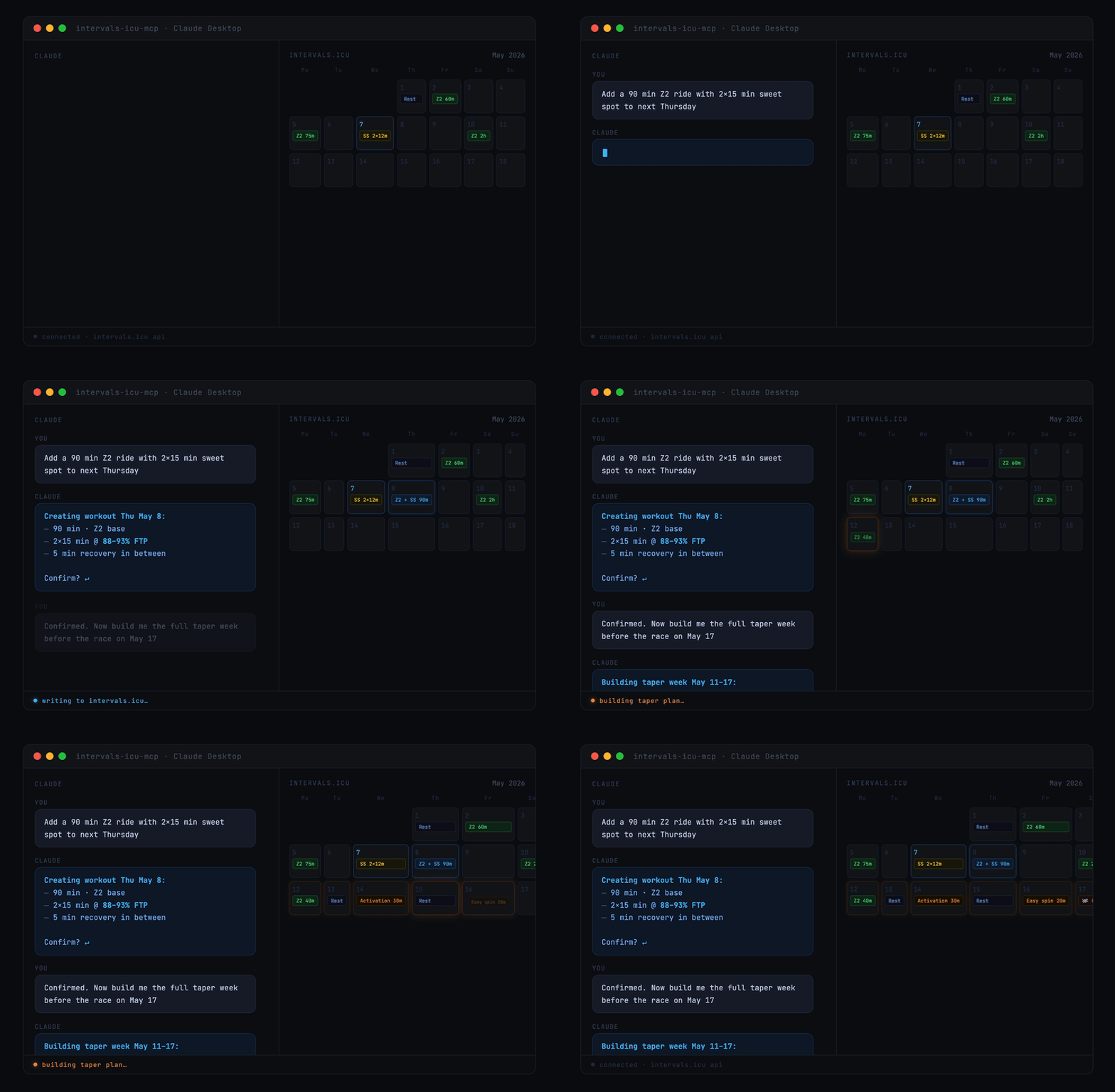
A Model Context Protocol (MCP) server for Intervals.icu integration. Access your training data, wellness metrics, and performance analysis through Claude and other LLMs.
Originally based on eddmann/intervals-icu-mcp (MIT licensed). This project is an independent continuation with significant bug fixes and new features — see Changelog for details.



Overview
This MCP server provides 51 tools to interact with your Intervals.icu account, organized into 9 categories:
- Activities (12 tools) - Query, search, update, delete, and download activities
- Activity Analysis (8 tools) - Deep dive into streams, intervals, best efforts, and histograms
- Athlete (2 tools) - Access profile, fitness metrics, and training load
- Wellness (3 tools) - Track and update recovery, HRV, sleep, and health metrics
- Events/Calendar (10 tools) - Manage planned workouts, races, notes with bulk operations
- Performance/Curves (3 tools) - Analyze power, heart rate, and pace curves
- Workout Library (2 tools) - Browse and explore workout templates and plans
- Gear Management (6 tools) - Track equipment and maintenance reminders
- Sport Settings (5 tools) - Configure FTP, FTHR, pace thresholds, and zones
Additionally, the server provides:
- 2 MCP Resources - Athlete profile with fitness metrics, and structured workout syntax reference for LLM-guided workout generation
- 7 MCP Prompts - Templates for common queries (training analysis, performance analysis, activity deep dive, recovery check, training plan review, weekly planning, workout generation)
Quick Start
Running with Claude Desktop, in 30 seconds:
- Get your API key and athlete ID
- Add this to your Claude Desktop config:
{
  "mcpServers": {
    "intervals-icu": {
      "command": "uvx",
      "args": ["intervals-icu-mcp"],
      "env": {
        "INTERVALS_ICU_API_KEY": "your-api-key-here",
        "INTERVALS_ICU_ATHLETE_ID": "i123456"
      }
    }
  }
}
- Restart Claude and ask "Show me my activities from the last 7 days."
Prefer Claude Code or Cursor? See Client Configuration. Want to run from source or with Docker? See Installation & Setup.
Prerequisites
Install uv — it handles Python, dependencies, and execution in one tool:
# macOS / Linux
brew install uv
# or: curl -LsSf https://astral.sh/uv/install.sh | sh

# Windows
powershell -c "irm https://astral.sh/uv/install.ps1 | iex"
That's all you need — uvx will fetch Python and the package automatically. Docker is also supported as an alternative.
Intervals.icu API Key Setup
Before installation, you need to obtain your Intervals.icu API key:
- Go to https://intervals.icu/settings
- Scroll to the Developer section
- Click Create API Key
- Copy the API key (you'll use it during setup)
- Note your Athlete ID from your profile URL (format:
i123456)
Installation & Setup
How Authentication Works
- API Key - Simple API key authentication (no OAuth required)
- Configuration - API key and athlete ID provided via environment variables (or
.envfile when running from source) - Basic Auth - HTTP Basic Auth with username "API_KEY" and your key as password
- Persistence - Subsequent runs reuse stored credentials
Option 1: Using uvx (Recommended)
No clone, no manual install. Credentials are passed via the env block in your MCP client config (see Client Configuration).
# Optional: test it runs locally
INTERVALS_ICU_API_KEY=your_key INTERVALS_ICU_ATHLETE_ID=i123456 uvx intervals-icu-mcp
uvx downloads the package from PyPI on first run, caches it, and reuses the cache thereafter.
Option 2: From Source
For development or if you want to modify the server:
git clone https://github.com/hhopke/intervals-icu-mcp.git
cd intervals-icu-mcp
uv sync
Then configure credentials using one of these methods:
Interactive Setup
uv run intervals-icu-mcp-auth
This will prompt for your API key and athlete ID and save credentials to .env.
Manual Setup
Create a .env file manually:
INTERVALS_ICU_API_KEY=your_api_key_here
INTERVALS_ICU_ATHLETE_ID=i123456
Option 3: Using Docker
# Build the image
docker build -t intervals-icu-mcp .
Then configure credentials using one of these methods:
Interactive Setup
# Create the env file first (Docker will create it as a directory if it doesn't exist)
touch intervals-icu-mcp.env

# Run the setup script
docker run -it --rm \
  -v "/ABSOLUTE/PATH/TO/intervals-icu-mcp.env:/app/.env" \
  --entrypoint= \
  intervals-icu-mcp:latest \
  python -m intervals_icu_mcp.scripts.setup_auth
This will prompt for credentials and save them to intervals-icu-mcp.env.
Manual Setup
Create an intervals-icu-mcp.env file manually in your current directory (see UV manual setup above for format).
Client Configuration
The server speaks MCP over stdio and works with any compliant client.
Claude Desktop
Add to your configuration file:
- macOS:
~/Library/Application Support/Claude/claude_desktop_config.json - Windows:
%APPDATA%\Claude\claude_desktop_config.json
Using uvx (recommended)
{
  "mcpServers": {
    "intervals-icu": {
      "command": "uvx",
      "args": ["intervals-icu-mcp"],
      "env": {
        "INTERVALS_ICU_API_KEY": "your-api-key-here",
        "INTERVALS_ICU_ATHLETE_ID": "i123456"
      }
    }
  }
}
From source
Requires having cloned the repo and run uv sync + uv run intervals-icu-mcp-auth.
{
  "mcpServers": {
    "intervals-icu": {
      "command": "uv",
      "args": [
        "run",
        "--directory",
        "/ABSOLUTE/PATH/TO/intervals-icu-mcp",
        "intervals-icu-mcp"
      ]
    }
  }
}
Using Docker
{
  "mcpServers": {
    "intervals-icu": {
      "command": "docker",
      "args": [
        "run",
        "-i",
        "--rm",
        "-v",
        "/ABSOLUTE/PATH/TO/intervals-icu-mcp.env:/app/.env",
        "intervals-icu-mcp:latest"
      ]
    }
  }
}
Claude Code
Register the server as a user-scoped MCP server:
claude mcp add intervals-icu --scope user \
  --env INTERVALS_ICU_API_KEY=your-key \
  --env INTERVALS_ICU_ATHLETE_ID=i123456 \
  -- uvx intervals-icu-mcp
Then in any Claude Code session, run /mcp to confirm intervals-icu is connected.
Cursor
Add to ~/.cursor/mcp.json (or the project-local .cursor/mcp.json):
{
  "mcpServers": {
    "intervals-icu": {
      "command": "uvx",
      "args": ["intervals-icu-mcp"],
      "env": {
        "INTERVALS_ICU_API_KEY": "your-api-key-here",
        "INTERVALS_ICU_ATHLETE_ID": "i123456"
      }
    }
  }
}
Restart Cursor and open Settings → MCP to verify the server is listed.
Remote Deployment (HTTP / SSE)
By default the server runs over stdio — the right transport for local clients like Claude Desktop, Claude Code, and Cursor. For remote deployment (hosted MCP, reverse proxy, Docker-on-a-server), the server also supports HTTP-based transports via a --transport flag:
# Streamable HTTP (recommended for new remote clients)
intervals-icu-mcp --transport http --host 127.0.0.1 --port 8000

# Legacy SSE (for clients that haven't moved to streamable HTTP yet)
intervals-icu-mcp --transport sse --host 127.0.0.1 --port 8000
All flags:
| Flag | Default | Description |
|---|---|---|
--transport | stdio | One of stdio, http, sse, streamable-http |
--host | 127.0.0.1 | Interface to bind. Use 0.0.0.0 only inside a container where Docker controls the exposure. |
--port | 8000 | TCP port |
--path | (framework default) | URL path to mount the server under |
⚠️ Security: do not expose an HTTP-mode server to untrusted networks.
The MCP protocol has no built-in authentication. Anyone who can reach the URL can exercise every tool with your credentials — read every activity, delete activities, modify your FTP, create calendar events, etc. Binding to
0.0.0.0on a direct-exposed host (VPS, LAN with open port) is equivalent to publishing your Intervals.icu API key.For remote access, prefer one of the following:
- Tailscale / Cloudflare Tunnel / ZeroTier — only your authenticated devices can reach the endpoint. Zero code changes, simplest option.
- Reverse proxy with auth (nginx + basic auth, Cloudflare Access, etc.) — terminates TLS and gates access.
- SSH tunnel —
ssh -L 8000:localhost:8000 hostif you just need occasional access from one machine.Credentials are always read from
INTERVALS_ICU_API_KEYandINTERVALS_ICU_ATHLETE_ID— use env vars (not a committed.env) when deploying to a shared host.
Usage
Ask Claude to interact with your Intervals.icu data using natural language. The server provides tools, a resource, and prompt templates to help you get started.
Try the MCP Prompts
Use built-in prompt templates for common queries (available via prompt suggestions in Claude):
analyze-recent-training- Comprehensive training analysis over a specified periodperformance-analysis- Analyze power/HR/pace curves and zonesactivity-deep-dive- Deep dive into a specific activity with streams, intervals, and best effortsrecovery-check- Recovery assessment with wellness trends and training loadtraining-plan-review- Weekly training plan evaluation with workout libraryplan-training-week- AI-assisted weekly training plan creation based on current fitnessgenerate-workout- Generate a structured workout for any sport (cycling, running, swimming) with proper Intervals.icu syntax
Activities
"Show me my activities from the last 30 days"
"Get details for my last long run"
"Find all my threshold workouts"
"Update the name of my last activity"
"Delete that duplicate activity"
"Download the FIT file for my race"
Activity Analysis
"Show me the power data from yesterday's ride"
"What were my best efforts in my last race?"
"Find similar interval workouts to my last session"
"Show me the intervals from my workout on Tuesday"
"Get the power histogram for my last ride"
"Show me the heart rate distribution for that workout"
Athlete Profile & Fitness
"Show my current fitness metrics and training load"
"Am I overtraining? Check my CTL, ATL, and TSB"
Note: The athlete profile resource (intervals-icu://athlete/profile) automatically provides ongoing context.
Wellness & Recovery
"How's my recovery this week? Show HRV and sleep trends"
"What was my wellness data for yesterday?"
"Update my wellness data for today - I slept 8 hours and feel great"
Calendar & Planning
"What workouts do I have planned this week?"
"Create a sweet spot cycling workout for tomorrow"
"Create a tempo run with 800m repeats for Wednesday"
"Generate a CSS swim training session for Friday"
"Update my workout on Friday"
"Delete the workout on Saturday"
"Duplicate this week's plan for next week"
"Create 5 workouts for my build phase"
Structured Workouts: The server includes a complete workout syntax reference (
intervals-icu://workout-syntax) that enables LLMs to generate valid structured workouts with proper power/HR/pace targets, zones, ramps, repeats, and cadence for cycling, running, and swimming.
Performance Analysis
"What's my 20-minute power and FTP?"
"Show me my heart rate zones"
"Analyze my running pace curve"
Workout Library
"Show me my workout library"
"What workouts are in my threshold folder?"
Gear Management
"Show me my gear list"
"Add my new running shoes to gear tracking"
"Create a reminder to replace my bike chain at 3000km"
"Update the mileage on my road bike"
Sport Settings
"Update my FTP to 275 watts"
"Show my current zone settings for cycling"
"Set my running threshold pace to 4:30 per kilometer"
"Apply my new threshold settings to historical activities"
Available Tools
Activities (12 tools)
| Tool | Description |
|---|---|
icu_get_recent_activities | List recent activities with summary metrics |
icu_get_activity_details | Get comprehensive details for a specific activity |
icu_search_activities | Search activities by name or tag |
icu_search_activities_full | Search activities with full details |
icu_get_activities_around | Get activities before and after a specific one |
icu_update_activity | Update activity name, description, or metadata |
icu_delete_activity | Delete an activity |
icu_download_activity_file | Download original activity file |
icu_download_fit_file | Download activity as FIT file |
icu_download_gpx_file | Download activity as GPX file |
icu_bulk_create_manual_activities | Create multiple manual activities with upsert on external_id |
icu_update_activity_streams | Update raw timeseries streams for an activity (JSON or CSV) |
Activity Analysis (8 tools)
| Tool | Description |
|---|---|
icu_get_activity_streams | Get time-series data (power, HR, cadence, altitude, GPS) |
icu_get_activity_intervals | Get structured workout intervals with targets and performance |
icu_get_best_efforts | Find peak performances across all durations in an activity |
icu_search_intervals | Find similar intervals across activity history |
icu_get_power_histogram | Get power distribution histogram for an activity |
icu_get_hr_histogram | Get heart rate distribution histogram for an activity |
icu_get_pace_histogram | Get pace distribution histogram for an activity |
icu_get_gap_histogram | Get grade-adjusted pace histogram for an activity |
Athlete (2 tools)
| Tool | Description |
|---|---|
icu_get_athlete_profile | Get athlete profile with fitness metrics and sport settings |
icu_get_fitness_summary | Get detailed CTL/ATL/TSB analysis with training recommendations |
Wellness (3 tools)
| Tool | Description |
|---|---|
icu_get_wellness_data | Get recent wellness metrics with trends (HRV, sleep, mood, fatigue) |
icu_get_wellness_for_date | Get complete wellness data for a specific date |
icu_update_wellness | Update or create wellness data for a date |
Events/Calendar (10 tools)
| Tool | Description |
|---|---|
icu_get_calendar_events | Get planned events and workouts from calendar |
icu_get_upcoming_workouts | Get upcoming planned workouts only |
icu_get_event | Get details for a specific event |
icu_create_event | Create new calendar events (workouts, races, notes, goals) |
icu_update_event | Modify existing calendar events |
icu_delete_event | Remove events from calendar |
icu_bulk_create_events | Create multiple events in a single operation |
icu_bulk_delete_events | Delete multiple events in a single operation |
icu_duplicate_events | Duplicate one or more events with configurable copies and spacing |
icu_apply_training_plan | Apply an entire training plan (workout folder) onto the calendar |
Performance/Curves (3 tools)
| Tool | Description |
|---|---|
icu_get_power_curves | Analyze power curves with FTP estimation and power zones |
icu_get_hr_curves | Analyze heart rate curves with HR zones |
icu_get_pace_curves | Analyze running/swimming pace curves with optional GAP |
Workout Library (2 tools)
| Tool | Description |
|---|---|
icu_get_workout_library | Browse workout folders and training plans |
icu_get_workouts_in_folder | View all workouts in a specific folder |
Gear Management (6 tools)
| Tool | Description |
|---|---|
icu_get_gear_list | Get all gear items with usage and status |
icu_create_gear | Add new gear to tracking |
icu_update_gear | Update gear details, mileage, or status |
icu_delete_gear | Remove gear from tracking |
icu_create_gear_reminder | Create maintenance reminders for gear |
icu_update_gear_reminder | Update existing gear maintenance reminders |
Sport Settings (5 tools)
| Tool | Description |
|---|---|
icu_get_sport_settings | Get sport-specific settings and thresholds |
icu_update_sport_settings | Update FTP, FTHR, pace threshold, or zone configuration |
icu_apply_sport_settings | Apply updated settings to historical activities |
icu_create_sport_settings | Create new sport-specific settings |
icu_delete_sport_settings | Delete sport-specific settings |
MCP Resources
Resources provide ongoing context to the LLM without requiring explicit tool calls:
| Resource | Description |
|---|---|
intervals-icu://athlete/profile | Complete athlete profile with current fitness metrics and sport settings |
intervals-icu://workout-syntax | Structured workout syntax reference for generating valid Intervals.icu workouts (cycling, running, swimming) |
MCP Prompts
Prompt templates for common queries (accessible via prompt suggestions in Claude):
| Prompt | Description |
|---|---|
icu_analyze_recent_training | Comprehensive training analysis over a specified period |
icu_performance_analysis | Detailed power/HR/pace curve analysis with zones |
icu_activity_deep_dive | Deep dive into a specific activity with streams, intervals, best efforts |
icu_recovery_check | Recovery assessment with wellness trends and training load |
icu_training_plan_review | Weekly training plan evaluation with workout library |
icu_plan_training_week | AI-assisted weekly training plan creation based on current fitness |
generate_workout | Generate a structured workout with sport, type, and duration parameters |
Changelog
Bug fixes
- Power/HR/pace curves — rewrote curve models to match actual API response format, added required
typeparameter, fixed query parameter format - Fitness summary — CTL/ATL/TSB now fetched from wellness endpoint (was returning empty from athlete endpoint)
- Duplicate events — fixed to correct API endpoint and batch body format
- Bulk delete events — fixed HTTP method and endpoint
- Activity intervals — API returns wrapped
IntervalsDTOobject, not a flat list; fixed model to extracticu_intervals - Best efforts — added required
streamparameter (watts, heartrate, pace); fixed response model to match APIBestEffortsformat - Activity streams — API returns array of stream objects, not a dict; fixed endpoint to use
.jsonextension and correct model - Date parsing — event tools now handle ISO-8601 datetime formats correctly
- Missing event IDs — calendar and workout responses include event IDs, enabling update/delete operations
New features
- Structured Workout Generation — LLM-ready workout syntax resource (
intervals-icu://workout-syntax) andgenerate_workoutprompt for creating valid structured workouts across cycling, running, and swimming. Syntax spec attributed to MarvinNazari/intervals-icu-workout-parser (MIT) - New Bulk/Streams APIs — full support for
icu_apply_training_plan,icu_bulk_create_manual_activitiesandicu_update_activity_streams - MCP Builder Standards — implemented universal
icu_naming prefix anddestructiveHintsafeguards for all modification tools - Multi-athlete support — optional
athlete_idparameter on activity, event, and calendar tools - MCP verification prompts —
verify-setupandverify-multi-athletefor live validation
Infrastructure
- Upgraded to FastMCP 3.x
- Added middleware integration tests
- Added tests for multi-athlete routing, model aliases, and date handling
Documentation
- Architecture overview — how the server, middleware, client, and tools fit together
- Testing guide — conventions for pytest + respx, fixtures, and running the suite
- Adding a new tool — step-by-step workflow for contributors
Contributing
Issues and pull requests are welcome. Before opening a PR, run make can-release locally to match what CI enforces (ruff, pyright, pytest). For new tools, follow the pattern in .claude/skills/add-tool/SKILL.md and add a respx-mocked test file alongside the implementation.
License
MIT License - see the LICENSE file for details.
Disclaimer
This project is not affiliated with, endorsed by, or sponsored by Intervals.icu. All product names, logos, and brands are property of their respective owners.