MAMA - Memory-Augmented MCP Assistant



Version 1.5.0 | Mobile Chat & Graph Viewer
MAMA tracks how your decisions evolve. Instead of just remembering what you chose, it remembers why you chose it, what you tried before, and what didn't work. Decisions connect through explicit relationships—building on prior work, debating alternatives, or synthesizing multiple approaches.
What is MAMA?
An always-on companion for Claude Code and Claude Desktop that remembers decision evolution. When you make architectural choices, try different approaches, or learn from failures, MAMA stores this context and surfaces it when relevant.
The killer feature: Session continuity. End your day with /mama-checkpoint, resume tomorrow with /mama-resume - and pick up exactly where you left off with full context.
Why MAMA?
"Reasoning Graph" over Knowledge Graph.
Modern vector databases and knowledge graphs often create information overload, burying key insights under thousands of irrelevant links. MAMA takes a different approach:
- Narrative-First: We store why you did something (Reasoning), not just what you did (Code).
- Evolutionary: We track how decisions supersede each other over time.
- Collaborative: Decisions explicitly reference each other—building on, debating, or synthesizing prior work.
- Agent-Centric: Optimized for how LLMs actually retrieve and use information, not for theoretical graph completeness.
We prioritize Retrieval Usability. If an LLM can't easily find and understand the context, the data is useless.
Installation
Claude Code
Quick Start (2 steps):
# Step 1: Add MAMA marketplace (one-time setup)
/plugin marketplace add jungjaehoon-lifegamez/claude-plugins

# Step 2: Install MAMA plugin
/plugin install mama
Note: Claude Code uses decentralized marketplaces. You need to add the MAMA marketplace once, then you can install and update the plugin anytime.
First use of /mama-save downloads the MCP server automatically (~50MB for embedding model).
Claude Desktop
Add to your claude_desktop_config.json:
{
  "mcpServers": {
    "mama": {
      "command": "npx",
      "args": ["-y", "@jungjaehoon/mama-server"]
    }
  }
}
Other MCP Clients
MAMA works with any MCP-compatible client. Below are verified configurations:
Codex
Add to ~/.codex/config.toml:
[mcp_servers.mama]
  command = "npx"
  args = ["-y", "@jungjaehoon/mama-server"]
  disabled = false
  disabled_tools = []
Antigravity IDE (Gemini)
Add to ~/.gemini/antigravity/mcp_config.json:
{
  "mcpServers": {
    "mama": {
      "command": "npx",
      "args": ["-y", "@jungjaehoon/mama-server"],
      "disabled": false,
      "disabledTools": []
    }
  }
}
Note: All MCP clients share the same database at
~/.claude/mama-memory.db, so decisions are available across all your IDEs.
Prerequisites
- Node.js >= 18.0.0 (20+ recommended)
- 500MB free disk space for embedding model cache
- SQLite support (included on most systems)
Configuration
MAMA server requires environment variables for security and configuration.
-
Copy
.env.exampleto.envin your project root:cp .env.example .env -
Edit
.envwith your settings:# Security Token (Required) MAMA_SERVER_TOKEN=your_secure_token_here # Database Path (Optional, default: ./mama.db) MAMA_DB_PATH=./mama.db # Server Port (Optional, default: 3000) MAMA_SERVER_PORT=3000
💡 Session Continuity - Never Lose Your Context
End your coding session. Pick up exactly where you left off.
# End of day - save your session state
/mama-checkpoint

# Next morning - resume with full context
/mama-resume
What you get:
🔄 Resuming Session (from yesterday, 6:30 PM)

📝 Session Summary:
Refactoring authentication module. Switched from session-based to JWT.
Token refresh working, but need to add expiration validation.

📂 Relevant Files:
- src/auth/jwt-handler.ts
- src/middleware/auth.ts
- tests/auth.test.ts

👉 Next Steps:
1. Add token expiration validation
2. Update tests for new JWT flow
3. Document API changes in README

Ready to continue where you left off!
This is MAMA's killer feature - you never lose context between sessions.
Quick Start
After installation:
# Save a decision
/mama-save topic="auth_strategy" decision="JWT with refresh tokens" reasoning="Need stateless auth for API scaling"

# Search for related decisions
/mama-suggest "How should I handle authentication?"

# View decision history
/mama-recall auth_strategy

# List all decisions
/mama-list
Available Commands
| Command | Purpose |
|---|---|
/mama-save | Save decision with reasoning and confidence |
/mama-recall <topic> | View full evolution history for a topic |
/mama-suggest <query> | Semantic search across all decisions |
/mama-list | Browse recent decisions chronologically |
/mama-checkpoint <summary> | Save current session state for later resumption |
/mama-resume | Load last checkpoint and restore context |
/mama-configure | View/modify settings and tier status |
MCP Tool Catalog (v1.3.0)
Design principle: LLM can infer decision evolution from time-ordered search results. Fewer tools = more LLM flexibility.
| Tool | Description | Key Parameters |
|---|---|---|
save | Save decision or checkpoint | type ('decision' or 'checkpoint'), then type-specific fields |
search | Semantic search or list recent | query (optional), type ('all', 'decision', 'checkpoint'), limit |
update | Update decision outcome | id, outcome (case-insensitive: success/failed/partial), reason |
load_checkpoint | Resume previous session | (none) |
Edge Types (v1.3)
Decisions connect through relationships. When saving, include references in your reasoning:
| Edge Type | Pattern in Reasoning | Meaning |
|---|---|---|
supersedes | (automatic for same topic) | Newer version replaces older |
builds_on | builds_on: decision_xxx | Extends prior work |
debates | debates: decision_xxx | Presents alternative view |
synthesizes | synthesizes: [decision_a, decision_b] | Merges multiple approaches |
Multi-Agent Collaboration
Edge types enable tracking decisions across multiple LLM sessions or agents. When different agents have conflicting opinions, the pattern is:
- Agent A saves initial decision (topic:
protocol_design) - Agent B disagrees → saves with
debates: decision_xxxin reasoning - Agent C reconciles → saves with
synthesizes: [id_a, id_b] - Future agents see the full evolution chain and understand the final consensus
This was used internally during v1.3 development where multiple LLMs debated the AX Supersede Protocol design.
save Tool
{
  "type": "decision",
  "topic": "auth_strategy",
  "decision": "Use JWT with refresh tokens",
  "reasoning": "Need stateless auth for API scaling",
  "confidence": 0.8
}
{
  "type": "checkpoint",
  "summary": "Refactoring auth module. JWT working, need expiration validation.",
  "next_steps": "1. Add expiration check\n2. Update tests",
  "open_files": ["src/auth/jwt.ts", "tests/auth.test.ts"]
}
search Tool
{ "query": "authentication", "limit": 5 }
Without query, returns recent items sorted by time (like a list command).
How It Works
MAMA uses a two-package architecture with a shared HTTP embedding server:
┌─────────────────────────────────────────────────┐
│              Local Machine                       │
├─────────────────────────────────────────────────┤
│  Claude Code  Claude Desktop  Cursor  Aider     │
│       │            │            │       │        │
│       └────┬───────┴────┬───────┴───┬───┘        │
│            │            │           │            │
│     ┌──────▼────────────▼───────────▼──────┐    │
│     │  HTTP Embedding Server (port 3847)   │    │
│     │  Model stays loaded in memory        │    │
│     └──────────────────────────────────────┘    │
│                      │                           │
│     ┌────────────────▼────────────────┐         │
│     │  MCP Server (stdio)             │         │
│     │  SQLite + sqlite-vec            │         │
│     └────────────────▼────────────────┘         │
│     ┌────────────────▼────────────────┐         │
│     │  mama-memory.db (shared DB)     │         │
│     └─────────────────────────────────┘         │
└─────────────────────────────────────────────────┘
MCP Server (@jungjaehoon/mama-server)
Published as an independent npm package. Handles SQLite database, vector embeddings, and runs an HTTP embedding server on 127.0.0.1:3847. Shared across Claude Code, Claude Desktop, and any MCP client on the same machine.
HTTP Embedding Server
The MCP server starts an HTTP embedding API that keeps the model loaded in memory:
- Port: 3847 (localhost only for security)
- Endpoints:
/health,/embed,/embed/batch - Benefit: ~150ms hook latency (vs 2-9 seconds without it)
Any local LLM client can use this shared embedding service.
Claude Code Plugin (mama)
Lightweight markdown-based plugin. Provides /mama-* commands and hooks. Hooks use the HTTP embedding server for fast context injection.
This separation means one database works across all your Claude environments, and the MCP server updates independently from the plugin.
Key Features
Session Continuity (💡 Killer Feature) Save your session state before closing Claude. Resume next time with full context: what you were working on, relevant files, and exact next steps. Never lose your flow between sessions.
Decision Evolution Tracking See how your thinking changed over time, from initial attempts to final solutions.
Semantic Search Natural language queries find relevant decisions even if exact keywords don't match.
Automatic Context Relevant past decisions surface automatically when you're working on similar problems.
Local-First All data stored on your device. No network calls, no external dependencies.
Multilingual Support Queries work across different languages using multilingual embeddings.
Tier Transparency System always shows what's working. Degraded mode still functions, just without vector search.
🔍 Graph Viewer (New in v1.4)
Visualize how your decisions connect and evolve over time.
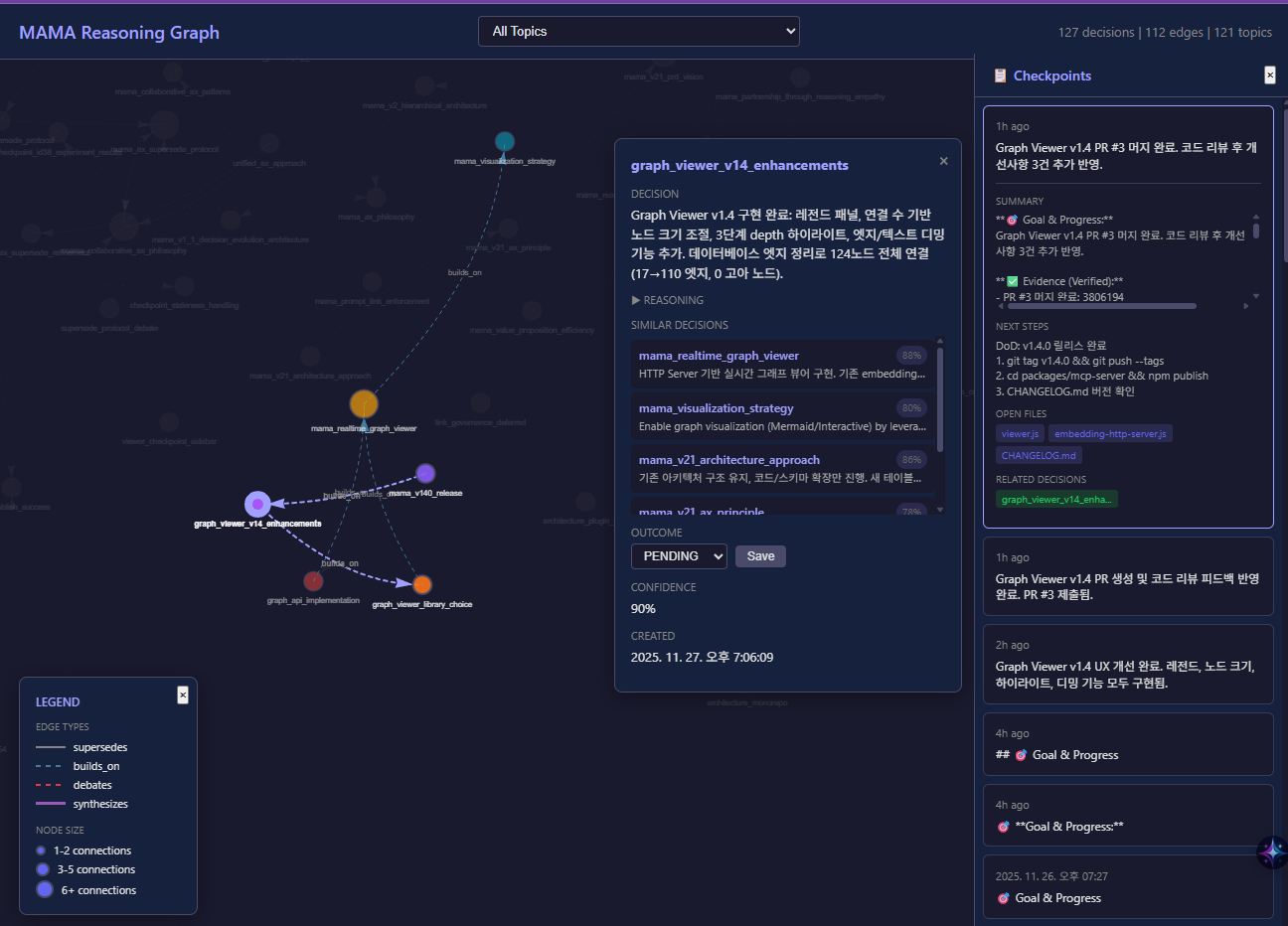
Access: http://localhost:3847/viewer (when MCP server is running)
Features:
- Interactive network graph with physics simulation
- Click nodes to see 3-depth connected relationships
- Checkpoint sidebar - Always-visible timeline of session checkpoints
- Draggable detail panel - Move the decision panel anywhere on screen
- Legend panel showing edge types and node size meanings
- Filter by topic, view full decision details
- Update outcomes directly from the viewer
The viewer runs on the existing HTTP embedding server—no additional setup required.
Tip: Use
MAMA_HTTP_PORTenvironment variable to change the port (default: 3847).
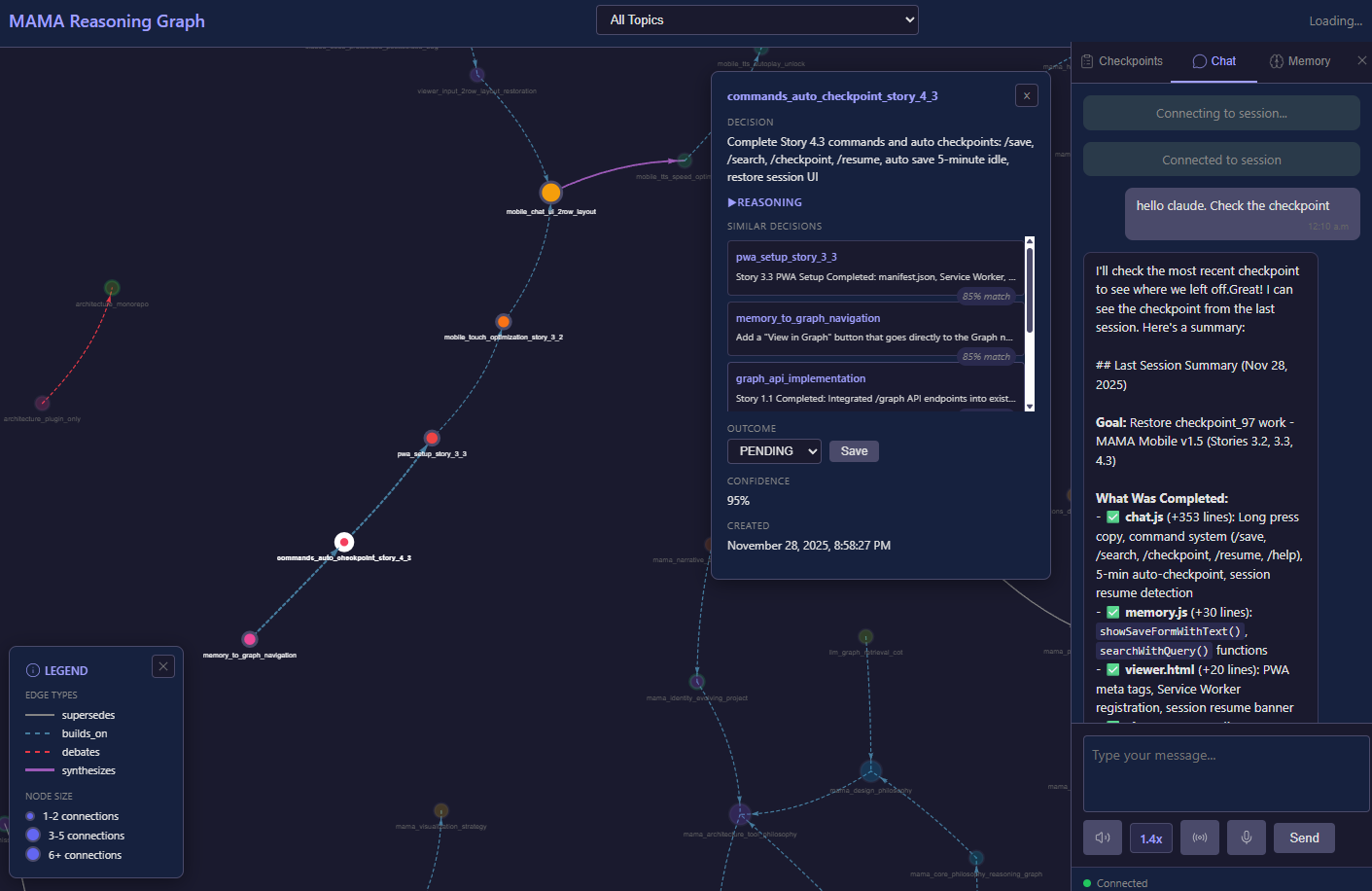
📱 MAMA Mobile (New in v1.5)
Connect to MAMA and chat with Claude Code from anywhere - your phone, tablet, or any device. Access your Claude Code sessions remotely through a mobile-optimized web interface with voice input and TTS.
Whether you're on the couch, commuting, or traveling, stay connected to your development workflow with real-time access to Claude Code.
⚠️ Requirements
| Feature | Claude Code Plugin | Claude Desktop (MCP) |
|---|---|---|
| MCP Tools (/mama-save, etc.) | ✅ | ✅ |
| Graph Viewer | ✅ | ✅ |
| Mobile Chat | ✅ | ❌ |
Mobile Chat requires Claude Code CLI:
- Uses
claudecommand as subprocess - Not available in Claude Desktop (MCP-only)
- Automatically enabled when using Claude Code plugin
Starting the HTTP Server
cd packages/mcp-server
node start-http-server.js
The server will start on http://localhost:3847 with:
- Graph Viewer:
http://localhost:3847/viewer(Memory tab) - Mobile Chat:
http://localhost:3847/viewer(Chat tab)
Features:
- Real-time chat with Claude Code sessions via WebSocket
- Voice input (Web Speech API, Korean optimized)
- Text-to-speech with adjustable speed (1.8x default for Korean)
- Hands-free mode - Auto-listen after TTS completes
- Long press to copy messages (750ms)
- PWA support - Install as a mobile app with offline capability
- Slash commands -
/save,/search,/checkpoint,/resume,/help - Auto-checkpoint - 5-minute idle auto-save with session resume
- Session resume - Auto-detect resumable sessions with banner UI
- MCP tool display - See real-time tool execution (Read, Write, Bash, etc.)
- 44px touch targets - Mobile-optimized button sizing
External Access Setup
⚠️ CRITICAL: External access gives attackers full control of your computer via Claude Code.
Choose based on use case:
🌟 Production Use: Cloudflare Zero Trust (RECOMMENDED)
Best for: Real deployment, long-term use, maximum security
# 1. Install cloudflared
# Download: https://developers.cloudflare.com/cloudflare-one/connections/connect-networks/downloads/

# 2. Create tunnel
cloudflared tunnel login
cloudflared tunnel create mama-mobile

# 3. Configure Zero Trust access (your Google email only)
# Cloudflare Dashboard → Zero Trust → Access → Applications
# Full setup: See docs/guides/security.md

# 4. Start tunnel
cloudflared tunnel run mama-mobile
What you get:
- ✅ Google/GitHub account authentication
- ✅ 2FA automatically enforced
- ✅ Only your email can access
- ✅ FREE for personal use
📖 Full Guide: Security Guide - Cloudflare Zero Trust
⚠️ Testing Only: Quick Tunnel + Token
Use ONLY for: Temporary testing (minutes/hours)
# 1. Set token
export MAMA_AUTH_TOKEN="$(openssl rand -base64 32)"

# 2. Start Quick Tunnel
cloudflared tunnel --url http://localhost:3847

# 3. Access with token
# https://xxx.trycloudflare.com/viewer?token=YOUR_TOKEN
DO NOT use for production - Token alone is weak security
Testing Connection: Chat tab → Globe icon → Test Connection
🔒 Security
IMPORTANT: MAMA is designed for localhost use only by default. External access via tunnels introduces security risks.
Default Security Posture
✅ Secure by default:
- HTTP server binds to
127.0.0.1only (localhost) - No external access without tunnels
- No authentication needed for local use
- Features can be disabled via environment variables
External Access Risks
⚠️ CRITICAL: When using tunnels, an attacker can take complete control of your computer:
What they can access:
- 🔓 Chat with Claude Code (send any prompt)
- 🔓 Read ANY file on your computer
- 🔓 Write ANY file on your computer
- 🔓 Execute ANY command (install backdoors, steal data)
- 🔓 Your decision database
- 🔓 API keys, SSH keys, passwords
This is not just data theft - it's full system compromise.
Recommended: Cloudflare Zero Trust
For production use, ALWAYS use Cloudflare Zero Trust:
✅ Benefits:
- Only your Google/GitHub account can access
- 2FA automatically enforced
- No token management needed
- FREE for personal use
- Enterprise-grade security
# Quick setup (15 minutes)
cloudflared tunnel login
cloudflared tunnel create mama-mobile

# Configure access (Cloudflare Dashboard)
# Zero Trust → Access → Applications
# Add your Google email to allow list

# Start tunnel
cloudflared tunnel run mama-mobile
📖 Full Guide: Cloudflare Zero Trust Setup
Alternative: Token Authentication (Testing Only)
⚠️ Use ONLY for temporary testing (minutes/hours)
# Generate token
export MAMA_AUTH_TOKEN="$(openssl rand -base64 32)"

# Access with token
https://your-tunnel-url/viewer?token=YOUR_TOKEN
DO NOT use for production - Token alone is weak security
Configuration
Easy Way: Use /mama-configure command (Claude Code only)
# View current settings
/mama-configure

# Disable features
/mama-configure --disable-http              # Disable all web features
/mama-configure --disable-websocket         # Disable Mobile Chat only
/mama-configure --enable-all                # Enable everything

# Set authentication token
/mama-configure --generate-token            # Generate random token
/mama-configure --set-auth-token=abc123     # Set specific token
After configuration changes, restart Claude Code for changes to take effect.
Manual Way: Edit plugin configuration
For Claude Code, edit ~/.claude/plugins/repos/mama/.claude-plugin/plugin.json:
{
  "mcpServers": {
    "mama": {
      "env": {
        "MAMA_DISABLE_HTTP_SERVER": "true",
        "MAMA_DISABLE_WEBSOCKET": "true",
        "MAMA_AUTH_TOKEN": "your-token-here"
      }
    }
  }
}
For Claude Desktop, edit claude_desktop_config.json:
{
  "mcpServers": {
    "mama": {
      "command": "npx",
      "args": ["-y", "@jungjaehoon/mama-server"],
      "env": {
        "MAMA_DISABLE_HTTP_SERVER": "true"
      }
    }
  }
}
Security Warnings
MAMA will warn you when external access is detected:
⚠️  ========================================
⚠️  SECURITY WARNING: External access detected!
⚠️  ========================================
⚠️
⚠️  Your MAMA server is being accessed from outside localhost.
⚠️  ❌ CRITICAL: MAMA_AUTH_TOKEN is NOT set!
⚠️  Anyone with your tunnel URL can access your local machine.
📖 Read the Security Guide for detailed information.
Project Structure
This is a monorepo containing two packages:
MAMA/
├── packages/
│   ├── mcp-server/          # @jungjaehoon/mama-server (npm)
│   │   ├── src/             # Server implementation
│   │   └── tests/           # Server tests
│   │
│   └── claude-code-plugin/  # mama (marketplace)
│       ├── commands/        # Slash commands
│       ├── hooks/           # Auto-context injection
│       ├── skills/          # Background skills
│       └── tests/           # Plugin tests
│
└── docs/                    # Documentation
Development
Setup
git clone https://github.com/jungjaehoon-lifegamez/MAMA.git
cd MAMA
pnpm install
pnpm test
Running Tests
# All tests
pnpm test

# MCP server only
cd packages/mcp-server && pnpm test

# Plugin only
cd packages/claude-code-plugin && pnpm test
Local Testing
Link the plugin for local development:
cd packages/claude-code-plugin
ln -s $(pwd) ~/.claude/plugins/repos/mama
Test the MCP server standalone:
cd packages/mcp-server
npm start  # Runs in stdio mode
Documentation
User Guides
- Getting Started - 10-minute quickstart
- Installation - Complete setup guide
- Commands Reference - All available commands
- Troubleshooting - Common issues
- Deployment Guide - pnpm workspace deployment
- Migration Guide (v0→v1.1) - Upgrade from v0
Developer Docs
- Developer Playbook - Architecture overview
- Contributing Guide - How to contribute
- Testing Guide - Test suite documentation
Testing
134 tests, 100% pass rate:
- 62 unit tests (core logic)
- 39 integration tests (hooks, workflows)
- 33 regression tests (bug prevention)
pnpm test               # Run all tests
pnpm test -- --coverage # With coverage report
Contributing
Contributions welcome. See Contributing Guide for code standards, pull request process, and testing requirements.
License
MIT - see LICENSE for details
Acknowledgments
MAMA was inspired by the excellent work of mem0 (Apache 2.0). While MAMA is a distinct implementation focused on local-first SQLite/MCP architecture for Claude, we appreciate their pioneering work in LLM memory management.
Links
Author: SpineLift Team Last Updated: 2025-11-29