Kanban MCP
A full-featured Kanban board with integrated Model Context Protocol (MCP) server, allowing AI coding agents to manage projects and tasks programmatically.
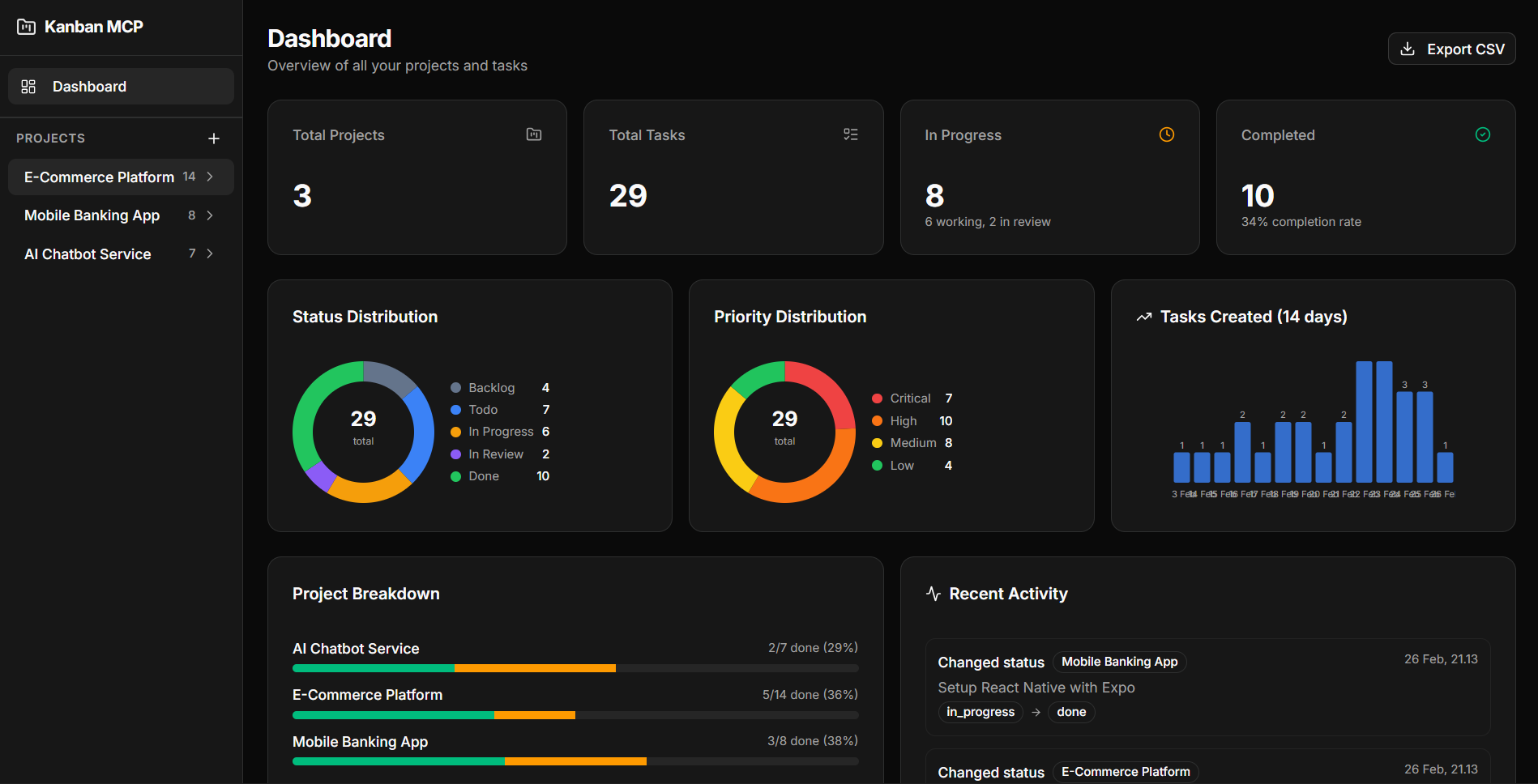
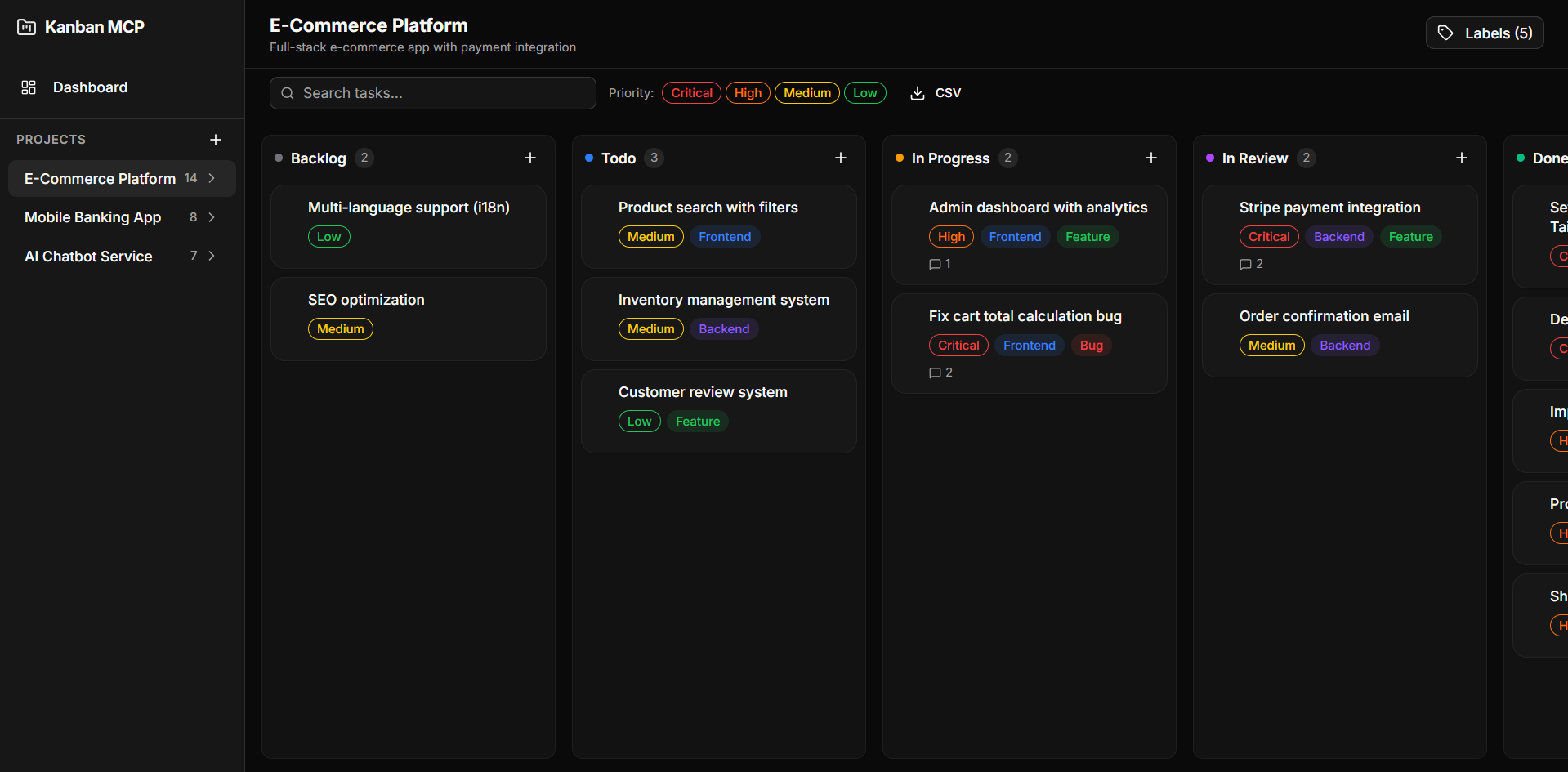
Table of Contents
- Tech Stack
- Features
- Getting Started
- MCP Server
- Scripts
- Project Structure
- AI Agent Integration
- License
Tech Stack
| Layer | Technology |
|---|---|
| Framework | Next.js 16 (App Router) |
| Language | TypeScript |
| Database | SQLite + Drizzle ORM |
| UI | shadcn/ui + Tailwind CSS v4 |
| State | Zustand |
| Drag & Drop | @dnd-kit |
| MCP | @modelcontextprotocol/sdk |
Features
- Kanban Board — Drag-and-drop tasks across Backlog, Todo, In Progress, In Review, Done
- Dashboard — Summary cards, donut charts (status/priority), 14-day trend bar chart, project breakdown
- Sub-tasks — Checklist-style sub-tasks with progress bar
- Labels — Custom color labels per project
- Comments — Timestamped comment threads on tasks
- Activity Log — Full history of task changes
- Search & Filter — Real-time search + priority filter on board
- CSV Export — Export all tasks or per-project
- Dark Mode — Enabled by default
- MCP Server — 13 tools + 4 resources for AI agent integration
Getting Started
Prerequisites
- Node.js 18+
- npm
Installation
git clone https://github.com/dzikrihilman/kanban-mcp.git
cd kanban-mcp
npm install
Database Setup
npm run db:generate
npm run db:migrate
Run Development Server
npm run dev
Open http://localhost:3000.
MCP Server
The MCP server exposes project and task management as tools for AI coding agents (Claude, Cursor, Windsurf, etc).
Available Tools
| Tool | Description |
|---|---|
list_projects | List all projects with task counts |
get_project | Get project details |
create_project | Create new project |
update_project | Update project fields |
delete_project | Delete project and all tasks |
list_tasks | List tasks (filter by status/priority) |
get_task | Get task with comments |
create_task | Create task with all fields |
update_task | Update task with activity logging |
delete_task | Delete task |
move_task | Move task between columns |
add_comment | Add comment to task |
search_tasks | Search by keyword |
get_dashboard_summary | Full dashboard statistics |
Available Resources
| URI | Description |
|---|---|
kanban://projects | All projects |
kanban://project/{id} | Project detail |
kanban://project/{id}/tasks | Project tasks |
kanban://task/{id} | Task with comments |
Run MCP Server Standalone
npm run mcp:start
Configure MCP Client
Add the following to your MCP client configuration:
Claude Desktop (claude_desktop_config.json):
{
  "mcpServers": {
    "kanban-mcp": {
      "command": "npx",
      "args": ["tsx", "/absolute/path/to/kanban-mcp/src/mcp-server/index.ts"]
    }
  }
}
Cursor / Windsurf / Antigravity (mcp_config.json):
{
  "mcpServers": {
    "kanban-mcp": {
      "command": "npx",
      "args": ["tsx", "/absolute/path/to/kanban-mcp/src/mcp-server/index.ts"]
    }
  }
}
Replace
/absolute/path/to/kanban-mcpwith the actual path to your project.
Usage Example
Once configured, your AI agent can:
"Create a new project called 'My App' and add 3 tasks to it"
"Move task X to in_progress"
"Show me the dashboard summary"
"Export all tasks as CSV"
Scripts
| Script | Description |
|---|---|
npm run dev | Start Next.js dev server |
npm run build | Production build |
npm run start | Start production server |
npm run mcp:start | Start MCP server (stdio) |
npm run db:generate | Generate Drizzle migrations |
npm run db:migrate | Run database migrations |
Project Structure
src/
├── app/
│   ├── api/              # API routes
│   │   ├── activity/     # Activity log
│   │   ├── analytics/    # Analytics data
│   │   ├── comments/     # Comments CRUD
│   │   ├── dashboard/    # Dashboard summary
│   │   ├── export/       # CSV export
│   │   ├── labels/       # Labels CRUD
│   │   ├── projects/     # Projects CRUD
│   │   ├── task-labels/  # Task-label junction
│   │   └── tasks/        # Tasks CRUD + reorder
│   ├── projects/[id]/    # Kanban board page
│   └── page.tsx          # Dashboard page
├── components/
│   ├── charts/           # DonutChart, MiniBarChart
│   ├── dashboard/        # DashboardView
│   ├── kanban/           # Board, Column, Card, FilterBar, etc.
│   ├── layout/           # AppSidebar
│   └── ui/               # shadcn/ui components
├── hooks/
│   └── useKanbanStore.ts # Zustand store
├── lib/db/
│   ├── schema.ts         # Drizzle schema
│   ├── index.ts          # DB client
│   └── migrate.ts        # Migration runner
├── mcp-server/
│   ├── index.ts          # MCP server (13 tools, 4 resources)
│   └── db-client.ts      # Standalone DB client for MCP
└── types/
    └── index.ts          # Shared types
AI Agent Integration
To make your AI agent automatically track every development task using Kanban MCP, you can add a system prompt and/or install it as a skill.
System Prompt
Add the system prompt from docs/SYSTEM_PROMPT.md to your AI agent configuration. This instructs the agent to:
- Automatically create tasks before starting any work
- Update task status as work progresses
- Add comments to document technical decisions
- Break complex work into sub-tasks
- Use consistent title formats (
[Feature],[Fix],[Refactor],[Docs],[Test])
See the file for setup instructions for Claude Desktop, Cursor, Windsurf, and Antigravity.
Skill (Antigravity)
Copy docs/SKILL.md to your Antigravity skills folder:
mkdir -p ~/.gemini/antigravity/skills/kanban-mcp
cp docs/SKILL.md ~/.gemini/antigravity/skills/kanban-mcp/SKILL.md
Once installed, the agent will automatically activate the skill when it detects keywords like task, project, kanban, track, progress, todo, or backlog.
See docs/SKILL.md for the full workflow reference and rules.
License
MIT