
Kremis





Work in Progress — Features incomplete. Breaking changes expected.
Kremis is a minimal, deterministic, graph-based cognitive substrate implemented in Rust.
It functions solely as a mechanism to record, associate, and retrieve structural relationships derived from grounded experience.
The system does not understand. It contains only the structure of the signals it has processed.
Why Kremis
| Problem | How Kremis addresses it |
|---|---|
| Hallucination | No fabricated data. Every result traces back to real ingested signals. Explicit "not found" for missing data |
| Opacity | Fully inspectable state. No hidden layers, no black box. Every result traces back to a graph path |
| Lack of grounding | Zero pre-loaded knowledge. All structure emerges from real signals, not assumptions |
| Non-determinism | Same input, same output. No randomness, no floating-point arithmetic in core |
| Data loss | ACID transactions via redb embedded database. Crash-safe by design |
→ Design Philosophy — why these constraints exist.
Quick Start
Requires Rust 1.89+ (stable, edition 2024) and Cargo.
git clone https://github.com/TyKolt/kremis.git
cd kremis
cargo build --release
cargo test --workspace
# Initialize database
cargo run -p kremis -- init

# Ingest sample data (9 signals: 3 entities with properties + relationships)
cargo run -p kremis -- ingest -f examples/sample_signals.json -t json

# Start HTTP server (in a separate terminal, or background with &)
cargo run -p kremis -- server

# Check health (in another terminal)
curl http://localhost:8080/health
Note: CLI commands and the HTTP server cannot run simultaneously (redb holds an exclusive lock). Stop the server before using CLI commands like
ingest,status, orexport.
Try It
With the server running, query the graph:
# Look up entity 1 (Alice)
curl -X POST http://localhost:8080/query \
     -H "Content-Type: application/json" \
     -d '{"type": "lookup", "entity_id": 1}'

# Traverse from node 0, depth 3
curl -X POST http://localhost:8080/query \
     -H "Content-Type: application/json" \
     -d '{"type": "traverse", "node_id": 0, "depth": 3}'

# Get properties of node 0 (name, role, etc.)
curl -X POST http://localhost:8080/query \
     -H "Content-Type: application/json" \
     -d '{"type": "properties", "node_id": 0}'

# Find common connections between nodes 0 and 1
curl -X POST http://localhost:8080/query \
     -H "Content-Type: application/json" \
     -d '{"type": "intersect", "nodes": [0, 1]}'

# Check graph status
curl http://localhost:8080/status
You can also ingest signals via HTTP:
curl -X POST http://localhost:8080/signal \
     -H "Content-Type: application/json" \
     -d '{"entity_id": 1, "attribute": "name", "value": "Alice"}'
# {"success":true,"node_id":0,"error":null}
The examples/ directory contains sample data in both JSON and text formats.
Honesty Demo
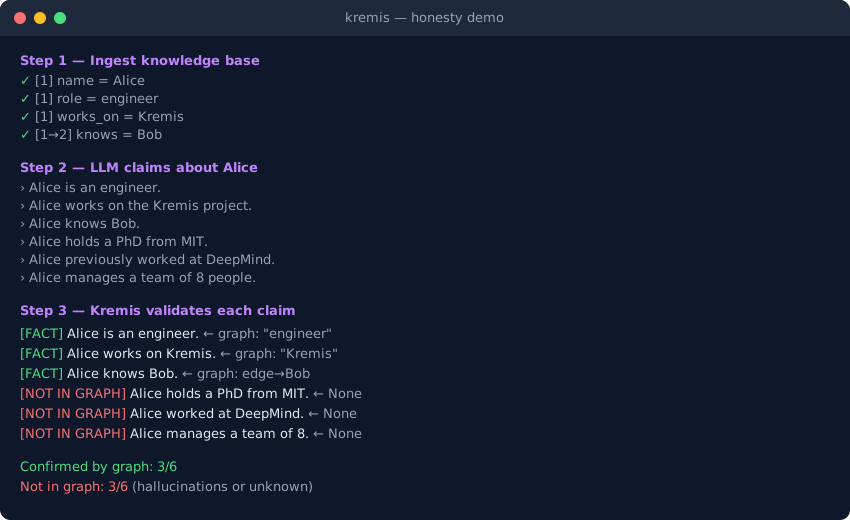
See what happens when an LLM makes claims about data you've ingested — Kremis tells you which ones are grounded and which ones aren't.
Requires a running server (see Quick Start above). No pip install needed — standard library only.
python examples/demo_honesty.py
Step 1 — Ingest knowledge base
  ✓  [1] name       = Alice
  ✓  [1] role       = engineer
  ✓  [1] works_on   = Kremis
  ...

Step 2 — LLM: "Tell me about Alice"
  › Alice is an engineer.
  › Alice works on the Kremis project.
  › Alice knows Bob.
  › Alice holds a PhD in machine learning from MIT.
  › Alice previously worked at DeepMind as a research lead.
  › Alice manages a cross-functional team of 8 people.

Step 3 — Kremis validates each claim
  [FACT]          Alice is an engineer.          ← Kremis: "engineer"
  [FACT]          Alice works on the Kremis project.  ← Kremis: "Kremis"
  [FACT]          Alice knows Bob.               ← Kremis: "Bob"
  [NOT IN GRAPH]  Alice holds a PhD from MIT.    ← Kremis: None
  [NOT IN GRAPH]  Alice previously worked at DeepMind.  ← Kremis: None
  [NOT IN GRAPH]  Alice manages a team of 8.     ← Kremis: None

  Confirmed by graph: 3/6
  Not in graph:       3/6  (hallucinations or unknown facts)
With --ollama (requires Ollama running locally), the LLM generates claims in real time:
python examples/demo_honesty.py --ollama
Docker
docker build -t kremis .
docker run -d -p 8080:8080 -v kremis-data:/data kremis
Pass configuration via environment variables:
docker run -d -p 8080:8080 \
  -v kremis-data:/data \
  -e KREMIS_API_KEY=your-secret \
  -e KREMIS_CORS_ORIGINS="https://example.com" \
  kremis
Multi-stage build (~136 MB image). Data persists in /data volume. Built-in healthcheck on /health.
Usage
CLI
# Show graph status
cargo run -p kremis -- status

# Show developmental stage
cargo run -p kremis -- stage --detailed

# Ingest signals from file
cargo run -p kremis -- ingest -f data.json -t json

# Query the graph
cargo run -p kremis -- query -t lookup --entity 1
cargo run -p kremis -- query -t traverse -s 0 -d 3
cargo run -p kremis -- query -t path -s 0 -e 5

# Export/Import
cargo run -p kremis -- export -o graph.bin -t canonical
cargo run -p kremis -- import -i graph.bin -B file
HTTP API
| Endpoint | Method | Description |
|---|---|---|
/health | GET | Health check |
/status | GET | Graph statistics |
/stage | GET | Developmental stage |
/signal | POST | Ingest a signal |
/signals | POST | Ingest a sequence of signals (creates edges) |
/signal/retract | POST | Retract a signal (decrement edge weight) |
/query | POST | Execute a query |
/export | POST | Export graph |
/hash | GET | BLAKE3 cryptographic hash |
/metrics | GET | Prometheus metrics |
See the full documentation or browse the source docs for API reference.
MCP Server
Kremis provides an MCP (Model Context Protocol) server that enables AI assistants like Claude to interact with the knowledge graph directly.
# Build the MCP server
cargo build -p kremis-mcp --release

# Run (requires a Kremis HTTP server running)
KREMIS_URL=http://localhost:8080 ./target/release/kremis-mcp
Configure in Claude Desktop (claude_desktop_config.json):
{
  "mcpServers": {
    "kremis": {
      "command": "/path/to/kremis-mcp",
      "env": {
        "KREMIS_URL": "http://localhost:8080",
        "KREMIS_API_KEY": "your-key-here"
      }
    }
  }
}
9 tools available: kremis_ingest, kremis_lookup, kremis_traverse, kremis_path, kremis_intersect, kremis_status, kremis_properties, kremis_retract, kremis_hash.
Rust API
use kremis_core::{Session, Signal, EntityId, Attribute, Value};

let mut session = Session::new();

let signal = Signal::new(
    EntityId(1),
    Attribute::new("name"),
    Value::new("Alice"),
);

let node_id = session.ingest(&signal)?;
Architecture
| Component | Description |
|---|---|
| kremis-core | Deterministic graph engine (pure Rust, no async) |
| apps/kremis | HTTP server + CLI (tokio, axum, clap) |
| apps/kremis-mcp | MCP server bridge for AI assistants (rmcp, stdio) |
See the architecture docs or browse the source for internal details (data flow, storage backends, algorithms, export formats).
Testing
cargo test --workspace
cargo clippy --all-targets --all-features -- -D warnings
cargo fmt --all -- --check
License
The brand assets in docs/logo/ (logo, icon, favicon) are proprietary and not covered by the Apache 2.0 license. See docs/logo/LICENSE.
Contributing
See CONTRIBUTING.md for guidelines. The architecture is still evolving — open an issue before submitting a PR.
Acknowledgments
This project was developed with AI assistance.
Keep it minimal. Keep it deterministic. Keep it grounded. Keep it honest.