Kubernetes AI Ops Agent
An AI-powered assistant for Kubernetes operations and management through natural language interactions.
Overview
Kubernetes AI Ops Agent is an intelligent agent that helps DevOps engineers and Kubernetes administrators manage Kubernetes clusters through conversational interfaces. The project leverages Large Language Models (LLMs) to interpret user intents and execute Kubernetes operations using specialized MCP (Model Context Protocol) servers.
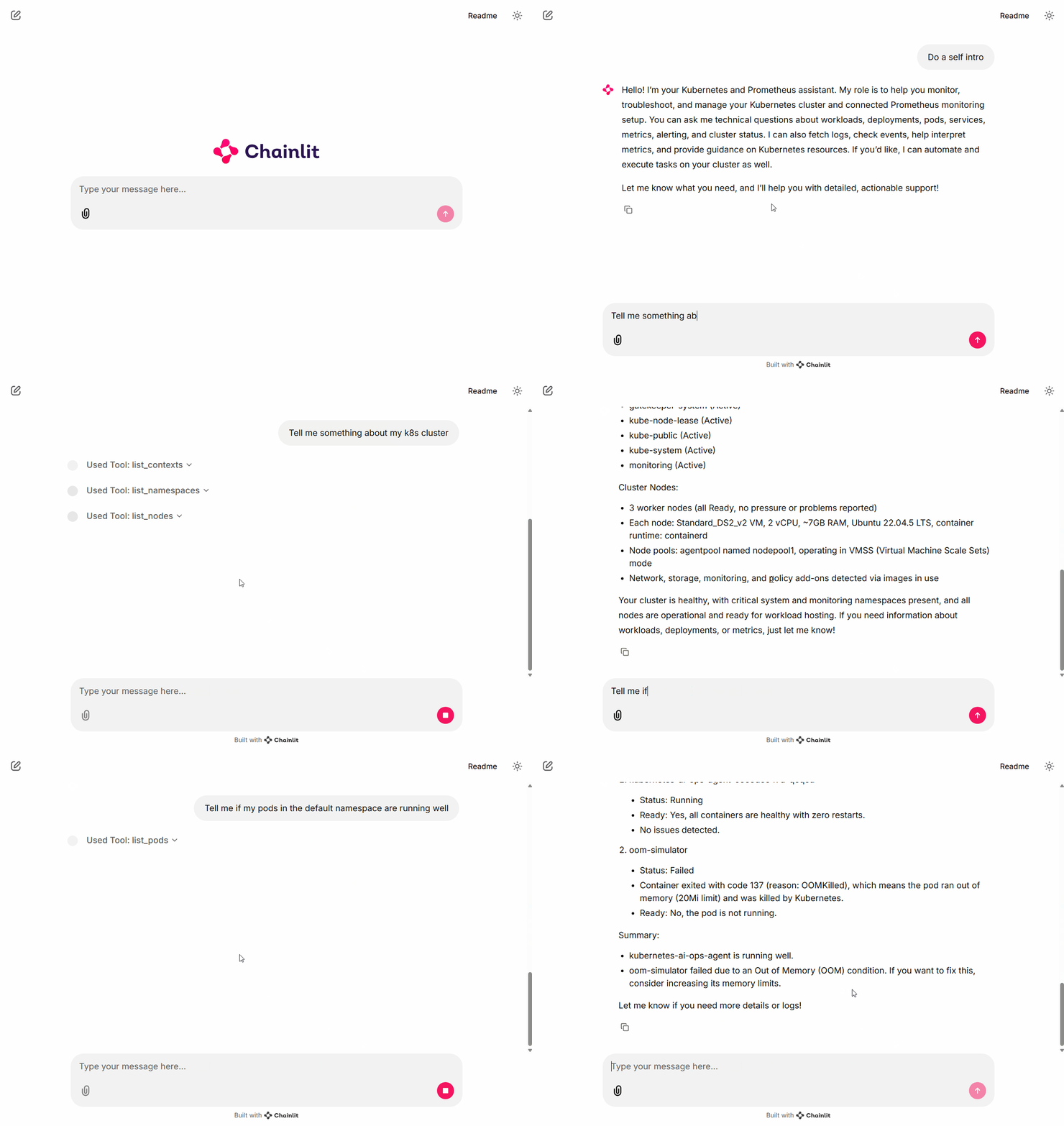
Project Status
Note: This project is currently in an experimental stage. It serves primarily as a proof of concept to validate the capabilities and potential benefits of integrating Large Language Models (LLMs) with Kubernetes, Prometheus, and other MCP (Model Context Protocol) servers. Features and functionality may change significantly as the project evolves.
Features
- 🤖 AI-Powered Assistance: Interact with your Kubernetes clusters using natural language
- 🧰 Tool Integration: Execute Kubernetes operations through specialized tools
- 🚀 Deployment Ready: Packaged with Docker and Helm charts for easy deployment
- 📊 Web Interface: Built with Chainlit for an interactive chat experience
Prerequisites
- Python 3.10+
- Docker
- Kubernetes cluster access
- Helm (for deployment)
Installation
Local Development
-
Clone the repository:
git clone https://github.com/yourusername/kubernetes-ai-ops-agent.git cd kubernetes-ai-ops-agent -
Install the dependencies:
pip install -r requirements.txt -
Install the required MCP servers:
# Install the Kubernetes MCP server npm install -g @kubernetes-ai/mcp-server-kubernetes # Install the Prometheus MCP server pip install prometheus-mcp-serverNote: Do not use the MCP servers located in the
deps/directory for local development. These are customized versions:- The Kubernetes MCP server in
deps/is modified to useloadFromClusterfor proper initialization in a Pod environment. - The MCP servers in
deps/are included to be packaged directly into the container image rather than downloaded at runtime.
- The Kubernetes MCP server in
-
Configure your Kubernetes access:
- Ensure your kubeconfig is properly set up
- The agent will use your current kubectl context
-
Start the application:
chainlit run src/main.py
Helm Chart Deployment
- Build and push the Docker image:
# Build the Docker image
docker build -t <YOUR_CONTAINER_REGISTRY>/kubernetes-ai-ops-agent:<TAG> .

# Push the image to your container registry
docker push <YOUR_CONTAINER_REGISTRY>/kubernetes-ai-ops-agent:<TAG>
- Create a
customized.values.yamlfile with your specific configuration:
# Customized values for kubernetes-ai-ops-agent
image:
  repository: <YOUR_CONTAINER_REGISTRY>/kubernetes-ai-ops-agent

# Configure the secrets
secrets:
  data:
    # Option 1: For Azure OpenAI configuration
    AZURE_OPENAI_ENDPOINT: "https://<YOUR_OPENAI_SERVICE>.openai.azure.com/"
    AZURE_OPENAI_API_KEY: "<YOUR_AZURE_OPENAI_API_KEY>"
    AZURE_OPENAI_MODEL: "<YOUR_DEPLOYMENT_NAME>"
    OPENAI_API_VERSION: "<API_VERSION>"

    # Option 2: For standard OpenAI configuration
    # OPENAI_API_KEY: "<YOUR_OPENAI_API_KEY>"
    # OPENAI_MODEL: "<YOUR_MODEL_NAME>" # e.g., "gpt-4o"

    # Prometheus configuration
    PROMETHEUS_URL: "http://<YOUR_PROMETHEUS_SERVICE>.<NAMESPACE>:9090"
- Install the chart using your customized values:
cd deploy/helm
helm install kubernetes-ai-ops ./kubernetes-ai-ops-agent -f customized.values.yaml
- Access the application using port-forward:
# Port-forward the service to access it locally
# Use the namespace where you installed the chart (default used here as example)
kubectl port-forward svc/kubernetes-ai-ops-agent 9000:9000 -n <NAMESPACE>

# Now you can access the web interface at http://localhost:9000
Note: Replace
<NAMESPACE>with the namespace where you installed the Helm chart. If you installed without specifying a namespace (-nflag), the current context's namespace will be used (usually "default").
Architecture
The application is built with the following components:
- Chainlit Interface: Web UI for interacting with the AI assistant
- Agent Layer: Processes natural language, plans operations, and executes them
- MCP Servers:
- Kubernetes MCP Server: Handles Kubernetes API operations
- Prometheus MCP Server: Provides monitoring metrics and data
Model Support
This project currently supports only OpenAI models. You can configure the agent to use either:
- OpenAI API directly
- Azure OpenAI API
Configuration details for both options are provided in the deployment settings.
Usage Examples
Basic Cluster Information
User: "Show me all pods in the default namespace"
Troubleshooting
User: "Why is my pod in CrashLoopBackOff state?"
Project Structure
src/: Main application codemain.py: Main entry point for the Chainlit applicationchainlit_session_manager.py: Manages Chainlit user sessionschainlit_session_storage.py: Handles session data storageinterfaces.py: Defines interfaces and abstractionskubernetes_ai_ops_agent_provider.py: Provider implementation for Kubernetes operationsmcp_server_provider_impl.py: Implementation for MCP server provideropenai_client_factory_impl.py: Factory for OpenAI client configuration
deps/: Dependencies and MCP serversmcp-server-kubernetes/: Kubernetes MCP serverprometheus-mcp-server/: Prometheus MCP server
deploy/: Deployment configurationshelm/: Helm charts for Kubernetes deployment
Contributing
Contributions are welcome! Please see CONTRIBUTING.md for guidelines.
License
This project is licensed under the MIT License - see the LICENSE file for details.