lilbee
Beta — feedback and bug reports welcome. Open an issue.






Local knowledge base that handles both code and documents, with a git-like per-project model. Search, ask questions, or chat — standalone or as a retrieval backend for AI agents via MCP. Everything stays on your machine, powered by Ollama and LanceDB.
- Why lilbee
- Demos
- Install
- Quick start
- Agent integration
- Interactive chat
- Supported formats
- Vision OCR (optional)
- Configuration
- How it works
Why lilbee
lilbee indexes documents and code into a searchable local knowledge base. Use it standalone — search, ask questions, chat — or plug it into AI coding agents as a retrieval backend via MCP.
Most tools like this only handle code. lilbee handles PDFs, Word docs, spreadsheets, images (OCR) — and code too, with AST-aware chunking.
- Standalone knowledge base — add documents, search, ask questions, or chat interactively with model switching and slash commands
- AI agent backend — MCP server and JSON CLI so coding agents (Claude Code, OpenCode, etc.) can search your indexed docs as context
- Per-project databases —
lilbee initcreates a.lilbee/directory (like.git/) so each project gets its own isolated index - Documents and code alike — PDFs, Office docs, spreadsheets, images, ebooks, and 150+ code languages via tree-sitter
- Open-source and fully offline — your documents never leave your machine. Runs with Ollama and LanceDB, no cloud APIs or Docker
Add files (lilbee add), then search or ask questions. Once indexed, search works without Ollama — agents use their own LLM to reason over the retrieved chunks.
Demos
AI agent — lilbee search vs web search (detailed analysis)
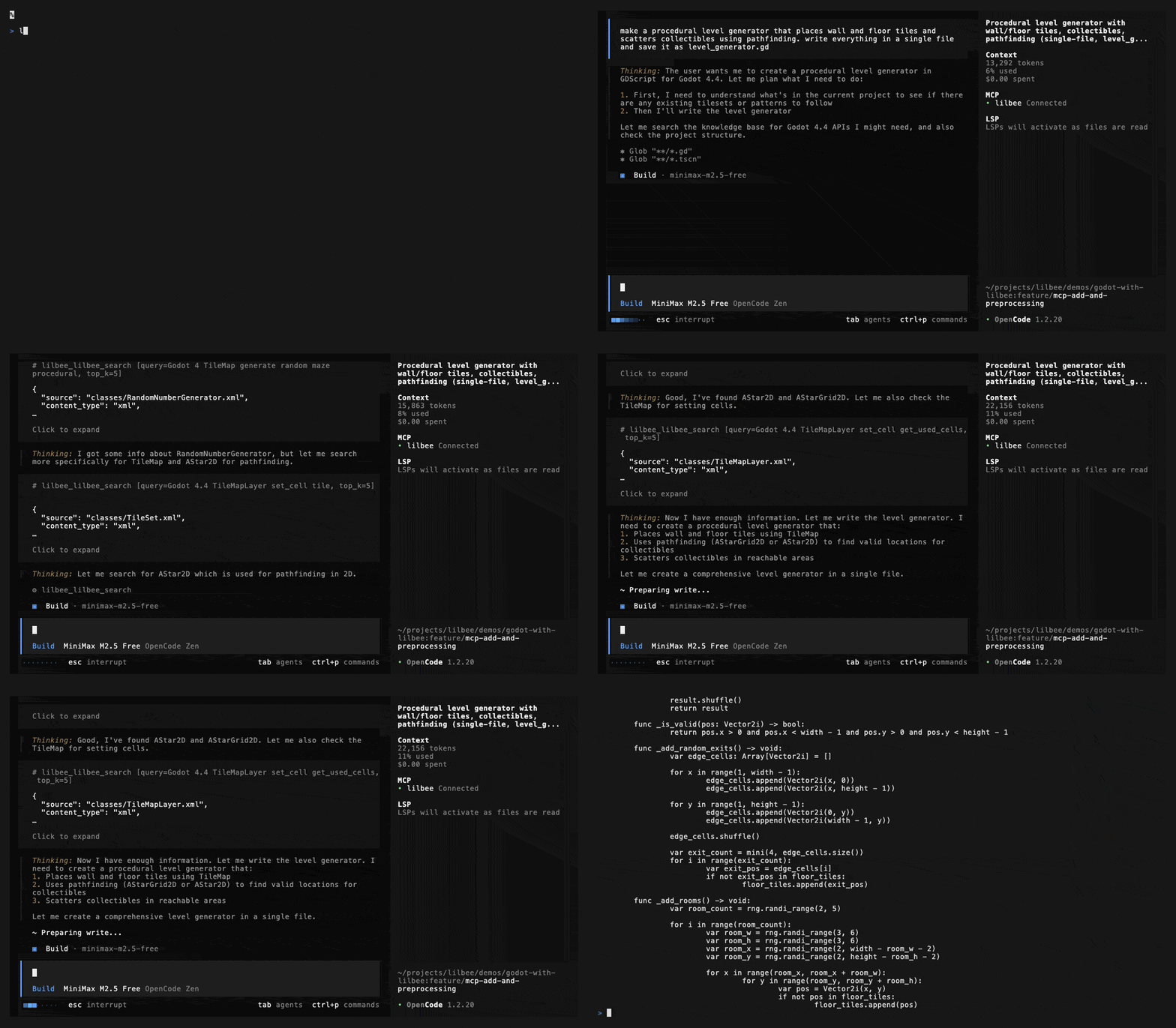
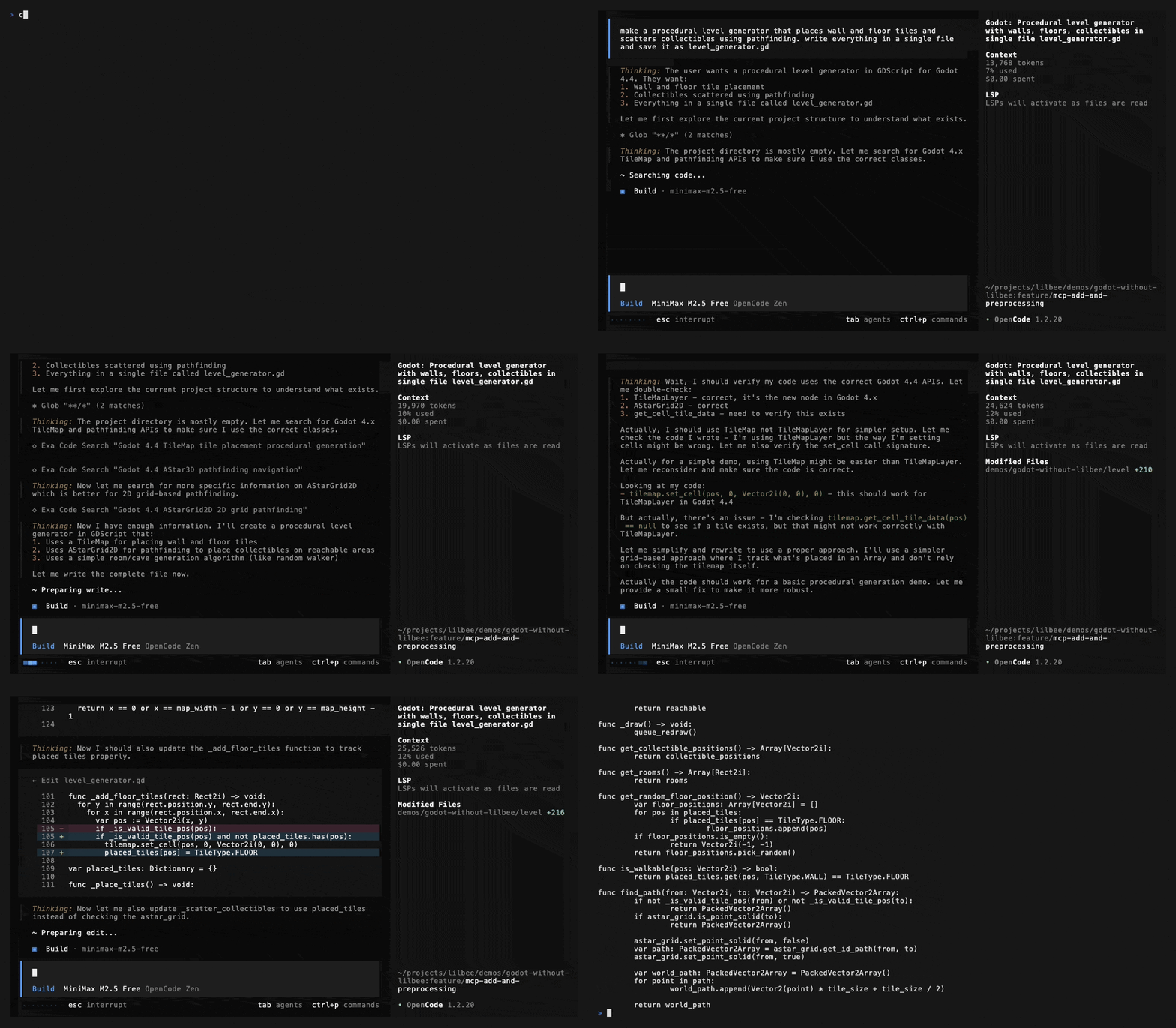
opencode + minimax-m2.5-free, single prompt, no follow-ups. The Godot 4.4 XML class reference (917 files) is indexed in lilbee. The baseline uses Exa AI code search instead.
⚠️ Caution: minimax-m2.5-free is a cloud model — retrieved chunks are sent to an external API. Use a local model if your documents are private.
| API hallucinations | Lines | |
|---|---|---|
| With lilbee (code · config) | 0 | 261 |
| Without lilbee (code · config) | 4 (~22% error rate) | 213 |
With lilbee — all Godot API calls match the class reference
Without lilbee — 4 hallucinated APIs (details)
If you spot issues with these benchmarks, please open an issue.
Vision OCR
Scanned PDF → searchable knowledge base
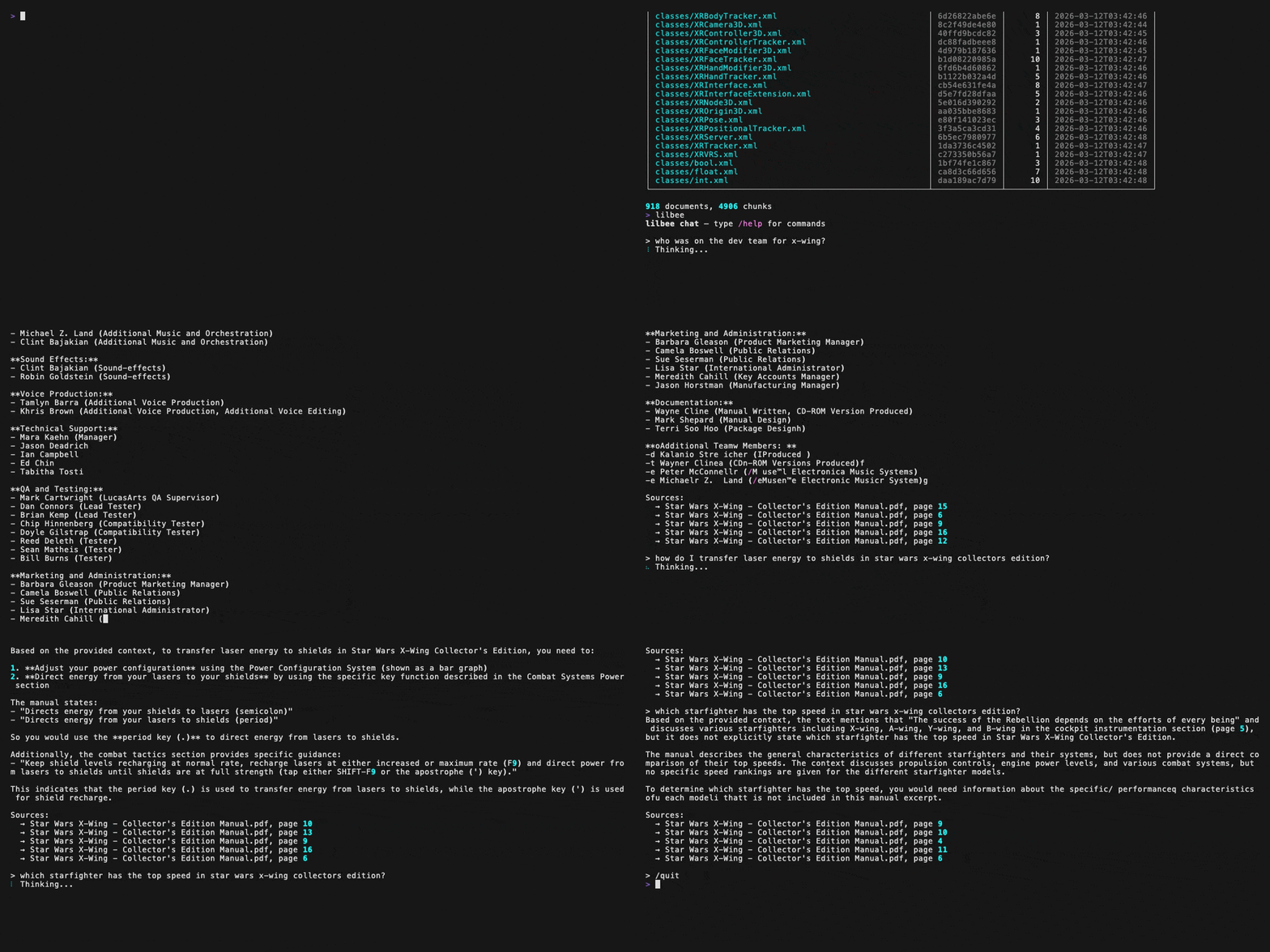
A scanned 1998 Star Wars: X-Wing Collector's Edition manual indexed with vision OCR (LightOnOCR-2), then queried in lilbee's interactive chat (qwen3-coder:30b, fully local). Three questions about dev team credits, energy management, and starfighter speeds — all answered from the OCR'd content.
See benchmarks, test documents, and sample output for model comparisons.
Standalone
Interactive local offline chat
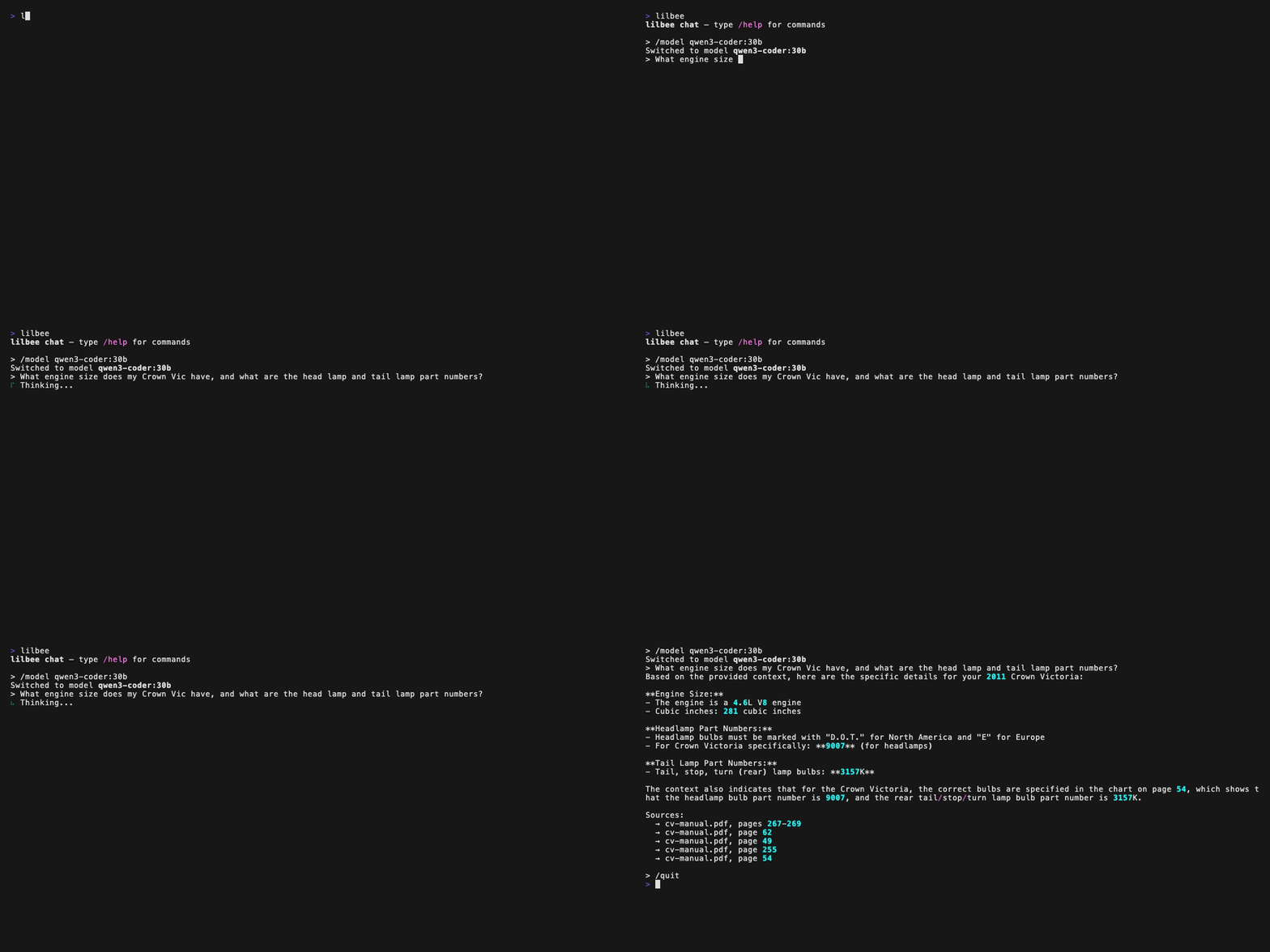
[!NOTE] Entirely local on a 2021 M1 Pro with 32 GB RAM.
Model switching via tab completion, then a Q&A grounded in an indexed PDF.
Code index and search
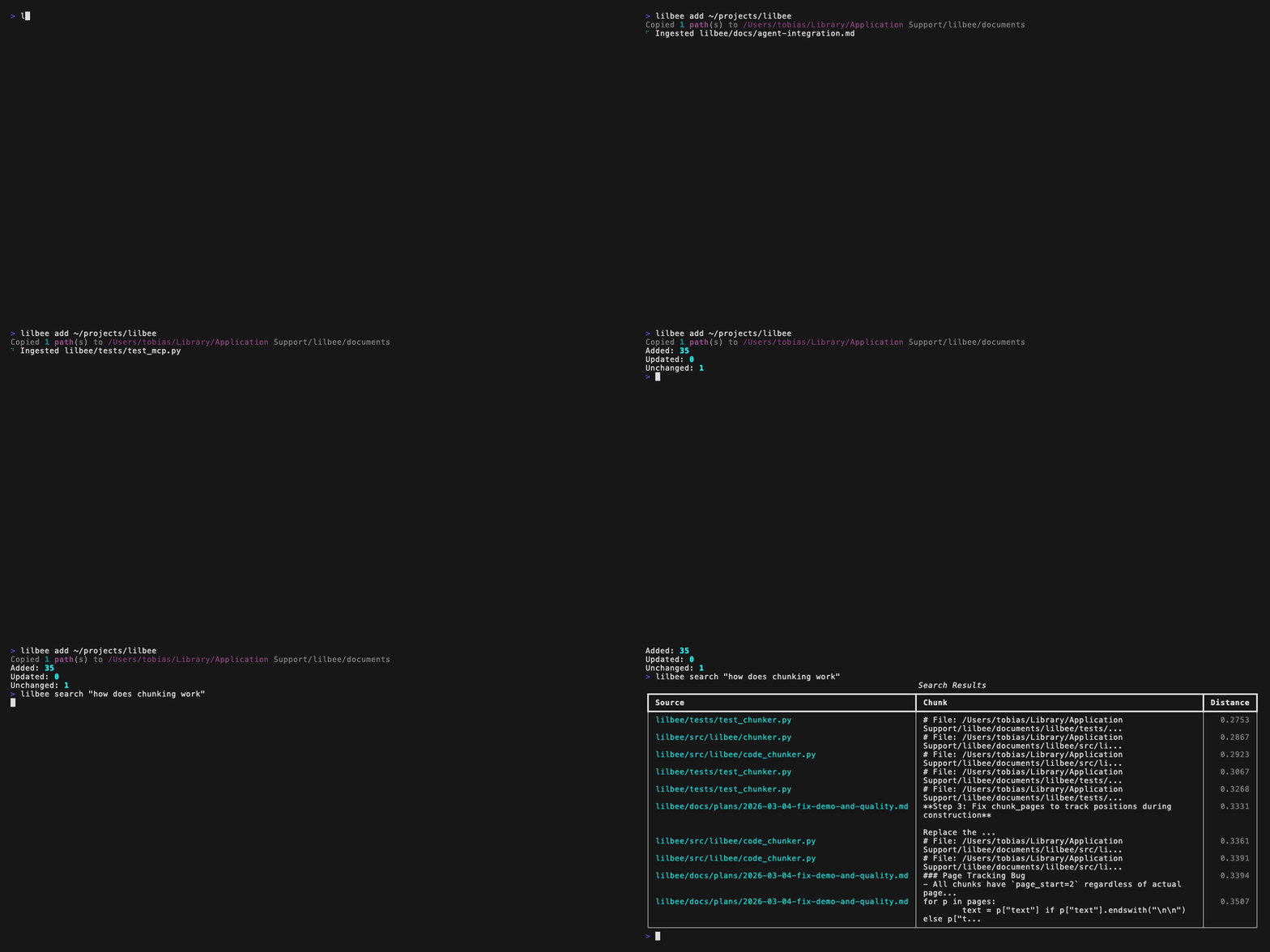
Add a codebase and search with natural language. Tree-sitter provides AST-aware chunking.
JSON output
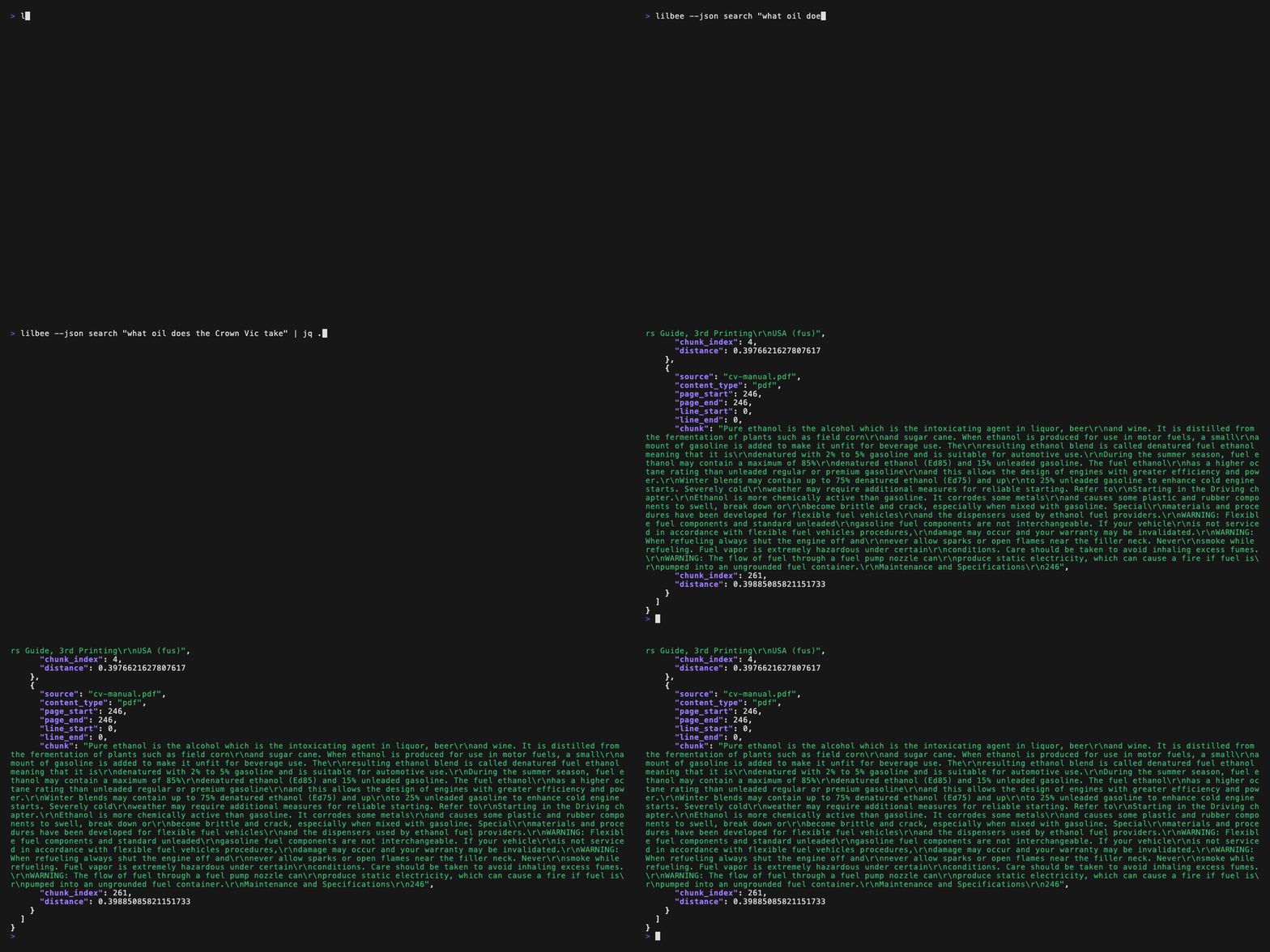
Structured JSON output for agents and scripts.
Hardware requirements
lilbee runs entirely on your local machine — your hardware is the compute.
| Resource | Minimum | Recommended |
|---|---|---|
| RAM | 8 GB | 16–32 GB |
| GPU / Accelerator | — | Apple Metal (M-series), NVIDIA GPU (6+ GB VRAM) |
| Disk | 2 GB (models + data) | 10+ GB if using multiple models |
| CPU | Any modern x86_64 / ARM64 | — |
Ollama handles inference and uses Metal on macOS or CUDA on Linux/Windows. Without a GPU, models fall back to CPU — usable for embedding but slow for chat.
Install
Prerequisites
- Python 3.11+
- Ollama — the embedding model (
nomic-embed-text) is auto-pulled on first sync. If no chat model is installed, lilbee prompts you to pick and download one. - Optional (for image OCR):
brew install tesseract/apt install tesseract-ocr
First-time download: If you're new to Ollama, expect the first run to take a while — models are large files that need to be downloaded once. For example,
qwen3:8bis ~5 GB and the embedding modelnomic-embed-textis ~274 MB. After the initial download, models are cached locally and load in seconds. You can check what you have installed withollama list.
Install
pip install lilbee # or: uv tool install lilbee
Development (run from source)
git clone https://github.com/tobocop2/lilbee && cd lilbee
uv sync
uv run lilbee
Quick start
# Check version
lilbee --version

# Initialize a per-project knowledge base (like git init)
lilbee init

# Chat with a local LLM (requires Ollama)
lilbee

# Add documents to your knowledge base (embedding runs locally — may take
# a moment per file, longer for large collections)
lilbee add ~/Documents/manual.pdf ~/notes/

# Ask questions — answers come from your documents via a local LLM
lilbee ask "What is the recommended oil change interval?"

# Search documents — returns raw chunks, no LLM needed at query time
lilbee search "oil change interval"

# Remove a document from the knowledge base
lilbee remove manual.pdf

# Use a different chat model
lilbee ask "Explain this" --model qwen3

# Check what's indexed
lilbee status

# Add a scanned PDF with vision OCR (prompts to pick a model if none configured)
lilbee add scan.pdf --vision

# Or set a vision model upfront and it applies to all future syncs
export LILBEE_VISION_MODEL=maternion/LightOnOCR-2
lilbee add scan.pdf
Agent integration
lilbee can serve as a local retrieval backend for AI coding agents via MCP or JSON CLI. See docs/agent-integration.md for setup and usage.
Interactive chat
Running lilbee or lilbee chat enters an interactive REPL with conversation history, streaming responses, and slash commands:
| Command | Description |
|---|---|
/status | Show indexed documents and config |
/add [path] | Add a file or directory (tab-completes paths) |
/model [name] | Switch chat model — no args opens an interactive picker; with a name, switches directly (tab-completes installed models) |
/version | Show lilbee version |
/reset | Delete all documents and data (asks for confirmation) |
/help | Show available commands |
/quit | Exit chat |
Slash commands and paths tab-complete. A spinner shows while waiting for the first token from the LLM.
Supported formats
| Format | Extensions | Requires |
|---|---|---|
.pdf | — | |
| Office | .docx, .xlsx, .pptx | — |
| eBook | .epub | — |
| Images (OCR) | .png, .jpg, .jpeg, .tiff, .bmp, .webp | Tesseract |
| Data | .csv, .tsv | — |
| Structured | .xml, .json, .jsonl, .yaml, .yml | — |
| Text | .md, .txt, .html, .rst | — |
| Code | .py, .js, .ts, .go, .rs, .java and 150+ more via tree-sitter (AST-aware chunking) | — |
Vision OCR (optional)
Scanned PDFs that produce no extractable text can be processed using a local vision model via Ollama. During add or sync, lilbee detects when text extraction yields nothing (common with scanned documents) and:
- Without a vision model configured: skips the file and tells you to re-add it with
--visionor setLILBEE_VISION_MODEL - With a vision model configured: rasterizes each page and sends it to the vision model for OCR. This is compute-intensive — expect seconds to tens of seconds per page depending on your hardware and model (see benchmarks below)
Setup:
# In chat, use the interactive picker:
/vision

# Or set directly:
/vision maternion/LightOnOCR-2

# Or via environment variable:
export LILBEE_VISION_MODEL=maternion/LightOnOCR-2
Recommended models:
| Model | Size | Speed | Quality |
|---|---|---|---|
| maternion/LightOnOCR-2 | 1.5 GB | 11.9s/page | Best — clean markdown output |
| deepseek-ocr | 6.7 GB | 17.4s/page | Excellent accuracy, plain text |
| glm-ocr | 2.2 GB | 51.7s/page | Good accuracy |
| minicpm-v | 5.5 GB | 35.6s/page | Decent, slower |
Benchmarks: Apple M1 Pro, 32 GB RAM, Ollama 0.17.7. See benchmarks, test documents, and sample output.
Configuration
All settings are configurable via environment variables:
| Variable | Default | Description |
|---|---|---|
LILBEE_DATA | (platform default) | Data directory path |
LILBEE_CHAT_MODEL | qwen3:8b | Ollama chat model |
LILBEE_EMBEDDING_MODEL | nomic-embed-text | Embedding model |
LILBEE_EMBEDDING_DIM | 768 | Embedding dimensions |
LILBEE_CHUNK_SIZE | 512 | Tokens per chunk |
LILBEE_CHUNK_OVERLAP | 100 | Overlap tokens between chunks |
LILBEE_MAX_EMBED_CHARS | 2000 | Max characters per chunk for embedding |
LILBEE_TOP_K | 10 | Number of retrieval results |
LILBEE_VISION_MODEL | (none) | Vision model for scanned PDF OCR |
LILBEE_VISION_TIMEOUT | (none) | Per-page vision OCR timeout in seconds |
LILBEE_LOG_LEVEL | WARNING | Logging level (DEBUG, INFO, WARNING, ERROR) |
LILBEE_SYSTEM_PROMPT | (built-in) | Custom system prompt for RAG answers |
CLI also accepts --model / -m, --data-dir / -d, --vision-timeout, --log-level, and --version / -V flags.
How it works
Documents are hashed and synced automatically — add, change, or delete files and lilbee keeps the index current. Kreuzberg extracts text from PDFs, Office docs, images (OCR), etc. For scanned or image-heavy PDFs, lilbee can rasterize pages to images and run them through a local vision model via Ollama for higher-quality extraction. tree-sitter chunks code by AST. Chunks are embedded via Ollama and stored in LanceDB. Queries embed the question, find the closest chunks by vector similarity, and pass them as context to the LLM.
Data location
lilbee uses per-project databases when available, falling back to a global database:
--data-dir/LILBEE_DATA— explicit override (highest priority).lilbee/— found by walking up from the current directory (like.git/)- Global — platform-default location (see below)
Run lilbee init to create a .lilbee/ directory in your project. It contains documents/, data/, and a .gitignore that excludes derived data. When active, all commands operate on the local database only.
| Platform | Global path |
|---|---|
| macOS | ~/Library/Application Support/lilbee/ |
| Linux | ~/.local/share/lilbee/ |
| Windows | %LOCALAPPDATA%/lilbee/ |
License
MIT