Local MCP Gateway
The Middleware Layer for your AI tools.
As AI clients multiply (Claude, Cursor, IDEs) and MCP servers proliferate (GitHub, Postgres, Slack), direct connections create an N×M fragmentation problem. Debugging is a nightmare, security is an afterthought, and context overload degrades model performance.
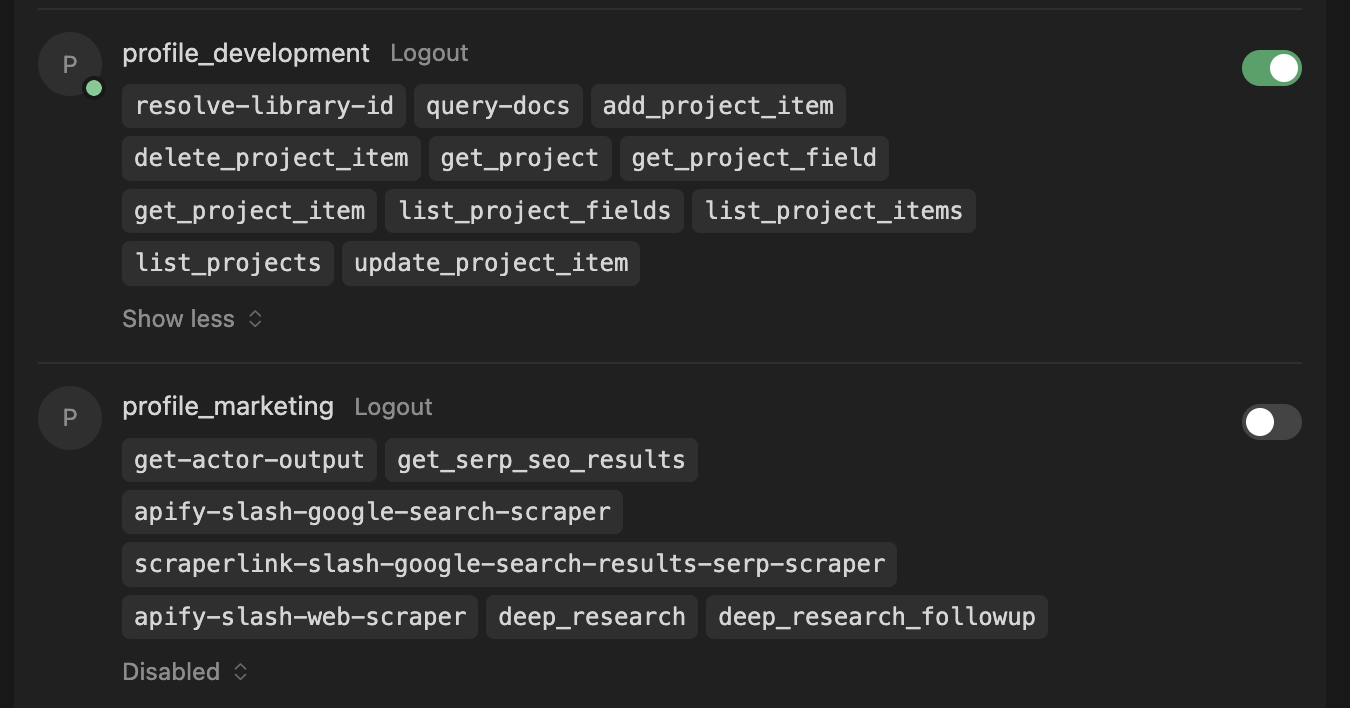
Local MCP Gateway is the Control Plane that solves this. It acts as a central hub where you configure your MCP servers once and expose them through curated Profiles—giving each AI assistant exactly the tools it needs, nothing more.
Local First: Your data and tools stay under your control. No cloud dependency, no SaaS API keys.
How it works
1. Create a profile for your use-case and configure the MCP servers you want to use.

2. Configure the MCP servers in your AI client.
{
  "mcpServers": {
    "profile_development": {
      "type": "http",
      "url": "http://localhost:9631/api/mcp/development"
    },
    "profile_marketing": {
      "type": "http",
      "url": "http://localhost:9631/api/mcp/marketing"
    }
  }
}
3. Use the profile in your AI client.
Quick Start with Docker (Recommended)
Run Local MCP Gateway instantly without cloning the repository:
curl -fsSL https://raw.githubusercontent.com/DXHeroes/local-mcp-gateway/main/docker-compose.hub.yml -o local-mcp-gateway.yml && docker compose -f local-mcp-gateway.yml up -d
- UI: http://localhost:9630
- MCP Endpoint: http://localhost:9631/api/mcp/default
- Data: Stored in
~/.local-mcp-gateway-data/
To stop: docker compose -f local-mcp-gateway.yml down
For more details, see Docker Quick Start Guide.
Features
- 🚀 Proxy & Aggregator: Combine multiple MCP servers (stdio, SSE, remote) into one
- 🛠️ Custom MCP Support: Write your own MCP servers in TypeScript with hot-reload
- 🔒 Security: Built-in API Key management and OAuth 2.1 support
- 📊 Observability: Real-time request/response logging and inspection
- 🖥️ Web Interface: Modern UI to manage servers, profiles, and logs
- 🐳 Docker Ready: Easy deployment with Docker Compose
Development Setup
If you want to develop or build from source:
Prerequisites
- Node.js 22+
- pnpm 9+
Installation
# Install dependencies
pnpm install

# Initialize database
pnpm db:seed

# Start development
pnpm dev
Development
Start both backend and frontend with hot-reload:
pnpm dev
- Backend: http://localhost:3001
- Frontend: http://localhost:3000
For Claude Desktop (HTTPS):
Start with HTTPS tunnel (using localtunnel):
pnpm dev:https
- Backend: http://localhost:3001
- HTTPS Tunnel: Public URL (displayed in console) -> http://localhost:3001
- Frontend: http://localhost:3000 (configured to show the HTTPS tunnel URL)
Use the HTTPS tunnel URL in your mcp.json configuration to avoid SSL certificate errors in Claude Desktop.
Building
pnpm build
Testing
# Run all tests
pnpm test

# Unit tests only
pnpm test:unit

# Integration tests
pnpm test:integration

# E2E tests
pnpm test:e2e

# Coverage
pnpm test:coverage
Production Usage
Running Locally (Bare Metal)
To run the production build locally:
pnpm start
This will:
- Build the application.
- Start the backend on http://localhost:3001.
- Start the frontend on http://localhost:3000.
Data Persistence:
Data is stored in ~/.local-mcp-gateway-data (your home directory) to ensure it persists across restarts and updates.
Running with Docker (from source)
Build and run from source using Docker:
docker compose up -d --build
This provides:
- UI: http://localhost:3000
- Backend API: http://localhost:3001
- MCP Endpoint: http://localhost:3001/api/mcp/default
- Data: Stored in
~/.local-mcp-gateway-data/
Integration with Claude Desktop
- Run
pnpm dev:https - Copy the public HTTPS URL from the terminal (e.g.,
https://blue-sky-42.loca.lt) - Configure your
mcp.json:"My Profile": { "type": "http", "url": "https://blue-sky-42.loca.lt/api/mcp/my-profile" } - AI Prompt: In the frontend (Profile page), copy the "AI Prompt" (TOON format) and paste it into your chat to give the AI full context about available tools.
Project Structure
local-mcp-gateway/
├── packages/          # Shared packages
│   ├── core/          # Core types and abstractions
│   ├── database/      # Prisma ORM + SQLite
│   ├── config/        # Shared configuration
│   └── ui/            # Shared UI components
├── apps/              # Applications
│   ├── backend/       # NestJS 11.x backend
│   └── frontend/      # React 19 frontend
├── mcp-servers/       # MCP server packages (auto-discovered)
└── docs/              # Documentation
Features
- ✅ Profile management
- ✅ MCP server management
- ✅ OAuth 2.1 support (PKCE, DCR)
- ✅ API key management
- ✅ MCP proxy endpoints per profile
- ✅ Debug logging
- ✅ HTTPS Tunneling for Claude Desktop
- ✅ AI Prompt Generation (TOON format) for easy context sharing
License
Elastic License 2.0 - Free to use, modify, and distribute. Cannot be provided as a hosted service to third parties.