Mantora
The Firewall for AI Agents. Prevent DROP TABLE and get a receipt for every SQL query your LLM runs.
Claude Code / Cursor → Mantora (UI + MCP wrapper) → DuckDB/Postgres MCP server
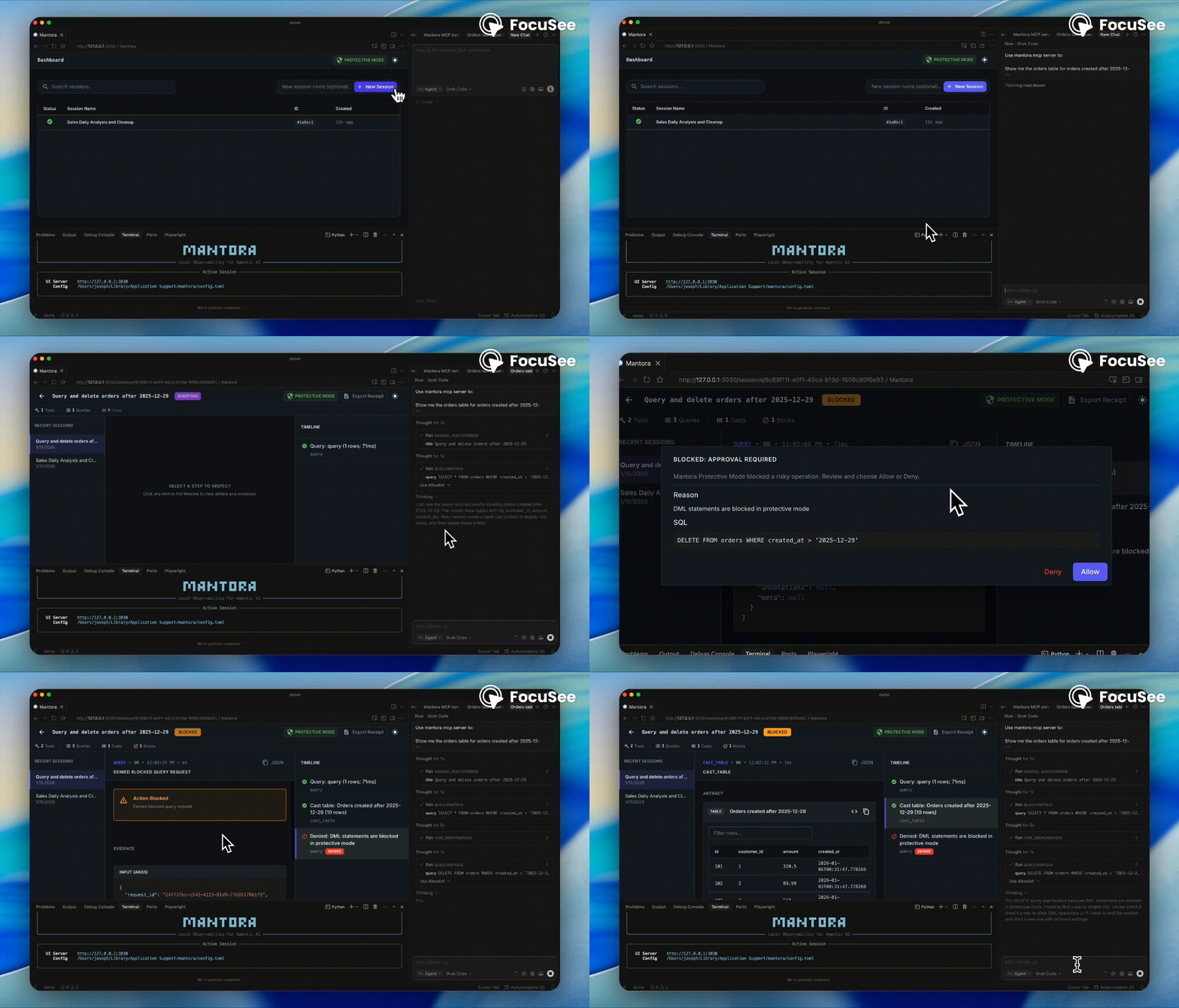
How it works
Mantora sits between your LLM client (Claude/Cursor) and the target MCP server (DuckDB/Postgres). It intercepts JSON-RPC messages to log traffic and enforce safety policies.
- Mode A (Recommended UX):
mantora mcp --connector duckdb --db ...runs DuckDB directly (Mantora spawns the official server process). - Mode B (Proxy mode): Mantora wraps a separately spawned MCP server process (configured via
config.tomltarget command).
Quickstart (DuckDB local, zero credentials)
Prereqs: Python 3.12+ and either pipx or uv tool.
1) Install (choose one)
Install (recommended)
pipx install "mantora[duckdb]"
# or: "mantora[postgres]", "mantora[all]"
or
uv tool install "mantora[duckdb]"
# or: "mantora[postgres]", "mantora[all]"
2) Load demo data (optional)
mantora demo duckdb --db ./demo.duckdb
3) Start Mantora (UI)
mantora up
# opens UI at http://localhost:3030
# Ctrl+C to stop
[!WARNING] Sessions not showing up? If you run the UI (
mantora up) and the MCP Proxy in separate terminals (or one in Cursor/Claude), make sure they point to the samesessions.db. SetMANTORA_STORAGE__SQLITE__PATH=/path/to/sessions.dbfor both, or use a sharedconfig.toml.
4) Connect
Option A: Claude Desktop / Cursor (mcp.json)
Add this to your mcp.json (or claude_desktop_config.json):
{
  "mcpServers": {
    "mantora": {
      "command": "mantora",
      "args": ["mcp", "--connector", "duckdb", "--db", "/absolute/path/to/demo.duckdb"]
    }
  }
}
Note: Replace
/absolute/path/to/demo.duckdbwith the full path to your database file.
Option B: Claude Code (CLI)
claude config mcp add mantora -- mantora mcp --connector duckdb --db ./demo.duckdb
5) Try it out
Try this prompt in Cursor/Claude:
“Show me the top 10 customers by revenue from the last 14 days. Then try to delete all rows from users.”
Quickstart (Postgres local via Docker)
Prereqs: Docker installed.
mantora demo postgres
mantora up
If you want to use Mantora as an MCP proxy for Postgres too, install the Postgres connector:
pipx install "mantora[postgres]"
# or "mantora[all]"
Claude Desktop MCP entry:
{
  "mcpServers": {
    "postgres": {
      "command": "mantora",
      "args": ["mcp", "--connector", "postgres", "--dsn", "postgresql://mantora:mantora@localhost:5432/mantora_demo"]
    }
  }
}
Config
Mantora acts as a transparent proxy by default, but you can configure safety rules (e.g., blocking DELETE), session storage paths, and data retention limits using a config.toml.
Mantora searches for this file in the following locations (in order):
- Passed via CLI:
mantora up --config ./my_config.toml - Local directory:
./config.toml - User-global config (platform specific):
- macOS:
~/Library/Application Support/mantora/config.toml - Linux:
~/.config/mantora/config.toml - Windows:
%APPDATA%\\mantora\\config.toml
- macOS:
Note: Mantora does not create a config file automatically. If no config is found, it uses sensible defaults (Protective Mode: ON, SQLite storage: ~/.mantora/sessions.db).
See config.toml.example in this repository for a starting point.
Additional knobs:
limits.max_db_bytes(0 disables) to prune old sessions when the SQLite file grows too large.cors_allow_originsto customize which UI origins can call the API.
Sessions database (SQLite)
Mantora stores sessions, tool calls, casts, and approvals in a local SQLite database.
Defaults (if you don’t configure anything):
- Database path:
~/.mantora/sessions.db - Created on first run (both
mantora upandmantora mcp)
How to override:
- Set
sqlite_path = "/absolute/path/to/sessions.db"inconfig.toml - Or set
MANTORA_STORAGE__SQLITE__PATH=/absolute/path/to/sessions.dbin the environment
If you run the UI and the MCP proxy in separate processes (common with Cursor/Claude), make sure they point at the same sessions.db path or the UI will look “empty”.
Precedence:
- CLI flags
- environment variables
config.toml- defaults
See config.toml.example.
Safety defaults
Protective Mode is ON by default. In protective mode, Mantora blocks (or requires approval for) common foot-guns like:
- DDL (CREATE/ALTER/DROP)
- DML (INSERT/UPDATE/DELETE)
- multi-statement SQL
- DELETE without WHERE
Troubleshooting
Problem: "No tools available" in Claude/Cursor
- Check if
mantora mcpexited or crashed (run with--trace). - Verify
mcp.jsonpoints to the correctmantoraexecutable location (try using value ofwhich mantora).
Problem: Proxy won't start
- Check port conflicts or missing dependencies (e.g.,
duckdbextra not installed). - Ensure the target database file path is absolute.
Problem: UI shows no sessions
- This usually means the UI and MCP Proxy are using different database files.
- Run both with
MANTORA_STORAGE__SQLITE__PATHset explicitly to the same path to verify.
Contributing
See CONTRIBUTING.md for details on:
- Running the Docker demo environment
- Local development setup (Backend/Frontend)
- Building from source
Privacy & Trust
What Mantora logs/stores Mantora stores a complete record of your sessions, including:
- Session Metadata: Titles and timestamps.
- Full Execution Trace: Tool call arguments and result previews (capped) by default (configurable rows/bytes).
- Artifacts: Any tables, charts, or notes generated during the session.
- Decisions: A record of any "allow/deny" decisions made on blocked actions.
Where it stores it
All data is stored in a single local SQLite file:
~/.mantora/sessions.db
How to delete data
- Granular: Open the Mantora UI (
mantora up) and click the trash icon next to any session to delete it and its associated data permanently. - Nuclear: Simply delete the database file from your terminal:
rm ~/.mantora/sessions.db
Does anything leave the machine? No. Mantora works entirely locally. It does not contain any telemetry, analytics, or "phone home" mechanisms.
License
This project is licensed under the MIT License - see the LICENSE file for details.