🚀 MCP Ecosystem Platform
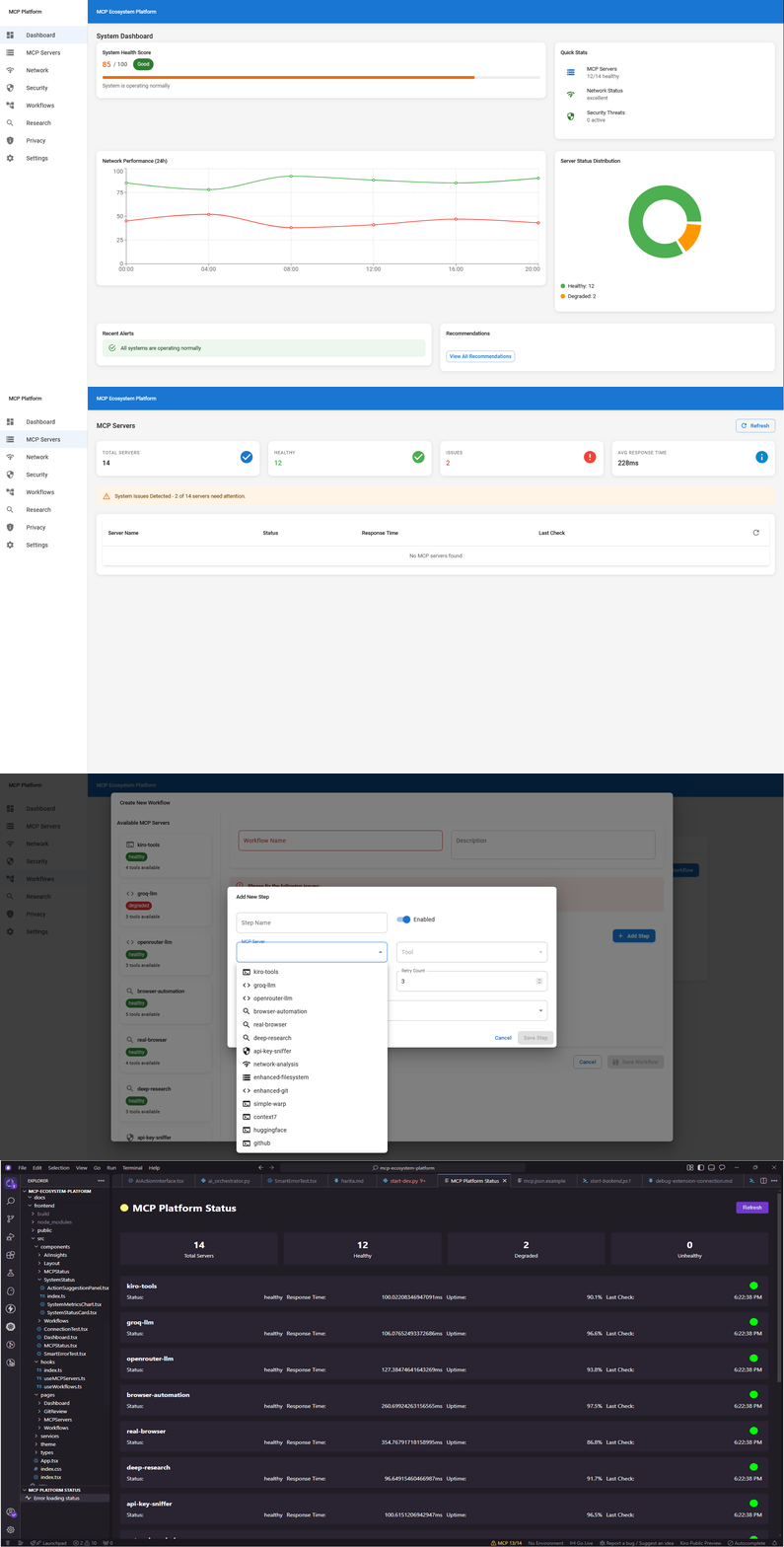
Ultimate Developer Productivity Suite - A comprehensive platform built around 11 specialized MCP (Model Context Protocol) servers, providing AI-powered code analysis, security scanning, browser automation, and intelligent workflow orchestration.
















🌟 Key Features
🤖 AI-Powered Development
- Smart Git Review: AI-driven code analysis and review automation
- Intelligent Workflow Orchestration: Chain MCP servers for complex tasks
- Multi-Model AI Access: Groq Llama 3.1, OpenRouter, and more
- Real-time Code Intelligence: Context-aware suggestions and analysis
🔒 Security & Monitoring
- API Key Protection: Advanced sniffer and protection mechanisms
- Network Analysis: Real-time traffic monitoring and optimization
- Security Scanning: Continuous threat detection and vulnerability assessment
- Automated Compliance: Security best practices enforcement
🌐 Web & Browser Automation
- Real Browser Control: No-simulation browser automation
- Deep Web Research: Comprehensive competitive intelligence
- Data Extraction: Automated web scraping and analysis
- Cross-platform Testing: Multi-browser compatibility testing
📊 Developer Dashboard
- Unified Control Interface: Single pane of glass for all operations
- Real-time Metrics: Performance monitoring and analytics
- Workflow Visualization: Interactive workflow designer
- Team Collaboration: Shared workspaces and project management
🏗️ Architecture
┌─────────────────────────────────────────────────────────────┐
│                    Frontend (React + TS)                    │
├─────────────────────────────────────────────────────────────┤
│                   FastAPI Backend                          │
├─────────────────────────────────────────────────────────────┤
│                  MCP Server Layer                          │
├─────────────────────────────────────────────────────────────┤
│  PostgreSQL  │    Redis     │   Docker    │  Kubernetes   │
└─────────────────────────────────────────────────────────────┘
🔧 MCP Servers (11 Specialized Servers)
| Server | Purpose | Key Features |
|---|---|---|
| kiro-tools | Core Operations | Filesystem, Git, Database operations |
| groq-llm | AI Processing | Ultra-fast Llama 3.1 AI processing |
| openrouter-llm | Multi-Model AI | Access to multiple AI models |
| browser-automation | Web Control | Real browser automation |
| deep-research | Intelligence | Comprehensive web research |
| api-key-sniffer | Security | API key protection and monitoring |
| network-analysis | Monitoring | Network performance analysis |
| enhanced-filesystem | File Ops | Advanced file operations |
| enhanced-git | Version Control | Git analysis and automation |
| real-browser | Web Testing | No-simulation browser control |
| simple-warp | Terminal | Terminal integration and automation |
🚀 Quick Start
🎯 Faz 0: Stabilizasyon Tamamlandı! Tek komutla tüm sistemi başlatabilirsiniz.
Prerequisites
- Python 3.11+
- Node.js 18+ (Frontend için)
- Git
⚡ One-Command Startup (Recommended)
git clone https://github.com/turtir-ai/mcp-ecosystem-platform.git
cd mcp-ecosystem-platform

# Edit .env with your API keys (optional for basic testing)
# Then start everything with one command:
python start-dev.py
That's it! 🎉 The script will:
- ✅ Check prerequisites
- 📦 Install dependencies automatically
- 🚀 Start all services in the correct order
- 🔧 Fix VS Code extension connection issues
🌐 Access the Platform
- Frontend: http://localhost:3000
- Backend API: http://localhost:8001
- API Documentation: http://localhost:8001/docs
- Health Check: http://localhost:8001/health
- MCP Status: http://localhost:8001/api/v1/mcp/status
- MCP Manager: http://localhost:8009
🔧 Port Standardization
| Service | Port | URL |
|---|---|---|
| Frontend | 3000 | http://localhost:3000 |
| Backend API | 8001 | http://localhost:8001 |
| MCP Manager | 8009 | http://localhost:8009 |
🛠️ Manual Setup (Advanced)
Click to expand manual setup instructions
1. Clone & Setup
git clone https://github.com/turtir-ai/mcp-ecosystem-platform.git
cd mcp-ecosystem-platform

# Copy environment template
cp .env.example .env
# Edit .env with your API keys
2. Backend Setup
cd backend
python -m venv venv

# Windows
venv\Scripts\activate
# Linux/Mac
source venv/bin/activate

pip install -r requirements.txt
3. Frontend Setup
cd frontend
npm install
4. Start Services Manually
# Terminal 1: Backend
cd backend
uvicorn app.main:app --reload --port 8001

# Terminal 2: Frontend
cd frontend
npm start

# Terminal 3: MCP Manager
python mock-api-server.py
📁 Project Structure
mcp-ecosystem-platform/
├── 📁 backend/                 # FastAPI backend
│   ├── 📁 app/
│   │   ├── 📁 core/           # Core interfaces and config
│   │   ├── 📁 services/       # Business logic services
│   │   ├── 📁 api/            # API routes
│   │   ├── 📁 models/         # Database models
│   │   └── 📄 main.py         # FastAPI application
│   ├── 📁 tests/              # Backend tests
│   ├── 📄 requirements.txt    # Python dependencies
│   └── 📄 Dockerfile          # Backend container
├── 📁 frontend/               # React frontend
│   ├── 📁 src/
│   │   ├── 📁 components/     # React components
│   │   ├── 📁 pages/          # Page components
│   │   ├── 📁 services/       # API clients
│   │   └── 📁 types/          # TypeScript types
│   ├── 📄 package.json        # Node dependencies
│   └── 📄 Dockerfile.dev      # Frontend container
├── 📁 mcp-servers/            # MCP server configurations
├── 📁 vscode-extension/       # VS Code extension
├── 📄 docker-compose.yml      # Development environment
├── 📄 .env.example           # Environment template
└── 📄 README.md              # This file
🔧 Configuration
Environment Variables
# API Keys
GROQ_API_KEY=your_groq_api_key
OPENROUTER_API_KEY=your_openrouter_key
GOOGLE_API_KEY=your_google_key
BRAVE_SEARCH_API_KEY=your_brave_key

# Database
DATABASE_URL=postgresql://postgres:password@localhost:5432/mcp_platform
REDIS_URL=redis://localhost:6379/0

# Security
SECRET_KEY=your_secret_key
JWT_SECRET=your_jwt_secret
MCP Server Configuration
The platform automatically discovers and configures MCP servers from your .kiro/settings/mcp.json file.
🧪 Testing
Backend Tests
cd backend
pytest tests/ -v --cov=app
Frontend Tests
cd frontend
npm test
Integration Tests
# Run full test suite
docker-compose -f docker-compose.test.yml up --build
🚀 Deployment
Docker Production
# Build and start production containers
docker-compose -f docker-compose.prod.yml up -d
Kubernetes
# Deploy to Kubernetes
kubectl apply -f k8s/
📊 Monitoring & Analytics
- Health Checks:
/healthendpoint for all services - Metrics: Prometheus metrics at
/metrics - Logs: Structured logging with correlation IDs
- Tracing: Distributed tracing support
🤝 Contributing
- Fork the repository
- Create a feature branch (
git checkout -b feature/amazing-feature) - Commit your changes (
git commit -m 'Add amazing feature') - Push to the branch (
git push origin feature/amazing-feature) - Open a Pull Request
Development Guidelines
- Follow PEP 8 for Python code
- Use TypeScript for all frontend code
- Write comprehensive tests
- Update documentation
- Follow conventional commits
🤖 AI ile Sistem Yönetimi
MCP Ecosystem Platform, AI destekli proaktif sistem yönetimi sunar. AI, sistem sağlığını sürekli izler ve sorunları otomatik olarak tespit ederek çözüm önerileri sunar.
🔍 Akıllı Sistem İzleme
AI sistemi şu bileşenleri sürekli izler:
- MCP Sunucuları: Tüm 11 MCP sunucusunun durumu ve performansı
- Sistem Kaynakları: CPU, bellek, disk kullanımı
- Veritabanı Performansı: Sorgu süreleri ve bağlantı havuzu durumu
- Ağ Bağlantıları: API yanıt süreleri ve bağlantı durumu
🚨 Proaktif Hata Tespiti
AI, şu pattern'leri otomatik olarak tespit eder:
- Tekrarlayan Hatalar: Belirli aralıklarla tekrarlanan sistem hataları
- Performans Düşüşü: Zaman içinde artan yanıt süreleri
- Kaynak Tükenmesi: Kritik eşiklere yaklaşan sistem kaynakları
- Cascade Hatalar: Birden fazla bileşeni etkileyen zincirleme hatalar
🛠️ AI Eylem Önerileri
Tespit edilen sorunlar için AI şu eylemleri önerebilir:
🟢 Otomatik Onaylı (Düşük Risk)
- Sistem durumu sorgulama
- Log dosyalarını okuma
- Performans metriklerini toplama
- Süreç analizi yapma
🟡 Kullanıcı Onayı Gerekli (Orta Risk)
- Dosya düzenleme işlemleri
- Konfigürasyon değişiklikleri
- Otomatik düzeltme uygulama
- Git işlemleri
🔴 Yüksek Riskli (Açık Onay Gerekli)
- MCP sunucu yeniden başlatma
- MCP sunucu durdurma
- Sistem servislerini yeniden başlatma
- Güvenlik ayarları değişiklikleri
📊 AI Dashboard Özellikleri
Web arayüzünde AI destekli özellikler:
- Akıllı Sistem Kartları: Gerçek zamanlı durum ve AI önerileri
- Eylem Önerisi Paneli: Kullanıcı dostu AI önerileri
- Onay Sistemi: Güvenli AI eylem onay workflow'u
- Akıllı Bildirimler: Bağlam duyarlı toast bildirimleri
🔐 Güvenlik ve İzinler
AI'ın sistem üzerindeki yetkileri katı güvenlik kurallarıyla sınırlandırılmıştır:
# AI İzin Seviyeleri
SAFE:     # Otomatik onaylı
  - get_system_health
  - mcp_server_logs (INFO/ERROR)

MEDIUM:   # Kullanıcı onayı gerekli
  - auto_fix_apply
  - config_changes

HIGH:     # Açık onay gerekli
  - mcp_server_restart
  - mcp_server_stop

CRITICAL: # Yasaklı
  - system_shutdown
  - database_delete
🚀 AI Kullanım Örnekleri
Senaryo 1: MCP Sunucu Hatası
1. AI, groq-llm sunucusunun offline olduğunu tespit eder
2. Kullanıcıya "Server Restart" önerisi sunar
3. Kullanıcı onayladıktan sonra sunucuyu yeniden başlatır
4. Başarılı restart sonrası sistem durumunu doğrular
Senaryo 2: Yüksek CPU Kullanımı
1. AI, %85 CPU kullanımı tespit eder
2. Süreç analizi yaparak kaynak tüketen uygulamaları bulur
3. Optimizasyon önerileri sunar
4. Gerekirse servis yeniden başlatma önerir
Senaryo 3: Veritabanı Gecikmesi
1. AI, 200ms+ veritabanı gecikmesi tespit eder
2. Bağlantı havuzu durumunu analiz eder
3. Sorgu optimizasyonu önerileri sunar
4. Gerekirse veritabanı bakım önerir
📈 AI Metrikleri ve Raporlama
AI sistemi şu metrikleri takip eder:
- Tespit Edilen Sorun Sayısı: Günlük/haftalık trend
- Çözülen Sorun Oranı: AI önerilerinin başarı oranı
- Ortalama Çözüm Süresi: Sorun tespitinden çözüme kadar geçen süre
- Proaktif Müdahale Sayısı: Kritik hale gelmeden önlenen sorunlar
🔧 AI Konfigürasyonu
AI davranışı .kiro/steering/ai-permissions.md dosyasıyla yapılandırılabilir:
# AI Risk Toleransı
risk_tolerance: "medium"

# Otomatik Onay Ayarları
auto_approve_safe: true
auto_approve_low: false

# Onay Timeout Süreleri
approval_timeout_high: 5 minutes
approval_timeout_critical: 2 minutes
🎯 Gelecek AI Özellikleri
Roadmap'te yer alan AI geliştirmeleri:
- Makine Öğrenmesi: Geçmiş verilerden öğrenen adaptif AI
- Tahmine Dayalı Analiz: Sorunları önceden tahmin etme
- Otomatik Optimizasyon: Sistem performansını otomatik iyileştirme
- Doğal Dil İşleme: Sesli komutlarla AI etkileşimi
📄 License
This project is licensed under the MIT License - see the LICENSE file for details.
🆘 Support
- Documentation: Wiki
- Issues: GitHub Issues
- Discussions: GitHub Discussions
🙏 Acknowledgments
- MCP Protocol: Model Context Protocol specification
- FastAPI: Modern, fast web framework for building APIs
- React: A JavaScript library for building user interfaces
- Docker: Containerization platform
- All Contributors: Thank you for your contributions!
Built with ❤️ by the Kairos AI Team
Empowering developers with AI-driven productivity tools