MCP Gearbox CLI
Setup high-quality MCP servers faster.
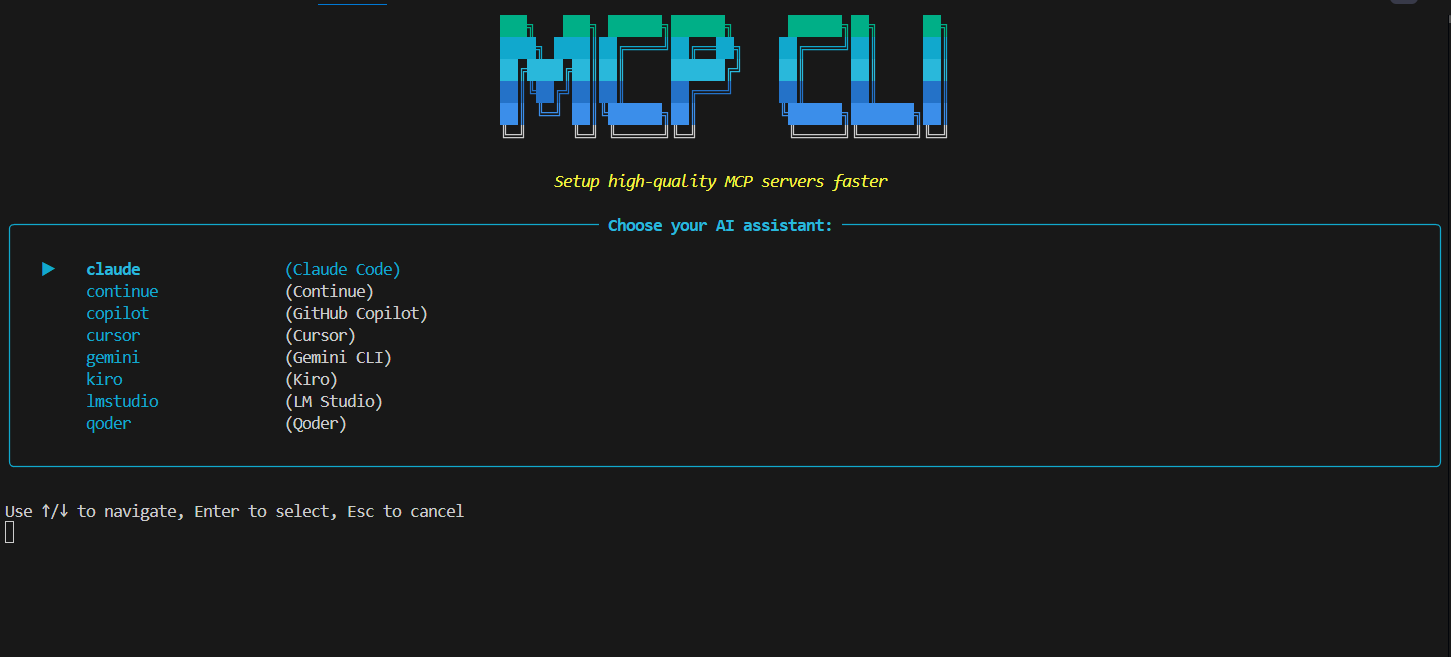
CLI tool to quickly download, configure, and deploy Model Context Protocol (MCP) servers for AI agents — cross-platform support for Windows, macOS, and Linux.



Documentation
For detailed usage instructions, please visit our documentation.
🤔 Overview
MCP Gearbox is a powerful Python CLI dev-tools package that provides an interactive way to discover, download, and configure Model Context Protocol (MCP) servers from the official ecosystem. This AI-powered tool automatically configures model-context-protocol servers for your preferred AI coding agent with cross-platform support and intelligent configuration management.
⚡ Installation
Using uv (recommended)
uv tool install mcp-gearbox --from git+https://github.com/rohitsoni007/mcp-gearbox-cli
To upgrade mcp-cli run:
uv tool install mcp-gearbox --force --from git+https://github.com/rohitsoni007/mcp-gearbox-cli
Using uvx (one-time execution)
uvx --from git+https://github.com/rohitsoni007/mcp-gearbox-cli mcp-cli
Using uv & pip
uv tool install mcp-gearbox
Using npm
npm install -g mcp-gearbox
Using pip
pip install mcp-gearbox
Development installation
git clone https://github.com/rohitsoni007/mcp-gearbox-cli
cd mcp-gearbox-cli
uv sync
🤖 Supported AI Agents
| Agent | Support | Notes |
|---|---|---|
| GitHub Copilot | ✅ | |
| Continue | ✅ | |
| Kiro | ✅ | |
| Cursor | ✅ | |
| Claude Code | ✅ | |
| Gemini CLI | ✅ | |
| Qoder | ⚠️ | Qoder does not support project-level MCP configuration |
| Copilot CLI | ✅ | Copilot CLI does not support project-level MCP configuration |
| LM Studio | ✅ | LM Studio does not need project-level MCP configuration |
| Google Antigravity | ✅ | Google Antigravity does not support project-level MCP configuration |
🔧 MCP CLI Reference
The mcp command supports the following options:
Commands
| Command | Description |
|---|---|
init | Initialize MCP configuration (supports both project-specific and global configuration) |
list | List configured MCP servers or all available servers |
rm | Remove MCP servers from configuration |
check | Check which AI agents are installed on your system |
mcp init Arguments & Options
| Argument/Option | Type | Description |
|---|---|---|
<directory> | Argument | Directory to initialize MCP configuration (use . for current directory, omit for global configuration) |
--servers, -s | Option | MCP server names to add directly. Use multiple times (-s git -s filesystem) or space-separated (-s "git filesystem") - optional |
--agent, -a | Option | AI agent to configure: copilot, copilot-cli, continue, kiro, cursor, claude, gemini, qoder, or lmstudio |
--json, -j | Option | Output in JSON format without banner or UI |
--pretty | Option | Pretty print JSON output (default: false) |
mcp list Arguments & Options
| Argument/Option | Type | Description |
|---|---|---|
--agent, -a | Option | AI agent to list servers for: copilot, copilot-cli, continue, kiro, cursor, claude, gemini, qoder, lmstudio, or antigravity |
--project, -p | Option | Project path (use '.' for current directory, omit for global configuration) |
--servers, -s | Option | List all available MCP servers instead of configured ones |
--json, -j | Option | Output in JSON format without banner or UI |
--pretty | Option | Pretty print JSON output when listing available servers (default: false) |
mcp rm Arguments & Options
| Argument/Option | Type | Description |
|---|---|---|
<servers> | Argument | MCP server names to remove (e.g., 'git', 'filesystem') - optional |
--all, -A | Option | Remove all MCP servers |
--agent, -a | Option | AI agent to configure: copilot, copilot-cli, continue, kiro, cursor, claude, gemini, qoder, lmstudio, or antigravity |
--project, -p | Option | Project path (use '.' for current directory, omit for global configuration) |
--force, -f | Option | Skip confirmation prompts |
--json, -j | Option | Output in JSON format without banner or UI |
--pretty | Option | Pretty print JSON output (default: false) |
mcp check Arguments & Options
| Argument/Option | Type | Description |
|---|---|---|
--agent, -a | Option | Specific agent to check: copilot, copilot-cli, continue, kiro, cursor, claude, gemini, qoder, lmstudio, or antigravity |
--json, -j | Option | Output in JSON format without banner or UI |
--pretty | Option | Pretty print JSON output (default: false) |
🔧 Usage Examples
# Check which AI agents are installed on your system
mcp check

# Interactive Model Context Protocol server selection (choose from available AI agents)
# Configure MCP globally
mcp init

# Configure MCP globally for GitHub Copilot AI agent
mcp init -a copilot

# Configure MCP globally for Copilot CLI
mcp init -a copilot-cli

# Configure MCP globally for Continue AI
mcp init -a continue

# Configure MCP globally for Kiro AI agent
mcp init -a kiro

# Configure MCP globally for Cursor AI agent
mcp init -a cursor

# Configure MCP globally for Qoder AI agent
mcp init -a qoder

# Configure MCP globally for Claude Code
mcp init -a claude

# Configure MCP globally for Gemini CLI
mcp init -a gemini

# Configure MCP globally for LM Studio AI agent
mcp init -a lmstudio

# Configure MCP globally for Google Antigravity
mcp init -a antigravity

# Add specific MCP servers directly without interactive selection
# Method 1: Space-separated in quotes
mcp init -a copilot --servers "git filesystem"

# Method 2: Multiple option flags
mcp init -a copilot -s git -s filesystem

# Add specific servers for Continue AI with JSON output (compact)
mcp init -a continue --servers "git filesystem" --json

# Add specific servers for Continue AI with pretty JSON output
mcp init -a continue --servers "git filesystem" --json --pretty

# Add servers to current directory project
mcp init . -a copilot --servers "git filesystem"

# Add servers to new project directory
mcp init my-project -a continue -s git -s filesystem

# Initialize MCP in current directory
mcp init .

# Initialize MCP in a new project directory
mcp init my-project

# Initialize MCP for GitHub Copilot AI agent in new project directory
mcp init my-project -a copilot

# Initialize MCP for Continue AI agent in new project directory
mcp init my-project -a continue

# Initialize MCP for Kiro AI agent in new project directory
mcp init my-project -a kiro

# Initialize MCP for Cursor AI agent in new project directory
mcp init my-project -a cursor

# Initialize MCP for Claude Code in new project directory
mcp init my-project -a claude

# Initialize MCP for Gemini CLI in new project directory
mcp init my-project -a gemini

# Initialize MCP for Google Antigravity in new project directory
mcp init my-project -a antigravity
mcp list Examples
# Interactive MCP server listing (choose from available AI agents)
# List servers from global configuration
mcp list

# List servers for specific agent from global configuration
mcp list -a copilot
mcp list -a copilot-cli
mcp list -a continue
mcp list -a kiro
mcp list -a cursor
mcp list -a claude
mcp list -a gemini
mcp list -a qoder
mcp list -a lmstudio
mcp list -a antigravity

# List servers from current directory configuration
mcp list -p .

# List servers from specific project directory
mcp list -p my-project

# List servers for specific agent from project
mcp list -a copilot -p my-project

# Output in JSON format (useful for scripting and automation)
mcp list -a continue --json
mcp list -a continue -j

# JSON output for project-specific configuration
mcp list -a continue -p my-project --json
mcp list -a continue -p my-project -j

# List all available MCP servers (interactive display)
mcp list --servers
mcp list -s

# List all available MCP servers with JSON output (pretty printed)
mcp list --servers --json

# List all available MCP servers with pretty JSON output
mcp list --servers --json --pretty
mcp list -s -j --pretty
mcp rm Examples
# Interactive MCP server removal (choose from configured servers)
# Remove servers from global configuration
mcp rm

# Interactive removal for specific agent
mcp rm -a copilot
mcp rm -a copilot-cli

# Remove specific MCP servers from global configuration
mcp rm git filesystem

# Remove specific servers for GitHub Copilot AI agent
mcp rm git filesystem -a copilot

# Remove specific servers for Copilot CLI
mcp rm git filesystem -a copilot-cli

# Remove specific servers for Continue AI
mcp rm git filesystem -a continue

# Remove specific servers for Kiro AI agent
mcp rm git filesystem -a kiro

# Remove specific servers for Cursor AI agent
mcp rm git filesystem -a cursor

# Remove specific servers for Claude Code
mcp rm git filesystem -a claude

# Remove specific servers for Gemini CLI
mcp rm git filesystem -a gemini

# Remove specific servers for Google Antigravity
mcp rm git filesystem -a antigravity

# Remove all MCP servers from global configuration
mcp rm --all

# Remove all servers for specific agent
mcp rm --all -a copilot
mcp rm --all -a copilot-cli

# Interactive removal from current directory configuration
mcp rm -p .

# Interactive removal from specific project directory
mcp rm -p my-project

# Remove specific servers from current directory configuration
mcp rm git filesystem -p .

# Remove specific servers from specific project directory
mcp rm git filesystem -p my-project

# Remove all servers from project directory
mcp rm --all -p my-project

# Remove servers with force (skip confirmations)
mcp rm git filesystem --force

# Remove all servers with force
mcp rm --all --force

# Output in JSON format (useful for scripting and automation)
mcp rm git filesystem -a continue --json
mcp rm git filesystem -a continue -j

# Output in pretty JSON format (human-readable)
mcp rm git filesystem -a continue --json --pretty

# Remove all servers with JSON output
mcp rm --all -a continue --json
mcp rm --all -a continue -j

# Remove all servers with pretty JSON output
mcp rm --all -a continue --json --pretty

# Remove servers from project with JSON output
mcp rm git filesystem -p my-project -a continue --json
mcp rm git filesystem -p my-project -a continue -j
mcp check Examples
# Check all AI agents installation status
mcp check

# Check specific agent installation status
mcp check -a copilot
mcp check -a copilot-cli
mcp check -a continue
mcp check -a kiro
mcp check -a cursor
mcp check -a claude
mcp check -a gemini
mcp check -a qoder
mcp check -a lmstudio
mcp check -a antigravity

# Output in JSON format (useful for scripting and automation)
mcp check --json
mcp check -j

# Output in pretty JSON format (human-readable)
mcp check --json --pretty
mcp check -j --pretty

# Check specific agent with JSON output
mcp check -a continue --json
mcp check -a continue -j

# Check specific agent with pretty JSON output
mcp check -a continue --json --pretty
General Examples
# Show version
mcp --version
mcp -v
📚 Features
- 🎯 Interactive AI agent selection and configuration
- 📋 Interactive MCP server selection with intelligent filtering
- 🔧 Automatic model-context-protocol configuration file generation
- 🌍 Cross-platform Python dev-tools support (Windows, Linux, macOS)
- 📁 Automatic AI agent configuration path detection
- 🔍 System-wide AI agent installation detection and status checking
- 🛠️ CLI-based workflow for seamless developer experience
🎯 Experimental Goals
- Common MCP server for all AI agents - Unified configuration and management across different AI platforms
- Future edit feature - Planned functionality to modify and update existing MCP configurations
Development
Project Structure
mcp-gearbox-cli/
├── src/mcp_cli/           # Main CLI package
│   ├── __init__.py        # Core CLI functionality
├── templates/             # Configuration templates
└── scripts/               # Build and deployment scripts
🔧 Requirements
- Linux/macOS/Windows
- uv for package management
- Python 3.11+
- Git
If you encounter issues with an agent, please open an issue so we can refine the integration.
👥 Maintainers
- Rohit Soni (@rohitsoni007)
💬 Support
For support, please open a GitHub issue. We welcome bug reports, feature requests, and questions about using MCP CLI.
🙏 Acknowledgements
This project is based on the data from Model Context Protocol Servers and Github MCP Registry.
Keywords
MCP model-context-protocol ai cli dev-tools python artificial-intelligence developer-tools command-line automation ai-agents github-copilot continue configuration-management cross-platform
📄 License
This project is licensed under the terms of the MIT open source license. Please refer to the LICENSE file for the full terms.