IP2WHOIS MCP Server
A Model Context Protocol (MCP) server that provides comprehensive WHOIS lookup capabilities using the IP2WHOIS API. This server allows AI agents to query domain registration details, including expiry dates, registrar information, and registrant data.
Features
-
Domain Lookup: Retrieve detailed WHOIS data for any domain name.
-
Comprehensive Data: Includes domain age, nameservers, registrar info, and administrative/billing contact details.
-
FastMCP Framework: Built using the high-performance FastMCP Python framework.
Requirement
This MCP server requires an API key to work. You can sign up for a free API key and enjoy up to 500 queries per month.
The setup also use uv, which can be install by following the guide.
Setup
Follow the steps to use this MCP server with Claude Desktop:
- Download the repository to your local.
- Setup the
uvpackage manager, you can once again refer to the guide to do so. - Make sure you have installed the Claude Desktop, if you haven't, kindly download from here for Windows and MacOS users, or follow this guide for Linux user.
- Open the
claude_desktop_config.jsonin your choice of editor, if you do not having one yet, follow this guide to create one. - Add the following to your
claude_desktop_config.json:
{
  "mcpServers": {
    "ip2whois": {
      "command": "uv",
      "args": [
        "--directory",
        "/path/to/ip2whois/src",
        "run",
        "server.py"
      ],
      "env": {
        "IP2WHOIS_API_KEY": "<YOUR API key HERE>"
      }
    }
  }
}
- Remember to replace the
/path/to/ip2whoispath with your actual path to IP2WHOIS MCP server in local. - To get your API key, just login to your dashboard and get it from there. Replaced the
<YOUR API key HERE>in above with your actual API key. - Restart the Claude Desktop after save the changes, and you should see it appear in the
Search and toolsmenu.
Usage
Just enter your query about the IP in a chat in Claude Desktop. Some of the example query will be:
- Who is the registrar of the (domain)?
- Who is the owner of (domain)?
- What is the WHOIS for (domain)?
For instance, below is the result of the domain google.com:
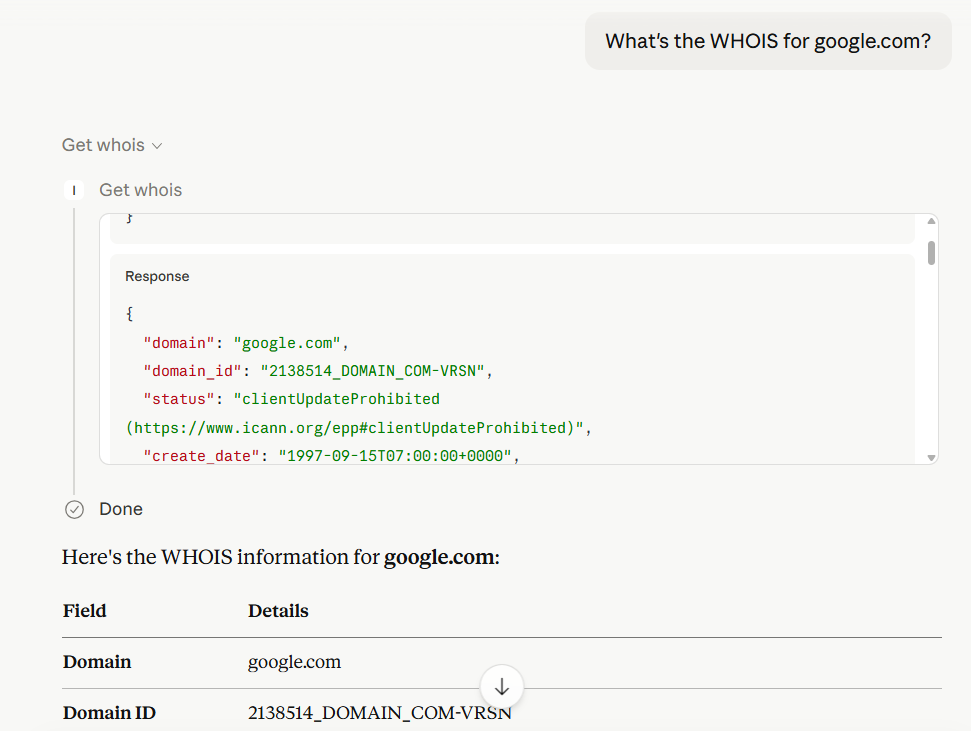
In Claude Desktop, the model will automatically generate the output based on the result returned by IP2WHOIS MCP server.
Environment Variable
IP2WHOIS_API_KEY
The IP2WHOIS API key, which allows you to query up to 500 per month for free and more details of the IP address. You can sign up for a free API key, or subscribe to a plan to enjoy more benefits.
Tools
get_whois
Look up WHOIS data for a domain name.
-
Arguments:
domain(string): The domain name to look up (e.g.,google.com).
-
Output: Returns a JSON object containing:
-
domain_id,status,domain_age -
create_date,update_date,expire_date -
registrar(name, url, etc.) -
registrant(name, organization, country) -
nameservers
-
License
See the LICENSE file.