MCP Jira DevFlow



Not just Jira CRUD. This is Scrum-aware AI tooling.
Table of Contents
| Section | What You'll Find |
|---|---|
| Why MCP Jira DevFlow | Differentiation, comparison table, why developers should care |
| The Core Idea | The philosophy: decisions and summaries, not raw payloads |
| What This is NOT | Setting clear expectations |
| Try in 90 Seconds | Run the interactive test tool with your Jira |
| Prompt Examples | Real screenshots from live Jira projects |
| Quick Start | Installation, configuration, Claude Desktop setup |
| Security | Read vs write operations, best practices |
| Architecture | Project structure, design principles, feature status |
| Skills Architecture | Agent skills organization, progressive disclosure, token optimization |
| Roadmap | Completed phases and project evolution |
| Contributing | How to contribute to the project |
Why MCP Jira DevFlow
There are 20+ MCP Jira connectors. Most do the same thing: create, read, update issues. This one understands your agile process.
MCP Jira DevFlow is a semantic AI layer for Agile workflows. It doesn't just fetch data from Jira—it analyzes sprint health, detects estimation anomalies, enforces Scrum best practices, and shapes outputs for AI context efficiency.
MCP Jira DevFlow returns decisions and summaries, not raw Jira payloads.
What Makes This Different
| Capability | Generic MCP Jira | MCP Jira DevFlow |
|---|---|---|
| Scrum Semantics | Read/write issues | Health scores, workflow recommendations, compliance checks |
| Hierarchy Analysis | Flat issue lists | Epic → Story → Subtask traversal with rollup metrics |
| Sprint Intelligence | Basic queries | Velocity trends, burndown insights, capacity analysis |
| Token Optimization | Raw JSON dumps | Adaptive output compression for large backlogs |
| Anomaly Detection | None | Points mismatch, stale items, unestimated work alerts |
Why Developers Should Care
- Fewer Jira clicks — Query your backlog from the terminal or IDE
- Less ceremony overhead — Get sprint status in seconds, not meetings
- Faster standups — "What's blocking the team?" answered instantly
- Better ticket quality — AI-assisted acceptance criteria and estimation checks
- Less planning friction — Velocity trends and capacity analysis on demand
The Core Idea
AI should understand Agile semantics, not just issue fields.
When you ask "Is my sprint healthy?", you don't want raw JSON. You want:
- Completion percentage and remaining capacity
- Items at risk based on time-in-status patterns
- Recommendations grounded in Scrum best practices
MCP Jira DevFlow provides that intelligence layer.
What This is NOT
To set clear expectations, MCP Jira DevFlow is:
-
Not a replacement for the Jira UI: This tool augments your workflow by enabling AI-powered queries and automation. You will still use Jira's interface for visual boards, complex configurations, and administrative tasks.
-
Not an autonomous agent: MCP Jira DevFlow responds to explicit prompts and commands. It does not independently make decisions, modify issues without instruction, or take actions on its own initiative.
-
Not full planning automation: While it provides velocity metrics, Scrum guidance, and analysis, sprint planning still requires human judgment. The tool informs decisions; it does not make them for you.
Try in 90 Seconds
Uses Jira API token. Stored locally in
.jira-test-config.json(gitignored). Recommended: use a service account with read-only permissions.
Want to see Scrum guidance in action before configuring Claude? Run the interactive test tool:
# Clone and build
git clone https://github.com/ximplicity/mcp-jira-devflow.git
cd mcp-jira-devflow
pnpm install && pnpm build

# Run the interactive test
node packages/mcp-jira/test-guidance.mjs
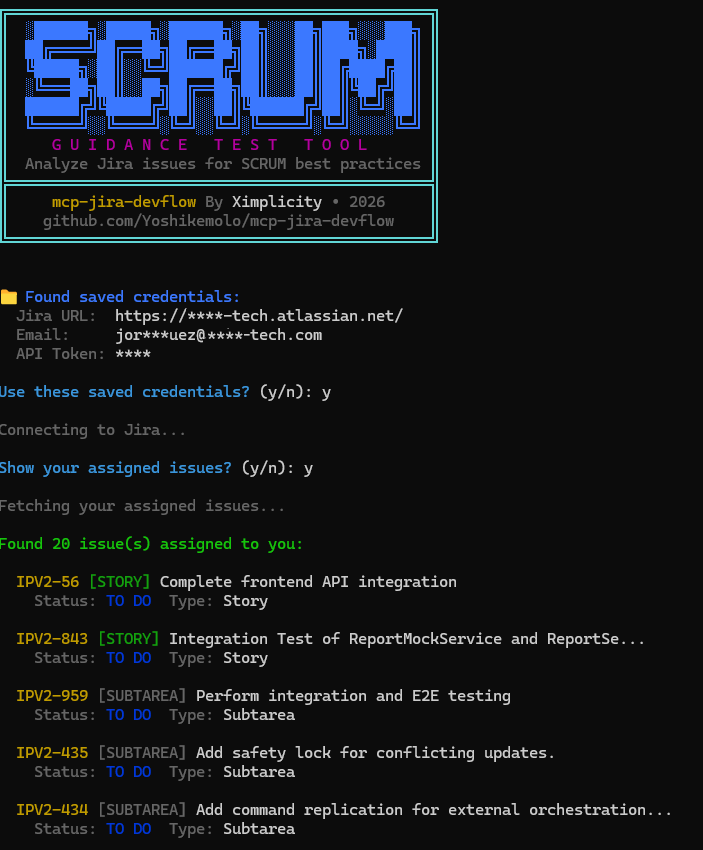
The tool will:
- Prompt for your Jira credentials (or use environment variables)
- Optionally show your assigned issues
- Analyze any issue for Scrum best practices
- Display health score, completeness score, and actionable recommendations
Example output:
  Issue:        IPV2-960 (Epic)
  Status:       indeterminate
  Health:       92/100
  Completeness: 89/100

── Recommendations ─────────────────────────────────────────────

  [MEDIUM] Consider Adding Business Value Statement
  Epics should clearly articulate business value to guide prioritization.
  → Add a business value or goal statement explaining why this epic matters.
Note: Credentials may be stored locally for convenience in
.jira-test-config.json(excluded from version control). This option is intended for local testing only. For production deployments or shared environments, always use environment variables (env) as documented.
Prompt Examples with Real Output
The screenshots below are real MCP responses generated by Claude Code using MCP Jira DevFlow on a live Jira project. No mockups—this is what you actually get.
Team Coordination
Problem: Standup meetings lack focus because team members spend time searching for their assigned work instead of discussing blockers.
Prompt:
Show me all in-progress items assigned to the frontend team.
Include how long each has been in progress and any blockers.
Output (Real Claude Session):
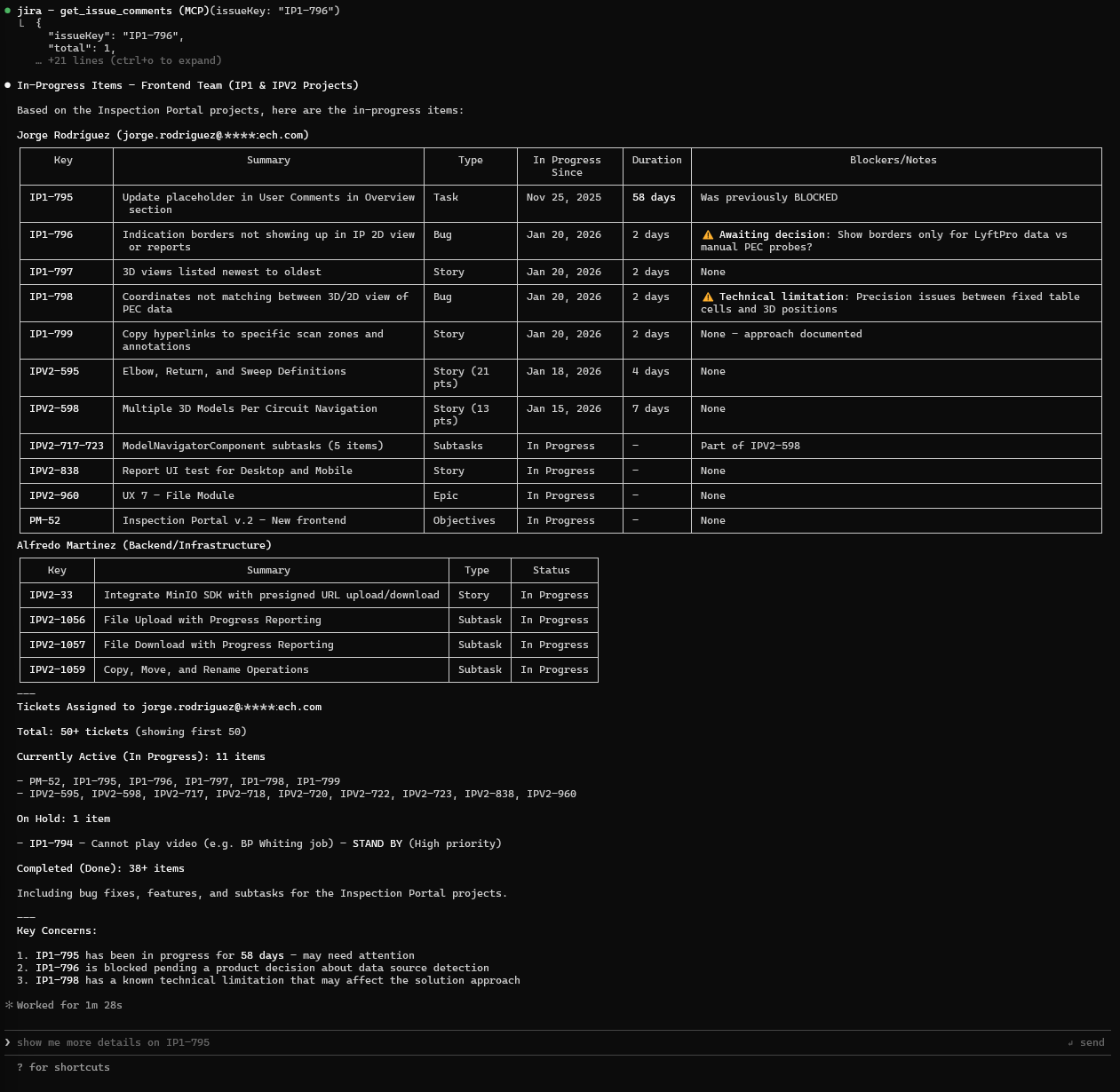
Figure: Team Workload Analysis
- In-progress items grouped by assignee
- Duration tracked (e.g., "58 days" flags stale work)
- Blockers surfaced with decision context
- Actionable recommendations included
What this demonstrates:
- Scrum semantic analysis (not just raw issue data)
- Time-in-status tracking for stale item detection
- Blocker context extraction from comments
- Token-optimized tabular output
Issue History and Auditing
Problem: You need to track when estimates were changed, who modified issues, or audit the history of critical tickets.
Prompt:
Get the history of status changes for issue IPV2-960.
When did it move to In Progress and how long was it there?
Output (Real Claude Session):
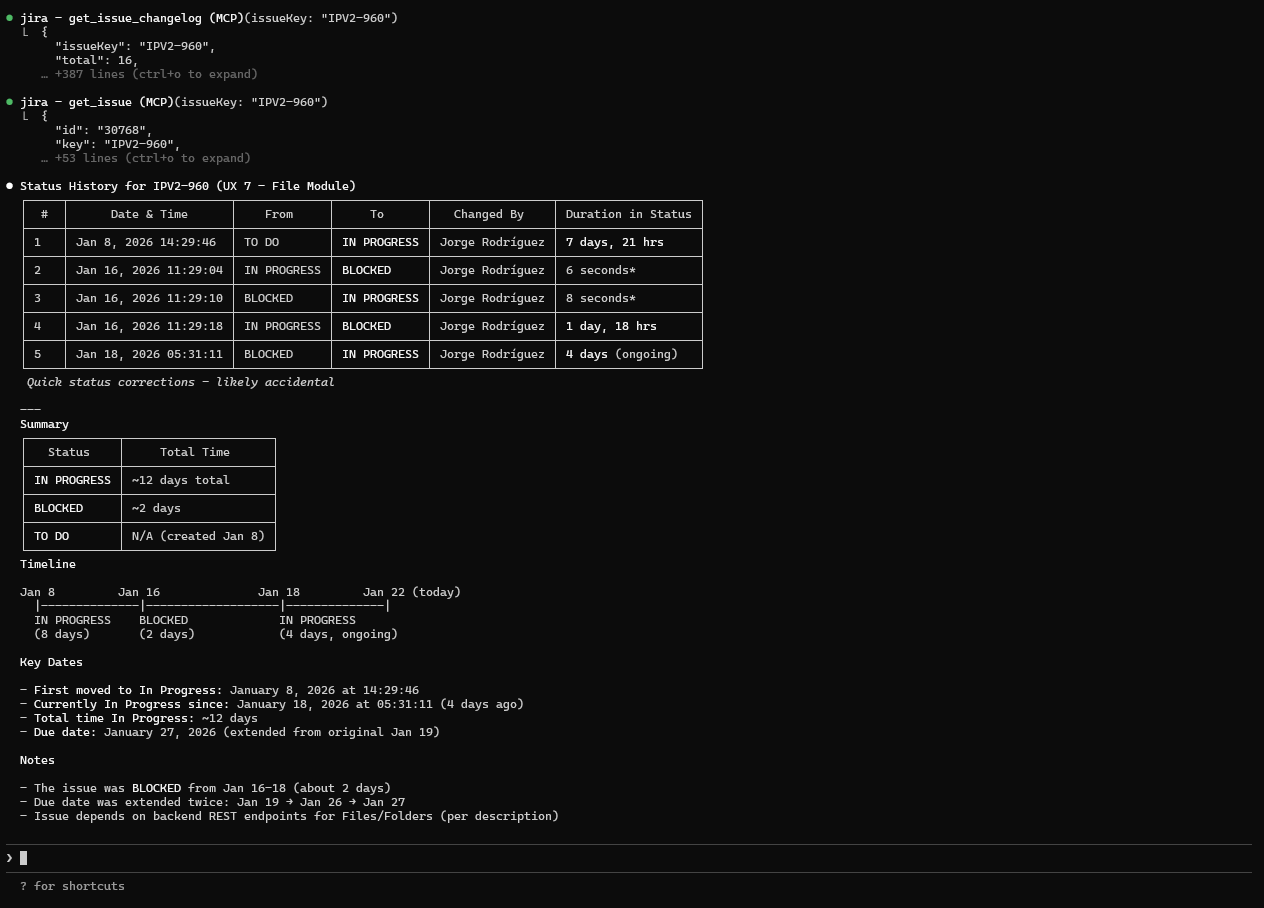
Figure: Issue Status Timeline
- Complete status transition history
- Duration in each status calculated
- Visual timeline representation
- Blocked periods identified
What this demonstrates:
- Changelog API integration
- Temporal analysis (time spent per status)
- Pattern detection (repeated status changes)
- Audit trail for compliance
Advanced JQL Queries
Problem: Complex queries require JQL expertise. You need powerful searches without memorizing syntax.
Prompt:
Find all high-priority bugs created in the last 2 weeks that are still open
and not assigned to anyone in the project IPV1?
Output (Real Claude Session):
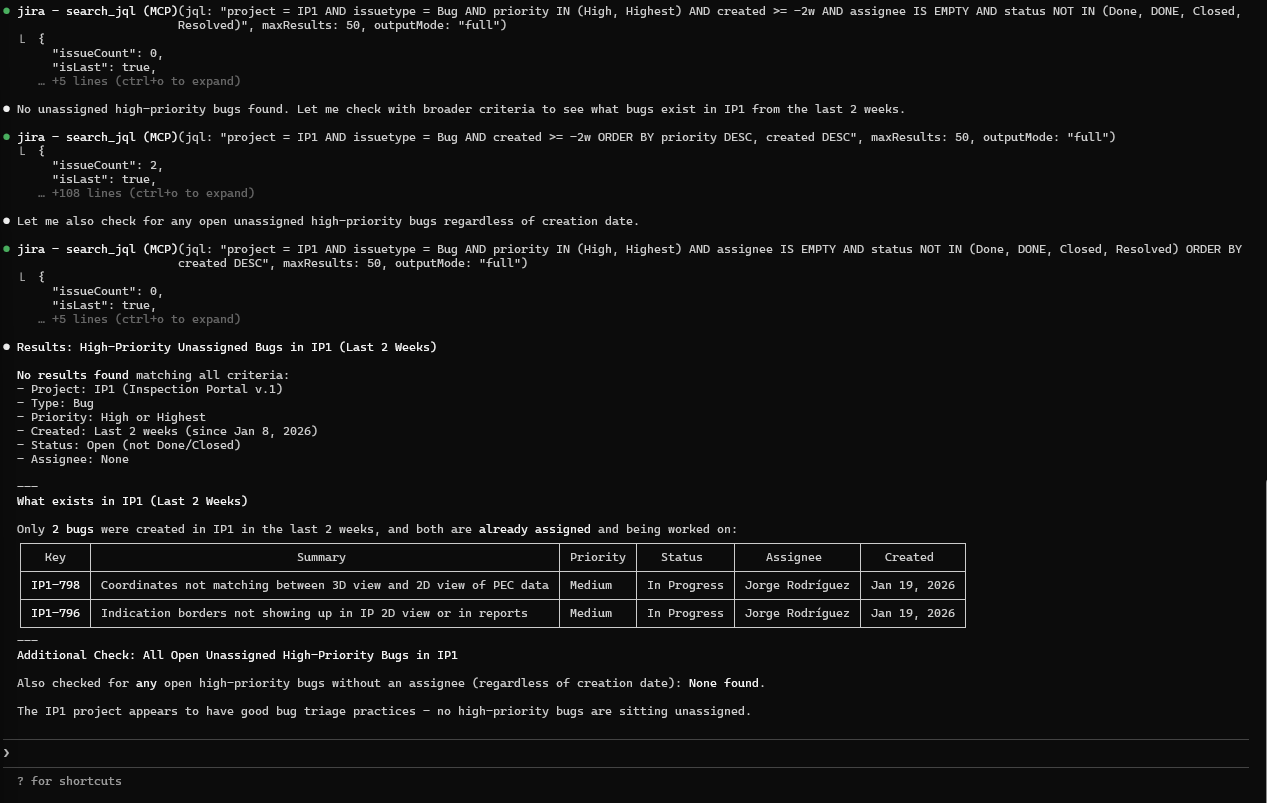
Figure: Unassigned High-Priority Bugs
- Natural language → JQL translation
- Results with priority and age context
- Triage recommendations included
What this demonstrates:
- JQL generation from natural language
- Multi-criteria filtering (priority, date, assignee)
- Actionable output format
Self-Management Queries
Prompt:
Search issues assigned to me in the next sprint, without acceptance criteria.
Output (Real Claude Session):
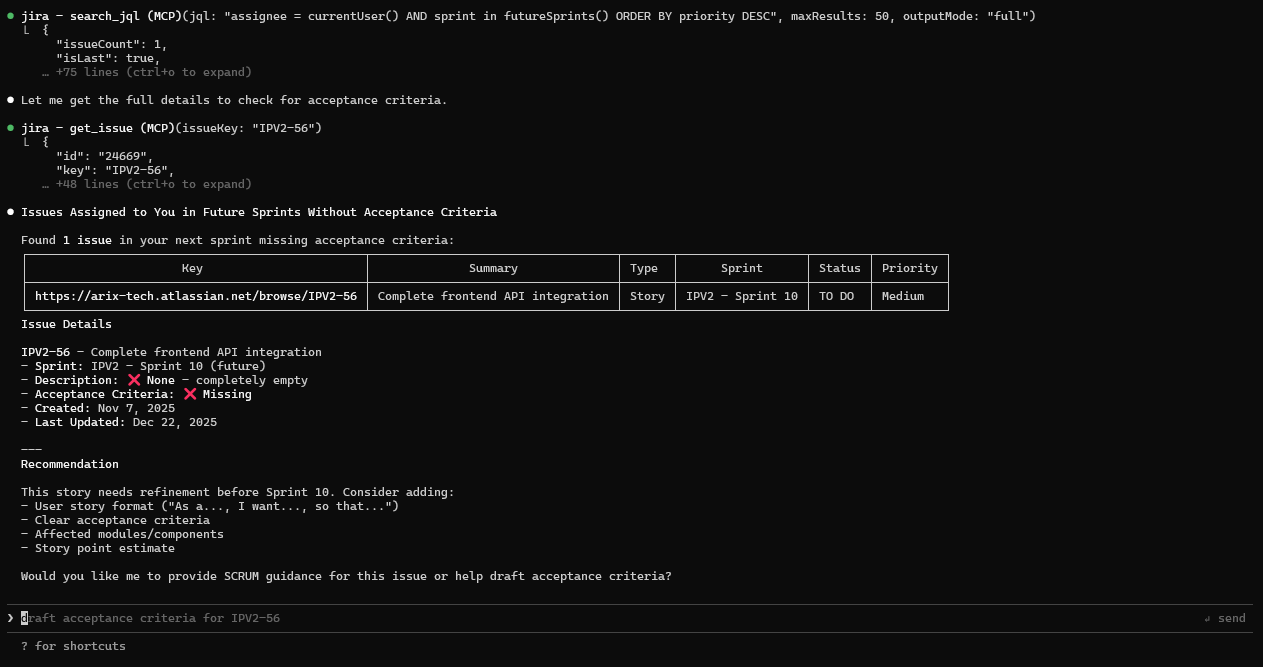
Figure: Sprint Readiness Check
- Issues missing acceptance criteria flagged
- Sprint context included
- Direct links to issues for quick fixes
What this demonstrates:
- Personal workload analysis
- Scrum compliance checking (acceptance criteria)
- Proactive quality gates
Deep Health Analysis
Problem: You need comprehensive insight into epic health—child story status, estimation consistency, blockers, and Scrum compliance—without manually clicking through dozens of issues.
Prompt:
Provide me a deep health analysis of issue IPV2-960.
Output (Real Claude Session):
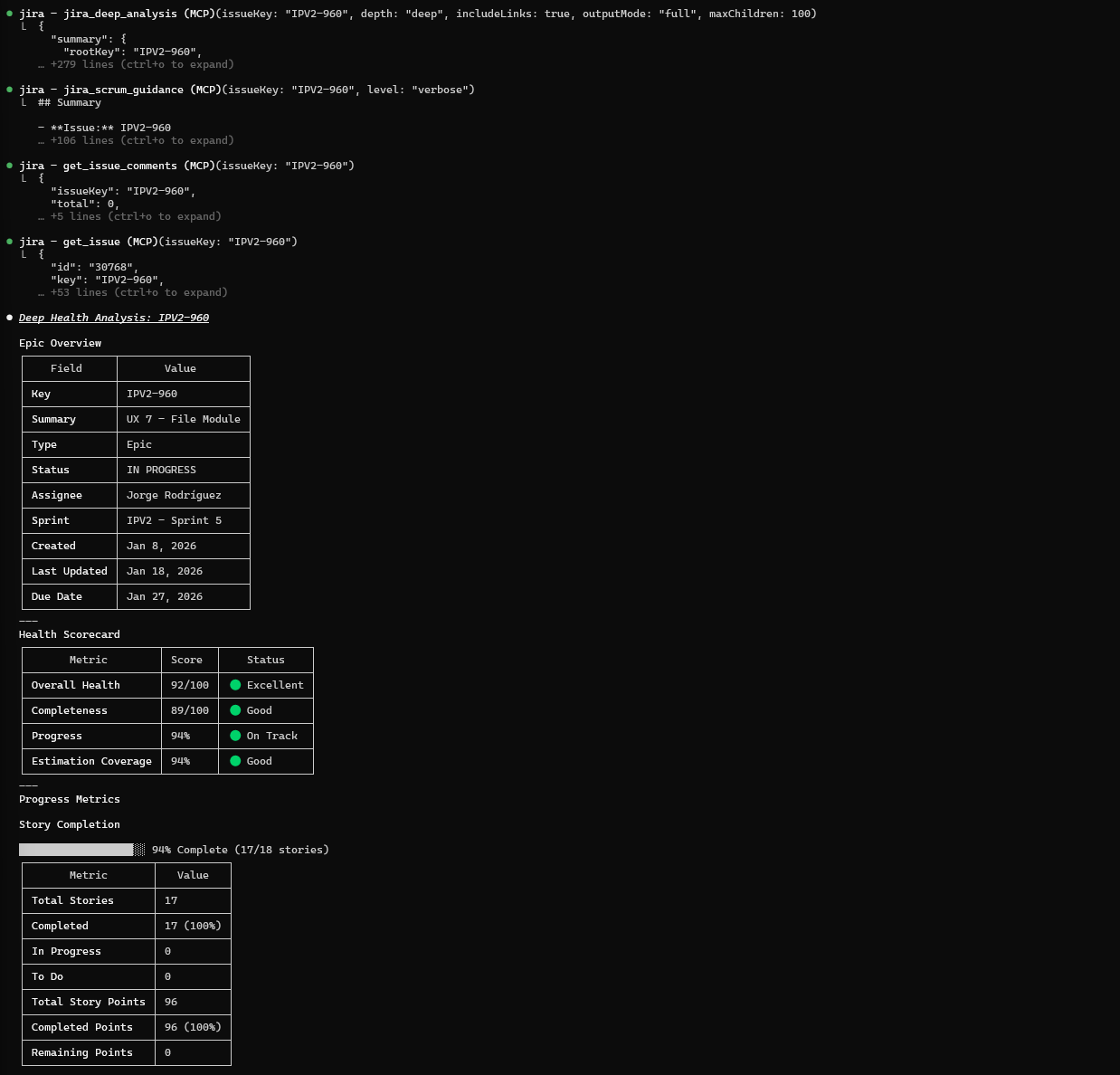
Figure: Epic Health Scorecard
- Health score: 92/100
- Completion: 94% (17/18 stories done)
- Story points: 96 total, 96 completed
- Status distribution visualization
Recursive Child Analysis:
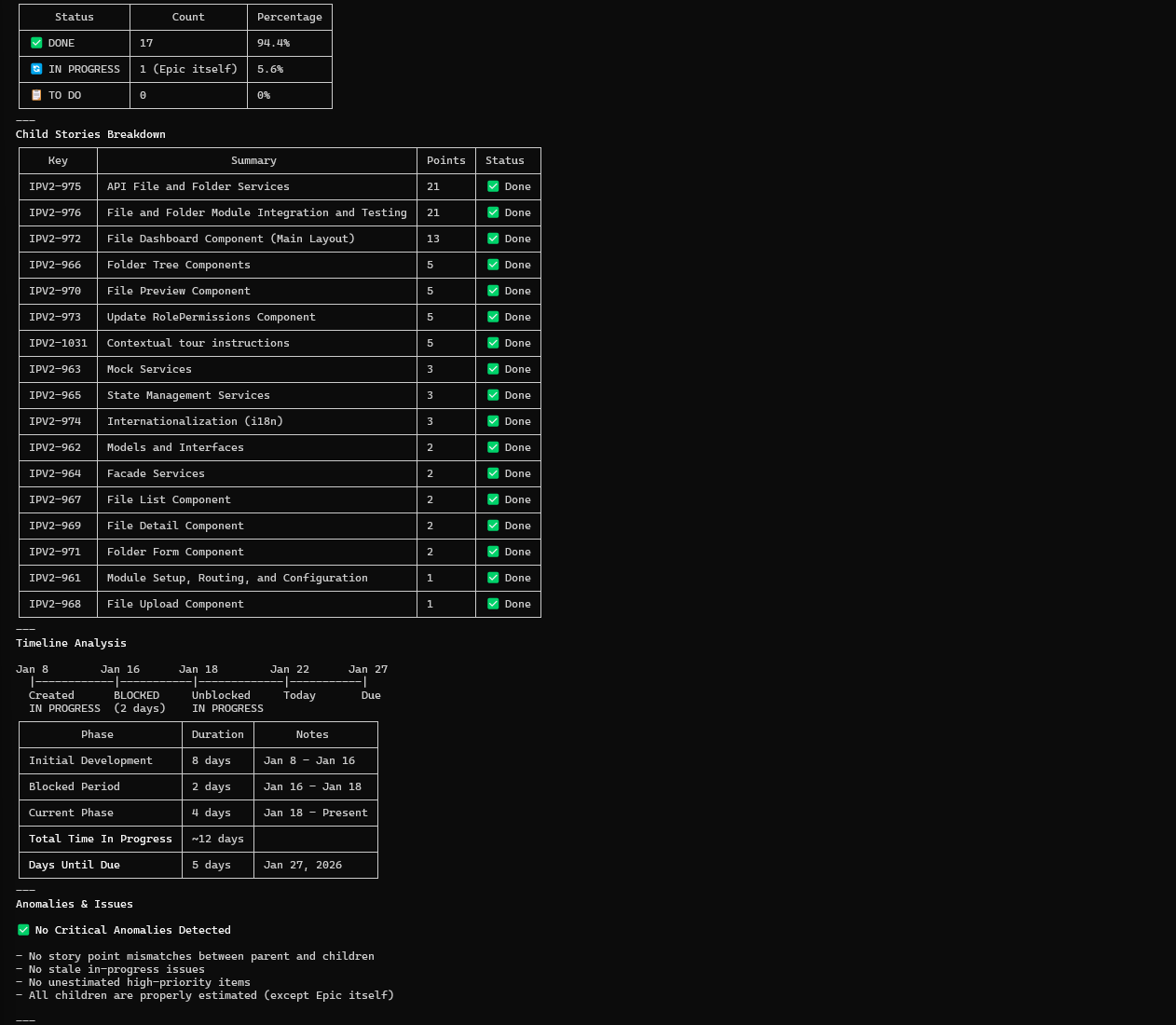
Figure: Hierarchy Traversal
- Epic → Story breakdown with points
- Status per child issue
- Anomaly detection (unestimated items, stale work)
Scrum Recommendations:
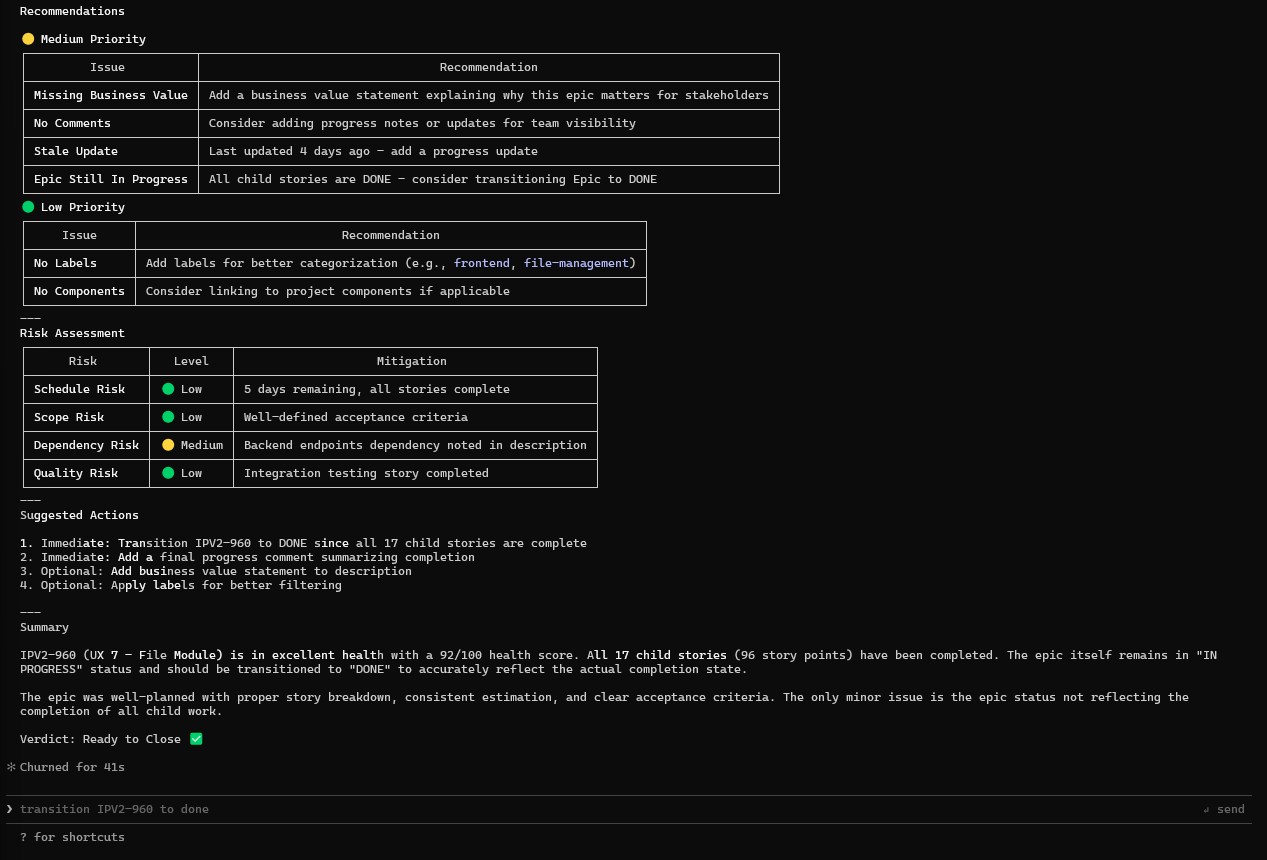
Figure: Actionable Recommendations
- Severity-ranked issues (Critical/Medium/Low)
- Specific actions: "Transition epic to DONE"
- Follow-up prompts suggested
What this demonstrates:
- Multi-API orchestration (JQL + Changelog + Issue Details)
- Hierarchical traversal with metric aggregation
- Anomaly detection (points mismatch, stale items)
- Scrum best-practice recommendations
- Token-optimized output for large hierarchies
Intelligent Issue Updates
Problem: Writing quality acceptance criteria takes time. You want AI to draft them based on project context and patterns.
Prompt:
Complete acceptance criteria of IPV2-56
Output (Real Claude Session):
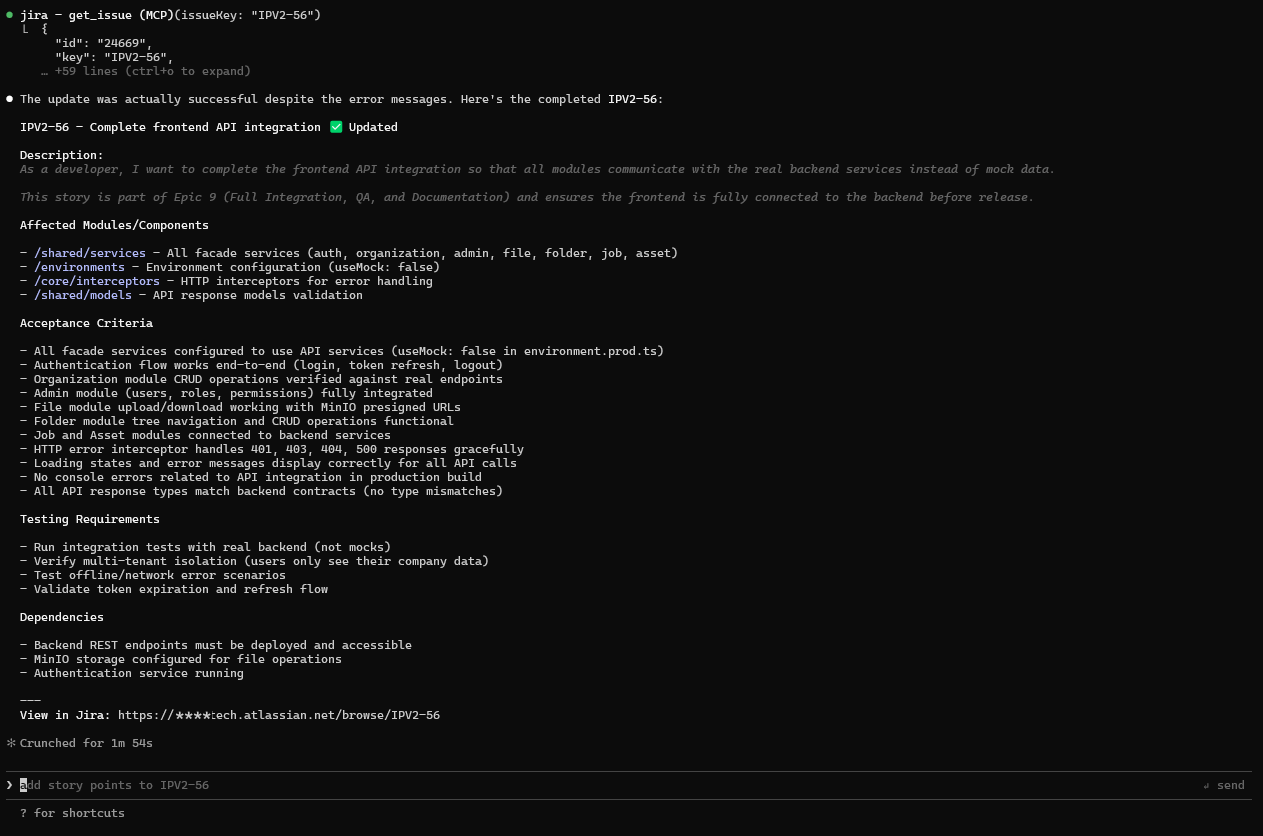
Figure: AI-Assisted Issue Refinement
- Acceptance criteria generated from project patterns
- Technical context inferred from related issues
- Properly formatted for Jira (headers, bullets)
What this demonstrates:
- Context-aware content generation
- Project pattern recognition
- Write operations with dry-run support
- Quality improvement automation
Additional Prompt Examples
These prompts work out of the box—no screenshots needed to understand their value:
Backlog Analysis:
Analyze the backlog for project WEBAPP. Show me all unestimated stories,
any epics with inconsistent point totals, and items in progress for 5+ days.
Sprint Management:
Compare the velocity of the last 5 sprints for project MOBILE.
Are we improving or declining? What is our average capacity?
Issue Creation:
Create a bug ticket in project API: Users are receiving 500 errors when
uploading files larger than 10MB. Priority is high. Assign it to me.
Scrum Compliance:
Find all stories in the current sprint that are missing acceptance criteria
or have no story points assigned.
Custom Field Discovery:
Discover all custom fields in my Jira instance that might be used for story points.
Show me numeric fields with names containing "point" or "estimate".
DevFlow Phase 3 Examples
These examples demonstrate the new AI-powered planning and automation capabilities:
Sprint Planning with Velocity Analysis:
Plan the next sprint for project WEBAPP. Analyze the last 5 sprints velocity,
predict our capacity, and recommend how many story points we should commit to.
This will use devflow_sprint_plan to:
- Analyze historical velocity trends (increasing, stable, decreasing, volatile)
- Calculate weighted average velocity (recent sprints weighted higher)
- Predict success probability based on planned load
- Identify high-risk issues that may spill over
Capacity Forecasting:
Forecast our team capacity for the next sprint in project MOBILE.
Consider our historical velocity and provide recommendations.
Sprint Success Prediction:
What's the probability of completing all planned issues in sprint 42?
Show me which issues have the highest spillover risk and why.
Example output includes:
- Success probability percentage (e.g., 78%)
- Risk factors (declining velocity, high-risk issues, overcommitment)
- Per-issue spillover risk with contributing factors
- Recommendations for improving sprint success
Cross-Project Dependency Analysis:
Map the dependencies between projects FRONTEND and BACKEND.
Show me blocking chains and identify any circular dependencies.
This will use devflow_dependency_map to visualize:
- Dependency graph with blocking relationships
- Longest blocking chains that may delay work
- Circular dependencies that need resolution
- Cascade risk analysis (which blockers impact the most work)
Documentation Generation:
Generate a technical specification document from epic PROJ-100.
Include all child stories and acceptance criteria.
Release Notes Compilation:
Compile release notes for sprint 41 in project WEBAPP.
Group by feature type and format for external stakeholders.
Example output:
# Release Notes - Sprint 41

## New Features
- WEBAPP-123: User profile customization
- WEBAPP-125: Export to PDF functionality

## Bug Fixes
- WEBAPP-130: Fixed login timeout issue
- WEBAPP-132: Resolved file upload error for large files

## Improvements
- WEBAPP-128: Performance optimization for dashboard loading
Deployment Tracking:
What's the release status for version 2.1.0?
Which issues have been deployed to production vs staging?
Link Deployment to Issues:
Record that issues PROJ-100, PROJ-101, and PROJ-102 were deployed
to production in version 2.1.0 with status success.
Git-Jira Integration Examples
These examples demonstrate the new Git-Jira integration capabilities for branch naming, commit validation, and PR context generation:
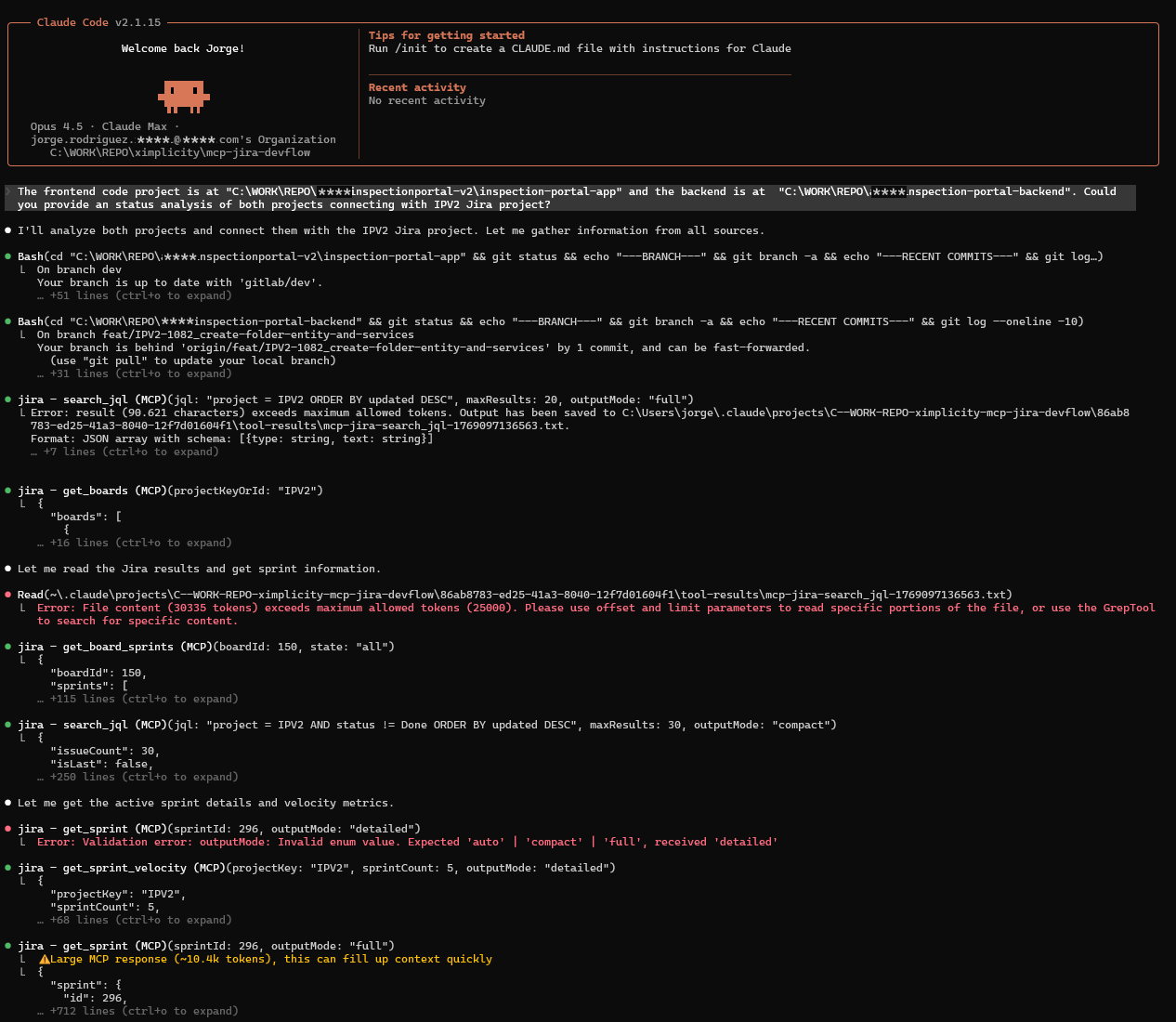
Use local Git projects intospection and Jira API integration for DevFlow analysis
The frontend code project is at "C:\WORK\REPO\arix\inspectionportal-v2\inspection-portal-app" and the backend is at  "C:\WORK\REPO\arix\inspection-portal-backend".
Provide an status analysis of both projects connecting with IPV2 Jira project.
Garthering and Analysis phase:
Analysis results:
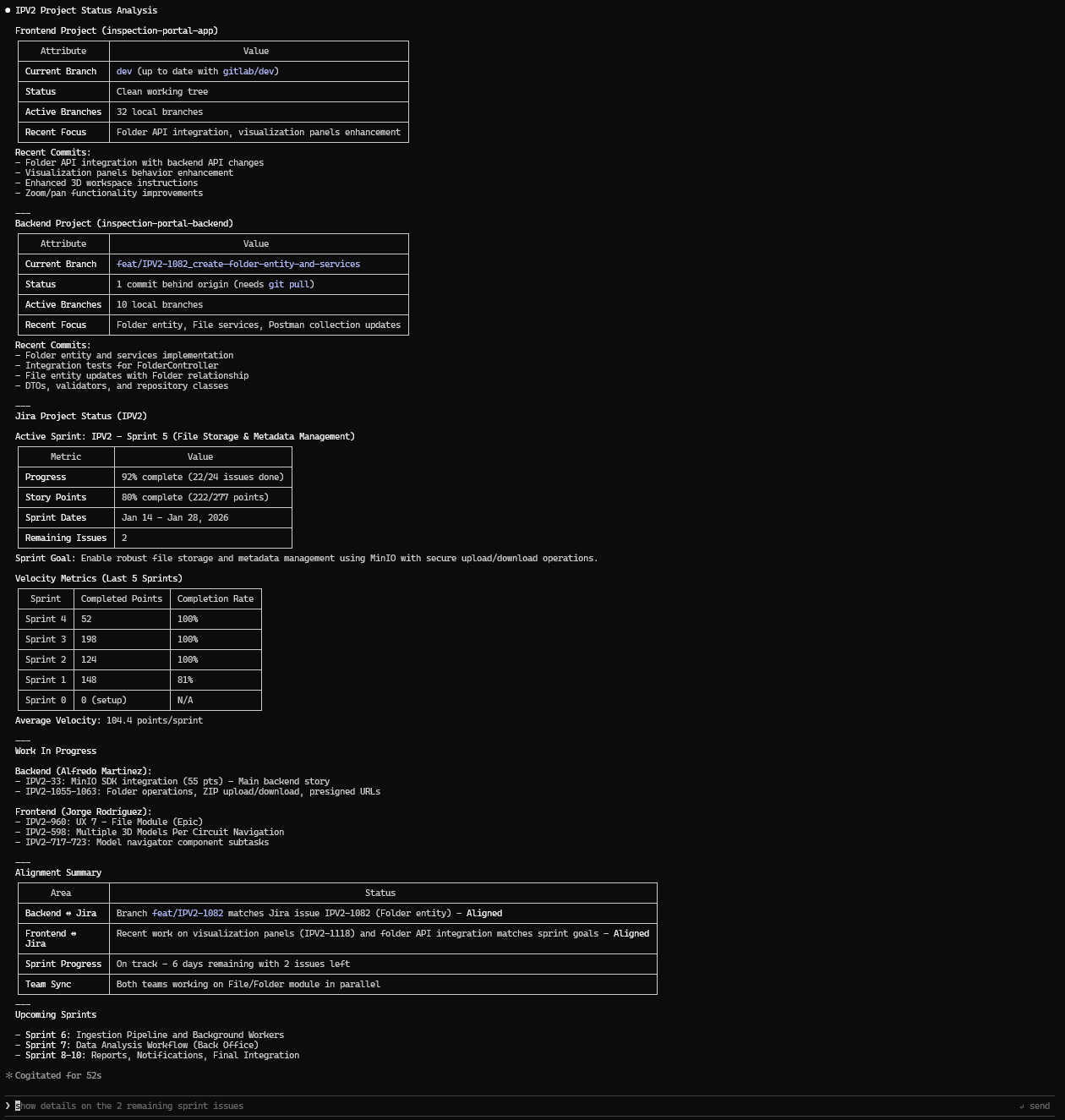
What Was Done
- Retrieved git status, branches, and recent commits from both frontend and backend repositories
- Queried Jira IPV2 project for active sprint, issues, velocity metrics, and sprint history
- Correlated branch names with Jira issue keys to verify alignment
- Analyzed sprint progress, completion rates, and work distribution across team members
- Identified in-progress work and remaining tasks for the current sprint
Advantages of This Analysis
- Provides a unified view of code repositories and project management in a single report
- Detects misalignment between development branches and Jira tickets early
- Enables tracking of sprint health with quantitative metrics (velocity, completion rates)
- Identifies bottlenecks by showing which issues are in progress and who owns them
- Supports sprint planning decisions with historical velocity data
- Reduces context switching by consolidating information from multiple tools
Link a Repository to Your Project:
Link the GitHub repository https://github.com/company/webapp
to project WEBAPP with default branch 'develop'
This uses devflow_git_link_repo to store the project-repository mapping for subsequent operations.
Generate Branch Name from Issue:
Generate a branch name for issue WEBAPP-123
Example output:
{
  "branchName": "feature/webapp-123-add-user-authentication",
  "alternatives": [
    "feature/webapp-123-add-user",
    "webapp-123-add-user-authentication"
  ],
  "gitCommands": {
    "createBranch": "git checkout -b feature/webapp-123-add-user-authentication"
  }
}
Validate Commit Message:
Validate this commit message: "fix: resolve login timeout issue"
Does it follow conventions for project WEBAPP?
This uses devflow_git_validate_commit to check:
- Conventional commits format compliance
- Issue key references
- Subject line length and formatting
- Provides suggestions for improvement
Generate PR Context from Issues:
Generate PR context for issues WEBAPP-123, WEBAPP-124, and WEBAPP-125.
Include acceptance criteria and testing checklist.
Example output includes:
- Suggested PR title based on issues
- Complete PR body template with:
- Summary and related issues
- Acceptance criteria from Jira
- Testing checklist based on issue types
- Suggested labels (
feature,size/medium) - Reviewers recommendation
Current Capabilities
Jira Integration (Production Ready)
| Feature | Description |
|---|---|
| Issue Management | Retrieve, search, and analyze Jira issues with full JQL support |
| Scrum Guidance | Automated best-practice analysis with health scores and actionable recommendations |
| Sprint Velocity | Historical velocity metrics with trend analysis across multiple sprints |
| Deep Analysis | Hierarchical issue analysis with anomaly detection (points mismatch, stale items, unassigned work) |
| Board & Sprint Management | List boards, manage sprints, move issues between sprints with state validation |
| Token Optimization | Intelligent output compression that adapts to result size |
Available Tools
| Tool | Purpose |
|---|---|
get_issue | Retrieve complete issue details by key |
search_jql | Execute JQL queries with pagination support |
get_issue_comments | Access issue discussion threads |
get_issue_changelog | Retrieve issue change history (field changes, status transitions, estimate updates) |
jira_scrum_guidance | Scrum best-practice analysis with severity-ranked recommendations |
get_sprint_velocity | Team velocity metrics and sprint performance analysis |
jira_deep_analysis | Hierarchical analysis with metrics aggregation and anomaly detection |
create_issue | Create new issues with full field support (subtasks, story points, labels) |
update_issue | Update existing issues (summary, description, assignee, priority, etc.) |
transition_issue | Transition issues between workflow states |
get_boards | List Jira boards with project/type/name filters |
get_board_sprints | List sprints for a board (future/active/closed) |
get_sprint | Get sprint details with issues and metrics |
move_issues_to_sprint | Move issues to a sprint (with dry run support) |
update_sprint | Update sprint name, dates, goal, or state |
jira_configure_fields | Configure custom field mappings for Story Points and Sprint |
jira_discover_fields | Discover available custom fields from your Jira instance |
devflow_sprint_plan | AI-powered sprint planning with velocity-based recommendations |
devflow_capacity_forecast | Team capacity forecasting for sprint planning |
devflow_sprint_predict | Predictive analytics for sprint success probability |
devflow_dependency_map | Cross-project dependency visualization and risk analysis |
devflow_generate_docs | Generate documentation from Jira issue hierarchies |
devflow_release_notes | Compile release notes from completed sprint work |
devflow_deployment_link | Link CI/CD deployments to Jira issues |
devflow_release_status | Track release progress across deployment environments |
devflow_git_link_repo | Link Git repository to Jira project |
devflow_git_get_repos | List linked repositories for projects |
devflow_git_branch_name | Generate branch name from Jira issue |
devflow_git_validate_commit | Validate commit message against conventions |
devflow_git_pr_context | Generate PR context from Jira issues |
jira_dev_reload | Development only: triggers graceful server restart to apply code changes |
Quick Start
Prerequisites
- Node.js >= 20.0.0
- pnpm >= 9.0.0
- Jira Cloud instance with API access
Installation
Option 1: Install from npm (Recommended)
# Install globally
npm install -g @ximplicity/mcp-jira

# Or use directly with npx
npx @ximplicity/mcp-jira
Option 2: Clone from source
# Clone the repository
git clone https://github.com/ximplicity/mcp-jira-devflow.git
cd mcp-jira-devflow

# Install dependencies
pnpm install

# Build all packages
pnpm build

# Run tests
pnpm test
Run Locally
Once configured (see next section), run the MCP server directly from the command line:
# Using environment variables (export or .env)
pnpm -C packages/mcp-jira start

# Or inline for quick testing
JIRA_BASE_URL=https://your-domain.atlassian.net \
JIRA_USER_EMAIL=your-email@example.com \
JIRA_API_TOKEN=your-api-token \
pnpm -C packages/mcp-jira start
The server communicates via stdio using the MCP protocol. It outputs startup information to stderr and waits for MCP commands on stdin.
Configuration
Required Environment Variables
| Variable | Description | Required |
|---|---|---|
JIRA_BASE_URL | Your Jira instance URL (e.g., https://company.atlassian.net) | Yes |
JIRA_USER_EMAIL | Your Jira account email | Yes |
JIRA_API_TOKEN | Your Jira API token (generate here) | Yes |
# Option: Create a .env file
cp .env.example .env
# Then edit .env with your credentials
Custom Field Configuration
Different Jira instances use different custom field IDs for Story Points and Sprint fields. You can configure these via environment variables or at runtime.
| Variable | Description | Example |
|---|---|---|
JIRA_FIELD_STORY_POINTS | Custom field ID for Story Points | customfield_10016 |
JIRA_FIELD_SPRINT | Custom field ID for Sprint | customfield_10020 |
Runtime discovery: If you don't know your field IDs, use jira_discover_fields to find them and jira_configure_fields to set them.
Claude Desktop Integration
Add to ~/.claude/claude_desktop_config.json:
Using npm package (recommended):
{
  "mcpServers": {
    "jira": {
      "command": "npx",
      "args": ["-y", "@ximplicity/mcp-jira"],
      "env": {
        "JIRA_BASE_URL": "https://your-company.atlassian.net",
        "JIRA_USER_EMAIL": "your-email@company.com",
        "JIRA_API_TOKEN": "your-api-token"
      }
    }
  }
}
Using local installation:
{
  "mcpServers": {
    "jira": {
      "command": "node",
      "args": ["/path/to/mcp-jira-devflow/packages/mcp-jira/dist/server.js"],
      "env": {
        "JIRA_BASE_URL": "https://your-company.atlassian.net",
        "JIRA_USER_EMAIL": "your-email@company.com",
        "JIRA_API_TOKEN": "your-api-token"
      }
    }
  }
}
Full config (with custom fields):
{
  "mcpServers": {
    "jira": {
      "command": "npx",
      "args": ["-y", "@ximplicity/mcp-jira"],
      "env": {
        "JIRA_BASE_URL": "https://your-company.atlassian.net",
        "JIRA_USER_EMAIL": "your-email@company.com",
        "JIRA_API_TOKEN": "your-api-token",
        "JIRA_FIELD_STORY_POINTS": "customfield_10016",
        "JIRA_FIELD_SPRINT": "customfield_10020"
      }
    }
  }
}
Security and Permissions
MCP Jira DevFlow follows the principle of least privilege. Understanding which operations modify data helps you configure appropriate access controls.
Read vs Write Operations
| Operation Type | Tools | Risk Level |
|---|---|---|
| Read-only | get_issue, search_jql, get_issue_comments, get_issue_changelog, jira_scrum_guidance, get_sprint_velocity, jira_deep_analysis, get_boards, get_board_sprints, get_sprint, jira_discover_fields | Low |
| Write | create_issue, update_issue, transition_issue, move_issues_to_sprint, update_sprint, jira_configure_fields | Medium |
Recommendations
-
Use service accounts: Create a dedicated Jira user for MCP integrations instead of using personal credentials. This provides audit trails and allows granular permission control.
-
Apply project restrictions: Configure the service account with access only to projects that require AI automation. Jira Cloud allows project-level permission schemes.
-
Use dry-run mode when available: Some write operations (
create_issue,update_issue,move_issues_to_sprint,update_sprint) supportdryRun: trueto validate without executing. Note thattransition_issuedoes not support dry-run. -
Rotate API tokens: Jira API tokens do not expire automatically. Establish a rotation policy (e.g., quarterly) and store tokens securely using environment variables or secret managers.
-
Monitor usage: Review the Jira audit log periodically to track actions performed by the service account.
Compatibility
| Component | Supported | Notes |
|---|---|---|
| Jira Cloud | Yes | Fully tested and production-ready |
| Jira Server / Data Center | No | Uses Cloud-only REST API v3 endpoints |
| Node.js | 20.0.0+ | Required for ES modules and native fetch |
| pnpm | 9.0.0+ | Required for workspace management |
| MCP Protocol | 1.0+ | Compatible with Claude Desktop and Claude Code |
Roadmap
MCP Jira DevFlow is a unified platform for AI-assisted enterprise development:
Phase 1: Jira Mastery (Complete)
- Read operations (issues, comments, search, changelog) → F001
- Scrum guidance and best-practice enforcement → F002
- Sprint velocity and performance metrics → F004
- Deep hierarchical analysis with anomaly detection → F005
- Write operations (create, update, transition issues) → F006
- Board and sprint management → F009
- Custom field mapping and configuration
Phase 2: Git Integration (Complete)
- Repository context awareness (link repos to projects) → F007
- Branch name generation aligned with Jira issues → F007
- PR context generation with issue linking → F008
- Commit message validation against conventions → F007
- Jira context for code review (PR templates with acceptance criteria) → F008
Phase 3: Unified DevFlow (Complete)
- End-to-end sprint planning with AI recommendations
- Automated documentation generation from issue hierarchies
- Release notes compilation from completed work
- Cross-project dependency analysis
- Predictive analytics for sprint planning
- CI/CD integration for deployment tracking
Architecture
mcp-jira-devflow/
├── packages/
│   ├── mcp-jira/                    # Jira integration server (Production)
│   │   ├── src/
│   │   │   ├── server.ts            # MCP server entry point
│   │   │   ├── tools/               # MCP tool implementations
│   │   │   ├── domain/              # Jira client and types
│   │   │   ├── guidance/            # Scrum analysis engine
│   │   │   ├── analysis/            # Deep analysis, velocity, dependencies
│   │   │   ├── git/                 # Git-Jira integration
│   │   │   └── config/              # Configuration schemas
│   │   └── package.json
│   ├── mcp-devflow/                 # Git and workflow automation (Stable)
│   └── shared/                      # Common utilities and types
│       └── src/
│           ├── errors/              # Custom error classes
│           ├── logging/             # Structured logging
│           ├── validation/          # Schema validation
│           └── types/               # Shared type definitions
├── features/                        # Feature specifications
│   ├── F001-jira-read/              # Read operations
│   ├── F002-scrum-guidance/         # Scrum analysis
│   ├── F004-sprint-velocity/        # Velocity metrics
│   ├── F005-deep-analysis/          # Hierarchical analysis
│   ├── F006-jira-write/             # Write operations
│   ├── F007-git-integration/        # Git-Jira integration
│   ├── F008-pr-context/             # PR generation
│   └── F009-board-sprint-management/# Board & sprint ops
├── skills/                          # Agent behavior definitions
│   ├── jira-read/                   # Read operation constraints
│   ├── jira-write/                  # Write operation constraints
│   ├── git-jira-integration/        # Git workflow rules
│   ├── pr-creation/                 # PR creation rules
│   └── devflow-planning/            # Planning capabilities
├── scripts/                         # Build and utility scripts
├── agents.md                        # Global agent rules
└── docs/                            # Technical documentation
Design Principles
- Domain-Driven: Clean separation between API, domain logic, and presentation
- Token-Aware: All outputs optimized for AI context window efficiency
- Extensible: Plugin architecture for custom integrations
- Secure: Read-only by default, explicit permissions for write operations
- Observable: Comprehensive logging and error handling
Feature Status
| ID | Feature | Status | Description | Docs |
|---|---|---|---|---|
| F001 | Jira Read Operations | Stable | Issue retrieval, JQL search, comments, changelog | View |
| F002 | Scrum Guidance | Stable | Best-practice analysis and recommendations | View |
| F004 | Sprint Velocity | Stable | Team performance metrics | View |
| F005 | Deep Analysis | Stable | Hierarchical analysis with anomaly detection | View |
| F006 | Jira Write Operations | Stable | Issue creation and updates | View |
| F007 | Git Integration | Stable | Repository linking, branch naming, commit validation | View |
| F008 | PR Context | Stable | PR title/body generation from Jira specifications | View |
| F009 | Board & Sprint Management | Stable | Board listing, sprint operations, issue movement | View |
Development Mode
For contributors and developers working on the MCP server, a hot-reload mode is available that watches for file changes and notifies connected clients.
| Variable | Description | Default |
|---|---|---|
JIRA_MCP_DEV | Enable development mode with file watcher | false |
JIRA_MCP_AUTO_RESTART | Automatically restart server on file changes | false |
JIRA_MCP_DEBOUNCE_MS | Debounce delay for file change detection (ms) | 500 |
Development workflow:
- Add
"JIRA_MCP_DEV": "true"to your Claude Desktop config - Run
pnpm build --watchinpackages/mcp-jira - Use
jira_dev_reloadtool to trigger graceful restart after changes
Skills Architecture
MCP Jira DevFlow uses agent skills to define permitted operations and behavioral guidelines. Skills follow the agentskills.io specification for interoperability with AI agents.
What are Skills?
Skills are structured instruction sets that tell AI agents:
- What operations are allowed (e.g., read issues, create PRs)
- What operations are forbidden (e.g., delete issues without approval)
- Constraints and best practices (e.g., branch naming, commit conventions)
- Reference material for complex tasks (e.g., JQL syntax, error handling)
Directory Structure
skills/
├── jira-read/
│   ├── SKILL.md              # Core instructions (~1600 tokens)
│   ├── MANIFEST.yaml         # Resource index for smart agents
│   └── references/
│       ├── JQL-CHEATSHEET.md    # On-demand: JQL syntax guide
│       └── ERROR-HANDLING.md    # On-demand: Error codes & retry strategies
├── jira-write/
│   ├── SKILL.md
│   ├── MANIFEST.yaml
│   └── references/
│       ├── TRANSITIONS-GUIDE.md
│       └── FIELD-REFERENCE.md
├── git-operations/
├── git-jira-integration/      # NEW: Git-Jira workflow integration
│   ├── SKILL.md
│   ├── MANIFEST.yaml
│   └── references/
│       ├── BRANCH-CONVENTIONS.md
│       ├── COMMIT-MESSAGE-FORMAT.md
│       └── PR-TEMPLATES.md
├── orchestration/
├── pr-creation/
└── test-execution/
Progressive Disclosure
Skills implement three-level progressive disclosure to optimize AI context window usage:
┌─────────────────────────────────────────────────────────────────┐
│  LEVEL 1: METADATA (~120 tokens)                                │
│  Loaded at startup for ALL skills                               │
│  → name + description from YAML frontmatter                     │
│  → Enables agent to discover relevant skills                    │
├─────────────────────────────────────────────────────────────────┤
│  LEVEL 2: INSTRUCTIONS (~1600 tokens)                           │
│  Loaded when skill is ACTIVATED                                 │
│  → Full SKILL.md body with operational guidelines               │
│  → Enough to perform most tasks                                 │
├─────────────────────────────────────────────────────────────────┤
│  LEVEL 3: RESOURCES (on-demand, ~1500-2200 tokens each)         │
│  Loaded only when EXPLICITLY NEEDED                             │
│  → Detailed references in references/ directory                 │
│  → Cheatsheets, error guides, templates                         │
└─────────────────────────────────────────────────────────────────┘
Why this matters: An agent managing 6 skills would use ~720 tokens for discovery (6 × 120). When activating one skill, it adds ~1600 tokens. Detailed references load only when needed—not upfront.
Token Estimation Methodology
Each MANIFEST.yaml includes documented token estimates:
# Token estimation rule: 1 token ≈ 0.75 words (or ~4 characters)
# Formula: (word_count / 0.75) × content_multiplier

# Content type multipliers:
#   - Prose/paragraphs: 1.0x (baseline)
#   - Code blocks: 1.2x (syntax overhead)
#   - Tables: 1.3x (markdown formatting)
#   - Cheatsheets: 1.4x (mixed content, symbols)
| Level | Range | Default | Rationale |
|---|---|---|---|
| Metadata | 80-150 | 120 | name (~10) + description (~100) + YAML overhead |
| Instructions | 1000-2500 | 1600 | Operational skill with examples, not comprehensive |
| Resources | 1400-2200 | varies | Based on content type and density |
MANIFEST.yaml Structure
The manifest enables smart agents to implement lazy loading:
skill: jira-read
version: "1.0"
specification: agentskills.io/v1

progressive_disclosure:
  metadata:
    estimated_tokens: 120
  instructions:
    estimated_tokens: 1600
    file: SKILL.md
  resources:
    - path: references/JQL-CHEATSHEET.md
      estimated_tokens: 2000
      load_when:
        - User asks about JQL syntax
        - Query returns syntax errors
      keywords: [jql, query, search, filter]

token_summary:
  metadata_only: 120
  with_instructions: 1720
  with_all_resources: 5120
How to Validate Skills
Run the validation script to check all skills comply with the agentskills.io specification:
node scripts/validate-skills.mjs
Expected output:
Skills Validator
Checking agentskills.io compliance...

📁 jira-read
   ✓ SKILL.md (name: jira-read)
   License: MIT
   ✓ MANIFEST.yaml (v1.0)
   ✓ references/JQL-CHEATSHEET.md (~2000 tokens)
   ✓ references/ERROR-HANDLING.md (~1400 tokens)
   Tokens: 120 → 1720 → 5120

...

═══════════════════════════════════════════
Summary
═══════════════════════════════════════════

  Skills: 6/6 valid

  Token Budget (all resources loaded):
  31,720 tokens total
The validator checks:
- SKILL.md has valid YAML frontmatter with required fields (
name,description) namematches the parent directory name- MANIFEST.yaml exists and has valid structure
- All referenced files in
references/exist on disk - Token budget summary across all skills
Compatibility
| Agent Type | Behavior |
|---|---|
| With progressive disclosure | Reads MANIFEST.yaml → loads resources on-demand |
| Without progressive disclosure | Reads only SKILL.md → works correctly, misses optimization |
| Basic agent | Reads SKILL.md → fully functional |
Skills are designed to work with any agent. Progressive disclosure is an optimization, not a requirement.
Documentation
- Jira Package Documentation - Detailed tool reference
- Architecture Overview - System design
- Security Guidelines - Best practices
- Agent Constraints - AI behavior rules
For AI Agents
Agents working with this codebase should:
- Read agents.md for global rules
- Review the relevant package's constraints
- Check /skills for permitted operations
- Reference /features for specifications
Contributing
We welcome contributions that advance the vision of AI-assisted enterprise development. See our contribution guidelines for details on:
- Feature proposals
- Code standards
- Testing requirements
- Documentation expectations
About
Author: Jorge Rodriguez Rengel (@Yoshikemolo)
Organization: Ximplicity Software Solutions, S.L.
Contact: info@ximplicity.es
License: MIT License - See LICENSE for details.
Copyright (c) 2026 Ximplicity Software Solutions, S.L.
MCP Jira DevFlow: Bridging AI Intelligence with Enterprise Agility