mcp-multi-model
An MCP server that lets Claude Code query multiple AI models (DeepSeek, Gemini, Kimi, and more) in parallel. Compare answers, leverage each model's strengths, and get real-time monitoring — all from within Claude Code.
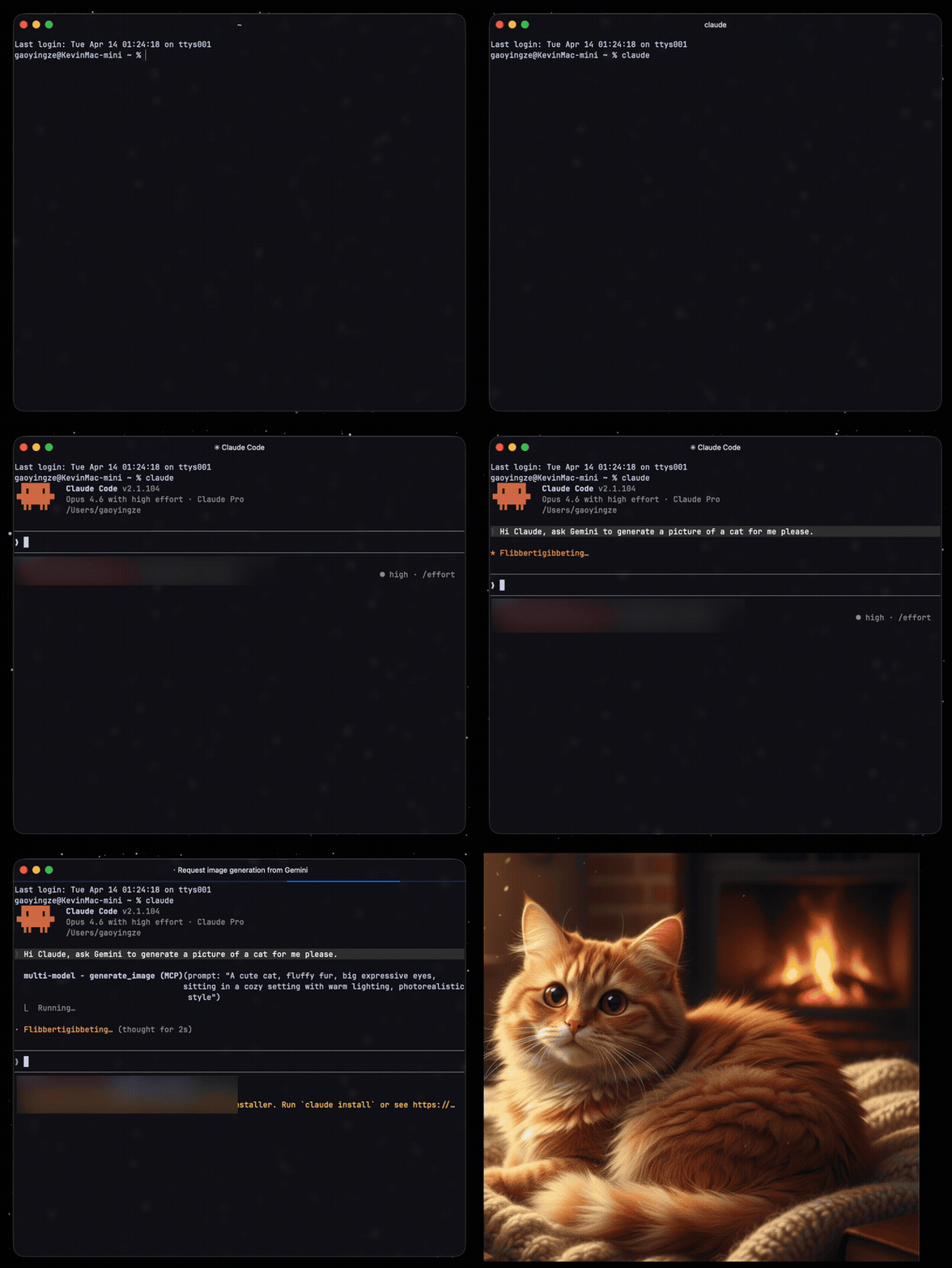
Features
- Parallel multi-model queries — Ask one question, get answers from all configured models side by side
- Streaming output — Real-time SSE streaming for OpenAI-compatible and Gemini APIs
- Conversation history — Multi-turn context with
conversation_id(30min expiry, up to 10 turns) - Built-in tools —
translate(CN/EN) andresearch(with web search) out of the box - Web search — Kimi web search and Gemini Google Search grounding
- Cost tracking — Per-call token usage and cost estimation based on model pricing
- Auto-retry — Exponential backoff on 429/5xx errors and network failures
- YAML config — Add new models by editing
config.yaml, no code changes needed - Real-time monitoring — Optional Agent Monitor TUI dashboard via Unix socket
Supported Models
Works with any OpenAI-compatible API or Google Gemini API. Pre-configured examples:
| Model | Adapter | Highlights |
|---|---|---|
| DeepSeek | openai | Code, math, logic. Very low cost |
| Gemini | gemini | Long context, broad knowledge, Google Search |
| Kimi (Moonshot) | openai | Chinese web search, real-time info |
| Ollama / LM Studio / llama.cpp | openai | Local models — no API key, no cost, full privacy |
Add more models (GPT-4o, Qwen, Yi, Mistral, etc.) by adding entries to config.yaml. Any OpenAI-compatible API works, including local model runners.
Installation
Option 1: npx (recommended)
No install needed. Add to your Claude Code MCP config:
{
  "mcpServers": {
    "multi-model": {
      "command": "npx",
      "args": ["-y", "mcp-multi-model"],
      "env": {
        "DEEPSEEK_API_KEY": "sk-...",
        "GEMINI_API_KEY": "AI..."
      }
    }
  }
}
Option 2: Clone and run locally
git clone https://github.com/K1vin1906/mcp-multi-model.git
cd mcp-multi-model
npm install
npm run setup   # Interactive setup wizard — validates your API keys
Then add to Claude Code config:
{
  "mcpServers": {
    "multi-model": {
      "command": "node",
      "args": ["/path/to/mcp-multi-model/index.js"]
    }
  }
}
API keys can be set via
envin the config above, or in a.envfile in the project directory.
Configuration
Copy and edit the config file:
cp config.example.yaml config.yaml
defaults:
  max_tokens: 4000
  temperature: 0.7
  timeout_ms: 60000
  max_retries: 2

models:
  deepseek:
    name: DeepSeek
    adapter: openai                    # openai or gemini
    endpoint: https://api.deepseek.com/chat/completions
    api_key_env: DEEPSEEK_API_KEY      # reads from environment
    model: deepseek-chat
    description: "Code, math, logic. Low cost."
    pricing:
      input: 0.14    # $/M tokens
      output: 0.28

  gemini:
    name: Gemini
    adapter: gemini
    endpoint: https://generativelanguage.googleapis.com/v1beta
    api_key_env: GEMINI_API_KEY
    model: gemini-2.5-flash-preview-04-17
    description: "Long context, broad knowledge, Google Search."
    features:
      - google_search
    pricing:
      input: 0.10
      output: 0.40

  # Add any OpenAI-compatible model:
  # qwen:
  #   name: Qwen
  #   adapter: openai
  #   endpoint: https://dashscope.aliyuncs.com/compatible-mode/v1/chat/completions
  #   api_key_env: DASHSCOPE_API_KEY
  #   model: qwen-plus

  # Local models — no API key needed:
  # ollama:
  #   name: Ollama
  #   adapter: openai
  #   endpoint: http://localhost:11434/v1/chat/completions
  #   model: llama3.2
  #   description: "Local Ollama model. No API key, no cost, full privacy."

tools:
  translate:
    model: deepseek
    description: "CN/EN translation via DeepSeek."
  research:
    model: gemini
    description: "Tech research with web search via Gemini."
Local Models
Any OpenAI-compatible local model runner works out of the box. Just omit api_key_env:
Ollama
ollama pull llama3.2
models:
  ollama:
    name: Ollama
    adapter: openai
    endpoint: http://localhost:11434/v1/chat/completions
    model: llama3.2
    description: "Local Llama 3.2 via Ollama."
LM Studio
models:
  lmstudio:
    name: LM Studio
    adapter: openai
    endpoint: http://localhost:1234/v1/chat/completions
    model: loaded-model
    description: "Local model via LM Studio."
llama.cpp / vLLM / text-generation-webui — any server with /v1/chat/completions endpoint works the same way.
You can mix local and cloud models freely — e.g., use ask_all to compare Ollama vs DeepSeek vs Gemini in one call.
MCP Tools
Tools are dynamically generated from your config. With the default 3-model setup you get:
| Tool | Description |
|---|---|
ask_deepseek | Query DeepSeek |
ask_gemini | Query Gemini |
ask_kimi | Query Kimi |
ask_all | Query all models in parallel, compare results |
ask_both | Query any two models in parallel |
translate | CN/EN translation |
research | Tech research with web search |
Parameters
All ask_* tools accept:
| Parameter | Type | Description |
|---|---|---|
prompt | string | Your question |
system_prompt | string? | Optional system prompt |
max_tokens | number? | Max output tokens (default: 4000) |
conversation_id | string? | Pass same ID for multi-turn conversations |
Usage in Claude Code
Once configured, just ask Claude naturally:
Ask DeepSeek to review this function for bugs
Use ask_all to compare how each model would implement a binary search
Research the current state of WebTransport browser support
Translate this paragraph to English, technical style
Agent Monitor (Optional)
A companion TUI dashboard that shows real-time model activity, streaming output, token usage, and cost tracking.
See agent-monitor for setup instructions.
License
MIT